
- NewspaperDesign your Post Pages using the Cloud Library Templates
- NewspaperDesign your post pages using the Default Templates
- NewspaperPage templates
- NewspaperCreate a form contact page
- NewspaperCloud Library Templates
- NewspaperCloud Library – Category Templates
- NewspaperHomepage – How to build and set it
- NewspaperPost templates
- NewspaperDefault post templates
- NewspaperCategory templates
- NewspaperPost template ads
- NewspaperSingle External Shortcode and External Shortcode
- NewspaperWP Rocket and Newspaper Theme: Optimization Guide
- NewspaperSearch setup for custom post type
- NewspapertagDiv Composer – Website Manager
- NewspaperBookmark – Save For Later
- NewspaperFlex Block Builder and Flex Loop Builder
- NewspaperModules Builder in Newspaper Theme
- NewspaperIntroduction to CPT and ACF with Newspaper Theme
- NewspaperCreate a frontend submission form
 Bettina
 Hello!
We recommend to use cloud/PRO templates in order to have the possibility to edit them with the TagDiv Composer which contains a lot of functions and features, please check our tutorial here: https://forum.tagdiv.com/tagdiv-composer-tutorial/
Documentation here:
– https://forum.tagdiv.com/cloud-library-templates/
– https://forum.tagdiv.com/design-post-pages-using-cloud-library-templates/
– https://forum.tagdiv.com/cloud-library-category-templates/
Check also our video tutorials here: https://www.youtube.com/c/tagdivThemes/videos
Of course you can import a cloud/PRO header template assign it on your page where you need and add the News Ticker there, or any other element.
Thank you!
Bettina Hello!
Let me explain you which options of mobile versions are:
1. Responsive version: A responsive version of your website is looking similar like on desktop, edit the page with TagDiv Composer, click on the mobile viewport: https://www.screencast.com/t/XDQJedlggSB ; there you can see your mobile version and you can edit the elements there.
2. Mobile pages: https://tagdiv.com/newspaper-10-3-7-update-brings-customizable-and-fast-mobile-pages/
3. Mobile theme plugin: The Mobile Theme is a performance optimized theme included in the Newspaper main theme and it loads only for mobile devices. It comes with its own templates for page, post, category, etc so your current templates from the desktop theme will get converted to the mobile theme layout. For more details, please take a look here: https://forum.tagdiv.com/the-mobile-theme/ https://forum.tagdiv.com/the-mobile-theme/
A full explanation you can find here: https://www.youtube.com/watch?v=SpGkOnJeNZY
Please provide more information about your issue, screenshots or a video with the settings you make in order to help you efficiently.
A solution for sending a screenshot/video is this:
Download, capture, send: https://www.techsmith.com/jing-tool.html
After making the screenshot, you will have a link, paste it here.
Thank you!
Bettina Hello!
We recommend to use cloud/PRO templates in order to have the possibility to edit them with the TagDiv Composer which contains a lot of functions and features, please check our tutorial here: https://forum.tagdiv.com/tagdiv-composer-tutorial/
Documentation here:
– https://forum.tagdiv.com/cloud-library-templates/
– https://forum.tagdiv.com/design-post-pages-using-cloud-library-templates/
– https://forum.tagdiv.com/cloud-library-category-templates/
Check also our video tutorials here: https://www.youtube.com/c/tagdivThemes/videos
The Standard Pack plugin is an old one with old features with default templates. We do not recommend it anymore.
Thank you for understanding!
 Anamaria
 Hello,
You don’t have the same footer in the posts, because you have the mobile theme plugin (the mobile theme comes with its templates for page, post, category, etc so your current templates from the desktop theme will get converted to the mobile theme layout).
So you can disable it and see the results.
Also, please check the link provided above to that topic with information about each mobile version and how they work -> https://forum.tagdiv.com/topic/mobile-version-not-working-properly-2/
Thank you!
Anamaria Hello,
The footer template does not have the button to be edited with the tagDiv Composer in the backend. Please check this guide:https://forum.tagdiv.com/footer-templates/
If you have a Pro Prebuilt Website you can edit with tagDiv Composer the footer template can be edited only from the frontend if it is assigned, edit a page/post template with tagDiv Composer and go down to the footer. => https://www.screencast.com/t/rpfNhfyrF
Thank you!
 menneskedyr
 Thank you for the quick response, but that’s not quite it. Yes, TD Composer has a lot of queries and we live with it, but this was caused by a single (double, actually) repeating query from TD Standard Pack apparently fetching the site logo, using what seems to be a highly inefficient function:
attachment_url_to_postid()
And it was doing it twice, once for the desktop and once for the mobile logo, on every single page load. This caused mysqld to spike to 200% and above.
I see now that I have posted the wrong screenshot above, sorry. Here’s the correct one:
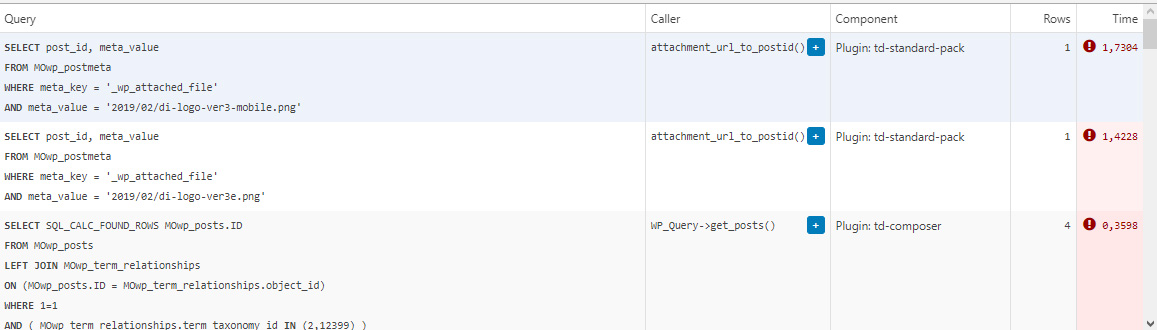
This morning I managed to patch up the problem, it’s a crude solution but may help someone. In header template I found that it was loading the logos from
plugins/td-standard-pack/Newspaper/parts/header/header-menu-h1.php
(yours may be different of course)
There I simply removed the PHP block fetching the logos and hardcoded the HTML for the logos in. As soon as I did that, the SQL spike went away. So I’d say it’s a bug, or inefficient code at least.
To be clear, we’re running the latest versions of WP, PHP, MySQL, the theme & plugins, all on a solid VPS. Yes there is quite a bit of SQL load, we’re working to optimize it with new blocks and Cloud Templates, but this was something else. Could be related to the latest Standard Pack update, don’t know, team didn’t report it before.
-
This reply was modified 4 years by
menneskedyr.
Bettina Hello Alexander!
Unfortunately, there is no custom template for the pages in the theme.
Please note that customization is not covered by the support team: https://forum.tagdiv.com/newspaper-theme-support/
For customization and other services you can contact our custom work team here: https://tagdiv.com/premium-customization-services/
Thank you!
 sashos
Hello,
Can you suggest a workaround to create custom templates for pages? The same way it can be done with posts, tags, authors, etc.
Thanks,
Alexander
 Rahul chauhan
While try to open any post on home page it shows:
wp_booster error:
td_api_base::mark_used_on_page : a component with the ID: single_template_2 is not set.
/home1/hindivib/public_html/wp-content/plugins/td-composer/legacy/common/wp_booster/td_api.php
Display backtrace
wp_booster error:
td_api_base::get_key : a component with the ID: single_template_2 Key: file is not set.
/home1/hindivib/public_html/wp-content/plugins/td-composer/legacy/common/wp_booster/td_api.php
Display backtrace
wp_booster error:
The path of the single_template_2 template not found. Did you disable a tagDiv plugin?
/home1/hindivib/public_html/wp-content/plugins/td-composer/legacy/common/wp_booster/td_api.php
Display backtrace
wp_booster error:
td_api_base::get_key : a component with the ID: single_template_2 Key: bg_use_featured_image_as_background is not set.
/home1/hindivib/public_html/wp-content/plugins/td-composer/legacy/common/wp_booster/td_api.php
Display backtrace
Bettina Hello!
Normally, it should work like this by default. Please access the search page results, edit it with the TagDiv Composer, and check if you have the sort order: Latest and without no limit or offset: https://www.screencast.com/t/8aQXkhkNatrA
If you use a default template, then you haven’t these settings, but it’s set as default also.
Thank you!
Anamaria Hello,
I checked your menu on mobile and work => https://i.imgur.com/8lWU2vZ.png
Also, I saw you have the mobile theme plugin activated, and on the main page is disabled that’s why the menu is ok, but for posts/categories template, etc you need to set the menu in Theme Panel -> Mobile Theme -> Header -> Main menu => https://i.imgur.com/AjjhTfB.png
Thank you!
Bettina Hello!
Let me explain you which options of mobile versions are:
1. Responsive version: A responsive version of your website is looking similar like on desktop, edit the page with TagDiv Composer, click on the mobile viewport: https://www.screencast.com/t/XDQJedlggSB ; there you can see your mobile version and you can edit the elements there.
2. Mobile pages: https://tagdiv.com/newspaper-10-3-7-update-brings-customizable-and-fast-mobile-pages/
3. Mobile theme plugin: The Mobile Theme is a performance optimized theme included in the Newspaper main theme and it loads only for mobile devices. It comes with its own templates for page, post, category, etc so your current templates from the desktop theme will get converted to the mobile theme layout. For more details, please take a look here: https://forum.tagdiv.com/the-mobile-theme/ https://forum.tagdiv.com/the-mobile-theme/
A full explanation you can find here: https://www.youtube.com/watch?v=SpGkOnJeNZY
If you created the mobile pages with TagDiv Composer, then when you install Mobile Theme plugin, your pages will be overwritten (disappear) by the plugin layout.
If you use Mobile theme plugin, then you can not edit the pages with TagDiv Composer.
You have only some settings for this layout, which you can find in Theme panel -> Mobile Theme. Please note that if a page is made by Composer, than the content won’t be displayed on Mobile theme version. You should create the content with the Mobile Editor.
Unfortunately, AMP is faster and works better only with Mobile Theme, because it is not compatible with cloud templates.
From my point of view, if you don’t use the Mobile Theme plugin, then there is no reason or benefit from AMP.
Check our documentation about this plugin here:
https://forum.tagdiv.com/tagdiv-amp-plugin-tutorial/
Thank you for understanding!
 lemads
I cannot edit my posts. I get the mesage: Please select tagDiv Builder Template from the theme panel or set a default template. The current page/post uses a template that is not editable.
Why is that and what do I do?
Web is struernyheder.dk
Anamaria Hello,
So I understood you add two blocks of the posts loop in your template, right? if yes, we do not recommend setting two posts loop on the same page/template, please use a flex block or another block, because most of the settings from the first loop element will be set for the second one.
Thank you!
Bettina Hello!
There is a huge configuration which is tested with our theme: https://forum.tagdiv.com/cache-plugin-install-and-configure/
Let me explain you which options of mobile versions are:
1. Responsive version: A responsive version of your website is looking similar like on desktop, edit the page with TagDiv Composer, click on the mobile viewport: https://www.screencast.com/t/XDQJedlggSB ; there you can see your mobile version and you can edit the elements there.
2. Mobile pages: https://tagdiv.com/newspaper-10-3-7-update-brings-customizable-and-fast-mobile-pages/
3. Mobile theme plugin: The Mobile Theme is a performance optimized theme included in the Newspaper main theme and it loads only for mobile devices. It comes with its own templates for page, post, category, etc so your current templates from the desktop theme will get converted to the mobile theme layout. For more details, please take a look here: https://forum.tagdiv.com/the-mobile-theme/ https://forum.tagdiv.com/the-mobile-theme/
A full explanation you can find here: https://www.youtube.com/watch?v=SpGkOnJeNZY
If you created the mobile pages with TagDiv Composer, then when you install Mobile Theme plugin, your pages will be overwritten (disappear) by the plugin.
This is how that element works there on the mobile version: https://www.screencast.com/t/tt0ZFk3XX5tT
Thank you!
Anamaria Hello Leif,
Please edit the page normally and change the setting for the page into Template: Default template because I think you have there the setting: Pagebuilder + Latest articles + Pagination and these are not editable by tagDiv Composer plugin.
Let me know the results!
Thank you!
Anamaria Hi,
If you’re seeing only NAVER please make this adjustment in the tagDiv Composer plugin -> wp-content/plugins/td-composer/legacy/common/wp_booster/td_first_install.php
=> https://www.screencast.com/t/yO3iU8E5JhH
Then hit a save in the theme panel and then revert the code back to the original, this will make the social icons appear properly again -> https://forum.tagdiv.com/design-post-pages-using-default-templates/.
If you don’t have success you can send us an email at contact@tagdiv.com and provide
– wp-admin URL and credentials
– cPanel URL and credentials
We will fix the problem. Include a link to this topic in the email.
Let me know the results!
Thank you!
 nomadwebs
 Hi Anamaria,
Great, I understad the option you described me. Is not optimal as I liked but it works.
Now I have a problem with the header template. I did the same action you described me in your last comment but I cannot add it to the other page.
Here you are an screenshot.
move header to template
As you can see, I created the header in the new page:
new header
Thanks in advance for your support.
Best regards.
Francisco
 Philwat
Hi,
My website theme was on 11.2 version, after update it with 11.3.1, many errors appeared.
Rollback with old version stable for my site not change anything.
In panel theme i cannot see header style, top bar…
Result: no logo, no footer, all settings are lost
In post settings, i see only one default post template, so the result is, where are disappears my features, result:
https://www.australien-backpackersguide.com/australien-blog/
Other result: https://www.australien-backpackersguide.com/unglaubliche-koala-geschichten/
wp_booster error:
td_api_base::mark_used_on_page : a component with the ID: single_template_3 is not set.
/var/www/clients/client1/web3/web/wp-content/plugins/td-composer/legacy/common/wp_booster/td_api.php
with a button display backtrace
I have two others website with same theme, same features etc and i make an update on one of it and there are no problems.
Please i need support, investigate, i can create credentials, how do you proceed in this case ?
Regards.
nomadwebsHello,
I used the theme Newspaper with the template london News to create the website https://developing.fetatarragona.cat. I customized in this page, the homepage and the categories pages. So now, I want to know how can I export the page a sowed you to the production domain https://fetatarragona.cat.
I find in the documentation but I just found how to export the theme settings but I can’t find anything to export the designs.
Can you help me?
By the other hand, I used my licence in order to develop the page. At the moment when I move the content for the productive environment, is enough just changing the purchase key to the other site? Or I need to do anything else?
I’ll wait for your answer.
Best regards.
Francisco
 mcvanz
Hi there,
I see that with Newspaper Theme it is possible to create pages with your Div Composer tag, creating templates for mobile pages. Unfortunately I see that, despite creating them, I still see the mobile homepage by default.
where I’m I wrong? How can i set a different mobile page?
Thanks in advance
Roberto
Bettina Hello Tamsin!
1. Here you can see step by step how you can import a new cloud template for your posts: https://forum.tagdiv.com/design-post-pages-using-cloud-library-templates/
2. Please add the text and the design (elements in the page) with the TagDiv Composer, not editing the page normally. Also, the shortcode can be inserted by using the element called “Column text”. For example, in the step3 here: https://forum.tagdiv.com/add-cryptocurrency-price-ticker-widget/
3. Yes, because our plugin Tagdiv Composer sees that the elements in the page weren’t made with it and it will ignore the content. The solution is at point 2.
1. The Post Settings in the Theme Panel will appear if you will install and activate the Standard Pack plugin from Newspaper -> Plugins.
2. If you use Mobile theme plugin, then you can not edit the pages with TagDiv Composer.
You have only some settings for this layout, which you can find in Theme panel -> Mobile Theme. Please note that if a page is made by Composer, than the content won’t be displayed on Mobile theme version. You should create the content with the Mobile Editor.
How I explained above the Mobile Theme has its own design for header and footer.
Thank you!
Anamaria Hello IM,
The element is available only in the Single Post Template, in the posts. In the pages, this is not available.
Thank you!
 tamsin_lechner
 Good morning,
I have encountered a few issues with Newspaper mobile view (both responsive version and theme plugin), and would really appreciate your help.
———-
WP 5.8.1
PHP 7.4.24
Newspaper 11.2
tagDiv Plug-ins – Composer, Cloud Library, Social Counter, Standard Pack (have also activated/deactivated Mobile theme + Official AMP for WP)
——–
My website is “coming soon” until I resolve my mobile settings, so I am sharing screenshots using your recommendation above.
FYI I have already utilised the Let’s Go Mobile tutorial (very helpful) and Theme documentation and spent a lot of time troubleshooting.
My preferred option is to use mobile templates and tagDiv composer, mostly as I have content on my homepage that I want to retain in mobile view. I have created mobile templates for the home page, header and footer only (at this stage).
When testing the responsive version live on mobile I have the following issues:
1. My posts are displayed in a default format (feature image, text then sidebar, plus wrong header and footer). In my cloud templates list I do not have any Single Post Template listed to customise as a mobile template.
Have I mistakenly deleted “Single Post Template – Default PRO” and if so how do I get it back? When searching in New Cloud Templates it is not listed and other templates would be inconsistent with my site.
2. My pages (via menu) are displayed in a similar default format. When I try to create mobile templates for these pages using Composer (checking copy content option) most of my pages are not picking up all the content. Specifically, pages that have shortcodes (eg. Contact Form 7). For example –
In the mobile template page I get an empty column (where the page title, text and/or image should display) and stretched out shortcode content. If I save it anyway and try to open it again it appears as blank.
3. One critical page on my site appears blank (header and footer only) when live on mobile. It is a Business Directory which is otherwise responsive to the theme.
Like Issue 2 above, when I create a mobile template for this page the content is copied and partially displays but after saving it disappears.
The alternative option – trying tagDiv Mobile Theme + Official AMP for WP, and testing it live, has not resolved the critical issues. NB: I switched my “homepage – mobile” to draft while using Mobile Theme.
When testing the mobile theme version live on mobile I still have these issues:
1. Posts are now ok but the “Post Settings” options (as shown in your Theme Documentation) do not appear in my Mobile Theme Plugin settings.
2. All of the pages (including Business Directory) are now completely blank (mobile theme header and footer only). FYI I have opened each page in WP Editor and ensured they are enabled for mobile theme in the tool bar and updated. This did not resolve the issue.
Please let me know your suggestions for resolution asap 🙂
Thank you, Tamsin
 YamhillAdvocate
 Actually I was wrong. I tried disabling auto loading of articles on the article template page and it’s not doing anything. It is still repeating the same article over and over again.
Example,
https://www.yamhilladvocate.com/2021/10/newberg-city-manager-dan-weinheimer-resigns/
It just repeats the same article



