
- NewspaperWP Rocket and Newspaper Theme: Optimization Guide
- TutorialsDefault Block Settings Guide
- TutorialsOffset Feature
 Anamaria
 Hello,
Please make sure you have the same header set on the article pages if you have a Header Template imported from Cloud Library, you can check which header is set, from Manager(Website Manager) -> Header => https://www.screencast.com/t/nKX3ff3zjr
If this is not what you mean, then please provide more information, screenshots and your website link in order to help you efficiently.
Thank you!
 comms
comms I am unable to disable the mobile view template for pages imported from Cloud Library. Only for regular created pages.
I already assigned a mobile page for the homepage, works great, footer & header showing off properly.
However, assigning the same footer & header for a single post/category template doesn’t apply.
I have looked over the videos.
If you can assist more, we can talk on the phone, I’m local.
Thanks!
-
This reply was modified 5 years by
comms.
 sparky263
I set up a master ‘Company’ page so I can feature the posts of various clients on their own ‘Company’ page. I thought once I set up the master, I could then just dupe it like a standard WP page to serve as the model but it doesn’t seem to work that way. How can I set my master page up as a template that I can just apply to each company’s content?
This is my ‘Master’ page: https://moic.onlineinvestmentconference.com/cartier-resources-ressources-cartier/
And this is the dupe of that page: https://moic.onlineinvestmentconference.com/gogold-resources-silver-gold-producer-mexico/ >>> Not so good.
Also, is there a way to template the Mobile page, or do I have to convert each time?
 kmanish95
Newspaper X: I disabled the author box, but it’s showing on the website. I disabled related articles but still I see related (2-3) more articles after the main article is over on the post page while scrolling down. I am using tagdiv single post template default pro for my posts. Can anyone help please how do I resolve this?
 byothe
Hello
I am trying to install templates for different pages on my site but it get stuck on “installing”
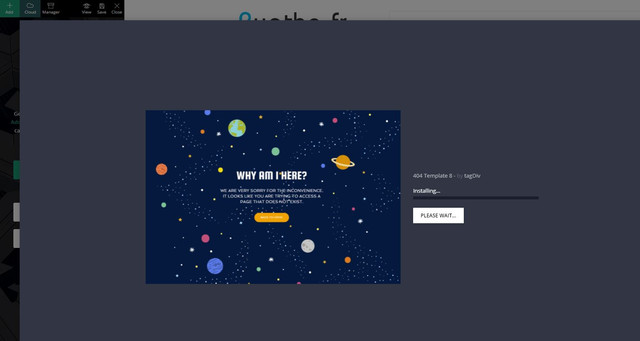
Just before doing that I had no problem to import a new footer template…
Anamaria Hello,
So, if I understood correctly, you to add a caption for the featured image you would add you added the title element, right?
if so, then yes, that item will be on all posts, to add a caption for the featured image, it must be added when you choose that image, like this => https://www.screencast.com/t/6e3XdnGs -> https://www.screencast.com/t/IxnAxfrHPuEX
tagDiv Composer is a page and cloud builder, it can be used only for pages and cloud templates, therefore you can use it on a single post template from tagDiv cloud library to adjust the layout, but not to write the post content, for this, you need to use the WordPress editor, you can only change the style/layout, this is a video about single post template => https://www.youtube.com/watch?v=6m8-EebnfM0
For fonts, you can check what family fonts apply on the post using the option from sidebar tool for each element => https://www.screencast.com/t/XLqSdtPv or from Manager(Website Manager) -> Fonts => https://www.screencast.com/t/zyhMF5hU -> https://www.youtube.com/watch?v=rbkYVyj1__Q
You can find more tutorials on our channel on youtube =>https://www.youtube.com/user/tagdiv which can help you to redesign.
A solution for sending a screenshot is this:
Download, capture, send: https://www.techsmith.com/jing-tool.html
After making the screenshot, you will have a link, paste it here.
Hope this helps you!
Thank you!
 Bettina
 Hello!
1. Try to add this CSS code:
.tdc-header-template .td-main-page-wrap, .tdc-no-header .td-main-page-wrap {

    padding-top: 50px;}
2. Unfortunately, this will require custom work which is not covered by the support team.
Thank you!
 malako
After updating from 10.3.9 to 10.4 I am experiencing major problems with the tagdiv editor.
I can’t add new elements or templates via the tagdiv menu.
If you import templates, they are not imported or delete all other elements of the page.
Newly added elements (e.g. spacing elements) cannot be edited or deleted. Also when editing already existing elements the error message appears after a while and the editor freezes.
If you open the console you will see corrupt .js files, which are probably directly related to the tag-div-composer plugin.
The exact error message is:
“changeData Error: Element model id is not in $refEl data! Current state has involved an issue. You could try an UNDO operation (CTRL+Z / CTRL+SHIFT+Z)”.
In another forum entry the same error is reported in combination with the translation plugin WPML, but I don’t use that.
I hope even with the unspecific information, somecone can give me a hint
Thank you
commsHi
> I have imported a single post template via the Cloud Library (Single Post Template – Magazine PRO). Edited the template for the desktop version, all good.
> Imported a header and a footer template and designed them to my liking (Header Magazine Pro Mobile & Footer Magazine Pro Mobile). These are only for the mobile view.
Now, I created a mobile version page of Single Post Template – Magazine PRO using the TagDiv Composer, assigned the two mobile header & footer templates but they are not showing.
If I would be able to edit the Single Post Template – Magazine PRO using the Gutenberg editor and disable the mobile theme settings I believe it would work, as it works for regular pages.
https://i.imgur.com/PFpL5vE.png
How can I disable the mobile theme for a desktop cloud library template?
Please advise.
Thank you
Bettina Hello!
1. You should use the element called “Ad box” from TagDiv Composer on your mobile page and there you need to add the ads. You need just drag & drop the element in that place.
2. Yes, you can, but you need to have another template assigned to that category. Note that a category template will have the same design as for all categories, so, you just need to assign another template with another structure, in your case ads for your chosen categories.
3. Because you use a cloud template, then the settings from theme panel are overwritten by the settings from Composer. So, open a post then “Edit with TagDiv Composer”. You need to add the element called “Single Post Comments” in order to have that.
4. If you want the same posts to appear there on top, then you should write the IDs of the posts in the element’s settings(Filter -> Post ID filter). If you don’t mean this, then please provide a screenshot with an example of what you need to achieve?
5. Check in the element’s settings if you have some offset and let the field empty.
Hope that helps you!
Thank you!
 Breinblik
 Your colleague already pointed me to this page: https://forum.tagdiv.com/custom-post-type-support/ and thank you but it doesn’t help me. Also i suspect the info on this page is outdated because i can’t find these files:
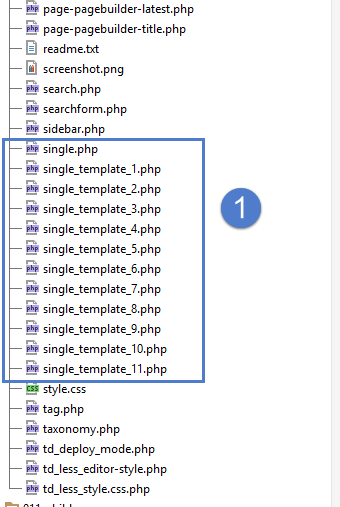
It looks like the root of the Newspaper theme but i don’t see these files in my theme folder, where are the located?
I would like to disable/uninstall WP Bakery pagebuilder but i first need to be sure that TagDiv Composer can offer me the same solutions.
-
This reply was modified 5 years by
Breinblik.
Bettina Hello!
Do not use both page builders on the same time.
For the moment, the only solution is to shift from WPBakery to Composer.
So, I gladly recommend you to shift from WPBakery to Composer, because WPBakery is an old builder plugin.
Please check our guide to know how to shift from WPBakery to Composer: https://forum.tagdiv.com/visual-composer-tagdiv-composer-transition/
If you will use a cloud template, then you can edit the template and find in Composer an element called ” Team Member ” and some settings for that. For more information about TagDiv Composer plugin, check our documentation here: https://forum.tagdiv.com/tagdiv-composer-tutorial/
Unfortunately, there is no such element(https://test.circulaireconsumptiegoederen.nl/doe-mee-test/) in TagDiv Composer to be able to build exactly the same feature.
You can not edit a default template/CPT with TagDiv Composer plugin.
Check the differences here:
– https://forum.tagdiv.com/design-post-pages-using-cloud-library-templates/
– https://forum.tagdiv.com/design-post-pages-using-default-templates/
If you want to try CPT, then you can take a look here:
https://forum.tagdiv.com/custom-post-type-support/
Hope that helps you!
Thank you!
Breinblik I’m trying to modify templates/pages of my custom post types but they are not editable by TagDiv Composer why is that and is there a way of enabling this?
 Frédéric Bénot
Hi,
I am mostly using the “podcast” templates.
. A sample of category page
. A sample of Sub-category page
As each sub-category fits a podcast, I would like to put a (powerpress) subscription widget on each subcategory page.. Unfortunately, the widget displaying on sub-category page is always the category widget, but not a “per sub-category” widget.
I would like it to work like on the Author’s pages : https://www.frequenceterre.com/author/marie-paule-peuteman/ (left down corner). Each author can have its own widget.
So… What can I do for each sub-category to have their own widgets ?
Thank you.
FB
Anamaria Hello,
What type of prebuilt website did you install, pro or standard?
If you have installed a Pro Prebuilt Website, then these settings are for Standard Prebuilt Websites, create without Cloud Templates.
These changes apply for example only when you use the standard header/footer templates (and other standard templates) from Theme Panel (not a cloud template) => https://www.screencast.com/t/4gApdblBu8 -> https://www.screencast.com/t/m1vrJsvHM
You need to edit the page with tagDiv Composer to make changes, like in this is a video https://www.youtube.com/watch?v=HXQQygkCCJ
Hope this helps you!
Thank you!
Anamaria Hello,
These are the methods how you can install the theme
Install via WordPress -> https://forum.tagdiv.com/install-via-wordpress/
Install via FTP -> https://forum.tagdiv.com/install-via-ftp/
If you have installed a Pro Prebuilt Website, then these settings are for Standard Prebuilt Websites, create without Cloud Templates.
These changes apply for example only when you use the standard header/footer templates (and other standard templates) from Theme Panel (not a cloud template) => https://www.screencast.com/t/4gApdblBu8 -> https://www.screencast.com/t/m1vrJsvHM
You need to edit the page with tagDiv Composer to make changes, like in this is a video https://www.youtube.com/watch?v=HXQQygkCCJo<a
If you have other questions you can ask us.
Hope this helps you!
Also, please note that at the moment the Support team is not 24/7 available. We answer the topics from Latest to Newest Monday – Friday from 08:00 AM to 05:00 PM GMT+2
Thank you!
Anamaria Hello,
I made a test with the influencer template and looks fine => https://www.screencast.com/t/8c1r1MBH4R
Also, please make sure you have this option enable from Theme Panel-> Post Settings -> Post and Custom Post Types => https://www.screencast.com/t/5Q0FvdDYpSjQ
Thank you!
 Michaelgroth
 Hello,
thank you for your help. I tried everything you described but it didn´t help.
Whenever I try to set an image for the header, it isn´t showing. This problem also exists if try to build a new header-template in Tagdiv-Composer.
This is the page i´m working on: https://www.stadt-tanna.de/
And this is how it looked before: https://web.archive.org/web/20210119160209/https://www.stadt-tanna.de/
BreinblikHi! Is there any way i can use elements made in visual composer on a page build with TagDiv composer?
I have a team members grid set up now in Visual Composer however the styling of this page is different from the other pages because they were made with TagDiv composer. I can’t use any templates because these two modeling tools can’t seem to work together on a single page. Please help!
Bettina Hello!
I just explained you above that you are not able to customize so much the mobile theme version. So, unfortunately, you can not move the elements on the page, but what you can do there is to deactivate some elements(show/not): https://www.screencast.com/t/mrZoW8PdiQUm
Also, with mobile theme plugin enabled, you can not change your footer.
The Mobile Theme is a performance optimized theme included in the Newspaper main theme and it loads only for mobile devices. It comes with its own templates for page, post, category, etc so your current templates from the desktop theme will get converted to the mobile theme layout. For more details, please take a look here: https://forum.tagdiv.com/the-mobile-theme/
If you want to use a mobile page, then you need to assign it to your homepage. For more information about this mobile version please take a look in this article: https://tagdiv.com/newspaper-10-3-7-update-brings-customizable-and-fast-mobile-pages/
Please note you should deactivate the Mobile theme plugin if you want to use mobile pages.
Thank you!
 Vlad S
 Hello !
In order to be able to adjust it you will need to use CSS or use a category template that is fully editable using tagDiv Composer.
Please provide a link to your category page so we can take a look if you would like a css code.
Thank you !
 mikevanmoonlight
 Cannot edit menu and logo with TagDiv composer when no Template choosen. When I clicking on menu using TagDiv it’s just nothing. Click on logo or menu elements leads to opening site on another page.
Also, how I can add a MORE button for menu, because it’s not looking good now.
Anamaria Hello,
Using our theme you can choose from 3 mobile versions
-> mobile responsive => https://www.screencast.com/t/oJ2ShOp47
-> mobile theme plugin => https://forum.tagdiv.com/the-mobile-theme/
-> mobile page => https://tagdiv.com/newspaper-10-3-7-update-brings-customizable-and-fast-mobile-pages/
So, the mobile responsive is what you see then that you select the viewport on phone => https://www.screencast.com/t/matV17hH, so some settings may apply for each viewport(where is the border blue), and others are not(where the border is black).
The mobile page has the mobile templates from Cloud Library => https://www.screencast.com/t/YCcZ8rL8
Mobile responsive version of the theme and the mobile page editor can be edit with tagDiv Composer, the mobile theme plugin not.
If I understood correctly, you want to have a different layout of pages on mobile, so you can create a mobile page, this is a video about Responsive Newspaper Theme, AMP & Mobile Theme, Mobile Pages & Templates -> https://www.youtube.com/watch?v=SpGkOnJeNZY
Hope this helps you!
Thank you!
Anamaria Hello,
I am not sure I fully understand what you are looking to edit. As an admin that information from the top bar appears to you, it cannot be hidden.
Also, I checked your website, and I saw you have a Pro Prebuilt Website, so the footer template can be edited only from the frontend if it is assigned, edit a page/post-template with tagDiv Composer and go down to the footer => https://www.screencast.com/t/rpfNhfyrF
First, make sure you haven’t made any changes to the files, and please make a full backup to all files and the database, after you can reset theme settings from Theme Panel -> Import/Export => https://www.screencast.com/t/lcGdqHKcY
Hope this helps you!
Thank you!
Bettina Hello!
When you create a page you have on the right side an option to select the template for that page and based on that type of template, you should edit the one of the files from td-composer/legacy/Newspaper: https://prnt.sc/1234p36
Hope that helps you!
Thank you!

