
- NewspaperDesign your Post Pages using the Cloud Library Templates
- NewspaperDesign your post pages using the Default Templates
- NewspaperPage templates
- NewspaperCreate a form contact page
- NewspaperCloud Library Templates
- NewspaperCloud Library – Category Templates
- NewspaperHomepage – How to build and set it
- NewspaperPost templates
- NewspaperDefault post templates
- NewspaperCategory templates
- NewspaperPost template ads
- NewspaperSingle External Shortcode and External Shortcode
- NewspaperWP Rocket and Newspaper Theme: Optimization Guide
- NewspaperSearch setup for custom post type
- NewspapertagDiv Composer – Website Manager
- NewspaperBookmark – Save For Later
- NewspaperFlex Block Builder and Flex Loop Builder
- NewspaperModules Builder in Newspaper Theme
- NewspaperIntroduction to CPT and ACF with Newspaper Theme
- NewspaperCreate a frontend submission form
 Anamaria
 Hello,
Unfortunately, this plugin is not tested with the theme. If you want to create the sidebar in Appearance -> Widgets and set the sidebar on pages, or using the tagDiv Composer; using the element from tagDiv Composer, Widget sidebar https://i.imgur.com/e1FPdYU.png -> https://i.imgur.com/q20UCZf.png -> https://forum.tagdiv.com/sidebars-tutorial/
If you using a single post template from Cloud Library then you need edit with tagDiv Composer,
this is a video what that can help you => https://www.youtube.com/watch?v=fa7GenCHcBU, and a guide => https://forum.tagdiv.com/smart-sidebar-2/
or if you have a Standard Post Template, a sidebar can be created only with widgets, and in this way, you can assign a different sidebar on each post.
Thank you!
Anamaria Hello,
1. I recommend using php version 8.2, but we don’t have a specific guide for this.
2. and 3. We recommend using cloud templates and flex blocks instead of the standard templates and standard blocks, like blocks 1-25 or Big Grid Full or others. So please replace all the standard blocks and templates and disable the tagdiv Standard pack plugin.
4. here are many optimization guides provided by our users here in the forum, some made by us; you could check some of them
– https://www.infophilic.com/get-almost-100-pagespeed-newspaper-theme/
– https://forum.tagdiv.com/cache-plugin-install-and-configure/
– https://forum.tagdiv.com/how-to-make-the-site-faster/
– https://forum.tagdiv.com/topic/high-number-of-ajax-request/
– https://forum.tagdiv.com/topic/score-100100-pagespeed-with-newspaper-wordpress-theme/
– https://www.andraware.com/wp-rocket-for-newspaper-theme/
– https://forum.tagdiv.com/topic/page-speed-guide-for-2023-beginners-and-advanced/
– https://forum.tagdiv.com/topic/newspaper-theme-speedify-your-website/
– https://forum.tagdiv.com/topic/tutorial-chriss-custom-optimizations-for-functions-php-etc/
– https://forum.tagdiv.com/cloudflare-cdn/
– https://forum.tagdiv.com/topic/theme-causing-high-cpu-usage-2/
– https://forum.tagdiv.com/topic/sql-querys-high-cpu/
– https://forum.tagdiv.com/topic/newspaper-theme-slow-to-respond/
– https://premium.wpmudev.org/blog/optimizing-your-wordpress-database-a-complete-guide/
– https://underconstructionpage.com/optimize-wordpress-database/
– https://crunchify.com/better-optimize-wordpress-database-all-in-one-guide/
Thank you!
Anamaria Hello,
@kpt
Please let me know where you are on a page/ category template.
You need to filter the block on the category you want to show it-> https://i.imgur.com/nlJvq8B.png -> https://forum.tagdiv.com/flex-block-settings-guide/ -> https://forum.tagdiv.com/what-is-ajax-preloading/ You need to edit the page with the tagdiv Composer and select the block to apply different filter and sort options.
For each category, on the flex block there is a special filter for the current category, which dynamically displays the posts from that category within each category -> https://forum.tagdiv.com/flex-block-settings-guide/
The Posts Loop automatically filters the posts depending on the cloud template you set (for example, on the category page, there will be posted posts from that category) https://forum.tagdiv.com/posts-loop/
@ali ghannouchi
We can help with this request, but you will need to contact us via email at contact@tagdiv.com, and you’ll need to provide the license key, then we’ll set the key in our system to be checked and if this no longer appears on that domain, then the mentioned domain will be removed.
Thank you!
Anamaria Hello,
The tagDiv Composer is our page builder and it can be used for building pages and cloud templates, but not for creating posts. For this, you’ll need to use Gutenberg or a classic editor https://forum.tagdiv.com/tagdiv-composer-tutorial/
Using tagDiv Composer, you can build/edit the single post template (the layout of the posts).
Here is a video that will show you how to use the builder to create a website from scratch https://www.youtube.com/watch?v=SoGQ0d5kIBg to do this you’ll need to have the posts already.
Also, I don’t recommend using two page builders on the same page/post.
You can use our gallery options, but for the page, you need to have the acf plugin pro version https://i.imgur.com/4K20QNp.png and use those options on the images -> https://i.imgur.com/jMo89lb.png Yes, you can set there the gallery.
You need to filter the block on the category you want to show it-> https://i.imgur.com/nlJvq8B.png -> https://forum.tagdiv.com/flex-block-settings-guide/ -> https://forum.tagdiv.com/what-is-ajax-preloading/ You need to edit the page with the tagdiv Composer and select the block to apply different filter and sort options.
For each category, on the flex block there is a special filter for the current category, which dynamically displays the posts from that category within each category -> https://forum.tagdiv.com/flex-block-settings-guide/
The Posts Loop automatically filters the posts depending on the cloud template you set (for example, on the category page, there will be posted posts from that category) https://forum.tagdiv.com/posts-loop/
Thank you!
 Davidpinto
Hi All,
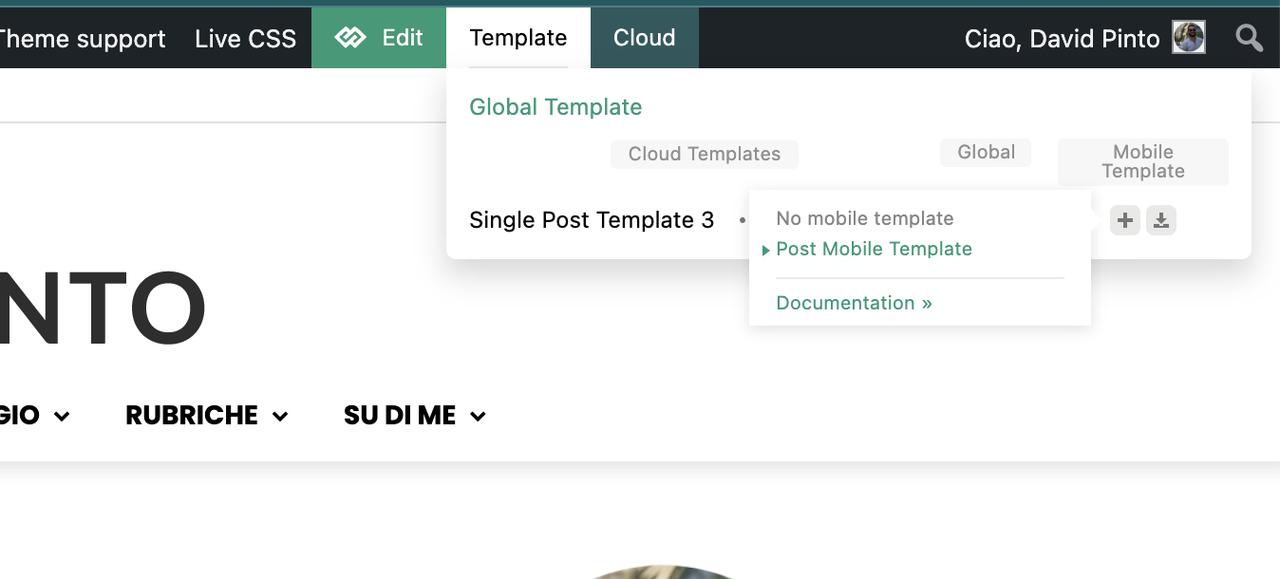
I’ve already created a template for mobile versione from the template single post that I’ve already used.
But when I visit the single post page on mobile I see the default mode page.
here the screeshot of the template for mobile that is selected.
the site is: https://www.davidpinto.it
All the best
David
 Daniel Finch
Can you run me through how Header Template – Office Nexus works exactly and how to edit the mobile menu? Because it doesn’t seem to operate like a normal menu instead its got a page template which I cannot seem to edit or make work in anyway.
 carlosll
Hello,
We are experiencing serious performance issues on our website due to the td-composer module in the Newspaper theme. We have identified that this module is the main cause of the extremely high Time to First Byte (TTFB) on our pages, significantly affecting the user experience.
web: https://fusionasturias.com
Technical Details:
• Server: VPS with optimized configuration.
• Web Server: Nginx (no Apache).
• PHP: Version 8.3 (FPM enabled).
• WordPress: Version 6.7.1.
• Cache Optimization: Using WP Rocket with Redis enabled.
• Compression: Brotli and GZIP active.
• Object Cache: Redis configured.
Observations:
1. We conducted several performance tests using tools like WebPageTest, which showed that the time it takes to load the initial HTML is excessively high. (See attached screenshot).
2. A more detailed analysis using a code profiler plugin confirmed that td-composer accounts for over 3 seconds of the total load time on each request. (See second attached screenshot).
3. This issue occurs even on simple pages without many dynamic elements, indicating that the problem is directly related to the module or its integration with the theme.
4. We updated our site design at the end of the summer. Previously, we used the Default PRO design, but now we’ve configured the site using the Pulses-PRO design. We wonder if residual configurations or data from the previous design might be “bloating” the database or negatively impacting performance.
5. We suspect that the Cloud Templates used in the current design might also contribute to the high load times. Could these be affecting performance?
Questions:
1. Are there specific configuration recommendations for Nginx + PHP 8.3 environments that could help improve the module’s response times?
2. Is it possible to disable or replace certain functionalities of the module without compromising the design integrity?
3. Could Cloud Templates be a cause of the slow performance? If so, how can we optimize them?
4. Is there any tool or recommended method to clean up residual configurations or data from previous designs that might be affecting the new one?
We would greatly appreciate any guidance or solutions you can provide.
Please find the test results attached to help diagnose the issue.
https://imgur.com/wkeeKt0https://imgur.com/wkeeKt0
Thank you in advance.
Best regards,
Carlos Llamazares
Anamaria Hello,
Did you have a created page or just tags? You can set the tags here -> https://i.imgur.com/OMIt58g.png or use the filter in the tag template -> https://i.imgur.com/xtVMyCO.png
Thank you!
Anamaria Hi,
Please tell me where it only appears on one page or the entire site. Did you add any code or elements from another plugin?
Please follow the steps from this topic https://forum.tagdiv.com/topic/error-at-zones-6models-1dom-the-model-does-not-match-the-content-currene/ if you have a child theme; please use the main theme.
You can try to revert an old revision on a page/template -> https://www.wpbeginner.com/beginners-guide/complete-guide-to-wordpress-post-revisions/
Thank you!
 Tony
Tonyhttps://tonylaubach.net/chase-log-april-15-2024/
I’d like to add a section to replace the ‘POST SHARING’ div. What I’d like to put in there instead is a table with various meta information.
Ideally, this would be an entire new option for me to add to a certain category of posts. Not sure how that can be arranged, but I would like to basically make it as part of the post template for posts within a certain group of categories. When added to a post, it would import various meta fields that would be added to the post.
The link above is an example of such a page. Below the TITLE, AUTHOR, DATE, there is the social sharing section. I’d like to remove that and replace it with the meta table I have written up. For simplicity purposes, this would be an example of the code. This would only be displayed on posts in a certain parent category.
	<table width="100%" border="0">

	  <tbody>

	    <tr>

	      <td>Meta Field 1</td>

	      <td>META INPUT 1</td>

        </tr>

	    <tr>

	      <td>Meta Field 2</td>

	      <td>META INPUT 2</td>

        </tr>

      </tbody>

</table>
I appreciate the assistance in this and am loving this theme as I get deeper into it!
 ammarr
Hello Everyone 👋,
Hope you guys are doing great.
Apologies if this sounds too basic, I’ve a website on which I would like to decrease the padding from left and ride throughout the website. I’ve tried to change the option from themepanel -> page template option but that didn’t work. Basically, I want to have the header, page container, and the footer as full-widget with slight padding just in case it doesn’t stick to the side. Can someone help me w/ this? my site URL is – https://htjap-dev.kreadevs.com/
Here’s the screenshot – https://prnt.sc/lGG3VIFJEr_7
Looking forward to your response.
TIA
Best Regards,
Ammar
 justco
where can I find it removes duplicate posts from the page.
I can’t find page template settings
 Oktay
OktayI am using the East Coast pre-built website as the main template. I want to import specifically just this page which is from the Cali Sight website.
I open the East Coast “post listing” page with composer but I cannot find the Cali Sight “post listing” page in the cloud library. How to import that specific page? Thanks
Anamaria Hello,
I’m sorry. You need to create a new page and the code there. I recommend creating your own blocks because the blocks from that template are from the standard pack, and those are deprecated.
Thank you!
OktayI’m using Eastcoast & Cali Sight templates for directories. However, I noticed that the map on the single directory page is actually just a screenshot image and not an actual interactive map. Also, on the Cali Sight search result, there is an “Explore” button which is not linked to anything else.
Is there, or what is the best way to go about adding OpenStreet Maps to the directories without breaking the theme and ensuring full compatibility? The website I am working on is https://double-glazing-windows.co.uk using the newspaper theme. Thanks
 jonybigude
Hi!
I have two rows on my homepage (standard template). They do not align with each other, as you can see on these print screens: https://imgur.com/a/8NlWHcC
I have tried to play with the settings, but the size of the columns or position of the rows do not change. What I would like to achieve would be that the small articles under the big article on top would stretch to assume the same width as the big article on top.
Is there a way to do that?
Thanks in advance!
Anamaria Hi,
Please edit the page normally in editor and change the setting for the page into Template: Default template because I think you have there the setting: Pagebuilder + Latest articles + Pagination and these are not editable by the tagDiv Composer plugin.
Thank you!
Anamaria Hello,
Please be patient! We reply from oldest to newest.
Support Hours (GMT+3)
Monday – Friday:
8:00 AM – 16:30 PM
You need to import a blank page template, edit it in the editor, select the text area, and paste the code https://i.imgur.com/Rdf9eul.png -> https://pastebin.com/gvc8FDKe
Thank you!
Anamaria Hi,
Please tell me where it only appears on one page or the entire site. Did you add any code or elements from another plugin?
Please follow the steps from this topic https://forum.tagdiv.com/topic/error-at-zones-6models-1dom-the-model-does-not-match-the-content-currene/ if you have a child theme; please use the main theme.
You can try to revert an old revision on a page/template -> https://www.wpbeginner.com/beginners-guide/complete-guide-to-wordpress-post-revisions/
Thank you!
Anamaria Hi,
Please tell me where it only appears on one page or the entire site. Did you add any code or elements from another plugin?
Please follow the steps from this topic https://forum.tagdiv.com/topic/error-at-zones-6models-1dom-the-model-does-not-match-the-content-currene/ if you have a child theme; please use the main theme.
You can try to revert an old revision on a page/template -> https://www.wpbeginner.com/beginners-guide/complete-guide-to-wordpress-post-revisions/
Thank you!
 tiffanyclarkwriter
 Bumping this up. I need to get this fixed this weekend. There isn’t a pre-designed template for this theme for the homepage, it seems. Please advise.
 egosuriname
Hi,
I am facing an issue where the cloud template for categories loads different content on mobile, and I don’t know why.
I turned off the mobile and AMP plugins as I want to have the same structure on every device.
But the category template is showing different results if loaded from mobile.
I can load the same category page from a browser and resize it to mobile and get the desired result. But the moment I toggle the device toolbar, it renders something different.
Image Browser Responsive
Image Browser Responsive
Image Device Toolbar
Image Device Toolbar
 Esquire
I have a website where i have 2 Main Categories (with sub-cats) Id like to make the posts in Category A single post page look different than posts in Category B , how do I achieve this? and can i do this with a template?
 zuberkz
Hello,
I reinstalled plugins, but error is not resolved.
Dashboard Page is’t working and get error:
tiffanyclarkwriterI love the New Week pre-built site, but I can’t figure out how to get my homepage to look like this. In the pre-designed templates, I can’t find the exact ones. I like the fonts, etc…and want it to be the same.



