
- NewspaperDesign your Post Pages using the Cloud Library Templates
- NewspaperDesign your post pages using the Default Templates
- NewspaperPage templates
- NewspaperCreate a form contact page
- NewspaperCloud Library Templates
- NewspaperCloud Library – Category Templates
- NewspaperHomepage – How to build and set it
- NewspaperPost templates
- NewspaperDefault post templates
- NewspaperCategory templates
- NewspaperPost template ads
- NewspaperSingle External Shortcode and External Shortcode
- NewspaperWP Rocket and Newspaper Theme: Optimization Guide
- NewspaperSearch setup for custom post type
- NewspapertagDiv Composer – Website Manager
- NewspaperBookmark – Save For Later
- NewspaperFlex Block Builder and Flex Loop Builder
- NewspaperModules Builder in Newspaper Theme
- NewspaperIntroduction to CPT and ACF with Newspaper Theme
- NewspaperCreate a frontend submission form
 kibiribi
 Thanks for your comment – it helps for post – https://prostobzor.com/uk/garmin-8-braclety-dovgyna/
But in this case, I need to fix the menu – acc. to this page –
But it doesn’t work for Template menu header
I’ve added lang. switcher to menu – it doesnt show in the header –
screenshot – 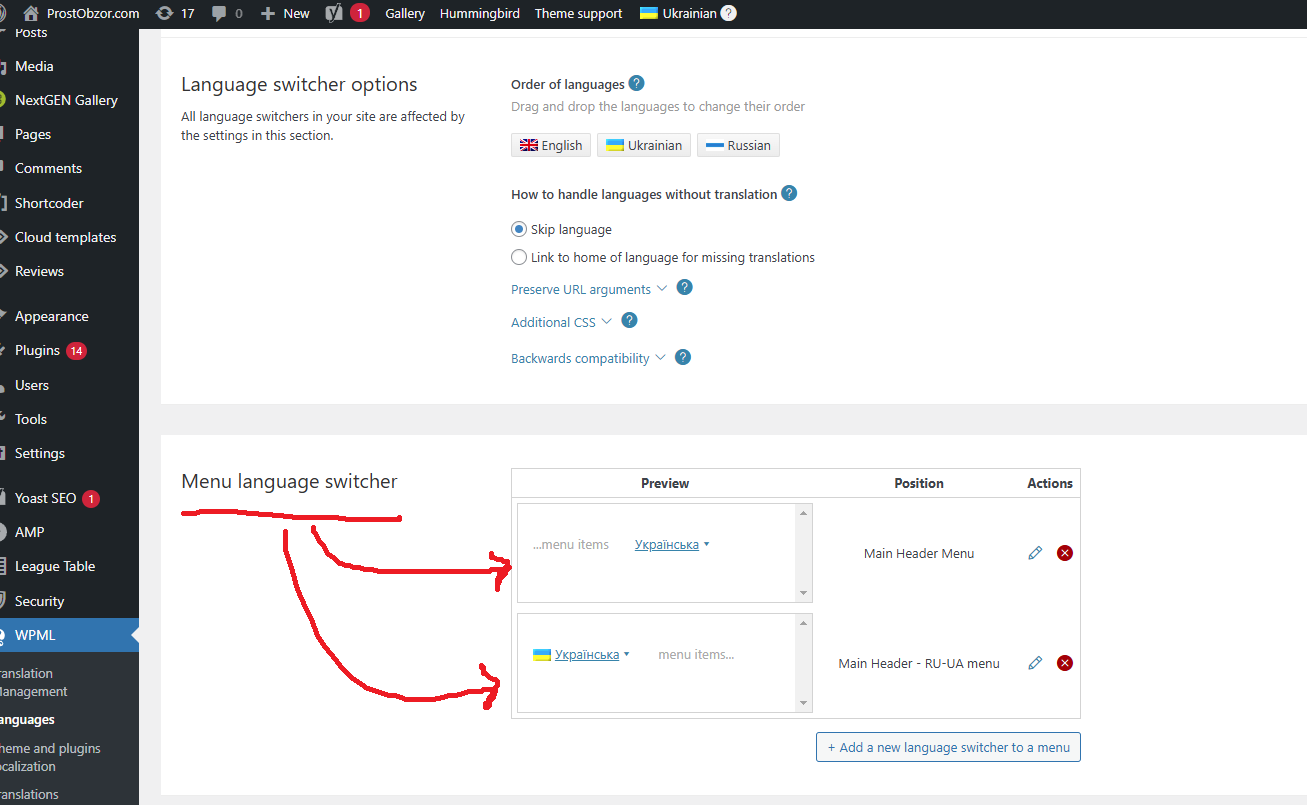
Do you have Tagdiv step-by-step instruction how to add WPML switcher to the Header menu?
 Anamaria
 Hello,
You have the mobile theme plugin activated; please deactivate it and clear the cache.
Using our theme, you can choose from 3 mobile versions
-> mobile responsive => https://www.screencast.com/t/oJ2ShOp47
-> mobile theme plugin => https://forum.tagdiv.com/the-mobile-theme/
-> mobile page => https://tagdiv.com/newspaper-10-3-7-update-brings-customizable-and-fast-mobile-pages/ The option that you need to use.
Suppose you created the mobile pages with tagDiv Composer. In that case, when you install the Mobile Theme plugin, your pages will be overwritten by the plugin (the mobile theme comes with its templates for page, post, category, etc, so your current templates from the desktop theme will get converted to the mobile theme layout, the page content is made without builders in mobile editor => https://www.screencast.com/t/xbgZG8kH also, the options that are provided to edit the mobile theme version are limited (this keeps the things simple)).
This is a video about Responsive Newspaper Theme, AMP & Mobile Theme, Mobile Pages & Templates -> https://www.youtube.com/watch?v=SpGkOnJeNZY.
So, the mobile responsive is what you see when that you select the viewport on phone => https://www.screencast.com/t/matV17hH, so some settings may apply for each viewport(where is the border blue), and others are not(where the border is black).
The mobile page has the mobile templates from Cloud Library => https://www.screencast.com/t/YCcZ8rL8
The Mobile responsive version of the theme and the mobile page editor can be edit with tagDiv Composer, the mobile theme plugin cannot.
For example, you can have the mobile theme plugin activated and use the mobile page/mobile responsive version for the homepage/pages, but for the categories pages/404 page, you can’t use the mobile page/mobile responsive version if you have the mobile theme plugin activated.
So, if you want to design the pages with tagDiv Composer, you can use the mobile page or mobile responsive version.
Thank you!
 b1lly2sheds
After installing a pre-built website on Newspaper (in my case Cosmopolitan Pro), the site does not display as per the demo. Are there extra steps to take when configuring the theme settings? Do you also have to install the cloud templates for the homepage, posts etc? The demo looks completely different and doesn’t incorporate the layout and design I like.
What else do I need to do to get the demo site working and looking like the preview?
I’m running the very latest version of Newspaper, and have tried the cloud templates as well with no luck. Have deleted all posts and pages and have tried removing and reinstalling the pre-built Metropolitan Pro demo, but still doesn’t work.
Any help or advice appreciated as it’s driving me nuts!
 Oktay
Oktay Oops I meant this is the standard template: https://prnt.sc/Jv50u3UhI6qb
And this is the customised blocks BEFORE making it a posts page as you say: https://prnt.sc/p5rcGqXXOEQ6.
So as soon as I make it a Posts Page, it reverts to the standard template.
-
This reply was modified 1 year by
Oktay.
Oktay Yes that is what I did.
I created a page called “Articles”. I customise it with cloud library blocks. It looks like this for example: https://prnt.sc/Jv50u3UhI6qb
But when I change the posts page on settings>readings>Posts page to “Articles”, the green button “Edit with TagDiv Composer” button disappears and the appearance reverts to default layout and does not show my customise design. It looks like standard template again when I set the post page to my custom design: https://prnt.sc/p5rcGqXXOEQ6
With the post page set to “Articles”, it says “TD Composer is disabled on Posts page” and does not permit me to edit the page via the cloud library. See this link: https://prnt.sc/cJiaBgRzfjuA.
Again the appearance becomes just a standard layout despite that I customised it prior to setting it to Posts Page.
OktayHi, for my site double-glazing-windows.co.uk I am using the eastcoast template but it won’t let me edit the blog archives page and it uses the standard template which doesn’t look presentable.
I create a new page called “articles” (/articles) and created my own template. Then in the WP settings, I changed the blog page to “articles”. But then it enforces the same standard template again and I cannot see my own layout. Please help
 gurgaonmail
Can you please how to remove the newspaper default ad placeholder from all template ?
 bluedot
Hello,
We are implementing a new cloud template header on BluedotLiving.com. Everything looks fine in the tagdiv editor, but once the header is on a page, the header main menu disappears. After some testing, this seems to be related to the Ad Box element we have in the header. If the ad box is deleted, or the menu is moved above the ad box, the menu shows up. We have tried deactivating all plugins and have not found a clash. Other cloud template headers are displaying the menu and Ad Box without issue.
Thank you,
Bluedot
Anamaria Hello,
You need to add this type of the ads, in the ad box element, code section https://forum.tagdiv.com/ads-adsense-overview/
You can add this element where you want on the page/template.
Thank you!
 Bettina
 Hello!
Yes. Check this thread and make sure you set up the page in the mobile editor as explained here: https://forum.tagdiv.com/topic/issues-with-buddypress-in-mobile-theme/. We have 3 options available for mobile versions that you can use:
1. Responsive version: A responsive version of your website looks similar to the desktop version. TagDiv Composer is used to edit the page. Click on the mobile viewport: https://www.screencast.com/t/XDQJedlggSB. You can see your mobile version there and edit or adjust the elements to look better.
2. Mobile pages: https://tagdiv.com/newspaper-10-3-7-update-brings-customizable-and-fast-mobile-pages
3. Mobile theme plugin: The Mobile Theme is a performance-optimized theme included in the main Newspaper theme that only loads on mobile devices. It comes with its own templates and designs for pages, posts, categories, etc., so your current templates from the desktop theme will get converted to the mobile theme layout. Please see https://forum.tagdiv.com/the-mobile-theme/ and https://forum.tagdiv.com/mobile-theme-introduction/ for more information.
A full explanation is here: https://www.youtube.com/watch?v=SpGkOnJeNZY
If you need to use mobile version 1 or 2, then you need to uninstall the Mobile Theme plugin and AMP.
Thank you!
 vysltnk
I installed the Newspaper theme and uploaded the Corona template as an example. On the homepage, in the blocks section, I noticed that even though I select certain categories, different category names appear instead of the ones I chose. Also, newly added posts aren’t appearing in the selected sections. What could be the reason for this?
1 : https://ibb.co/G2DCJ8w
2 : https://ibb.co/s3pJFBK
3 : https://ibb.co/zHWW36q
 beginwithbutter
hi! my client’s site (beginwithbutter.com) has the font quicksand employed throughout the whole site both in the cloud templates and in the theme panel. recently, we’ve started seeing some random other font pop up in certain bulleted lists and on titles on post pages. I’ve triple-checked that every font chosen is set to quicksand and my client has been uploading posts the same way she always has. any tips as to how to stop this from happening? thanks.
Anamaria Hello,
I recommend using cloud templates and creating the pages with tagdiv Composer. Please check the documentation -> https://forum.tagdiv.com/design-post-pages-using-cloud-library-templates/ and you can stretch the row https://i.imgur.com/bqqhri3.jpeg -> https://tagdiv.com/flexibility-rows-columns-newspaper-theme/
-> https://tagdiv.com/how-to-add-delete-and-duplicate-row-newspaper-theme/
Thank you!
 Davidpinto
Hi,
I would like to know how can I set the layout size for blog and post template.
I saw that it is impossible to do it for the page template on the theme setting.
I choose the size 1200px for page size, but the size page is only for page and not for blog and post size.
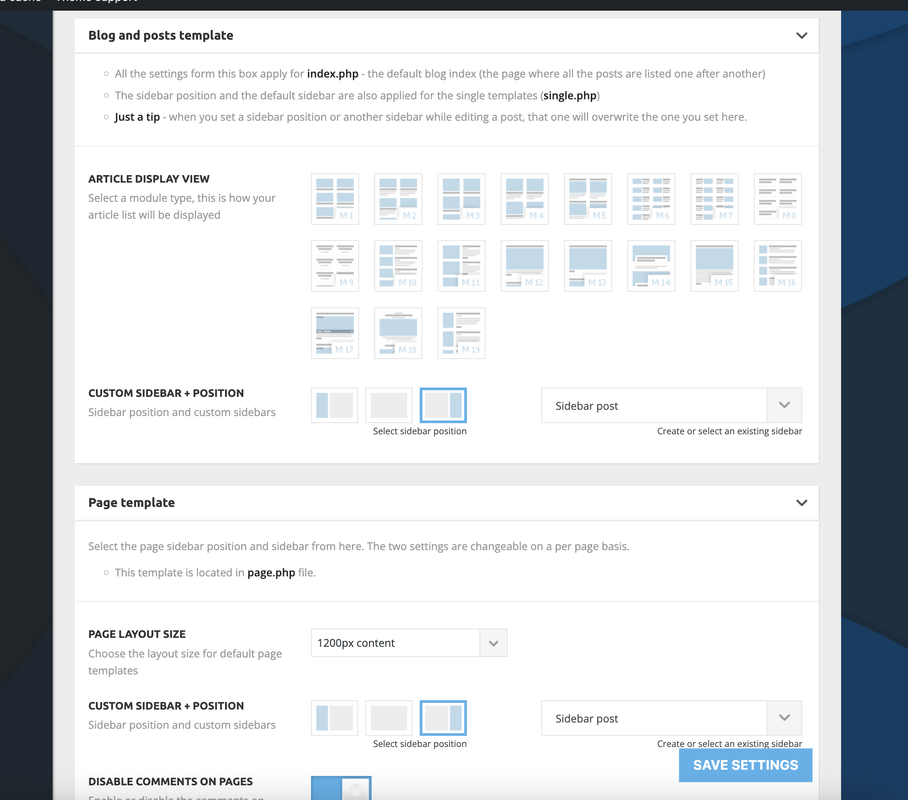
All the best
David
Anamaria Hello,
You have mobile page, so please edit the mobile page https://i.imgur.com/MNB4w9m.png -> https://tagdiv.com/newspaper-10-3-7-update-brings-customizable-and-fast-mobile-pages/
This video is about Responsive Newspaper Theme, Mobile Theme, Mobile Pages & Templates -> https://www.youtube.com/watch?v=SpGkOnJeNZY .
Thank you!
Anamaria Hello,
Have you checked for a plugin conflict? Please enable only tagdiv plugins and clear the cache.
You can try to revert an old revision on a page/template -> https://www.wpbeginner.com/beginners-guide/complete-guide-to-wordpress-post-revisions/
Thank you!
 ilouie
Hi, I installed the page template for The Rimont, and I accidentally deleted the header that installed with the template. My problem now is that re-installing the header template doesn’t give the bg transition option, and upon trying several other header templates, none seem to work. Is there a special way to accomplish this? Thanks in advance.
Anamaria Hello,
No, there are templates and pages. If you have installed the Town talk template, you need to edit it like this https://we.tl/t-kUncQFca6V Please check the documentation -> https://forum.tagdiv.com/design-post-pages-using-cloud-library-templates/
Thank you!
 iltestdrive
 Ok, sorry about that, we’ve never done it before.
We’ve always built the Home Page with Composer, but never a page for articles.
So, we create a new page, and then what? Isn’t there a main master template to modify?
Then, from “Appearance,” we link the built page to the “Posts Page,” we assume.
Is that correct? But can’t we start with a standard base page?
Thanks again,
Alessio
Bettina Hello!
You can change the limit of the block: https://forum.tagdiv.com/flex-block-settings-guide/
About pages here: https://forum.tagdiv.com/page-templates-2/ -> https://forum.tagdiv.com/homepage-how-to-build-and-set-it/
Check out this video about how to create a website from scratch: https://www.youtube.com/watch?v=SoGQ0d5kIBg
More documentation about the cloud templates is here:
– https://forum.tagdiv.com/cloud-library-templates/
– https://forum.tagdiv.com/design-post-pages-using-cloud-library-templates/
– https://forum.tagdiv.com/cloud-library-category-templates/
How to create a single post without a sidebar? You can import one, for example, Single Post Template – InsightAI, Single Post Template – Chained News PRO, etc. Or you can edit a PRO one with the tagDiv Composer, https://app.screencast.com/C5MB4Tem01Gb3, delete the element from the sidebar which can be found after the post content.
WpBackery is deprecated and no longer used. I recommend using only one builder at a time. Try to delete the empty columns. You could try to delete it like this: select the row, press the button delete from your keyboard, then with your mouse select “YES”.
Also you have another option too, check this: https://www.screencast.com/t/pxuOzYIIpcG
Thank you!
Anamaria Hi,
Please tell me where it only appears on one page or the entire site. Did you add any code or elements from another plugin?
Please follow the steps from this topic https://forum.tagdiv.com/topic/error-at-zones-6models-1dom-the-model-does-not-match-the-content-currene/ if you have a child theme; please use the main theme.
You can try to revert an old revision on a page/template -> https://www.wpbeginner.com/beginners-guide/complete-guide-to-wordpress-post-revisions/
Thank you!
Anamaria Hello,
You can translate them from Theme Panel -> Translations -> Translations -> https://i.imgur.com/ezhjmLq.png and the title of the blocks or other elements you need to edit the pages/templates with tagDiv Composer to change the translation https://i.imgur.com/wwImzZu.png
Thank you!
Anamaria Hello,
The theme and WordPress create thumbs.
For each thumbnail you enable, a copy of that image will be created. I recommend using Flex blocks instead of blocks 1-25, which are from the tagDiv standard pack and cannot be customized as a Flex Block. This plugin loads all the styles even if they are not used. Therefore, our theme creates thumbnails that are enabled in Theme Panel -> Block Settings => https://www.screencast.com/t/ZvDvpiBFKY3 -> https://forum.tagdiv.com/theme-thumbs/. Additionally, WordPress creates thumbnails at https://www.screencast.com/t/AMVBOZWto. Our suggestion is to review the blocks you use and ensure that the thumbnails are active only for that particular use => https://forum.tagdiv.com/theme-thumbs/.
The tagDiv Composer is our page builder and it can be used for building pages and cloud templates, but not for creating posts. For this, you’ll need to use Gutenberg or a classic editor.
Using tagDiv Composer, you can build/edit the single post template (the layout of the posts).
Here is a video that will show you how to use the builder to create a website from scratch https://www.youtube.com/watch?v=SoGQ0d5kIBg to do this you’ll need to have the posts already.
Thank you!
Anamaria Hello,
Please check the block with “No posts” and delete it the offset number; leave it empty with no space or value: https://app.screencast.com/Gh9jDf6t0XtLS
For each tag, on the flex block there is a special filter for the current tag, which dynamically displays the posts from that tag within each tag https://i.imgur.com/twZS0DH.png
The Posts Loop automatically filters the posts depending on the cloud template you set (for example, on the tag page, there will be posted posts from that tag) https://forum.tagdiv.com/posts-loop/
Also, please email the wp-admin URL, username, and password.
Thank you!
 lukinou
I don’t want a sticky menu. Just a menu that is part of the page and scrolls together with a page. Even if I disable the sticky menu in tagDiv Composer, it is still sticky. See screenshot. I use Insight AI demo page and templates. It is interesting that diabling sticky menu on mobile works. But not on desktop. The site is Technomanie.cz



