
- NewspaperDesign your Post Pages using the Cloud Library Templates
- NewspaperDesign your post pages using the Default Templates
- NewspaperPage templates
- NewspaperCreate a form contact page
- NewspaperCloud Library Templates
- NewspaperCloud Library – Category Templates
- NewspaperHomepage – How to build and set it
- NewspaperPost templates
- NewspaperDefault post templates
- NewspaperCategory templates
- NewspaperPost template ads
- NewspaperSingle External Shortcode and External Shortcode
- NewspaperWP Rocket and Newspaper Theme: Optimization Guide
- NewspaperSearch setup for custom post type
- NewspapertagDiv Composer – Website Manager
- NewspaperBookmark – Save For Later
- NewspaperFlex Block Builder and Flex Loop Builder
- NewspaperModules Builder in Newspaper Theme
- NewspaperIntroduction to CPT and ACF with Newspaper Theme
- NewspaperCreate a frontend submission form
 Catalin
 Hello fabinhoalmeida,
If you want to create a condition for module 16 (for example) excerpt length only for category page, you can add it like this – http://screencast.com/t/IxPxKkZmukH
<?php

   if (is_category ()) {

      echo $this->get_excerpt(2);

}

   else{

      echo $this->get_excerpt();

}

?>
Result
– category – http://screencast.com/t/pHZCBvJkG4HX
– Another template where module 16 is used – http://screencast.com/t/RGKvlVlYAhxE
Thanks!
 Maveitalia
Hithere, I would like to turn the images that are part of the template into links to pages on my site. I have the Newspaper Travel Blog theme and I see the pictures in the images gallery, but I cannot figure out how to add a link to them. Please help!
Link to my site: http://mariaseestheworld.com/
The images I am referring to are the “Travel Explore Enjoy” right below the image carousel. Thank you so much!
 techpaced
 @Bogdan – That’s the same response that I received many times when i raised a question on shortcodes. Not only this question for many other question i was told the same thing and till now the features are not implemented. One thing that I want to mention here, I have seen few theme authors who create something called future updates page and there is voting option available for users. With this the users can post their feature required and others can vote if they want the same feature to be seen in the theme. Once it’s voted by many people, it will be implemented in the theme. In your case, we don’t even know what’s on your update list, there is no transparency on what is coming up in next update. I have asked this question many times but you have a standard answer template ready. As a buyer/theme user if i get to know what is coming up in next update, it would be really exciting. I just want to suggest few things to improve the theme but it’s not heard at all.
@Chris – Thank you so much. Looks like I have to find another way to fulfill my shortcode requirement.
 Sascha309
Hey,
Is it possible to get the same template layout for the tag-pages as for the category-pages?


what do i need to change in the tag.php?
Thanks! 🙂
 ParisSingapore
Hello tagDiv Team,
Thanks for the great template, I’ve been using it for a few years and I’m really happy about it. The latest updates make it even better to use. Also appreciate the tons of documentation and visual examples.
I’m currently thinking of changing my template and I was wondering if there is an option to set a maximum width for a post/page to avoid the text to be stretch on larger screen like MBP Retina (making the content difficult to read).
If I use a sidebar on a post/page there is no problem as there is already a max width set by default apparently. But if I remove the sidebar (in the option) I ended up with a very strech text.
– See example of a post with Sidebar
– See example of a page without sidebar
I know I can edit the code to set a max width directly, but I was wondering if there’s an option in the theme to do it already (so I have no worries when I update the theme). And if not it will probably be a good addition.
The main reason for me to getting rid of the sidebar is now almost 60% of my traffic is mobile and people don’t see it/use it (not to mention it will slow the the display for mobile user). Thanks for reading and have a great day!
 Simion C.
 Hi,
Thank you for your appreciation. The only available ad spots at the moment are in the ones in Theme panel->Ads.
There are no options to use ads in the category page and tag page except for the ones that you can use in the sidebars. You can have a sidebar for each of the categories – https://www.screencast.com/t/cWi36ghUN one for the tag page – https://www.screencast.com/t/zToAyGogVY and also one for the attachment page
– https://www.screencast.com/t/XOe2x8jil
In these sidebars you can use ad box elements with custom ads for example
– https://www.screencast.com/t/TwErpn5a9IbE
These templates for the categories and tags are predefined, and do not have any other ad related options by default. If you want like to implement different ads in these templates it would require to modify the theme files.
Thanks
Simion C. Hi,
Please note that when using the mobile theme plugin, this comes with predefined templates for pages, posts etc. There is only one smart list template available, and that will be displayed regardless of what is set on desktop. If you want it to display the same, just disable the plugin. You can not have only parts of the website display with the mobile theme. The theme has full responsive design for every device and will display the same content like on desktop adapted for smaller screens.
More information about the mobile theme here – https://forum.tagdiv.com/the-mobile-theme/
Thanks
 simchris
 I use Auto Post Thumbnail Pro; which sets the featured image, and then the featured image gets placed onto page with a template supporting use of featured image as primary photo on post.
 awilcock
Hi,
I’m trying to customise the Newspaper template. I have a published page that I’m tying to link to the main menu, but I can’t get it to work. When I click on the relevant part of the menu, it doesn’t link to the page. I can see the page and its permalink on the dashboard, but can’t figure out what I’m not doing in the ‘Menu’ section of the dashboard, to get the page to link to the menu.
Thanks!
 kaifanun
 GD is enabled. still no go. I’m able to upload images. That portion works. Just can’t insert any image to page or post. I have took out all the plugins and changed the template to WP default theme and still no go. Do you have any other ideas where I can look? Just additional info. I have multiple WP running on that server and other WP’s are working fine.
thanks.
Simion C. Hi,
If you would like to modify the text for the “Latest articles” section you can do it in Theme panel->Translations
– https://www.screencast.com/t/qNfyZt3Kt
You can customize the latest articles section in the edit page screen like this
– https://www.screencast.com/t/Txu10tjc0
To remove this section from your page, simply select a different page template from page attributes
– https://www.screencast.com/t/mCmXkWnPY
More information about the page templates here – https://forum.tagdiv.com/page-templates-2/
Thanks
simchris Many form plugins work with theme; many require either
a) create form; insert shortcode for form onto a ‘page’
b) create custom page template and hard code form into that
most work with ‘a’ method, and always have.
Catalin Hello soithong,
I have inspected your website and I saw that you are using post template 4 for your post pages -> https://www.screencast.com/t/leSO1UEO and this thing is not good because this type of post template is not recommended to be used for feature video, sorry! You should change the post template according to our guide here -> https://www.screencast.com/t/TCvpTzi1RgS and after you should have access to handle your player.
Thanks for your understanding!
Catalin Hello hnthn,
Please notice that you have this duplication because you are using the Page Builde+Page Title and your page title is the same with the name of your website and that’s why appears this twice words. You should change the page template to another one. If you need more assistance in this regard, please provide your website so I can take a closer look at it and also, so i will be able to provide a more accurate response.
Thanks for your understanding!
Simion C. Hi,
It seems there is a problem with the breadcrumbs not displaying on the post page in this particular demo, and this combined with some header style is causing this issue. I have added this on our fix list and it will get resolved as soon as possible. Please try and use the code provided below as a quick fix for you to use in the meantime, with this result – https://www.screencast.com/t/lfHHGhBGb3jc
.td-blog-beauty .td-post-template-default

.td-crumb-container {

display: block;

}
The code must be entered in Theme panel->Custom Css – https://www.screencast.com/t/Sxtr3nhrnnHd
Thank you for understanding!
 fenomeno0chris
Hello to the whole Newspaper/Newsmag team!
First I want to say, thank you very much for creating such great themes.
After 3 years I decided with my team to change the overall design of my homepage, by buying Newspaper7. The reaction of our readers and users are mostly positive. So thats a good sign.
Of course such a huge change is not that easy to handle and thats why I still have some problems and question, which should be solved.
All problems occur on the latest version of Newspaper 7.8
1) On my MacBook with the default Safari browser, I often get this annoying and bad looking line through the whole header section. How can I solve the problem?
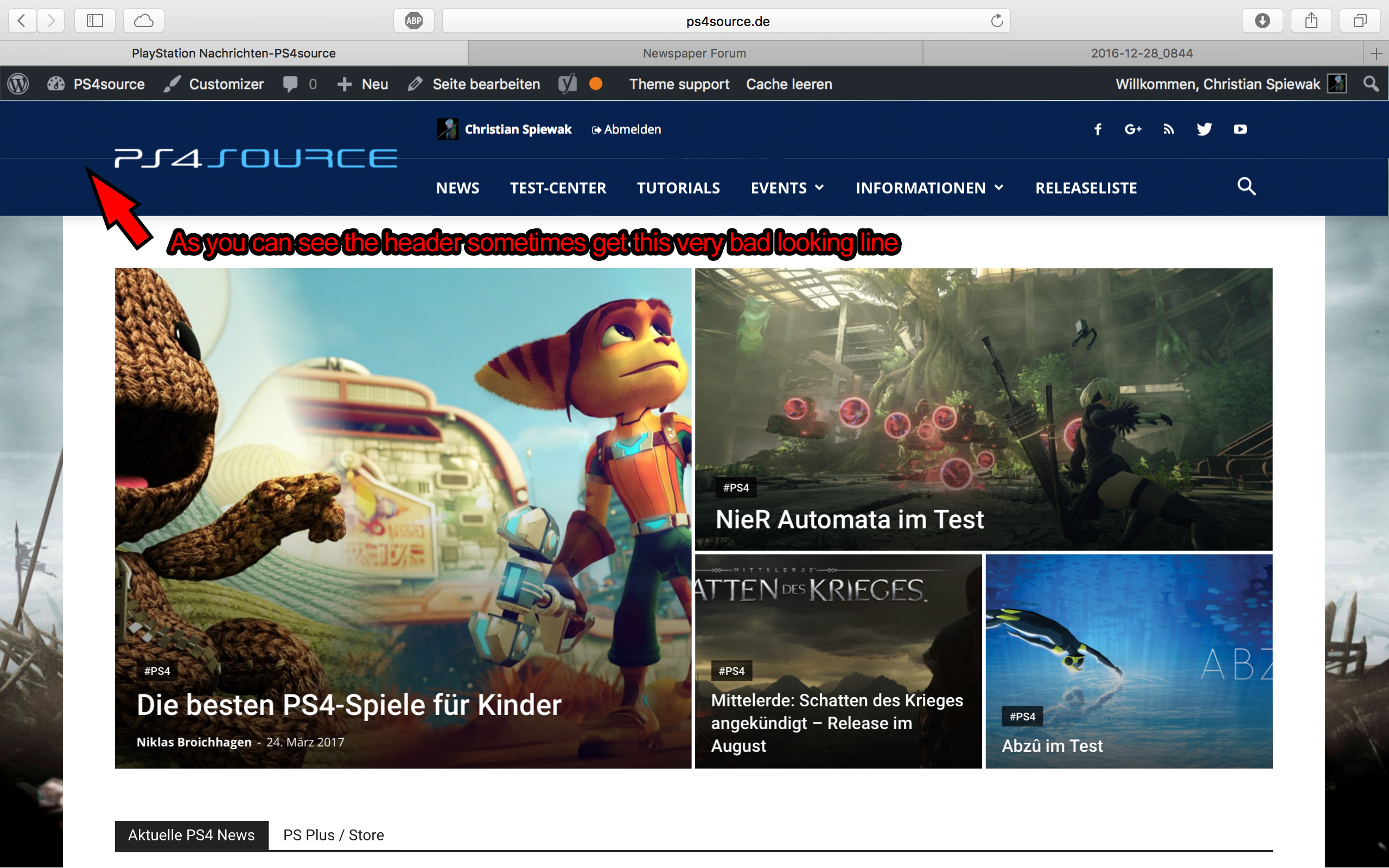
2) Which register plugin should I use? I don’t want to let new users to set a new password on the bad looking interface of WordPress. Im sure you guys know what I mean and have a good recommendation for that. Beside that, what should I use to prevent registrations from bots?
3) Is it possible to have a gradient header and footer, instead of just one color? It looks a bit boring.
4) How can I change the menu just for the mobile page, without using td-mobile-plugin?
5) How can I change the the font style and size of quotes? At default settings it looks way too big (see here)
6) Is it ok too use the responsive options, to create one site with different blocks and grids for mobile and desktop? Im asking cause I don’t know if my site will load much longer, if it has to load information even though there are not displayed. (see details here)
7) My current page speed is a disaster (see here). Why is it so bad, since Im using kraken.io image optimizer and WP Super Cache? How can I improve the score?
8) How can I use td-speed-booster, without uninstalling my plugins? (Disqus Comment System, TablePress, TotalPoll…) I really need those plugins, but I still want to have a fast homepage!
9) If I set [Template Setting->Force Full width->Header Menu] to “No Stretch”, the logo of my site is not at the correct position.

10) validator.w3.org shows, that my page has 33 errors (see here). How can I fix them?
 ben.hinc
 I’m not disputing the fact that the AMP templates can be edited. I make many customizations to mine and have to make them each time the plugin is updated.
What I would PREFER is the following:
— Someone searches Google for content and sees my site in the search results.
— Because they’re on a mobile device, they’re presented with a link to an AMP-compliant version.
— When they click the link, they are taken to a page that looks identical to any other page on my site when viewed on a mobile device.
I firmly believe that the first WordPress news-focused theme that can offer this experience will win big. I simply don’t understand why anyone here is defending a less-than-optimal experience for website visitors who come in by clicking on an AMP link in mobile search results.
Simion C. Hi,
If you wanted to know how to remove the page title from the homepage, you can do that by selecting a different page template – https://www.screencast.com/t/dpPqXQFc
More about the available page templates here – https://forum.tagdiv.com/page-templates-2/
Thanks
 blk709
Hi there,
I would like to add a landing page template for posts and pages so I can use the pagebuilder Beaver Builder for my site http://www.disabledveterans.org.
How can I remove the footer, header and menu for a template for landing pages?
Simion C. Hi,
Unfortunately Visual composer is available only for the creation of pages, if you want to create a new single template or modify one of the existing post templates, here are some guides to help you
– https://forum.tagdiv.com/api-single-template-introduction/
– https://forum.tagdiv.com/td_api_single_templateadd/
Thanks
Simion C. Hi,
There seems to be an issue with the demo install process at the moment, and we are currently investigating this issue. If in the future you decide to uninstall a demo or use another one instead, all the dummy content will be removed, so it would be best that you do not edit this content, and use your own content. Periodical website backups are also helpful and should be made.
Basically what a demo does is to use a predefined layout and populate it with content, so you can get an idea about what can be achieved using the theme. All the demo content in located in the theme folder – https://www.screencast.com/t/wxthH5w0q2 and you could use elements from them (homepage, theme panel settings, stylesheet etc) to create your website without actually installing it, if that is what you want.
You could always create your own pages using elements from Visual composer and uniquely personalize them the way you want. Or use one of the available Visual composer page templates – https://www.screencast.com/t/WLELbX1q
The child theme version in the stylesheet does not affect it’s functionality.
Thank you for understanding!
 flyinginside
How can I create a new post template? Like, with pages you can create a new template. Can that be done with posts too?
Simion C. Hi,
The article bottom ad appears by default just after the post content – https://www.screencast.com/t/sZKkakx4H In your case it is being pushed down by the plugin content inserted in the content – https://www.screencast.com/t/AzPbGVVCV0v
You could use a do shortcode containing a custom ad – https://www.screencast.com/t/qallJwKXn7cu and insert it in the loop file corresponding to your post template style, below the related articles section. The ad will be displayed like this – https://www.screencast.com/t/bjEXpzQZQqJH
Here are some other topics related to this, that may provide useful information
– https://forum.tagdiv.com/topic/ads-shortcode/
– https://forum.tagdiv.com/topic/sourcevia-above-add/
– https://forum.tagdiv.com/topic/banner-below-navigation-and-remove-white-section-on-category-pages/
Thanks
Catalin Hello ferdinand98,
1)If you want to achieve this, please try to code below and place it in Theme panel->Custom CSS area.
The code is ->
.td-magazine .td-related-title .td-cur-simple-item{
color:white!important;
}
The result is here -> https://www.screencast.com/t/D6OaCS1dUmRQ
2)Here is talking about two different header styles. Notice that you are using the header style 5 and the Travel Demo uses the header style 8. If you want to have the same theme behavior regarding on the main menu, you should switch your header to the header style 8 and then you will have this thing. Also, if you want that your color to be another when you hover over the menu items you should use a bit of CSS code to do this. Try the code below and place it in Theme panel->Custom CSS area.
The code is ->
.td-header-wrap .black-menu .sf-menu > li > a:hover{
color:black!important;
}
The result can be found here -> https://www.screencast.com/t/WgfTgrjq
3)
4)IF you want to remove the Breadcrumbs from the top of your website, you should change the page template to default template or you can use a bit of CSS code to do that.
The code is ->
.td-crumb-container{

display:none!important;

}

.td-page-header{

margin-top:10px!important;

}
The result is here -> https://www.screencast.com/t/kXmLEEzV
4)Check your theme panel, Theme Colors settings and ensure that your colors settings for all elements are setup on default.(push to be clear) Clear all your caches and check the results.
6)Please consult our documentation here -> https://forum.tagdiv.com/newsmag-header-styles/ because there you will find our available header style. If you want to have anything else, you should implement it yourself because we cannot provide custom services at the moment, sorry!
Thanks for your understanding!
 Chrizze
Hey!
Can you please help me out? 🙂
I’m experimenting with a listing page, and want to get the built in stars to show in list.
I’ve already used the code
<?php echo get_post_meta($post->ID, 'td_review_key', true); ?>
to show the actual value of the key.
I’ve got a custom page template sitting in the themes folder, but I can’t figure out how the fetch the stars in a div. I tried searching the classes and found the td_review.php… how do I hook into this?
I’ve got a loop going with this Boosnippet: http://bootsnipp.com/snippets/6A0M
But I can’t get the stars to show in front of the meta key value.
