- NewspaperDesign your post pages using the Default Templates
- NewspaperPost template ads
- NewspaperWP Rocket and Newspaper Theme: Optimization Guide
- NewspaperHow to use the Flex Blocks cache option
- NewspaperFlex Block Settings Guide
- NewspaperThe Newspaper Mobile Theme: Introduction
- NewspaperDefault Category Settings
- NewspaperCloud Library – Category Templates
- NewspaperBig Grid Flex Settings
- NewspaperHeader Builder
- NewspaperMeta Info on Modules and Blocks
- NewspaperTheme modules and blocks
- NewspaperImport / Export Theme Settings
- TutorialsDefault Block Settings Guide
- NewsmagImport / Export theme settings
- TutorialsOffset Feature
- NewspaperUnique Articles
- TutorialsSystem status parameters guide
- NewsmagRequirements for Newsmag
- NewsmagBlock settings tutorial
 Simion C.
 That design is one of the characteristics of that post template. Without using a featured image it will not look properly. You could use a different post template instead
– https://forum.tagdiv.com/post-templates-2/
If you really want to use style 4 and remove that extra space
– https://www.screencast.com/t/zTTb7ckpLbK
Use a code like this in Theme panel->Custom CSS
– https://www.screencast.com/t/MeBzkwuzlK9
.td-post-template-4 .td-image-gradient:before {

display: none;

}
Simion C. Hi,
I don’t think you will find any related topics in the forum. The theme blocks and other elements that display posts will pick them according to your filtering and sorting you set for each of them
– https://forum.tagdiv.com/block-settings-guide/
The blocks will display posts from the categories you choose, also with the sorting you choose.
Renaming tags and categories should not be difficult. Edit them and rename them. A thing to note is that if you installed a demo with content, you should not use demo categories (or rename them). These will be removed when the demo is uninstalled or a different one is installed. Create new categories and tags instead.
Thanks
 Bogdan B.
 Hello,
Using visual composer on posts was never supported in our theme. We always advised against it. If you want to move over to the tagdiv composer, you will have to remove any vc code from your post. The width change you made in css will impact other parts of the site as well. It is not a solution. The only proper solution is to remove VC elements from your posts.
Thank you!
Simion C. Hi,
The main theme and also mobile theme will only display ads if you enter ad codes in the locations you want. Removing them is easy, remove the codes from the locations you don’t want ads to appear.
From what I see the ads are not displaying on your website at the moment, I checked in a post page, there are some ad related errors
– https://www.screencast.com/t/s2JaQaeJ
Maybe double check the implementation of the ads, if everything is set properly. The error seems to mention you have more than one enable page level ads inserted in the page. I believe those only have to be inserted in the header.php file of the theme between teh head tags, that would be enough.
 mjehangir
 Hi,
Few observations. I actually removed couple of plugins like ‘wp-forms lite’, ‘wp-smush’ which were working earlier fine with the previous version of newspaper but non-admins are not accessing the wordpress properly with them. I have removed them but still the ’tagDiv Composer’ is creating problems. When i remove it, ‘all posts’ for non-admin users comes to display. So i believe apart from other plugins i mentioned earlier, tagDiv Composer is also giving problems. You can see in the screenshot http://prntscr.com/ip9g6b that no post being displayed for the non-admin user
For now i am turning back to the previous stable version of newspaper. could you deeply check it on the above grounds?
-
This reply was modified 8 years by
mjehangir.
Simion C. Hi,
The post page you mention looks like this for me
– https://www.screencast.com/t/zl3mCs147
If you could provide some more details about what exactly you want to remove, I will try to give you a solution. There are a couple of post templates that does not display a featured image in the post page (template 5 and 12)
– https://forum.tagdiv.com/post-templates-2/
Or you can disable the featured image in the theme panel
– https://www.screencast.com/t/XcKw5XxBlt8
A featured image still has to be set in order for the thumbnails to be created
– https://forum.tagdiv.com/theme-thumbs/
For the centering of the pagination use a code like this
– https://www.screencast.com/t/WV0GLZOzm
Enter it in Theme panel->Custom CSS section
.page-nav {

margin-right: auto;

margin-left: auto;

display: table;

width: auto;

}
Thanks
 rafael-l
Hi there, all my posts have a category for permalinks settings, and i need to exclude this specific category from the related articles, otherwise the related articles don’t work properly, i already tried everything that is on this forum like this: https://forum.tagdiv.com/topic/filtering-related-articles-at-bottom-of-post/
… and this: https://forum.tagdiv.com/topic/remove-category-from-related-articles-filter/
… and don’t work, i just need to the related articles don’t “get” a specific category, i was using this plugin: https://wordpress.org/plugins/wp-hide-category/ but it stoped working…
I’m using this option in the pannel : https://www.baixesoft.com/wp-content/uploads/2018/03/Hide-categories.jpg
… but the related articles “get” this category anyway…
I’m just wondering if i can try anithing different here
‘td_column_number’ => $td_column_number,
‘category_id’ => ‘-4’
If i use like this, all posts that have that category disappear from the block and the related articles don’t show nothing.
I appreciate any help, and please consider add more options in related articles in the theme pannel, users are asking for this since 2014. Thank you!
 kimchiman-in-seoul
Hello tagdiv team,
Thanks a lot a lot for your work and prompt answer. You mentioned I should not use both tagdiv builder and visual composer since they are not compatible and make crashes. So I would not use tagdiv builder. What functions are related to tagdiv builder?
For example, as far as I know, there are two ways of using categories; one from the basic wordpress function and the other buying getting into the theme panel of the the newspaper control section right above posts section. Is using the category through the latter method the part of tagdiv builder function?
I am asking you this question because I am keen on using only visual composer and will remove tagdiv builder. So before I take action, I would like to make sure of everything.
Thanks!
EUngul Cho
 kame
kameHi!
I’m a new user. First of all, I have to congratulate you because of your work. I really love the Newsmag theme.
Now my questions:
1. It’s possible to edit the News Ticker? I just want to remove the button “TRENDING NOW” and keep only the text.
2. I’m using “Style 6 – Top menus + logo and ad” on the header. Can I center the logo instead of having it at the left side?
3. I love to put a Newspaper style grid in my homepage, Newsmag don’t have this style. If it’s possible to import features from the other theme? I tried just changing the names of the files but it doesn’t work. xD
4. I tried two different plugins to use facebook comments instead the wordpress ones, but always happen the same. The facebook comments are placed just after the text of the post. Before the share buttons. Did you tested any plugin.
Screen Capt. https://ibb.co/cDd1cc
5. In the smartphone mode the bar is too short, and my logo is hardly readable. Is possible to make it taller?
6. How can I add more social share buttons to the posts? Reddit for example.
7. In the Social Counter plugin, Instagram bar appears blue. Don’t you think that purple is more accurate to the Instagram logo?
8. I disabled “SHOW COMMENT COUNT” and “ENABLE COMMENTS ON POSTS” but sometimes it appears a logo in the article when I’m in the homepage. What I’m doing wrong?
Screen Capt. https://ibb.co/eT7Bcc (First grid’s post)
Thanks in advance,
Angel L.
 Catalin
 Hello WakeUpCallProject,
Please remove all fo untested plugins, clear all the caches, also, make sure that your installed theme is the latest version of it and check the results. This option should works as expected. If do not, please send us an email at contact@tagdiv.com with your log-in information so we can access your setup page and also, so we can check the Post ID filter functionality.
Thanks for your understanding!
Simion C. Hi,
That is the Related articles/More from author section, it will be displayed below the posts when enabled in the theme panel. It also has some settings
– https://forum.tagdiv.com/more-articles-box/
A setting to remove either the Related articles or More from author tabs is not available if that is what you are trying to do. There are solutions with modifications in the code. Removing either one from the code can be done in this file if this is required for you
– https://www.screencast.com/t/smUPibCf
Thanks
Simion C. Posts will inherit the sidebar from the primary category they belong
– https://forum.tagdiv.com/primary-category/
Unless you set a sidebar manually for the post, in the post edit screen
– https://www.screencast.com/t/XzPNGe8BThfJ
So remove the sidebar from the category page in the theme panel, and set sidebars only for the posts.
Simion C. Hi,
From what I can see there are ads on the website at the moment
– https://www.screencast.com/t/OkfsAjgDYnL4
– https://www.screencast.com/t/GKThBRPU
So I believe there is no problem. Updating the theme will not cause the ad codes to disappear from the theme panel. I will remove the login details, do not post them here on the forum for everyone to see. When sensitive information is required you can contact us by email at contact@tagdiv.com and provide them there.
Thanks
 benjaone1
 Hi,
I have added postcount on my frontpage by following this tut:
https://forum.tagdiv.com/topic/post_views_count/
And now I want to remove them since they don’t work, thanks.
 vamsinani24
 @bogdan, thanks for the reply. I already mentioned that I removed the old tagdiv composer, uninstalled the theme > deleted the old theme folder > uploaded the new theme file [downloaded from envato] using FTP > installed the tagdiv manually and I still face the same issue.
I couldn’t see any of the posts and it only loads the title. The homepage generated using tagdiv is also blank. All I can see is category pages, archives, etc. but once I go to any post, it shows as blank.
 poporil
1. Google for mobile to mobile ad allows 320×50 when I create this size and pass the client and slot to the Header Ad of the AMP setting then it does not take the 320×50 into account, it makes it bigger and square.
2. I’ve deactivated creating photos for 265 x 198 and I do not have such thumbnails. How do I make another choice or totally remove your own Related Posts Module and place a Matched content unit;
3. the already existing post will appear on google as amp OR applies only to the articles I add by activating the plugin afterwards?
4. embed code Instagram does not display the post with the photo. no solution?
Simion C. Hi,
@rihasi Please try to provide all the details in one posting, if you keep replying in the topic you will only delay the response. We answer from oldest to newest. Note the support hours mentioned in the top right corner as well.
You mention you had problem using the multi-purpose plugin since purchasing the theme, you could have mentioned this before. We would have investigated the issue. The HTTP error is an internal server error.
You could try these suggestions. Reinstall theme by FTP
– https://forum.tagdiv.com/how-to-update-the-theme-2/
Deactivate and remove the theme plugins and install them again from the latest theme package. Deactivate all other plugins, leave only theme plugins active. Clear all caching and CDN cache if used.
Check if the error is still present. If it is, that would mean there is a problem with the hosting server. Check with them, mention the theme requirements
– https://forum.tagdiv.com/requirements-for-newspaper/
– https://forum.tagdiv.com/system-status-parameters-guide/
Maybe there are also logs kept by the server that could be helpful to identify what is causing this problem. Let us know the conclusions.
Thanks
Simion C. That is unusual, check as Bogdan suggested to see if the posts that are loaded initially in that block are sticky
– https://www.screencast.com/t/QYMhW0kO1p2
If they are, remove that condition for all of them, it can cause issues
– https://www.screencast.com/t/p3xgpdHCu
In case there still is an issue, please send us an email at contact@tagdiv.com and provide admin login information. We will take a look at the issue. Also include a link to this topic in the email.
Thanks
 glick-fray
Hi, I followed the instructions from this post but it doesn’t seem to be removing the category labels. You can view site here. https://idahowomenscharitablefoundation.org/
https://forum.tagdiv.com/topic/how-to-remove-category-label-on-big-grid-or-slider/
Thank you, Nancy
Simion C. Hi,
The theme uses modules to display posts on pages, these modules form blocks and grids. A block or grid can contain multiple module types
– https://forum.tagdiv.com/theme-blocks-modules/
Each of the modules has a predefined thumbnail size
– https://forum.tagdiv.com/theme-thumbs/
The necessary thumbnails will be created from the featured images or videos you set for posts
– https://forum.tagdiv.com/featured-image-or-video/
A center-top cropping is used when creating the thumbnails
– https://forum.tagdiv.com/featured-image/
The resulting thumbnails are also affected by the image aspect ratio
– https://forum.tagdiv.com/thumbnails-vs-featured-image-size/
So different modules can have different results with the same image. You can choose what block types you use, also the modules used where they are present.
I see you are using block 13 on your homepage, by editing the page with the tagDiv composer you can add/remove blocks and configure them
– https://forum.tagdiv.com/block-settings-guide/
So to summarize the thumbnails cannot be resized with a theme option, you can change module/block type but not the thumbnail size.
Please correct me if I misunderstand something.
Thanks
Simion C. Hi,
The featured category is not mandatory, you could even remove it if needed. It is a simple category with some special attributes
– https://forum.tagdiv.com/featured-posts-2/
Content can still be displayed in blocks without it just as well. Of course it is also helpful (no category tag, featured sorting).
In terms of SEO I really could not say if something like that will affect the website in a negative or positive way. You could maybe make some more online research in the matter, there are many helpful SEO tutorials available. You can make a decision based on those, hopefully the right one.
The forum search will display results from documentation first, then topic results
– https://www.screencast.com/t/7EBRTfjlTOK
Please let us know if you have further questions, or you need help with something.
Thanks
 Tatiane Pires
Hello there! I need some help.
I already checked the page How to use custom post type and taxonomy, and downloaded the suggested plugin td-custom-post-type. It seems to me that this is a “plugin way” to add CPTs other than my “child theme way” to add them.
I’m working with a Newspaper’s child theme, the files cpt-events.php and cpt-photos.php are required from functions.php. Then I rebuild the permalinks from /wp-admin/options-permalink.php whenever I add or remove the require lines.
The issue is that, upon adding these CPTs, TagDiv Composer no longer loads after clicking the button that links to /wp-admin/post.php?post_id=SOME_ID&td_action=tdc
Both CPT files were generated from Generate WP and everything else (other than TagDiv Composer) works flawlessly.
To make things even stranger, after removing cpt-events.php and cpt-photos.php require lines from functions.php, and rebuilding permalinks, TagDiv Composer continues not loading. It will only work if I restore a database backup saved right before activating the CPTs.
I don’t have an URL so that you could login in wp-admin. I’ve been testing it on my local development environment.
I’d like to know if you could take a look in the linked php files. I’m not aware of any CPT setting in those files that could trigger this behavior (composer not loading), perhaps you can spot it.
 meri
meriHi,
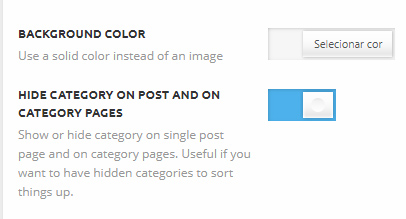
I would like to remove the category tags in Category pages and their Post pages.
So I activated “HIDE CATEGORY ON POST AND ON CATEGORY PAGES” for all categories.
But it doesn’t make a change…
Could you kindly help?
 unit45host
HI,
Some of the posts facebook likes zero-ed…
Not all – but some of them…
eg: január 12, 2018 115 View 0 Comment 0 Like — yesterday morning was 98 FB like
https://www.1000wordsmagazine.com/bea-ipolyi/japan-teli-csodai-es-titkai/#.WnU_-VVl-Uk
Also, the post view sometimes zeroing…
eg: január 29, 2018 27 View 0 Comment 52 Like — yesterday evening was 86 View/18 fb-like
I read somewhere, Facebook removes “likes” on look-a-like very popular posts – like gaming sites several 10-thousands
“purchased-fake-likes” – facebook zero-ing for good, fair play…
but in our case – its simple happen if plugins from tagdiv re-and re-activated: multi-purpose, tagdiv-mobil-theme, – td-booster
Thx, Zoltan
 Alin [tagDiv]
 Hi,
The css provided above is not correct. The is no display:all property – https://www.w3schools.com/cssref/pr_class_display.asp
And like you can see here the css is not applied – https://www.screencast.com/t/Lwf7kxVUrd
The category tag was is hidden on mobiles for module 14 and it appears on your site because you have removed display:none; from stylesheet file.
I suggest to remove your custom modifications and use this custom css in Theme Panel > Custom Css – https://www.screencast.com/t/vIaNZgxgb
@media (max-width: 767px){

.td_module_14 .td-post-category {

 margin-left: 14px;

 display: inline-block !important;

}

}
Thanks!