- NewsmagReviews
- NewsmagtagDiv Composer Tutorial
- NewsmagCategory templates
- NewsmagHow to add icons in the menu
- NewsmagNewsmag documentation
- NewsmagBlock settings tutorial
- NewsmagInstalling pre-built websites
- NewsmagMain menu
- NewsmagFeatured image or video
 Vlad S
 Hello @Archerix !
Unfortunately Disqus is not a tested / supported plugin therefore this issue cannot be covered. You will have to deactivate the plugin in order to preview your post.
Thank you !
 djsavagewgon
Since updating newspaper theme to 10.3.9 (WordPress 5.6) I have no featured images showing on homepage on PC (seems OK on phone)
 Archerix
 I have the same problem. In my case it’s because of the comments. The preview loads de comments, in my case by disqus , and it gives a critical error.
 great1212
I am facing the problem is that the post draft is not showing properly and shows there’s has been a critical error on your website.
How could I solve this problem?
Archerix I have the same problem, in my case it’s because the preview in newspaper is loading the comments, in my case Disqus wich is only shown on a live post, so it shows a error. Newspaper theme shouldn´t load the comments on preview
 Redlemon
Header:
Although I have opened Website Manager and set Mobile Menu Sticky as enabled, and saved, when I open the website on an actual mobile device and scroll down, the sticky header does not appear. Inside the TDC environment, when previewing the website on a mobile device, the sticky header is there and functions as set and expected.
Footer:
I open TDC and select the footer row. Then, right between the settings tabs and the search box, I click on the mobile icon to edit those settings. The styles and settings which are displayed in the TDC preview window do not represent the ones applied in reality. Yes, I’ve saved the changes, cleared the cache, minified JS and CSS versions, and even browsed the page from a new and single incognito session from an actual mobile device, and in chrome’s and firefox’s dev tools. For once, the background color is different (light blue in TDC vs Black in reality), and then the structure of the footer is different also.
In website manager, under the footer section, I only see two options; Global Template and/or No Footer. Currently applied I have the Footer Template – Default PRO.
Then in cloud templates I open the Footer Template – Default PRO to edit it, but “Edit with Tag Div Composer” button is not available. In the textarea I can only see gibberish, which I know is not gibberish really, but a nightmare to work with at the least.
Lastly, in the admin pages, under Newspaper > Theme panel > Footer, I see no other option other than the CLOUD LIBRARY TEMPLATE section, but the Footer Settings or any other section besides the CLOUD LIBRARY TEMPLATE, as described here ( https://forum.tagdiv.com/footer-templates/ ), are nowhere to be seen.
The theme version is 10.3.7
Please advise as you see appropriate.
 wixoo
wixoohi all,
tdcomposer not working ! i have some javascript errors in console :
Some messages have been moved to the Issues panel.
VM1606 post.php:4718 Uncaught TypeError: jQuery(…).live is not a function
at VM1606 post.php:4718
at VM1606 post.php:4805
(anonymous) @ VM1606 post.php:4718
(anonymous) @ VM1606 post.php:4805
jquery.js?ver=1.12.4-wp:2 Uncaught Error: Syntax error, unrecognized expression: undefined<div class=”tdc-sidebar-separator tdc-sidebar-text-separator”><span>Posts Loop</span></div><div class=”tdc-sidebar-element tdc-element” data-shortcode-name=”tdb_loop” data-start-values=”W3sibW9kdWxlc19vbl9yb3ciOiJleUp3YUc5dVpTSTZJakV3TUNVaWZRPT0iLCJtb2R1bGVzX2dhcCI6ImV5SnNZVzVrYzJOaGNHVWlPaUkwTUNJc0luQnZjblJ5WVdsMElqb2lNamdpTENKaGJHd2lPaUl5TUNKOSIsIm1vZHVsZXNfY2F0ZWdvcnkiOiJpbWFnZSIsInNob3dfZXhjZXJwdCI6IiIsInNob3dfYnRuIjoibm9uZSIsImFqYXhfcGFnaW5hdGlvbiI6ImxvYWRfbW9yZSIsImhpZGVfYXVkaW8iOiJ5ZXMiLCJpbWFnZV93aWR0aCI6IjI1IiwiaW1hZ2VfZmxvYXRlZCI6ImZsb2F0X2xlZnQiLCJtZXRhX3BhZGRpbmciOiIxMHB4IDEwcHggMHB4IDE1cHgiLCJpbWFnZV9yYWRpdXMiOiI3IiwiaW1hZ2VfaGVpZ2h0IjoiMTAwIiwibWV0YV9pbmZvX2hvcml6IjoiIiwibW9kdWxlc19jYXRlZ29yeV9tYXJnaW4iOiIiLCJmX3RpdGxlX2ZvbnRfZmFtaWx5IjoiNTIxIiwiZl9jYXRfZm9udF9mYW1pbHkiOiI1MjEiLCJmX21ldGFfZm9udF9mYW1pbHkiOiI1MjEiLCJmX2V4X2ZvbnRfZmFtaWx5IjoiNTIxIiwiZl9idG5fZm9udF9mYW1pbHkiOiI1MjEiLCJ0aXRsZV90eHQiOiJyZ2JhKDYsNTEsNzksMC44NikiLCJhbGxfdW5kZXJsaW5lX2NvbG9yIjoicmdiYSg2LDUxLDc5LDAuODYpIiwidGl0bGVfdHh0X2hvdmVyIjoicmdiYSg0NCw2Niw4MCwwLjg2KSIsImV4X3R4dCI6InJnYmEoNDQsNjYsODAsMC44NikiLCJjb21fYmciOiJyZ2JhKDYsNTEsNzksMC44NikiLCJzaG93X3JldmlldyI6Im5vbmUiLCJmX3RpdGxlX2ZvbnRfc2l6ZSI6IjE4IiwiZl90aXRsZV9mb250X3dlaWdodCI6IjYwMCIsImZfZXhfZm9udF9zaXplIjoiMTYiLCJmX2V4X2ZvbnRfd2VpZ2h0IjoiNDAwIiwiYXJ0X2V4Y2VycHQiOiI4cHggMHB4Iiwib2Zmc2V0IjoiNCJ9XQ==” ><div class=”tdc-element-ico tdc-ico-template”></div><div class=”tdc-element-id”>loop MO – template</div><div class=”tdc-element-delete” data-type=”tdb_loop” data-name=”loop MO”></div></div>
at Function.ea.error (jquery.js?ver=1.12.4-wp:2)
at ea.tokenize (jquery.js?ver=1.12.4-wp:2)
at ea.select (jquery.js?ver=1.12.4-wp:2)
at Function.ea [as find] (jquery.js?ver=1.12.4-wp:2)
at n.fn.init.find (jquery.js?ver=1.12.4-wp:2)
at new n.fn.init (jquery.js?ver=1.12.4-wp:2)
at n (jquery.js?ver=1.12.4-wp:2)
at Object.updateSavedShortcodes (js_files_for_wrapper.min.js?ver=819b7f9b02b0195f80e3eab970f44973x:589)
at Object.init (js_files_for_wrapper.min.js?ver=819b7f9b02b0195f80e3eab970f44973x:558)
at js_files_for_wrapper.min.js?ver=819b7f9b02b0195f80e3eab970f44973x:598
ea.error @ jquery.js?ver=1.12.4-wp:2
ea.tokenize @ jquery.js?ver=1.12.4-wp:2
ea.select @ jquery.js?ver=1.12.4-wp:2
ea @ jquery.js?ver=1.12.4-wp:2
find @ jquery.js?ver=1.12.4-wp:2
n.fn.init @ jquery.js?ver=1.12.4-wp:2
n @ jquery.js?ver=1.12.4-wp:2
updateSavedShortcodes @ js_files_for_wrapper.min.js?ver=819b7f9b02b0195f80e3eab970f44973x:589
init @ js_files_for_wrapper.min.js?ver=819b7f9b02b0195f80e3eab970f44973x:558
(anonymous) @ js_files_for_wrapper.min.js?ver=819b7f9b02b0195f80e3eab970f44973x:598
(anonymous) @ js_files_for_wrapper.min.js?ver=819b7f9b02b0195f80e3eab970f44973x:598
js_files_vue_modals.min.js?ver=c8cba5620a72d5b299fa8f62aeca6adfx:204 Download the Vue Devtools extension for a better development experience:
https://github.com/vuejs/vue-devtools
js_files_vue_modals.min.js?ver=c8cba5620a72d5b299fa8f62aeca6adfx:204 You are running Vue in development mode.
Make sure to turn on production mode when deploying for production.
See more tips at https://vuejs.org/guide/deployment.html
wp-seo-post-scraper-440.min.js?ver=4.4:16 Uncaught Error: The snippet preview requires a valid target element
at new H (wp-seo-post-scraper-440.min.js?ver=4.4:16)
at Object.f [as create] (wp-seo-post-scraper-440.min.js?ver=4.4:1)
at c (wp-seo-post-scraper-440.min.js?ver=4.4:1)
at HTMLDocument.F (wp-seo-post-scraper-440.min.js?ver=4.4:1)
at i (jquery.js?ver=1.12.4-wp:2)
at Object.fireWith [as resolveWith] (jquery.js?ver=1.12.4-wp:2)
at Function.ready (jquery.js?ver=1.12.4-wp:2)
at HTMLDocument.J (jquery.js?ver=1.12.4-wp:2)
H @ wp-seo-post-scraper-440.min.js?ver=4.4:16
f @ wp-seo-post-scraper-440.min.js?ver=4.4:1
c @ wp-seo-post-scraper-440.min.js?ver=4.4:1
F @ wp-seo-post-scraper-440.min.js?ver=4.4:1
i @ jquery.js?ver=1.12.4-wp:2
fireWith @ jquery.js?ver=1.12.4-wp:2
ready @ jquery.js?ver=1.12.4-wp:2
J @ jquery.js?ver=1.12.4-wp:2
content.js:1 this is content page
content.js:36 Just visited https://meilleurordinateur.com/wp-admin/post.php?post_id=31090&td_action=tdc&tdbTemplateType=page#/
jquery.js?ver=1.12.4-wp:2 Mixed Content: The page at ‘https://meilleurordinateur.com/?td_action=tdc_edit&post_id=31090&tdbTemplateType=page’ was loaded over HTTPS, but requested an insecure element ‘http://meilleurordinateur.com/wp-content/uploads/2017/08/14.jpg’. This request was automatically upgraded to HTTPS, For more information see https://blog.chromium.org/2019/10/no-more-mixed-messages-about-https.html
(anonymous) @ jquery.js?ver=1.12.4-wp:2
i @ jquery.js?ver=1.12.4-wp:2
fireWith @ jquery.js?ver=1.12.4-wp:2
ready @ jquery.js?ver=1.12.4-wp:2
J @ jquery.js?ver=1.12.4-wp:2
js_files_for_wp_admin.min.js?ver=819b7f9b02b0195f80e3eab970f44973x:27 (5) [i, i, i, i, i]
ace.js?ver=819b7f9b02b0195f80e3eab970f44973x:1 Uncaught TypeError: n is not a function
at n (ace.js?ver=819b7f9b02b0195f80e3eab970f44973x:1)
at a (ace.js?ver=819b7f9b02b0195f80e3eab970f44973x:1)
at r (ace.js?ver=6.0.5:10)
at Object.a [as require] (ace.js?ver=6.0.5:10)
at post.php?post_id=31090&td_action=tdc&tdbTemplateType=page:2758
at dispatch (jquery.js?ver=1.12.4-wp:3)
at r.handle (jquery.js?ver=1.12.4-wp:3)
n @ ace.js?ver=819b7f9b02b0195f80e3eab970f44973x:1
a @ ace.js?ver=819b7f9b02b0195f80e3eab970f44973x:1
r @ ace.js?ver=6.0.5:10
a @ ace.js?ver=6.0.5:10
(anonymous) @ post.php?post_id=31090&td_action=tdc&tdbTemplateType=page:2758
dispatch @ jquery.js?ver=1.12.4-wp:3
r.handle @ jquery.js?ver=1.12.4-wp:3
load (async)
add @ jquery.js?ver=1.12.4-wp:3
(anonymous) @ jquery.js?ver=1.12.4-wp:3
each @ jquery.js?ver=1.12.4-wp:2
each @ jquery.js?ver=1.12.4-wp:2
ra @ jquery.js?ver=1.12.4-wp:3
on @ jquery.js?ver=1.12.4-wp:3
init @ td_wp_admin.min.js?ver=10.2:83
(anonymous) @ td_wp_admin.min.js?ver=10.2:92
content.js:12 tttt:
content.js:18 data:null
 omghackers
‘ve been trying to debug my website, because I can’t preview my post.
It turned out some of the plugins were the culprits.

Image URL: https://pasteboard.co/JDWn9K5.jpg
Hopefully this issue can be resolved in the next plugin update.
 MateaSedic
Hi,
When looking at a single post/category/subcategory preview, the sidebar disappears: https://bit.ly/2JAjHiY
But in the template is defined and assigned as it should: https://bit.ly/3mYCJxK
What could be the issue?
 Calin
Calin Hi,
In order to change the fonts of the review section you can use a single post template from tagDiv Cloud Library:
-> https://www.screencast.com/t/6x2HRiI5
-> https://www.screencast.com/t/E8vqCrqzv
or you can use custom css -> https://tagdiv.com/how-to-create-custom-code-in-newspaper-theme/
Thank you for your understanding!
 Bettina
 Hello!
After activate the theme, you need to install a demo like this: https://forum.tagdiv.com/installing-demos/
There you can choose to import with content or not. If you choose a demo with content you can see it like in preview.
Hope that helps you!
Thank you!
 davidgaines
Hi,
I recently installed the Newspaper theme and selected one of the demo templates. Looks great except none of the images are appearing. Is there a setting that disables the displaying of images? I see them when previewing in the editor but they don’t show on my blog.
 saurabhchawla2345
 Hi, Thank you for your reply. That’s what I meant. The post view counts seem low than actual counts. As reported by Jetpack + Google Analytics, Post counts of about 160+ are shown as 60+. An Example URL – https://www.storizen.com/book-reviews/an-insight-on-death-an-inside-story-by-sadhguru/.
It has over 200+ views but it shows only 64!
Let me know where the issue is. Appreciate your help.
 MattTTAG
  peopleinitiativefoundation
hello i purchased the theme a couple of days ago and the theme do not look like it preview. I do not see even a single picture in the theme. Please i need help. The theme seems incomplete
 pagondorf
Hello,
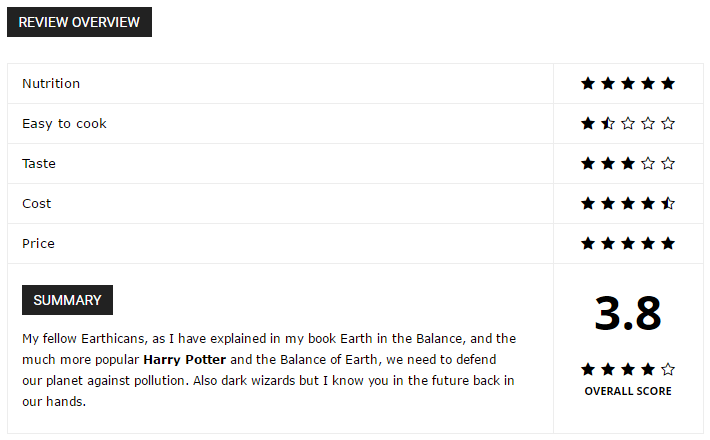
I don’t find where change fonts size of my reviews in the theme panel.
I speak about this :
 sector
Hi,
I added the picture on the post. but they don’t appear on the home page.
http://prntscr.com/vvbx64 But if you click on the post the pictures is showing http://prntscr.com/vvbxwx
 Howler
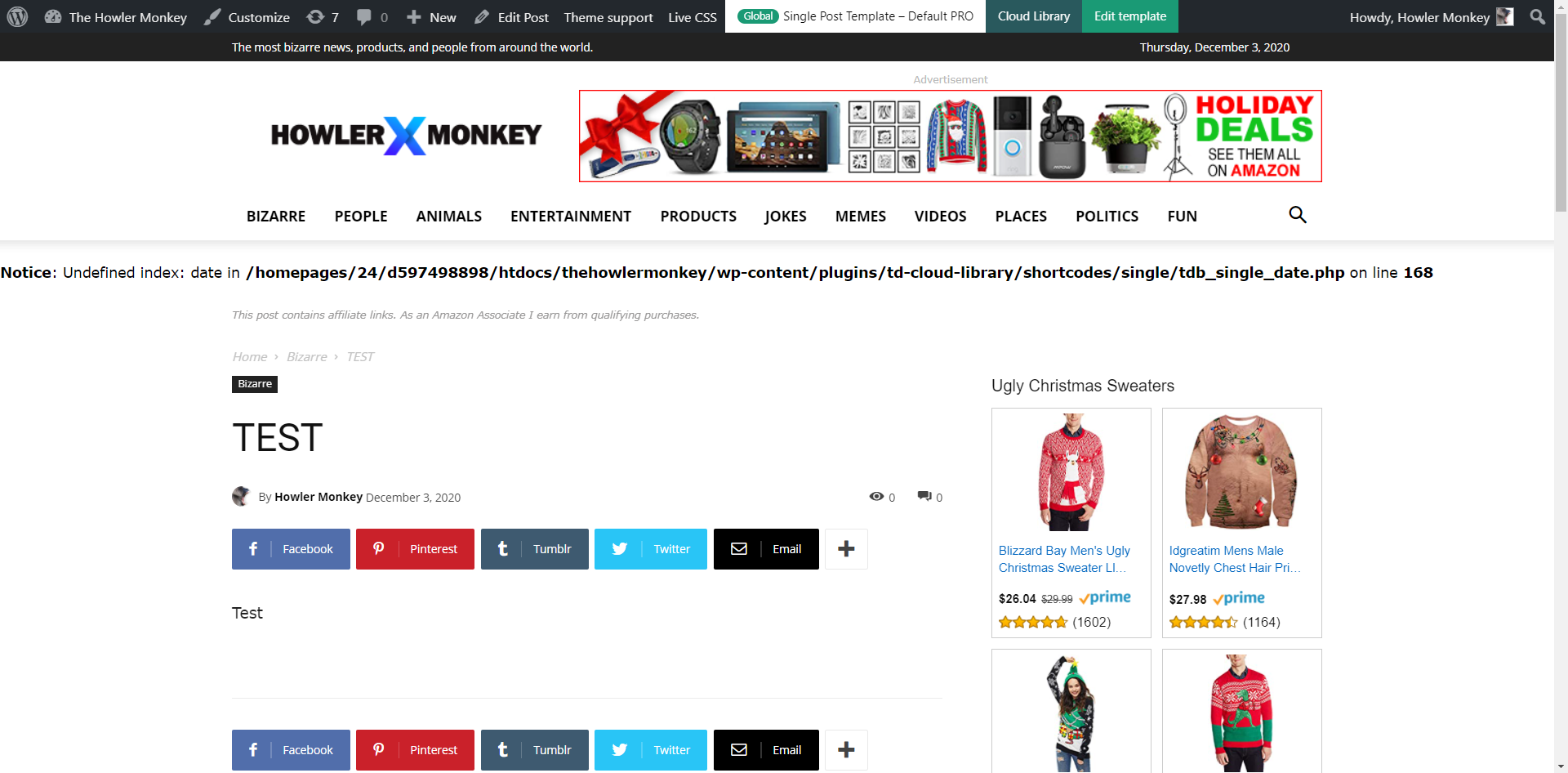
 Okay, here is a test screenshot. This error is only showing up on brand new post previews. Once I publish the post, the error goes away. And if I go into a previously published post and preview that, it doesn’t show then. It’s just on new posts that aren’t published yet.
HowlerNotice: Undefined index: date in /homepages/24/d597498898/htdocs/thehowlermonkey/wp-content/plugins/td-cloud-library/shortcodes/single/tdb_single_date.php on line 168
The theme has worked perfect since install, and now today, I am getting this error on post preview.
https://www.thehowlermonkey.com/
Calin Hi venkatreviewrider, please make use sure that there were no problems during the theme installation (to be sure, you can delete and reinstall the theme), also make sure that all theme requirements are set as in our guide from here -> https://forum.tagdiv.com/requirements-for-newspaper/ and you do not have any plugin conflict (try only with theme plugins).
If there are still some problems, please provide some more details and some screenshots.
Let me know the results!
 ottobe
I have been working on an update of my site for some time, and finished today. Only thing left was to change categories on some posts. Great was my surprise when I returned to main screen from categories for testing. When previewing a page it only shows the script inserted from Newspaper. Looking closer I realize the Newspaper has gone. Plugins are not there.
That is, not completely gone. The Welcome/Plugins/Support pages are there, but the theme is not installed in WP. I tried to close down and reopen. No effect.
So what to do?
Can I just re-enable Newspaper, since the script in pages is there?
Anything else? I have used a few Cloud templates.
The environment is Bluehost/staging. Newspaper V 10.3.8
PS. Hope this not happen when I go live..
 notjustpcs
I insert a blog using tagdiv, and it works fine. I add the offset, and the category filter and it shows me the posts it will show and it looks as I want it to.
However, when I click either preview, or save it disappears from the page. And then when I re-enter the tag div editor it shows the block with the same settings but suddenly shows that there are no eligible posts to go into there.
I have tried it getting rid of the filters, and it does the same thing. I have looked at it in classic mode, and it does have the shortcode for the block but it isn’t appearing.
Was hoping somebody could please help. Thank you!
 ladof
ladofGood afternoon ,
I would like to know if I have a way to put all my sub-categories, in the category “Modalidades” visible where the others are. When I move the mouse over “Modalidades” some news opens up as a preview, and below there are some sub-categories, but I wanted them to appear all, even if it was on a second line. How can I do this?
I leave here an image that shows what I’m talking about: https://i.imgur.com/cHKGdTe.jpg
Thank you!
ladof.pt
 Rovshan
 I have just reviewed my website. Installed demo is Default. But there is a demo Default Pro that Install button is active. So it means I should uninstall my current Default and install Default Pro, yes? What will I lose if I do that? I am a little bit confused.
 gutsnaechtle
If Iam sharing my website link there will be displayed a placeholder in Facebook, Whatsapp etc.
Only with Articlelinks the featured image will be displayed.
Iam using All in one SEO Plugin for selecting a featured image.
There is no effect when I select the logo for previewimage on any Page.
Any Idea to fix this?