
- NewspapertagDiv Composer Tutorial
- NewspaperCredit System
- NewspaperCreate a frontend submission form
- NewspaperHow to Use the Tabbed Content shortcode
- NewspaperCreate a form contact page
- NewspaperFilters and sorting for taxonomies
- NewspaperUser review system
- NewspaperModal Popup
- NewspaperFlex Block Settings Guide
- NewspaperSocial Sharing
- NewspaperSingle Post Shortcodes
- NewspaperInfinite Loading for Single Posts
- NewspaperThe Newspaper Mobile Theme: Introduction
- NewspaperHow to Add a Logo in Newspaper
- NewspaperCustom Post Type Support
- NewspaperCloud Library Templates
- NewspaperDesign your Post Pages using the Cloud Library Templates
- NewspaperHeader Builder
- NewspapertagDiv Cloud Library Plugin
- NewspaperAd Box Element and Ads Overview
 Neuhaus
Hello,
I tried to update the Newspaper theme from 10.39.1 to 10.4 on a staging environment but WordPress responded with a critical error on the frontend. I deactivated all plugins except the composer and cloud gallery and the issue is still there. The staging is not public so I can’t post a URL.
No cache plugin active and the system status is alright. All requirements are good.
I tried only deactivating the composer and the issue was gone. Of course, the whole website wasn’t looking nice without it. According to the debugger the issue lies with the new CSS analyzer:
WordPress Debug Log (Staging)
#7 /home/wp/disk/wordpress_staging/wp-includes/script-loader.php(20 in /home/wp/disk/wordpress_staging/wp-content/plugins/td-composer/css-analyze/css-analyze.php on line 507
#6 /home/wp/disk/wordpress_staging/wp-includes/plugin.php(484): WP_Hook->do_action()
#5 /home/wp/disk/wordpress_staging/wp-includes/class-wp-hook.php(311): WP_Hook->apply_filters()
#4 /home/wp/disk/wordpress_staging/wp-includes/class-wp-hook.php(287): td_load_css_fonts()
#3 /home/wp/disk/wordpress_staging/wp-content/plugins/td-composer/legacy/common/wp_booster/td_wp_booster_functions.php(572): metadata_exists()
#2 /home/wp/disk/wordpress_staging/wp-includes/meta.php(676): apply_filters()
#1 /home/wp/disk/wordpress_staging/wp-includes/plugin.php(212): WP_Hook->apply_filters()
#0 /home/wp/disk/wordpress_staging/wp-includes/class-wp-hook.php(287): {closure}()
Stack trace:
[20-Apr-2021 15:10:36 UTC] PHP Fatal error: Uncaught ArgumentCountError: Too few arguments to function {closure}(), 4 passed in /home/wp/disk/wordpress_staging/wp-includes/class-wp-hook.php on line 287 and exactly 5 expected in /home/wp/disk/wordpress_staging/wp-content/plugins/td-composer/css-analyze/css-analyze.php:507
#7 /home/wp/disk/wordpress_staging/wp-includes/script-loader.php(20 in /home/wp/disk/wordpress_staging/wp-content/plugins/td-composer/css-analyze/css-analyze.php on line 507
#6 /home/wp/disk/wordpress_staging/wp-includes/plugin.php(484): WP_Hook->do_action()
#5 /home/wp/disk/wordpress_staging/wp-includes/class-wp-hook.php(311): WP_Hook->apply_filters()
#4 /home/wp/disk/wordpress_staging/wp-includes/class-wp-hook.php(287): td_load_css_fonts()
#3 /home/wp/disk/wordpress_staging/wp-content/plugins/td-composer/legacy/common/wp_booster/td_wp_booster_functions.php(572): metadata_exists()
#2 /home/wp/disk/wordpress_staging/wp-includes/meta.php(676): apply_filters()
#1 /home/wp/disk/wordpress_staging/wp-includes/plugin.php(212): WP_Hook->apply_filters()
#0 /home/wp/disk/wordpress_staging/wp-includes/class-wp-hook.php(287): {closure}()
Stack trace:
[20-Apr-2021 15:10:35 UTC] PHP Fatal error: Uncaught ArgumentCountError: Too few arguments to function {closure}(), 4 passed in /home/wp/disk/wordpress_staging/wp-includes/class-wp-hook.php on line 287 and exactly 5 expected in /home/wp/disk/wordpress_staging/wp-content/plugins/td-composer/css-analyze/css-analyze.php:507
#7 /home/wp/disk/wordpress_staging/wp-includes/script-loader.php(20 in /home/wp/disk/wordpress_staging/wp-content/plugins/td-composer/css-analyze/css-analyze.php on line 507
#6 /home/wp/disk/wordpress_staging/wp-includes/plugin.php(484): WP_Hook->do_action()
#5 /home/wp/disk/wordpress_staging/wp-includes/class-wp-hook.php(311): WP_Hook->apply_filters()
#4 /home/wp/disk/wordpress_staging/wp-includes/class-wp-hook.php(287): td_load_css_fonts()
#3 /home/wp/disk/wordpress_staging/wp-content/plugins/td-composer/legacy/common/wp_booster/td_wp_booster_functions.php(572): metadata_exists()
#2 /home/wp/disk/wordpress_staging/wp-includes/meta.php(676): apply_filters()
#1 /home/wp/disk/wordpress_staging/wp-includes/plugin.php(212): WP_Hook->apply_filters()
#0 /home/wp/disk/wordpress_staging/wp-includes/class-wp-hook.php(287): {closure}()
Stack trace:
[20-Apr-2021 15:10:16 UTC] PHP Fatal error: Uncaught ArgumentCountError: Too few arguments to function {closure}(), 4 passed in /home/wp/disk/wordpress_staging/wp-includes/class-wp-hook.php on line 287 and exactly 5 expected in /home/wp/disk/wordpress_staging/wp-content/plugins/td-composer/css-analyze/css-analyze.php:507
#7 /home/wp/disk/wordpress_staging/wp-includes/script-loader.php(20 in /home/wp/disk/wordpress_staging/wp-content/plugins/td-composer/css-analyze/css-analyze.php on line 507
#6 /home/wp/disk/wordpress_staging/wp-includes/plugin.php(484): WP_Hook->do_action()
#5 /home/wp/disk/wordpress_staging/wp-includes/class-wp-hook.php(311): WP_Hook->apply_filters()
#4 /home/wp/disk/wordpress_staging/wp-includes/class-wp-hook.php(287): td_load_css_fonts()
 Bettina
 Hello!
Check this topic where we discussed about this issue: https://forum.tagdiv.com/topic/wp_booster-error-on-single-more-from-author-box-in-td-composer-after-update/
If this problem is not solved after that, then we need to take a look and see what happened there.
Please contact us via email at contact@tagdiv.com and provide the following:
– admin url and credentials
– a link to this topic in order to identify you
Our team will take a look!
Thank you!
 Prateek
 I can’t see why it’s necessary, Sir.
I’ve already explained everything in detail. Having a look at my website wouldn’t be of more use. That’s why I provided the screenshots.
I can try once more.
In CSS, if you add background color to an element along with border radius, that element will have background of that color and it will have round borders, but most importantly the color that is applied would not flow outside of the corners. Refer to the SECOND screenshot. It has round corners and the color is contained properly within the element.
Now, if I add background color and radius to a column using TD Composer instead of writing custom CSS myself, it doesn’t work very well. The background color flow out of the element’s rounded corners. Refer to the FIRST screenshot. The corners are round but the color is flowing out.
So, when I add background color using .custom-class { background-color: #f22b29; } instead of TD-Composer, it works fine.
I think it’s easier to understand now. If, for whatever reason, you’re unable to help without having to have a look at my website, please forward this to someone else. It’s that easy. I’d be extremely grateful.
Thanks.
 katsar0v
 An update on this issue would be really helpful, thank you! I have tried adding the code here:
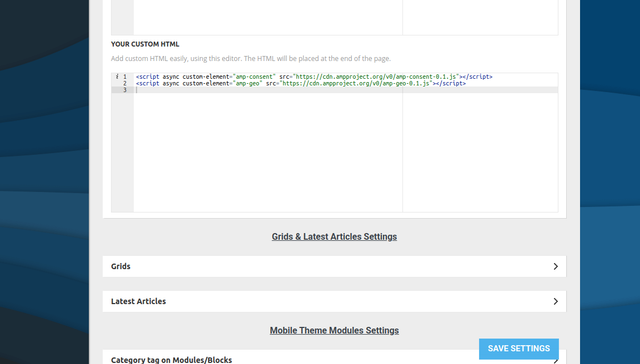
But it does not seem to show. I also tried adding it here (wp-content/plugins/td-composer/mobile/header-amp.php):
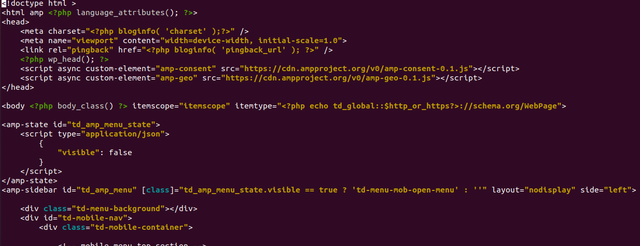
But it also does not work unfortunately. Any help would be appreciated!
 celluv
 If you look at the “More from author” item, the same error is displayed.
I want to know the cause and solution.
——– error ———-
wp_booster error:
mc1_title_tag – Is not mapped in the shortcode that uses this module ( tdb_module_related)
/opt/bitnami/apps/wordpress/htdocs/wp-content/plugins/td-composer/legacy/common/wp_booster/td_module.php
celluv“More from author” 항목을 보면 아래와 같은 에러가 표시된다.
원인과 해결방법을 알고 싶다.
——– error ———-
wp_booster error:
mc1_title_tag – Is not mapped in the shortcode that uses this module ( tdb_module_related)
/opt/bitnami/apps/wordpress/htdocs/wp-content/plugins/td-composer/legacy/common/wp_booster/td_module.php
 jlkinaz
URL: https://cullenh1.sg-host.com/
I am having troubles with the site holding its configuration after clearing cache. It appears to be reverting to a mobile theme on a desktop view. Here is an example of a page that is now displaying as a mobile page on a PC:
https://cullenh1.sg-host.com/information-center/.
This is happening randomly and it has impacted all screens. Any suggestions?
Temporary fix has been to open each page in TD Composer, save it, then clear cache. It seems to last an hour or so before it breaks.
The issue is readily visible when using a cellphone as well.
 JJ0000
 Nvm found it in plugins > tdcomposer > legacy
 develery
 Thank you, it solved the issue but now I have another one.
When I tried to add a text block with title to my page and I tried to edit the content I cannot edit the text in the popup and I have the following error in my server log:
Uncaught Error: Call to undefined function schema_wp_is_admin_page() in /srv/dev/kriptoakademia.co
m/wordpress/wp-content/plugins/schema/includes/admin/settings/register-settings.php:1668\nStack trace:\n#0 /srv/xxx.com/wordpress/wp-includes/class-wp-hook.php(292): schema_wp_admin_footer_
scripts(”)\n#1 /srv/xxx.com/wordpress/wp-includes/class-wp-hook.php(316): WP_Hook->apply_filters(NULL, Array)\n#2 /srv/xxx.com/wordpress/wp-includes/plugin.php(484): WP_Hook
->do_action(Array)\n#3 /srv/xxx.com/wordpress/wp-content/plugins/td-composer/includes/wpeditor.php(404): do_action(‘admin_print_foo…’)\n#4 {main}\n thrown in /srv/xxx.com/
wordpress/wp-content/plugins/schema/includes/admin/settings/register-settings.php on line 1668
Bettina Hello!
Some are coming from Composer, so better deactivate this plugin if you do not use it.
Do not use both page builder in the same time!
Standard Pack is used only for default templates and not for a cloud/PRO templates. It is recommend it to uninstall this plugin if you do not use default templates.
The first one is coming from WordPress and it is important.
Ans also, this one – <link rel=’stylesheet’ id=’td-theme-css’ href=’wp-content/themes/Newspaper/style.css?ver=10.4′ type=’text/css’ media=’all’ /> ; which is from the theme and it is important too.
Hope that helps you!
Thank you!
develeryWe updated the theme to the latest version, now the site is down.
This is the error in the server error.log
PHP Fatal error: Uncaught ArgumentCountError: Too few arguments to function {closure}(), 4 passed in /srv/xxx.com/wordpress/wp-includes/class-wp-hook.php on line 287 and exactly 5 expected in /srv/xxx.com/wordpress/wp-content/plugins/td-composer/css-analyze/css-analyze.php:507\nStack tra
ce:\n#0 /srv/xxx.com/wordpress/wp-includes/class-wp-hook.php(287): {closure}(NULL, 38, ‘tdc_google_font…’, true)\n#1 /srv/xxx.com/wordpress/wp-includes/plugin.php(206): WP_
Hook->apply_filters(NULL, Array)\n#2 /srv/xxx.com/wordpress/wp-includes/meta.php(676): apply_filters(‘get_post_metada…’, NULL, 38, ‘tdc_google_font…’, true)\n#3 /srv/dev/kriptoakademia.
com/wordpress/wp-content/plugins/td-composer/legacy/common/wp_booster/td_wp_booster_functions.php(572): metadata_exists(‘post’, 38, ‘tdc_google_font…’)\n#4 /srv/xxx.com/wordpress/wp-inclu
des/class-wp-hook.php(287): td_load_css_fonts(”)\n#5 /srv/xxx.com/wordpress/wp-includes/class-wp-hook. in /srv/xxx.com/wordpress/wp-content/plugins/td-composer/css-analyze/c
ss-analyze.php on line 507
Thank you for your help.
Bettina Hello!
Check this topic where we discussed about this issue: https://forum.tagdiv.com/topic/wp_booster-error-on-single-more-from-author-box-in-td-composer-after-update/
Thank you!
 fantalab
Hi,
in order to optimize our website for Google web vitals, we were analyzing CSS and trying to figure out what stylesheets can be safely removed.
Currently the Newspaper theme automatically inserts the following stylesheets in all pages:
– <link rel=’stylesheet’ id=’wp-block-library-css’ href=’https://fantamaster.b-cdn.net/wp-includes/css/dist/block-library/style.min.css?ver=5.3.3′ type=’text/css’ media=’all’ />
– <link rel=’stylesheet’ id=’td-plugin-multi-purpose-css’ href=’https://fantamaster.b-cdn.net/wp-content/plugins/td-composer/td-multi-purpose/style.css?ver=78be34af347704c29acc8080ee49e259′ type=’text/css’ media=’all’ />
– <link rel=’stylesheet’ id=’js_composer_front-css’ href=’wp-content/plugins/js_composer/assets/css/js_composer.min.css?ver=4.11.2′ type=’text/css’ media=’all’ />
– <link rel=’stylesheet’ id=’td-theme-css’ href=’wp-content/themes/Newspaper/style.css?ver=10.4′ type=’text/css’ media=’all’ />
– <link rel=’stylesheet’ id=’td-legacy-framework-front-style-css’ href=’wp-content/plugins/td-composer/legacy/Newspaper/assets/css/td_legacy_main.css?ver=78be34af347704c29acc8080ee49e259′ type=’text/css’ media=’all’ />
– <link rel=’stylesheet’ id=’td-standard-pack-framework-front-style-css’ href=’wp-content/plugins/td-standard-pack/Newspaper/assets/css/td_standard_pack_main.css?ver=eccb2c408442ac58c2bcf4360ad09738′ type=’text/css’ media=’all’ />
– <link rel=’stylesheet’ id=’td-theme-demo-style-css’ href=’wp-content/plugins/td-composer/legacy/Newspaper/includes/demos/sport/demo_style.css?ver=10.4′ type=’text/css’ media=’all’ />
The demo stylesheet can probably be removed, what about the others? Are the two “legacy” stylesheets really needed? Is it safe to remove them?
For your information, we’re still using the old visual composer which leverages wp bakery, we haven’t yet migrated to the new td composer.
Thanks
 Calin
Calin Hi,
1. I’m not sure on what element are you referring, if it is the “News ticker” -> https://i.imgur.com/91I25Ve.jpg this can be edited only with tagDiv Composer and doesn’t have an option to make it as scroll that follows.
2. Unfortunately there is no option to can add an icon in Newspaper that it will be display in all posts/articles, but this maybe achieved using a custom css, if you have the icon in media and you can provide the link to it, I can try a css to set it.
3. The subtitle color can be adjusted with this code https://i.imgur.com/uzJ56YB.png
.td-post-sub-title {

    color: #999;

    background: #000;

}
The color is use for the text color and the background for the background color for that subtitle, if you do not want one of theme, just remove it from code, also you can adjust the colors.
The code need to be set in theme panel> custom code> custom css.
Thank you!
 Anamaria
 Hello,
After you install the plugin go back on your WP Dashboard click on Contact > Contact Forms and copy the code under Shortcode https://www.screencast.com/t/xWSvwavU5Y after that click on pages or in posts -> hover the page you have for contact and select edit with tagDiv Composer ( https://www.screencast.com/t/sqDfb18UaqP ) or you can click on the page and after is open click the button TAGDIV Composer (https://www.screencast.com/t/s5qIyXHl).
After TD Composer is open click on add element ( https://www.screencast.com/t/5cUJtKWOGKp), click on the row and drag it at the bottom of your page (or where you like to be your contact https://www.screencast.com/t/kpfqK8PgXJ) and drop the row there, then search for column text then drag it and drop him on the row ( https://www.screencast.com/t/rrb72hZknn ) click on it and then in the sidebar from the left click on edit Content ( https://www.screencast.com/t/n1r2NCyHv ) then paste the code there and click on save and view page (https://www.screencast.com/t/La1oahu35c ).
See the results: https://www.screencast.com/t/mumXQD0uCQ
Here is some documentation: https://contactform7.com/getting-started-with-contact-form-7/
I hope this will help you.
Thank you!
 topmagazin
CSS Analyzer stops after a few steps with the following error in the console: c.focus is not a function
The error is referring to: /wp-content/plugins/td-composer/assets/js/js_files_for_plugin_analyze_css.min.js?ver=78be34af347704c29acc8080ee49e259
After I already read two other posts with the same error in the forum: Where does this error come from that prevents the analyzer from running? Is there any solution?
Regards
PrateekHello, team tagDiv.
I am trying to set a border radius for my newsletter with some background color. It looks nicer than with sharp corner.
But I came across something weird. While the border radius works perfectly fine, that background radius doesn’t respect this rule and maintains the sharp corners.
The only method was to use custom css for background color on column rather than tagDiv composer but that inefficient. Anyway, Why doesn’t the background color set with tagDiv composer works the same as the custom css for the same property
The images below demonstrate this.
 imkimc
 Hi Bettina,
Since I found a plugin that works and we’re still going in circles here I’ve had to move on.
For everyone’s reference the only Stripe plugin that I found to work with TD Composer 2.8 is “Accept Stripe Payments” from wptipsntricks.
Their addons enabled me to setup payment options that are now a single click instead of using WPForms. Which is an overall improvement for our site.
I do hope that your devs find the issue, especially since it seems several users are now affected (possibly many more without knowing it)
Good luck everyone! Hope they get this fixed soon.
Best Regards,
Kim
 Syem
Syem Or if your wordpress version 5.7 will have some incompatibilities with other plugins and want to keep the old one, go to wp-content/plugins/td-composer/css-analyze/css-analyze.php on line 506 and change from if ( in_array( version_compare(get_bloginfo('version'), '5.5'), array(0, 1))) { to if ( in_array( version_compare(get_bloginfo('version'), '5.5'), array(0, -1))) { and your website will be UP again.

 ibasher
I want to add my own option to Ajax Categories Dropdown (basically a custom link to a category, much like the block header itself).
What file/hook can I edit to achieve that simple thing?
For now, my only option is JS or bad practice like editing
plugins/td-composer/legacy/Newspaper/includes/block_templates/td_block_template_1.php
Alternatively, would be nice if I can select No Filter dropdown and still set Filter dropdown text with link equal to Title url
 zcarpman
Hello, just bought the theme and I can’t even activate the tagDiv composer. When I go to activate the plugin I get this fatal error:
An error of type E_ERROR was caused in line 507 of the file /nas/content/live/centralmatown/wp-content/plugins/td-composer/css-analyze/css-analyze.php. Error message: Uncaught ArgumentCountError: Too few arguments to function {closure}(), 4 passed in /nas/content/live/centralmatown/wp-includes/class-wp-hook.php on line 287 and exactly 5 expected in /nas/content/live/centralmatown/wp-content/plugins/td-composer/css-analyze/css-analyze.php:507 Stack trace: #0 /nas/content/live/centralmatown/wp-includes/class-wp-hook.php(287): {closure}(NULL, 2, ‘tdb_template_ty…’, true) #1 /nas/content/live/centralmatown/wp-includes/plugin.php(212): WP_Hook->apply_filters(NULL, Array) #2 /nas/content/live/centralmatown/wp-includes/meta.php(676): apply_filters(‘get_post_metada…’, NULL, 2, ‘tdb_template_ty…’, true) #3 /nas/content/live/centralmatown/wp-content/plugins/td-composer/legacy/common/wp_booster/td_first_install.php(201): metadata_exists(‘post’, 2, ‘tdb_template_ty…’) #4 /nas/content/live/centralmatown/wp-includes/class-wp-hook.php(287): {closure}(”) #5 /nas/content/live/centralmatown/wp-includes/class-wp-hook.php(311): WP_Hook->apply_filters(”, Array) #6 /nas/content/live/c
 thecrazybuyersblog
 Hi,
I have sent the credentials but I have still not got any solution. Can you please get it fixed. I have removed and reinstalled TD composer plugin as well.
Bettina Hello!
You can try to inject the code in these files:
wp-content/plugins/td-composer/mobile/header-amp.php
wp-content/plugins/td-composer/mobile/footer-amp.php
But, please note that any change you make in the files after update will be overwritten and you have to make the changes again. Better save the code somewhere and then apply it again after update.
Hope that helps you somehow!
Thank you!
Bettina Hello @yourbackupemployee!
The easiest solution for adding a banner there is to use “Ad box” element edited with TagDiv Composer, but this is working only for cloud/PRO post template and not for a default one which you use at the moment.
The file you should change it is at wp-content/plugins/td-standard-pack/Newspaper/loop-single.php
But, please note that any change you make in the files after update will be overwritten and you have to make the changes again. Better save the code somewhere and then apply it again after update.
Hope that helps you somehow!
Thank you!
 201
201Hi Tagdiv Team,
We are using the latest version of your Newspaper theme, but on our front page we get a lot of slow queries from the TD Composer. It is not a problem of server optimization (dedicated) since with other templates there are no problems. We are using a pro template from the cloud templates. Is there anyway we can optimize that so that the site would run better. Also we are using WP Rocket as a cache plugin, but out TTFB is not that great.
Thanks!


