
- NewspapertagDiv Composer Tutorial
- NewspaperCredit System
- NewspaperCreate a frontend submission form
- NewspaperHow to Use the Tabbed Content shortcode
- NewspaperCreate a form contact page
- NewspaperFilters and sorting for taxonomies
- NewspaperUser review system
- NewspaperModal Popup
- NewspaperFlex Block Settings Guide
- NewspaperSocial Sharing
- NewspaperSingle Post Shortcodes
- NewspaperInfinite Loading for Single Posts
- NewspaperThe Newspaper Mobile Theme: Introduction
- NewspaperHow to Add a Logo in Newspaper
- NewspaperCustom Post Type Support
- NewspaperCloud Library Templates
- NewspaperDesign your Post Pages using the Cloud Library Templates
- NewspaperHeader Builder
- NewspapertagDiv Cloud Library Plugin
- NewspaperAd Box Element and Ads Overview
 Simple
When I want to edit a page via the TD Composer it opens the Composer interface but immediately enters an infinite loading loop and does not allow me to work. It won’t let me add, remove or edit items, it won’t let me save or preview.
How can I do?
 Anamaria
 Hi,
If an attacker wants to target this URL /wp-json/tdw/save_css they can do so. Even if the website uses a different theme, the attacker can still try that URL. We could add an option to be able to enable/disable the Live CSS, it will be considered. But for now in order to remove it this can only be done with a modification to the composer plugin. I think that all that removing it requires is to comment this line of code – https://prnt.sc/RtwvL5Nc4ikR -> https://prnt.sc/ymZmhdUfp57U But as I mentioned, the attacker can still try to access the URL.
Thank you!
 infosante24
wp-content/plugins/td-composer/legacy/Newsmag/js/tdAjaxSearch.js?ver=5.4.2
Image : 
 Eduardo-C
I have update from version 10.6 to the latest version, and the updating process completely broke my website. I can provide screenshots if needed, but I see things like:
Warning: Undefined array key 1 in /Users/eduardo/Local Sites/wctast/app/public/wp-content/plugins/td-composer/legacy/common/wp_booster/td_util.php on line 4922
and the td shortcakes are displayed on the website, like:
[td_block_23 limit=”1″ sort=”random_posts” custom_title=”” tdc_css=”eyJwaG9uZSI6eyJtYXJnaW4tYm90dG9tIjoiNjAiLCJkaXNwbGF5IjoiIn0sInBob25lX21heF93aWR0aCI6NzY3fQ==” post_ids=”366″]
 aviaciondigital
 Hi,
I have disabbled all plugins but the tagDIV ones, and still have the same issue.
I am afraid I need some help on this. I can provide dev access.
Here is the error that I get in the logs:
PHP Fatal error: Uncaught TypeError: Unsupported operand types: string + int in /wp-content/plugins/td-composer/legacy/common/wp_booster/td_data_source.php:952
Stack trace:
#0 /wp-content/plugins/td-composer/legacy/common/wp_booster/td_data_source.php(1423): td_data_source::shortcode_to_args(Array, ‘2’, ”)
#1 /wp-content/plugins/td-composer/legacy/common/wp_booster/td_ajax.php(138): td_data_source::get_wp_query(Array, ‘2’, ‘td_flex_block_5’)
#2 /wp-includes/class-wp-hook.php(324): td_ajax::on_ajax_block(Array)
#3 /wp-includes/class-wp-hook.php(348): WP_Hook->apply_filters(”, Array)
#4 /wp-includes/plugin.php(517): WP_Hook->do_action(Array)
#5 /wp-admin/admin-ajax.php(188): do_action(‘wp_ajax_td_ajax…’)
#6 {main}
thrown in /wp-content/plugins/td-composer/legacy/common/wp_booster/td_data_source.php on line 952
 wordpressive
 I used both Column Text and Text with Title options. This works nicely and saves once. However, every time I reload the TD Composer I get an error:
Errors at columns elements: 19(models) : 20(dom). The model does not match the content Current state has involved an issue. You could try an UNDO operation (CTRL+Z / CTRL+SHIFT+Z)
The shortcode I put in behaves like a normal shortcode and simply returns some html output.
If I remove the shortcode, everything goes back to working fine. For some reason having it execute a shortcode is causing this error.
 nfzambrano
 Hello Ana Maria,
Thanks for your quick response.
This is the error message I see in the console:
td-composer/save_post – ERROR
Object
debug_data:
endpoint:
“td-composer/save_post”
error:
“”
request:
{readyState: 0, getResponseHeader: ƒ, getAllResponseHeaders: ƒ, setRequestHeader: ƒ, overrideMimeType: ƒ, …}
[[Prototype]]:
Object
message:
“Invalid reply from server endpoint.”
type:
“AJAX ERROR”
[[Prototype]]:
Object
 JimC50
Hello, I just updated tagdiv composer on one of my sites, and now the news section that runs down the site is missing, replaced by [td_block_11 custom_title=”More News” header_color=”#2c8293″ limit=”20″ offset=”5″]
The site is deeptechdigest.com
It should look like the site at futurefoodtoday.com, with news running down the side.
When I go in to TagDiv composer to try and add/replace Block 11, there is no option to add it.
My other site, walkingpost.com is asking me to update TagDiv Composer but when I click on update, it just generates a blank page.
So, of my three sites, only one is functioning properly.
What’s going on and how do I fix this urgently?!
Thanks!
Jim
 defenseupdate
 I also have a similar error,
wp_booster error on Newspaper 12:
td_api_base::mark_used_on_page : a component with the ID: single_template_3 is not set.
/home/dupdate/sites/defense-update.com/htdocs/wp-content/plugins/td-composer/legacy/common/wp_booster/td_api.php
Any suggestions?
-
This reply was modified 2 years by
defenseupdate.
 yukiy531
 I have created a tag using “TAGDIV COMPOSER” and the tag filter does not work.
Why is this?
https://drive.google.com/file/d/1l9kmiS26DkbuTDZpW0sfvb37h3uYV6aZ/view?usp=sharing
 Bettina
 Hello @depatech!
The files for the Mobile theme can be found here: wp-content/plugins/td-composer/mobile/
Thank you!
 contactASN
https://autosecnews-jmeoh5rxuz.live-website.com/
How do you change the Header title of “td-pulldown-size” ?
It’s currently written as “Applications”
Previously, I have changed them via the TagDiv Composer and hovering/clicking the element and changing/customizing the name in editor box, however when I hover over the elements on the bottom of the website there is no configurable element.
 egm_ar
Hi good evening,
I’ve imported the Urban Observer header, but when I try to edite it on TD Composer, I get the following code:
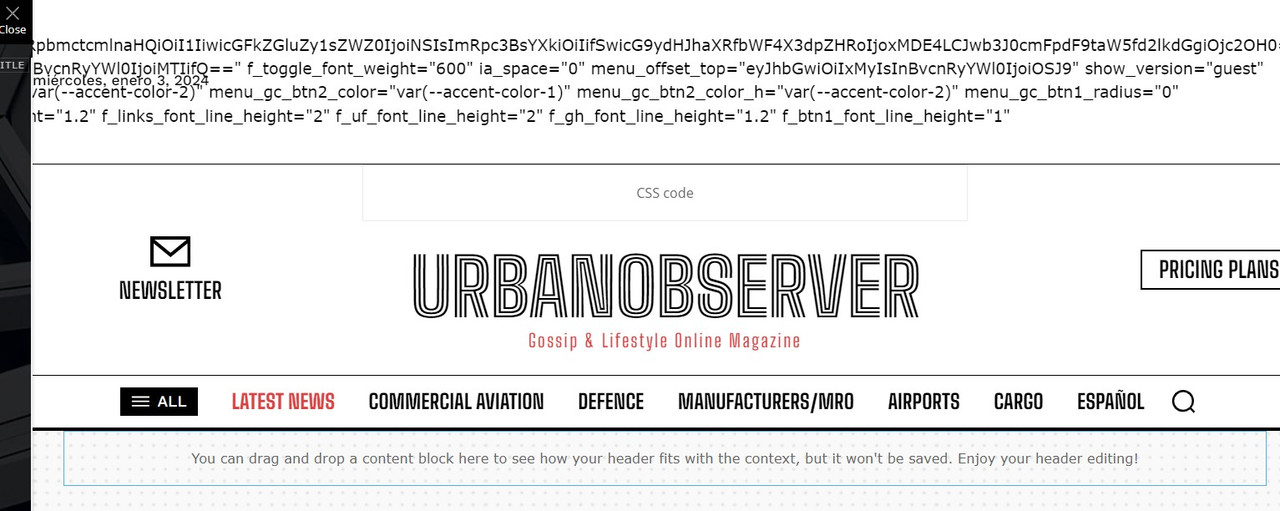
What could be happening?
Thanks in advance!
 gerard7803
I tried to install the update 12.6.3, but after installing it, it created bugs on my website.
Updating all tagDiv plugins…
tagDiv Composer
Success
tagDiv Cloud Library
Ajax error
tagDiv Social Counter
Ajax error
tagDiv Newsletter
Ajax error
tagDiv Opt-In Builder
Ajax error
tagDiv Shop
Ajax error
tagDiv Standard Pack
Ajax error
Fatal error: Uncaught Error: Class ‘tds_config’ not found in /home/customer/www/lawyertribune.com/public_html/wp-content/plugins/td-laywer-tribune/includes/config/td_cw_config_shortcodes.php:1402 Stack trace: #0 /home/customer/www/lawyertribune.com/public_html/wp-includes/class-wp-hook.php(324): {closure}(”) #1 /home/customer/www/lawyertribune.com/public_html/wp-includes/class-wp-hook.php(348): WP_Hook->apply_filters(”, Array) #2 /home/customer/www/lawyertribune.com/public_html/wp-includes/plugin.php(517): WP_Hook->do_action(Array) #3 /home/customer/www/lawyertribune.com/public_html/wp-content/plugins/td-composer/td-composer.php(178): do_action(‘tdc_loaded’) #4 /home/customer/www/lawyertribune.com/public_html/wp-includes/class-wp-hook.php(324): tdc_plugin_init(”) #5 /home/customer/www/lawyertribune.com/public_html/wp-includes/class-wp-hook.php(348): WP_Hook->apply_filters(”, Array) #6 /home/customer/www/lawyertribune.com/public_html/wp-includes/plugin.php(517): WP_Hook->do_action(Array) #7 /home/customer/www/lawyertri in /home/customer/www/lawyertribune.com/public_html/wp-content/plugins/td-laywer-tribune/includes/config/td_cw_config_shortcodes.php on line 1402
Please, can you help me?
Thanks.
 arunmeena617
Hi,
my website automatically redirects to other unknown links after using the td-composer plugin.
I think the plugin has some malware code that redirects my homepage to unknown websites.
 khnalsaroj083
Fatal error: Uncaught TypeError: Unsupported operand types: int – string in /home3/jalbayukhabar/public_html/wp-content/plugins/td-cloud-library/state/single/tdb_state_single.php:1124 Stack trace: #0 /home3/jalbayukhabar/public_html/wp-content/plugins/td-cloud-library/shortcodes/single/tdb_single_date.php(189): tdb_state_single->{closure}() #1 /home3/jalbayukhabar/public_html/wp-content/plugins/td-cloud-library/shortcodes/single/tdb_single_date.php(189): Closure->__invoke() #2 /home3/jalbayukhabar/public_html/wp-content/plugins/td-composer/legacy/common/wp_booster/td_global_blocks.php(27): tdb_single_date->render() #3 /home3/jalbayukhabar/public_html/wp-includes/shortcodes.php(433): td_global_blocks::proxy_function() #4 [internal function]: do_shortcode_tag() #5 /home3/jalbayukhabar/public_html/wp-includes/shortcodes.php(273): preg_replace_callback() #6 /home3/jalbayukhabar/public_html/wp-content/plugins/td-composer/includes/tdc_composer_block.php(281): do_shortcode() #7 /home3/jalbayukhabar/public_html/wp-content/plugins/td-composer/includes/shortcodes/vc_column_inner.php(344): tdc_composer_block->do_shortcode() #8 /home3/jalbayukhabar/public_html/wp-content/plugins/td-composer/legacy/common/wp_booster/td_global_blocks.php(27): vc_column_inner->render() #9 /home3/jalbayukhabar/public_html/wp-includes/shortcodes.php(433): td_global_blocks::proxy_function() #10 [internal function]: do_shortcode_tag() #11 /home3/jalbayukhabar/public_html/wp-includes/shortcodes.php(273): preg_replace_callback() #12 /home3/jalbayukhabar/public_html/wp-content/plugins/td-composer/includes/tdc_composer_block.php(281): do_shortcode() #13 /home3/jalbayukhabar/public_html/wp-content/plugins/td-composer/includes/shortcodes/vc_row_inner.php(376): tdc_composer_block->do_shortcode() #14 /home3/jalbayukhabar/public_html/wp-content/plugins/td-composer/legacy/common/wp_booster/td_global_blocks.php(27): vc_row_inner->render() #15 /home3/jalbayukhabar/public_html/wp-includes/shortcodes.php(433): td_global_blocks::proxy_function() #16 [internal function]: do_shortcode_tag() #17 /home3/jalbayukhabar/public_html/wp-includes/shortcodes.php(273): preg_replace_callback() #18 /home3/jalbayukhabar/public_html/wp-content/plugins/td-composer/includes/tdc_composer_block.php(281): do_shortcode() #19 /home3/jalbayukhabar/public_html/wp-content/plugins/td-composer/includes/shortcodes/vc_column.php(349): tdc_composer_block->do_shortcode() #20 /home3/jalbayukhabar/public_html/wp-content/plugins/td-composer/legacy/common/wp_booster/td_global_blocks.php(27): vc_column->render() #21 /home3/jalbayukhabar/public_html/wp-includes/shortcodes.php(433): td_global_blocks::proxy_function() #22 [internal function]: do_shortcode_tag() #23 /home3/jalbayukhabar/public_html/wp-includes/shortcodes.php(273): preg_replace_callback() #24 /home3/jalbayukhabar/public_html/wp-content/plugins/td-composer/includes/tdc_composer_block.php(281): do_shortcode() #25 /home3/jalbayukhabar/public_html/wp-content/plugins/td-composer/includes/shortcodes/vc_row.php(1173): tdc_composer_block->do_shortcode() #26 /home3/jalbayukhabar/public_html/wp-content/plugins/td-composer/legacy/common/wp_booster/td_global_blocks.php(27): vc_row->render() #27 /home3/jalbayukhabar/public_html/wp-includes/shortcodes.php(433): td_global_blocks::proxy_function() #28 [internal function]: do_shortcode_tag() #29 /home3/jalbayukhabar/public_html/wp-includes/shortcodes.php(273): preg_replace_callback() #30 /home3/jalbayukhabar/public_html/wp-content/plugins/td-composer/includes/tdc_composer_block.php(281): do_shortcode() #31 /home3/jalbayukhabar/public_html/wp-content/plugins/td-composer/includes/shortcodes/tdc_zone.php(591): tdc_composer_block->do_shortcode() #32 /home3/jalbayukhabar/public_html/wp-content/plugins/td-composer/legacy/common/wp_booster/td_global_blocks.php(27): tdc_zone->render() #33 /home3/jalbayukhabar/public_html/wp-includes/shortcodes.php(433): td_global_blocks::proxy_function() #34 [internal function]: do_shortcode_tag() #35 /home3/jalbayukhabar/public_html/wp-includes/shortcodes.php(273): preg_replace_callback() #36 /home3/jalbayukhabar/public_html/wp-includes/class-wp-hook.php(324): do_shortcode() #37 /home3/jalbayukhabar/public_html/wp-includes/plugin.php(205): WP_Hook->apply_filters() #38 /home3/jalbayukhabar/public_html/wp-content/plugins/td-cloud-library/wp_templates/tdb_view_single.php(139): apply_filters() #39 /home3/jalbayukhabar/public_html/wp-includes/template-loader.php(106): include(‘/home3/jalbayuk…’) #40 /home3/jalbayukhabar/public_html/wp-blog-header.php(19): require_once(‘/home3/jalbayuk…’) #41 /home3/jalbayukhabar/public_html/index.php(17): require(‘/home3/jalbayuk…’) #42 {main} thrown in /home3/jalbayukhabar/public_html/wp-content/plugins/td-cloud-library/state/single/tdb_state_single.php on line 1124
There has been a critical error on this website.
Learn more about troubleshooting WordPress.
you can check link https://jalbayukhabar.com/?p=1
but defalt post-template is working
 marshalleq
I did try searching, but this forum is so slow it actually times out. Took me a good 10 minutes just to log in to post.
Anyway, it’s a brand new install of Newsmag and as soon as I enabled one of the prebuilt templates I started getting an error. I’m trying here first, because I bought this theme a while ago, even though I only just activated it today. So I assume that means I don’t have official support.
Anyway, this is the error:
wp_booster error:
td_res_context->get_att(gap) Internal error: The atts are not set yet(AKA: the render template method was called without atts)
/home/u625203387/domains/digital-archivist.com/public_html/wp-content/plugins/td-composer/legacy/common/wp_booster/td_css_res_compiler.php
Any ideas?
Thanks.
Anamaria Hi,
If an attacker wants to target this URL /wp-json/tdw/save_css they can do so. Even if the website uses a different theme, the attacker can still try that URL. We could add an option to be able to enable/disable the Live CSS, it will be considered. But for now in order to remove it this can only be done with a modification to the composer plugin. I think that all that removing it requires is to comment this line of code – https://prnt.sc/RtwvL5Nc4ikR -> https://prnt.sc/ymZmhdUfp57U But as I mentioned, the attacker can still try to access the URL.
Thank you!
 javid
javid i active wordfence plugin for my websites
yesterday i deleted code between <style id=”tdw-css-placeholder”> and ending </style>
What does this code do for the site?
And is it necessary?
Because I have removed this code
echo ‘ <style id=”tdw-css-placeholder”>/* custom css – generated by TagDiv Composer */’ . PHP_EOL . $css_buffer . ‘</style>’;
}
 JapanGeeck
Hi,
I’m using NFTnews from Newspaper.
For this page :
https://demo.tagdiv.com/newspaper_nft_pro/2022/01/20/td-post-digital-animals-project-plans-to-turn-sentimental-users-into-nft-souls/
I have hidden the block :
<div style=”display: inline-block”><span class=”nt “>- Advertisement -</span> </div>
The page looks great. But on my webpage code I still see :
I try to refind the block with TagDivComposer but I can’t reach because this block is hidden.
How can I reach this block with TagDivComposer.
or to change https://themeforest.net/item/newspaper/5489609 to #
Do you know where is written this url ?
Thank you for your help.
javid the problem is in the tagdiv composer plugin. I found a quick-fix. This is not a permanent solution, but it works quickly:
wp-content/plugins/td-composer/css-live/css-live.php line: 142 where is <style id=”tdw-css-placeholder”>. i Just deleted code between <style id=”tdw-css-placeholder”> and ending </style>
echo ‘ <style id=”tdw-css-placeholder”>/* custom css – generated by TagDiv Composer */’ . PHP_EOL . $css_buffer . ‘</style>’;
}
 jakegeno
Hi!
When I’m trying to edit single post template with tagdiv composer I get following error in console:
Uncaught URIError: URI malformed

    at decodeURIComponent (<anonymous>)

    at Object.b64DecodeUnicode (js_files_for_wrapper.min.js?ver=6e115e4f3fd55dfd38f44cc142869bd1:14:90)

    at js_files_for_wrapper.min.js?ver=6e115e4f3fd55dfd38f44cc142869bd1:44:305

    at js_files_for_wrapper.min.js?ver=6e115e4f3fd55dfd38f44cc142869bd1:45:375

b64DecodeUnicode @ js_files_for_wrapper.min.js?ver=6e115e4f3fd55dfd38f44cc142869bd1:14

(anonymous) @ js_files_for_wrapper.min.js?ver=6e115e4f3fd55dfd38f44cc142869bd1:44

(anonymous) @ js_files_for_wrapper.min.js?ver=6e115e4f3fd55dfd38f44cc142869bd1:45

load-scripts.php?c=0&load%5Bchunk_0%5D=jquery-core,jquery-migrate,utils,wp-polyfill-inert,regenerator-runtime,wp-polyfill,wp-hooks&ver=6.4.2:2 jQuery.Deferred exception: Cannot read properties of undefined (reading 'getShortcodeFromData') TypeError: Cannot read properties of undefined (reading 'getShortcodeFromData')

    at Object.saveHeaderState (https://evhicle.org/wp-content/plugins/td-composer/assets/js/js_files_for_wrapper.min.js?ver=6e115e4f3fd55dfd38f44cc142869bd1:28:388)

    at Object.init (https://evhicle.org/wp-content/plugins/td-composer/assets/js/js_files_for_wrapper.min.js?ver=6e115e4f3fd55dfd38f44cc142869bd1:23:279)

    at https://evhicle.org/wp-admin/post.php?post_id=131&td_action=tdc&tdbLoadDataFromId=115&tdbTemplateType=single&prev_url=%2F%2Fevhicle.org%2F2023%2F12%2F16%2Fapple-may-be-making-major-changes-to-some-of-its-iphone-sizes-next-year%2F:808:44

    at c (https://evhicle.org/wp-admin/load-scripts.php?c=0&load%5Bchunk_0%5D=jquery-core,jquery-migrate,utils,wp-polyfill-inert,regenerator-runtime,wp-polyfill,wp-hooks&ver=6.4.2:2:25304)

    at fireWith (https://evhicle.org/wp-admin/load-scripts.php?c=0&load%5Bchunk_0%5D=jquery-core,jquery-migrate,utils,wp-polyfill-inert,regenerator-runtime,wp-polyfill,wp-hooks&ver=6.4.2:2:26053)

    at e (https://evhicle.org/wp-admin/load-scripts.php?c=0&load%5Bchunk_0%5D=jquery-core,jquery-migrate,utils,wp-polyfill-inert,regenerator-runtime,wp-polyfill,wp-hooks&ver=6.4.2:2:27300)

    at t (https://evhicle.org/wp-admin/load-scripts.php?c=0&load%5Bchunk_0%5D=jquery-core,jquery-migrate,utils,wp-polyfill-inert,regenerator-runtime,wp-polyfill,wp-hooks&ver=6.4.2:2:27330) undefined

ce.Deferred.exceptionHook @ load-scripts.php?c=0&load%5Bchunk_0%5D=jquery-core,jquery-migrate,utils,wp-polyfill-inert,regenerator-runtime,wp-polyfill,wp-hooks&ver=6.4.2:2

t @ load-scripts.php?c=0&load%5Bchunk_0%5D=jquery-core,jquery-migrate,utils,wp-polyfill-inert,regenerator-runtime,wp-polyfill,wp-hooks&ver=6.4.2:2

setTimeout (async)

(anonymous) @ load-scripts.php?c=0&load%5Bchunk_0%5D=jquery-core,jquery-migrate,utils,wp-polyfill-inert,regenerator-runtime,wp-polyfill,wp-hooks&ver=6.4.2:2

c @ load-scripts.php?c=0&load%5Bchunk_0%5D=jquery-core,jquery-migrate,utils,wp-polyfill-inert,regenerator-runtime,wp-polyfill,wp-hooks&ver=6.4.2:2

fireWith @ load-scripts.php?c=0&load%5Bchunk_0%5D=jquery-core,jquery-migrate,utils,wp-polyfill-inert,regenerator-runtime,wp-polyfill,wp-hooks&ver=6.4.2:2

fire @ load-scripts.php?c=0&load%5Bchunk_0%5D=jquery-core,jquery-migrate,utils,wp-polyfill-inert,regenerator-runtime,wp-polyfill,wp-hooks&ver=6.4.2:2

c @ load-scripts.php?c=0&load%5Bchunk_0%5D=jquery-core,jquery-migrate,utils,wp-polyfill-inert,regenerator-runtime,wp-polyfill,wp-hooks&ver=6.4.2:2

fireWith @ load-scripts.php?c=0&load%5Bchunk_0%5D=jquery-core,jquery-migrate,utils,wp-polyfill-inert,regenerator-runtime,wp-polyfill,wp-hooks&ver=6.4.2:2

s.<computed> @ load-scripts.php?c=0&load%5Bchunk_0%5D=jquery-core,jquery-migrate,utils,wp-polyfill-inert,regenerator-runtime,wp-polyfill,wp-hooks&ver=6.4.2:2

c @ load-scripts.php?c=0&load%5Bchunk_0%5D=jquery-core,jquery-migrate,utils,wp-polyfill-inert,regenerator-runtime,wp-polyfill,wp-hooks&ver=6.4.2:2

fireWith @ load-scripts.php?c=0&load%5Bchunk_0%5D=jquery-core,jquery-migrate,utils,wp-polyfill-inert,regenerator-runtime,wp-polyfill,wp-hooks&ver=6.4.2:2

s.<computed> @ load-scripts.php?c=0&load%5Bchunk_0%5D=jquery-core,jquery-migrate,utils,wp-polyfill-inert,regenerator-runtime,wp-polyfill,wp-hooks&ver=6.4.2:2

Q.onsuccess @ js_files_for_wp_admin.min.js?ver=6e115e4f3fd55dfd38f44cc142869bd1:49

IndexedDB (async)

get @ js_files_for_wp_admin.min.js?ver=6e115e4f3fd55dfd38f44cc142869bd1:49

(anonymous) @ post.php?post_id=131&td_action=tdc&tdbLoadDataFromId=115&tdbTemplateType=single&prev_url=%2F%2Fevhicle.org%2F2023%2F12%2F16%2Fapple-may-be-making-major-changes-to-some-of-its-iphone-sizes-next-year%2F:778

load (async)

(anonymous) @ post.php?post_id=131&td_action=tdc&tdbLoadDataFromId=115&tdbTemplateType=single&prev_url=%2F%2Fevhicle.org%2F2023%2F12%2F16%2Fapple-may-be-making-major-changes-to-some-of-its-iphone-sizes-next-year%2F:777

(anonymous) @ post.php?post_id=131&td_action=tdc&tdbLoadDataFromId=115&tdbTemplateType=single&prev_url=%2F%2Fevhicle.org%2F2023%2F12%2F16%2Fapple-may-be-making-major-changes-to-some-of-its-iphone-sizes-next-year%2F:812
Note that editing homepage works perfectly fine and currently I have only 3 plugins activated: tagDiv Composer, tagDiv Cloud Library and tagDiv Newsletter.
Site url: evhicle.org
 ComicsBeat
My website was running fine but suddenly all the posts stopped loading. The front page still gets up but I get this error when I click on any post:
wp_booster error:
td_api_base::mark_used_on_page : a component with the ID: single_template_3 is not set.
/home/xxx/public_html/wp-content/plugins/td-composer/legacy/common/wp_booster/td_api.php
Display backtrace
It seems this error incoming from the theme, but how can I restore the missing templates?
My site is here:
comicsbeat.com
 pavel@earnware.com
 How to Disable Access to Exploitation Path for Vulnerable Code in Outdated TagDiv Composer Plugin: https://www.pluginvulnerabilities.com/2023/10/19/how-to-disable-access-to-exploitation-path-for-vulnerable-code-in-outdated-tagdiv-composer-plugin/
 insight
My pages are displaying properly but when I try to edit them they are not displaying properly. Following are some snapshots
https://app.screencast.com/ggvmNTDsp46B9
https://app.screencast.com/QtEO4Uuo3Nx9i
thx
