
- NewspaperHow to update a plugin
- NewspaperHow to update the WPBakery Page Builder plugin
- NewspaperHow to Update the Newspaper Theme
- NewspaperSingle Post Excerpt
- NewspaperWP Rocket and Newspaper Theme: Optimization Guide
- NewspaperCredit System
- NewspaperHow to use the Bing Maps API
- NewspaperModules Builder in Newspaper Theme
- NewspaperCreate a frontend submission form
- NewspaperCustom Fields Support
- NewspaperFlex Block Settings Guide
- NewspapertagDiv Opt-In Builder
- NewspaperHow to use the YouTube API
- NewspaperDefault Category Settings
- NewspapertagDiv Composer Tutorial
- NewspaperHow to Set the Image Avatar
- NewspaperUnique Articles
- NewspaperFacebook Share
- NewspaperCache plugin – install and configure
- NewspaperFeatured Image, Video or Audio
 BuddhaNET777
This orange bar just appeared after updates on computer and tablet versions. http://www.buddhanet.world
How can I remove this orange bar? Thanks
 jabedhasan091
I wanted to update some plugins and themes.
So I purchased the newspaper again.
I have uploded the plugins and theme.
Now there are some section missing.
also I can not active the license from my worpdress dashboard.
 pkvolattu
Hi,
I’m encountering an issue with Google not reflecting the modified dates of my posts in search results. Despite using a single post template (Today News Pro) that successfully displays modified dates on single posts without any issues, Google doesn’t seem to pick up on these updates in its search results.
For instance, take a look at this URL: https://infoinspired.com/google-docs/spreadsheet/multiple-values-using-vlookup-in-google-sheets/.
I originally posted this on Dec 26, 2017, and updated it on Apr 15, 2024.
While Google now displays the new title “Retrieve Multiple Values Using VLOOKUP in Google Sheets” in its search results, it still shows the old post date, not the updated date.
Here are the settings in the Theme Panel:
Block Settings: “Show Date” and “Show Modified Date” are both enabled.
Post Settings: “Show Date” is enabled.
I’d appreciate any insights or suggestions on this issue. Thanks!
 norbertn99
Hi, I’ve recently made a few changes on my website thisissoccer.net (I added few articles, and changed menu structure) however, when I’m on the home page, I see only the old version. The new version is visible only when I go to a particluar category (for example Latest News). I also see the updated version when I’m logged in to WordPress.
 Media_Ex
 I do a Right Click and from the menu, Reset Style
For now, it works, but just found one more problem
When You scroll half a page on the left side is a module that, when scrolled, overlaps other content no idea how to fix that
Screenshot: https://imgur.com/a/6ZrubOA
I think all this happened after the last update
 Iqtidar
A weird aero appears above the entire page and creates blank space after I update the Newspaper theme to 12.6.5 (see screenshot below).
I rolled back to the previous version and the website is fine but I want to keep everything updated. I am using the latest version of WordPress.
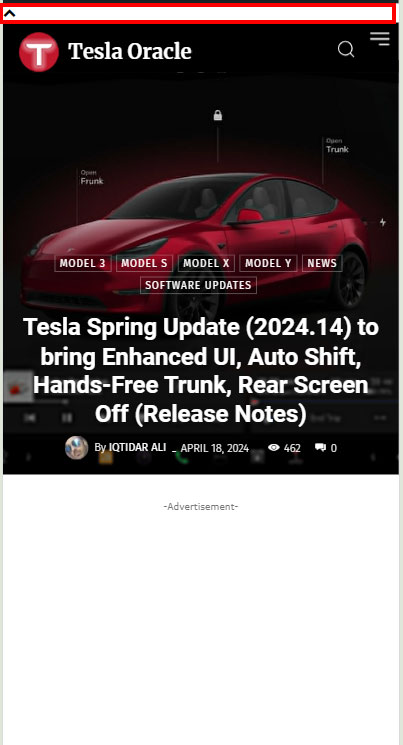
Website: https://www.teslaoracle.com/
 Felipe Moretti
 Hello, this JetPack function no longer exists, the platform has been updated. I had tried that. Unfortunately I can’t restore the theme toolbar again after the last update.
 Bettina
 Hello!
This situation appears when you are using the mobile theme plugin and the cache plugin that you have does not feature options for a separate mobile theme plugin therefore do not know when to deliver the mobile version and when to deliver the desktop version.
We have 3 options available for mobile versions that you can use:
1. Responsive version: A responsive version of your website looks similar to the desktop version. TagDiv Composer is used to edit the page.Click on the mobile viewport: https://www.screencast.com/t/XDQJedlggSB. There, you can see your mobile version and edit or adjust the elements to look better.
2. Mobile pages: https://tagdiv.com/newspaper-10-3-7-update-brings-customizable-and-fast-mobile-pages
3. Mobile theme plugin: The Mobile Theme is a performance-optimized theme included in the main Newspaper theme that only loads on mobile devices. It comes with its own templates and designs for pages, posts, categories, etc., so your current templates from the desktop theme will get converted to the mobile theme layout. Please see https://forum.tagdiv.com/the-mobile-theme/ and https://forum.tagdiv.com/mobile-theme-introduction/ for more information.
A full explanation is here: https://www.youtube.com/watch?v=SpGkOnJeNZY
If you need to use mobile version 1 or 2, then you need to uninstall the Mobile Theme plugin and AMP.
Thank you!
Bettina Hello @infocj!
You shouldn’t update that plugin. https://forum.tagdiv.com/import-revolution-sliders-on-demos-prebuilt-websites/ -> https://forum.tagdiv.com/how-to-install-revolution-slider-v5/
That WpBakery plugin is deprecated and it is not used anymore in the latest update. Please check those screenshots to know how to shift from WPBakery to Composer: https://www.screencast.com/t/6xLVMmlsY ; https://www.screencast.com/t/zWHrRmK1LQC ; https://www.screencast.com/t/vuFdT9Stx ; https://www.screencast.com/t/DWbSf3qj ; https://www.screencast.com/t/QuHyGccTK71v
They are cropped automatically: https://forum.tagdiv.com/featured-image/ ; that’s why you can disable the thumbs you are not using. Set up your thumbs from Newspaper -> Theme panel -> Block settings -> Thumbs on modules/blocks. If you deactivate a dimension from there, next time when you will upload an image, it will not be resized to that dimension.
After changing the thumbnail sizes you need to regenerate your thumbnails using a plugin. Check this: https://forum.tagdiv.com/using-the-theme-with-existing-content/
Unfortunately, no. Read more info here: https://forum.tagdiv.com/newspaper-theme-support/
Thank you!
 infocj
slider revolution has any license code to register? as can’t update it automatically and latest version isn’t available in theme pack, wordfence says the plugin has a security vulnerability, same with the WPBakery Page Builder.
if i deactivate all the thumb on modules/blocks and regenerate the thumbnails what images will be displayed in modules/blocks? the default thumbs from wordpress? as are generated thousands of images because of those modules/block sizes.
also is there any support for the theme outside the forum? creating topics on and on and waiting sometimes over 1h for response isn’t always good.
 Anamaria
 Hi,
Using our theme, you can choose from 3 mobile versions
-> mobile responsive => https://www.screencast.com/t/oJ2ShOp47
-> mobile theme plugin => https://forum.tagdiv.com/the-mobile-theme/
-> mobile page => https://tagdiv.com/newspaper-10-3-7-update-brings-customizable-and-fast-mobile-pages/ The option that you need to use.
Suppose you created the mobile pages with tagDiv Composer. In that case, when you install the Mobile Theme plugin, your pages will be overwritten by the plugin (the mobile theme comes with its templates for page, post, category, etc, so your current templates from the desktop theme will get converted to the mobile theme layout, the page content is made without builders in mobile editor => https://www.screencast.com/t/xbgZG8kH also, the options that are provided to edit the mobile theme version are limited (this keeps the things simple)).
This is a video about Responsive Newspaper Theme, AMP & Mobile Theme, Mobile Pages & Templates -> https://www.youtube.com/watch?v=SpGkOnJeNZY.
So, the mobile responsive is what you see when that you select the viewport on phone => https://www.screencast.com/t/matV17hH, so some settings may apply for each viewport(where is the border blue), and others are not(where the border is black).
The mobile page has the mobile templates from Cloud Library => https://www.screencast.com/t/YCcZ8rL8
The Mobile responsive version of the theme and the mobile page editor can be edit with tagDiv Composer, the mobile theme plugin cannot.
For example, you can have the mobile theme plugin activated and use the mobile page/mobile responsive version for the homepage/pages, but for the categories pages/404 page, you can’t use the mobile page/mobile responsive version if you have the mobile theme plugin activated.
So, if you want to design the pages with tagDiv Composer, you can use the mobile page or mobile responsive version.
Thank you!
 marclaude
 Dear Bettina,
Is there any update about this issue?
Google isn’t showing anymore our reviews due to this product snippet review issue.
How can I receive support on this?
Looking forward to hearing from you soon,
Best Regards,
Marco
-
This reply was modified 2 years by
marclaude.
Anamaria Hello,
We recommend using PHP version 8.0 or 8.1; with version 8.3, certain issues may arise.
1. You need to download the latest version from Themeforest and perform the update manually. We recommend conducting the update on a staging website because there have been many changes from version 9.1 to 12.6.5. Additionally, the auto-update option was only added later in version 10.3.x.x.
2.No, you don’t need to purchase a new license, as updates are for a lifetime if the license is valid.
3. The license remains the same; only the theme version differs, so you can use the same license on the website where you currently have that older version.
4. Over time, vulnerabilities have been discovered and resolved through updates. You can find the changelog for each version here -> https://tagdiv.com/newspaper/
Unfortunately, the tagdiv Composer may be disabled due to malware, so certain plugin files may be targeted. However, this can only be seen in the error log file. I recommend that after updating the theme, WordPress, and PHP, you use Wordfence to scan the website and block access to /wp-json/tdw/save_css
If an attacker wants to target this URL /wp-json/tdw/save_css they can do so. Even if the website uses a different theme, the attacker can still try that URL. We could add an option to enable/disable the Live CSS, and it will be considered. But for now in order to remove it this can only be done with a modification to the composer plugin. I think that all that removing it requires is to comment this line of code – https://prnt.sc/RtwvL5Nc4ikR -> https://prnt.sc/ymZmhdUfp57U But as I mentioned, the attacker can still try to access the URL.
Thank you!
Anamaria Hi,
If you want to update the theme, you should download the latest version of it from Theme Forest account and download it.
I recommend that you update the theme manually https://forum.tagdiv.com/how-to-update-the-theme-2/ via FTP/cPanel/File Manager, also if possible disable extra plugins during the theme update to avoid any problems that may arise and make sure that you have activated the tagDiv Standard pack plugin to keep the website’s look. You can try to update the theme on a staging website.
After you update the theme, you need to update the theme plugins too.
In the worst cases, the settings in the theme panel may be lost (there have been isolated cases), in these cases, after the theme plugins that were previously used are activated, you will have to use a backup for the theme panel -> https://forum.tagdiv.com/import-export-theme-settings/
If you want, you can contact our custom work team here, and they can help you update the theme safely: https://tagdiv.com/premium-customization-services/
Thank you!
Anamaria Hello,
You have the mobile theme plugin activated; please disable it.
Using our theme, you can choose from 3 mobile versions
-> mobile responsive => https://www.screencast.com/t/oJ2ShOp47
-> mobile theme plugin => https://forum.tagdiv.com/the-mobile-theme/
-> mobile page => https://tagdiv.com/newspaper-10-3-7-update-brings-customizable-and-fast-mobile-pages/ The option that you need to use.
Suppose you created the mobile pages with tagDiv Composer. In that case, when you install the Mobile Theme plugin, your pages will be overwritten by the plugin (the mobile theme comes with its templates for page, post, category, etc, so your current templates from the desktop theme will get converted to the mobile theme layout, the page content is made without builders in mobile editor => https://www.screencast.com/t/xbgZG8kH also, the options that are provided to edit the mobile theme version are limited (this keeps the things simple)).
This is a video about Responsive Newspaper Theme, AMP & Mobile Theme, Mobile Pages & Templates -> https://www.youtube.com/watch?v=SpGkOnJeNZY.
So, the mobile responsive is what you see when that you select the viewport on phone => https://www.screencast.com/t/matV17hH, so some settings may apply for each viewport(where is the border blue), and others are not(where the border is black).
The mobile page has the mobile templates from Cloud Library => https://www.screencast.com/t/YCcZ8rL8
The Mobile responsive version of the theme and the mobile page editor can be edit with tagDiv Composer, the mobile theme plugin cannot.
For example, you can have the mobile theme plugin activated and use the mobile page/mobile responsive version for the homepage/pages, but for the categories pages/404 page, you can’t use the mobile page/mobile responsive version if you have the mobile theme plugin activated.
So, if you want to design the pages with tagDiv Composer, you can use the mobile page or mobile responsive version.
Thank you!
 Fausto
 Hello,
Is there a way to hide the Single Post Modified Date when there’s no update? It’d be simpler than duplicate templates.
 pedroarmindo1
  Felipe Moretti
 yes, this is showing… but the Composer still doesn’t appear in the header to facilitate editing, I can even edit my Home, but I can’t edit the pages and publications because the TagComposer option doesn’t appear in the header, and this happened with the last updates.
 Pooja Dhawan
Hi,
How to update Newspaper – Version: 9.8 to latest version without losing data, i have over 480 post on my website.
Today i have done renew of my support after payment of 6 month charges.
Please help me with the process, as on 9.8 version update option is not showing.
Anamaria Hi,
With tagDiv Composer, you can add the element Single Post Modified Date in Single Post Template, and you can change the additional text in “Last updated on” => https://www.screencast.com/t/EvfUQMfzkd, and the Single Post Modified Date will show you the last time you edited that post => https://www.screencast.com/t/j74uz43paZj
-> https://forum.tagdiv.com/single-post-shortcodes/
You can duplicate the single post template, add the modified date, and assign a template only when you modify the posts to show the modified date.
Thank you!
 tusaludguia
 Hello Anamaría,
After reading your response, I can tell that it seems like a robotic reply and you didn’t read carefully what I mentioned about my issue.
You’re telling me to update the theme to the latest version 12.6.5, which doesn’t exist in this theme. I’ve attached some screenshots for you to verify.
https://prnt.sc/5PFGbCQKfeWQ
https://prnt.sc/Yza1ViLf444P
You’re asking me to use tools like Wordfence to scan my site when I also mentioned the tools I’ve used, and it doesn’t detect the code in the tagDiv Composer. I would like your response to actually help me, not one that seems like I’m being assisted by a robotic support.
Thank you very much.
 findbitter
Hi,
I would like to show updated time when i updated post. How can i setup this? I attach photo.
Thank you
 Atithya
Hi, in one of my website I am missing ‘ font from the website creating a character wherever this ‘ is used. This has happened after the website update. Is there anyway I can bring this back.
Examples: https://www.opensourceforu.com/2015/10/fwbackups-%c2%96-back-up-files-with-ease/
https://www.opensourceforu.com/2015/10/fwbackups-%c2%96-back-up-files-with-ease/
 Ashot
AshotHello.
At the moment, the Newspaper theme version 9.1 is installed and used on my site. WordPress has been updated to version 6.4.4. Php version 7.4.33 is used on the hosting.
There are more and more problems with the old version, and in order not to deal with them, it would be nice to update the theme version. There is an opportunity to upgrade the php version on the hosting up to 8.3. WordPress will also be updated before updating the theme.
But I have a number of questions, as some points are unclear.
1) I bought the Newspaper version 9.1 theme 5-6 years ago or more. There is an activation key and it is applied to the theme on the site. But on the tabs of the theme settings, I do not see where it would be possible to update between versions or sub-versions from the administrative part of the theme. As shown in the tutorial on updating the theme. That is, I will most likely have to update the new version via Ftp. Tutorial I read how to do it.
2) To get the new version, will I have to pay for it in full, as a new separate product? That is, not as an update for an already purchased product at any discount or reduced cost, for example.
3) Will the activation key be new or will the old one remain, which is currently activated by the current version of the theme?
4) And I want to understand whether the update will solve the problems that currently exist with the theme and its plugins.
Currently, there is a vulnerability issue for new malware in older versions. Malware was encountered and something was partially defeated by making edits to the theme code, something was limited by banning the REST API for the site, since installing a clean WordPress and a clean theme did not bring results.
And periodically, the tagDiv Composer plugin is deactivated by itself. It occurs at different times of the day and with different frequency by day. I have not been able to detect dependence on anything.
Therefore, I would like to understand that updating to the latest version of the theme has fixes for these problems. At least a security solution against the current malware attack and infection mechanisms. And it will be very cool if the update also solves the problem of self-deactivation of the plugin. Otherwise, it greatly spoils the appearance of the site when the Composer plugin is disabled.
I hope for understanding and help in answering my questions.
As soon as everything becomes more or less clear, I will send the answers to my management so that they pay for the new version and we will receive the new version of the topic as soon as possible.
Ashot Thanks) I will clarify some details for the update in a separate discussion.
