
- NewspaperHow to update a plugin
- NewspaperHow to update the WPBakery Page Builder plugin
- NewspaperHow to Update the Newspaper Theme
- NewspaperSingle Post Excerpt
- NewspaperWP Rocket and Newspaper Theme: Optimization Guide
- NewspaperCredit System
- NewspaperHow to use the Bing Maps API
- NewspaperModules Builder in Newspaper Theme
- NewspaperCreate a frontend submission form
- NewspaperCustom Fields Support
- NewspaperFlex Block Settings Guide
- NewspapertagDiv Opt-In Builder
- NewspaperHow to use the YouTube API
- NewspaperDefault Category Settings
- NewspapertagDiv Composer Tutorial
- NewspaperHow to Set the Image Avatar
- NewspaperUnique Articles
- NewspaperFacebook Share
- NewspaperCache plugin – install and configure
- NewspaperFeatured Image, Video or Audio
 Bogdan B.
 Hello,
Please update your theme to the latest version as the version you currently have does not support the latest version of WP.
Please use this guide: https://forum.tagdiv.com/how-to-update-the-theme-2/
Thank you!
 gilvancn
I updated the Newspaper from version 7.4 to 8.5.1.
After updating, “GENERAL MODAL IMAGE” is enabled but does not work.
Only works when images are in gallery.
WordPress version: 4.9.1
—
TRADUZIDO DE:
Atualizei o Newspaper da versão 7.4 para 8.5.1.
Após a atualização, o “GENERAL MODAL IMAGE” está habilitado mas não funciona.
Só funciona quando as imagens estão em galeria.
Versão do WordPress: 4.9.1
 yanaguita
 But I do not use Google AdSense on my website … Is it a native feature of Newspaper 4? Is there any way I can update (from http to https) this line of code?
Bogdan B. No problem. Just let us know if it still will not update.
Thanks.
Bogdan B. Hello,
If you want your logo not to be scaled down, please use one of the full logo header styles (9, 10 or 11) The other header styles will not show the full logo. This has been the case from the very start. It has nothing to do with the new update.
Thank you!
 Sergej
Why is my logo automatically scaled down to 300×157 after the update?

Regards
 fenomeno0chris
 I have updated the whole theme manually, by deleting the old theme and uploading the new one. I did the same thing with js_composer, td-social-counter and td-speed-booster. And of course I haven’t changed any css code.
Bogdan B. Hello,
The instagram widget is not a live widget. It will only make a few requests per day to keep server load to a minimum. Please give it a bit of time to update.
I can’t see any instagram widgets on your site at the moment though.
Thanks.
Bogdan B. Hello,
Please contact us on our email address at contact@tagdiv.com and provide a link to your site and wp-admin (login information and admin rights) so we can login and investigate. Please also include a link to this conversation.
Please also update the multi purpose plugin by disabling and deleting the current one you have and installing it again from the theme panel plugins section.
Thank you!
 beppepicaro
 I haven’t noticed that on my side, but I am still “offline” with mine. Anyway did you reinstall all the plugins? Maybe “they” forgot to instruct us to update those as well. Or maybe you made some changes to the css file?
fenomeno0chris Hello my problem fits perfectly to the headline of this topic, so I hope you’re not angry beppepicaro, if Im using your place to describe my issue.
Yesterday Ive updated my theme to 8.5.1 and its running fine except one thing.
The mobile layout has shrunken a little bit and it doesn’t look as good as before:
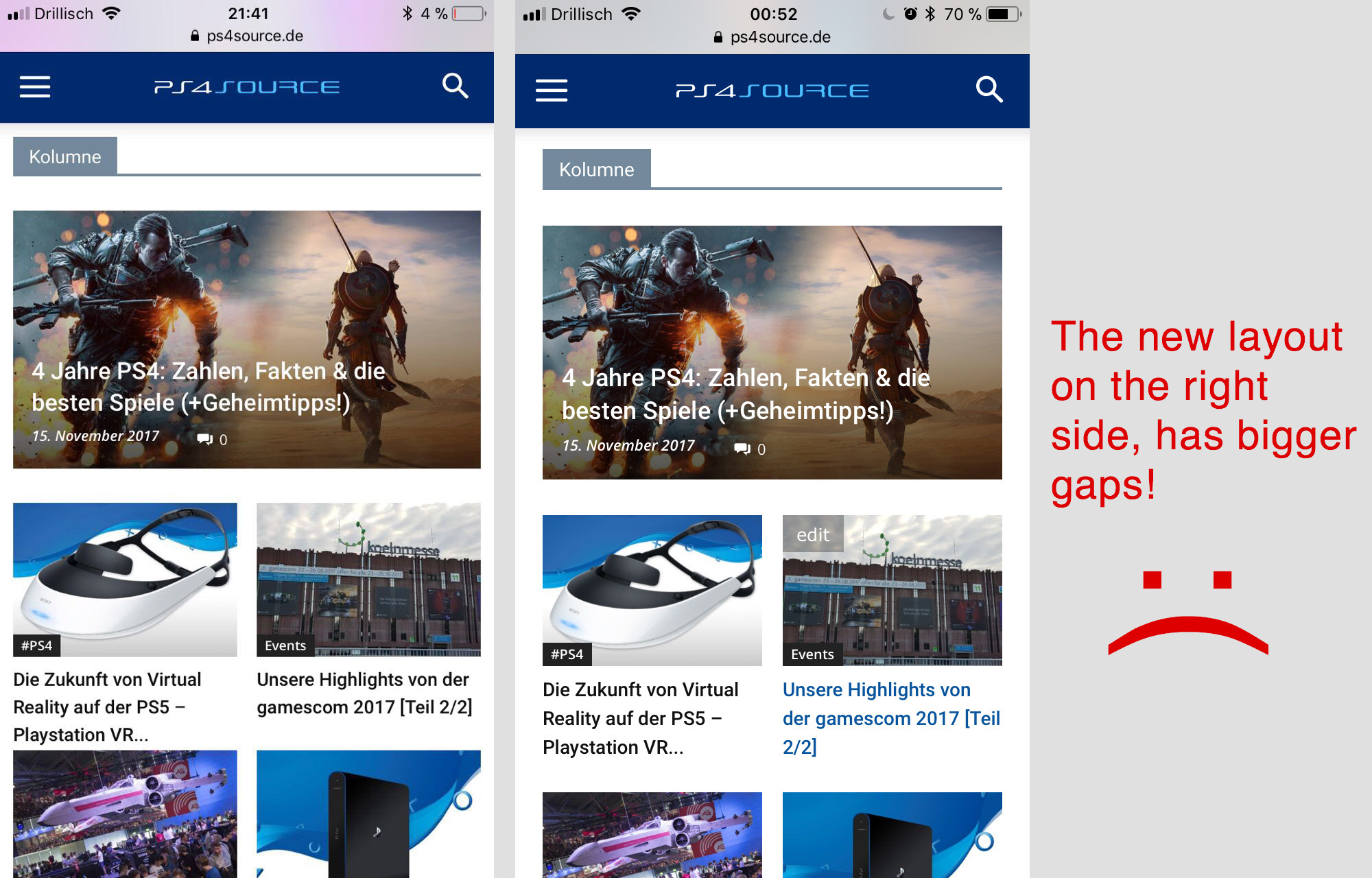
How can I fix it to the previous look?
 Catalin
 Hello masterskg,
Make a new fresh install via FTP way and also, ensure that all of the plugins have been updated to the latest version of it. Also, if you are using some untested plugins, disable all of them, leave just to active only the plugins that come bundled with the theme core files, clear all the caches and check the results. This plugin has been fully tested and should work as expected.
Thanks for the message!
Catalin Hello videomaker,
Please make sure that you have fully update your theme via FTP way, inclusive the main plugins from the theme in order to achieve best theme results. Try to update again after you have downloaded the latest packet from Theme Forest and check the results. Should work as expected, without any errors. I have tested on my side and works properly.
Thanks for the message!
Catalin Hello a h,
Make sure that you have correctly made your theme update via FTP way according to our documentation, check your system status to be increased. If the problem is still there, please send us an email at contact@tagdiv.com with your log-in information (wp-admin) so we can further inspect it closer your setup page. Provide there the link to this topic so we can quickly identify you.
Thanks for the message!
Bogdan B. Hello,
You should also update the multi-purpose plugin. Please disable and delete your current version of the plugin and then install it again from the theme panel plugins section.
Thank you!
 zdrave
Hello,
I was bought newspaper theme and everything work perfectly with version 7. But when I updated version 8 problems begin to arise. First slider revolution not working like in version 7 I cannot make images to be full width. And second, in chrome browser, main content theme do not stay in the center but stay left or right. This is my link so you can see it https://poshbelgrade.com also if needed I will send you png to prove it.
Thanks.
Bogdan B. Hello,
If you updated using the patch, the file td_sub_footer_template_1.php must also be replaced. Please download the theme from envato and copy the file from parts/footer to your install.
Thank you!
Bogdan B. You can simply replace the theme files as you would when you update. Please use this guide: https://forum.tagdiv.com/how-to-update-the-theme-2/ and choose the wordpress method.
Then remove any custom code from the theme panel.
Thank you!
Bogdan B. Hello,
If you altered the theme files and you do not know what you modified, reverting to the default code is simple. Update your theme and replace all files with the original files. Use this guide: https://forum.tagdiv.com/how-to-update-the-theme-2/
Thank you!
Bogdan B. This means you did not update to the new version. It is a brand new element that comes with newspaper 8.5 and the new multi-purpose plugin. Please update your theme using this guide: https://forum.tagdiv.com/how-to-update-the-theme-2/
Thank you!
Bogdan B. Hello,
There was an issue with newspaper 8.5 and the new multi-purpose plugin. These were however updated so you need to update the theme to the latest version (8.5.1) and then update the multi-purpose plugin as well.
Thank you!
 Moranton
 Anyway just to get a tech support rep to log into my site and poke around. Update what needs to be updated? I am running Newspaper on 4 different sites, all set up very similar and this is the only site I am having issues with.
 Aakash
 Update and check disable third party plugins too.. still not working also can you please let me know how to put banner add between post articles. As i have used once by putting it into Theme panel->ads> Article inline ad but still i want to put one more between content.
 Yeloby
Hello.
I have made a website with Newspaper theme, using the default black layout. The problem is that the Instagram-feed at the footer is not updating when I add new pictures.
The sites address is http://www.ymte.no. The site focuses mainly on news and humor, so Instagram is a necessity for the concept.
I have tried to change the Instagram info, but the feed is still stuck on the one test image I posted on Instagram with the main Instagram account.
I have also tried to erase caches and deactivate cache plugin. But the problem still persists.
 Afterglow
Hello,
Just updated to Version 4.2 and getting this message: “Weather widget Api key is empty. Configure this block/widget and enter an api key :)” on top of my pavlikeni.com? Why is this happening and how to fix?
Thanks.
