
- NewspaperHow to update a plugin
- NewspaperHow to update the WPBakery Page Builder plugin
- NewspaperHow to Update the Newspaper Theme
- NewspaperSingle Post Excerpt
- NewspaperWP Rocket and Newspaper Theme: Optimization Guide
- NewspaperCredit System
- NewspaperHow to use the Bing Maps API
- NewspaperModules Builder in Newspaper Theme
- NewspaperCreate a frontend submission form
- NewspaperCustom Fields Support
- NewspaperFlex Block Settings Guide
- NewspapertagDiv Opt-In Builder
- NewspaperHow to use the YouTube API
- NewspaperDefault Category Settings
- NewspapertagDiv Composer Tutorial
- NewspaperHow to Set the Image Avatar
- NewspaperUnique Articles
- NewspaperFacebook Share
- NewspaperCache plugin – install and configure
- NewspaperFeatured Image, Video or Audio
 Bettina
 Hello!
Then you can find the modal in td-composer/legacy/Newspaper/parts/header/td-login-modal.php in order to modify it how you’ll like.
Please note that any change you make in the theme files after update will be overwritten and you have to make the changes again. Better save the code somewhere and then apply it again after every update.
Thank you!
Bettina Hello @msakande!
If you use mobile pages, then you can have a mobile page to any cloud template. You can find and edit them in the Cloud Templates or while you see the pages in frontend: https://www.screencast.com/t/cI3kmlNrcklY
Thank you!
Bettina Hello @desirevp!
I’ve tested your website on Microsoft Edge browser and it seems to work good. Please make sure your browser has the latest update, delete the cache and see the results.
Thank you!
 Calin
Calin Hi,
About the code that you added, please remove those related to cart, in this way you can be sure that will not interfere.
From what I seen on your record and from the tests that I made it is like the cart is not updated only if you refresh the page.
Also, when you are logged the problem happens? If not it can also be from some settings from the cache plugin. It may be from the siteground optimizer settings.
Thank you!
 Anamaria
 Hi Tobias,
If you have that version, then there should be no problems with the update, but it is recommended that you have a full backup to all files and databases -> https://forum.tagdiv.com/how-to-update-the-theme-2/
Thank you!
Anamaria Hello @fwoedit,
Please let us know the result.
Also, please make a full backup to all files and databases before update.
Thank you!
 Backros
 Right. There is a section with instructions to do this manually “Update the theme via file transfer protocol (FTP)” https://forum.tagdiv.com/how-to-update-the-theme-2/#:~:text=Update%20the%20theme%20via%20file%20transfer%20protocol%20(FTP)
This is how I did it.
Make sure you follow those instructions explicitly!
 fwoedit
 Thank you, but mine doesn’t have the “Update” tab! ?
Backros  crisalrehe
 Hello, what I want to say is that I checked that my site has the plugin active and is updated, I also tried deleting it and activating it again, but the problem still persists. I include a screenshot with the error message
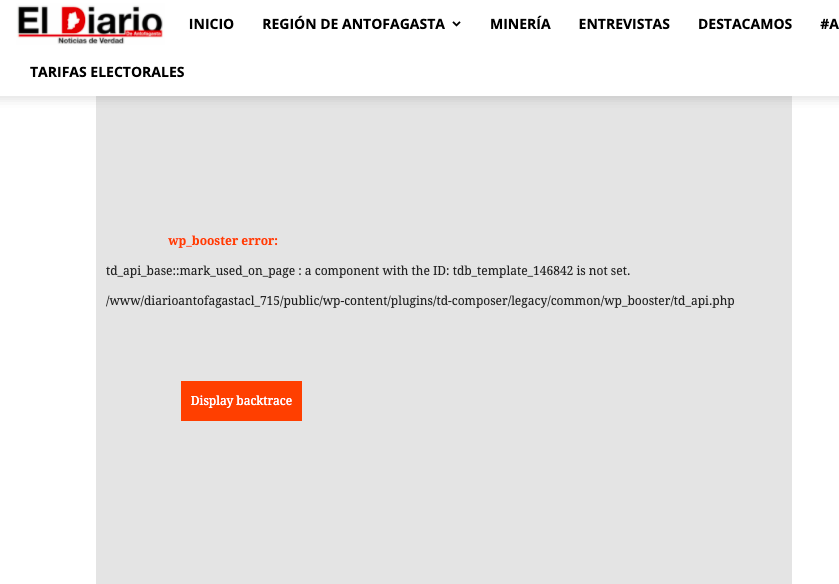
 Dibbes
Hi,
I managed to change the 404 response for non-existing / deleted posts to a 410 by modifying
wp-content/plugins/td-cloud-library/wp_templates/tdb_view_404.php
added : header($_SERVER[“SERVER_PROTOCOL”] . ” 410 Gone”);
It would be much better that I could that in the child-theme functions. As when the theme will update the code will be removed.
I would even prefer that I could create a special page for the 410 response like doing something like this:
$custom_410_page_ID = 76761;//Error 410 page ID
header($_SERVER[“SERVER_PROTOCOL”] . ” 410 Gone”);
header(“Refresh: 0; url=” . get_permalink($custom_410_page_ID));
Could you explain how I can add this functionality in the child theme?
fwoeditHow do I update Newspaper to the latest version?
?
 PoliticaMagazine
 the data has not been updated for several days
Bettina Hello @jozef !
From what I can see in your screenshot, it seems that you use the Mobile Theme plugin which can overwrite the design you build for your mobile view. If you deactivate the plugin, then it will show the responsive version of your desktop.
We have 3 options of mobile versions that you can use:
1. Responsive version: A responsive version of your website is looking similar like on desktop, edit the page with TagDiv Composer, click on the mobile viewport: https://www.screencast.com/t/XDQJedlggSB ; there you can see your mobile version and you can edit the elements there.
2. Mobile pages: https://tagdiv.com/newspaper-10-3-7-update-brings-customizable-and-fast-mobile-pages/
3. Mobile theme plugin: The Mobile Theme is a performance optimized theme included in the Newspaper main theme and it loads only for mobile devices. It comes with its own templates/design for page, post, category, etc so your current templates from the desktop theme will get converted to the mobile theme layout. For more details, please take a look here: https://forum.tagdiv.com/the-mobile-theme/ and https://forum.tagdiv.com/mobile-theme-introduction/
A full explanation you can find here: https://www.youtube.com/watch?v=SpGkOnJeNZY
You can choose to use which one is more affordable and useful for you.
Hope that helps you!
Thank you!
Anamaria Hi,
Normally without a cache plugin, it should update once per day, with a cache plugin it can take some more time.
Thanks!
 dimitrisv
 I did this, and it is still does not get updated. In carts that had history in them, but were abandoned, after deletion of the item the user also sees the past choices. I will post a video of the situation.
Anamaria Hi,
You can create a new mobile page, and now with content, and delete the mobile page which is blank -> https://tagdiv.com/newspaper-10-3-7-update-brings-customizable-and-fast-mobile-pages/ -> https://www.youtube.com/watch?v=SpGkOnJeNZY (03:11 – Mobile Templates & Pages)
Thank you!
 Haberton Medya
 (OBJ) symbol in the URL and title appears after 5.9 update…
Something is wrong, we need help.. When we adding posts it sometimes appear sometimes not appear…
Dont know what causes it to appear…
But as i read https://wordpress.org/support/topic/what-is-a-obj-on-yoast-seo-plugin/
I found when peaople change themes the problem is gone…
Site: https://haberton.com
We deleting the added OBJ’s manually…
So can you help us with this problem…
Anamaria I just answered here in your own topic: https://forum.tagdiv.com/topic/i-do-not-have-the-update-on-my-newspaper-and-i-still-have-ver-10/ please check it.
Thank you!
Anamaria Hello,
To have the automatic updates option, you had to have version 10.3.1 and from version 10.3.2 you could use this option -> https://tagdiv.com/introduction-to-newspaper-theme-automatic-updates/
Please try to do the update manually via FTP/cPanel -> https://forum.tagdiv.com/how-to-update-the-theme-2/
Also, please do a full backup of all files and databases before updating.
Thank you!
Bettina Hello Ethan!
Please make sure you updated the Opt-In Builder plugin too: https://forum.tagdiv.com/tagdiv-opt-in-builder/
Thank you!
Anamaria Hello,
I just verified your website and seems the social counter is updated -> https://i.imgur.com/btZ9BTs.png or did you set a fixed count?
Thank you!
 howmanywon
Theme: Royal pub
Wesbite URL: howmanywon.com
1. Logo on mobile
Although I was able to update the logo on the desktop using the global header, it isn’t updating on Mobile:
2. Blocks under the first section on mobile
There is a dark grey and cream block after the first section on mobile
3. White gaps between sections on mobile
Can I remove these black space gaps on mobile?
https://imgur.com/SpVbn9T
https://imgur.com/tNJ04oB
4. Featured image showing on post/article on mobile
Can I remove this? I was able to on desktop
5. Large blank white space on desktop
On desktop, before the ‘Greatest golfers’ section there’s a large white gap I’d like to remove the size of.
Thank you for your help!
 Rafael
 Hi everyone,
So I have a somewhat similar issue. However, doing what otggamer mentioned didn’t resolve mine. I’m on the latest version of Newspaper 11.4.
Basically, I migrated from one host to another. Now, after the migration, if I go to:
Theme Panel > Header > Logos & Favicon, all the logos (desktop and mobile) are showing a URL of “https://wordpress-722984-2411204.cloudwaysapps.com/wp-content/uploads/2018/…..”.
There are 3 issues with that:
1) The URL points to a temporary Cloudways link. However, I’ve already changed my DNS away from the Cloudways temporary WP name to stluciatimes.com. I’ve already updated my permalink structure. I’ve also confirmed that all URLs are working correctly on my site. Therefore, the URLs should point to “https://stluciatimes.com/wp-content/uploads/…”.
2) The folders that the URLs are pointing to (year of 2018) have all been deleted. However, I have already re-uploaded a new set of logos.
3) Whenever I try to change the logos to the new ones I’ve uploaded and click save, all the URLs automatically go back/reset to the old “https://wordpress-722984-2411204.cloudwaysapps.com/wp-content/uploads/2018/…..” once I refresh the page.
Any assistance or ideas that could help would be awesome.
Thanks so much!!
Regards,
Rafael
howmanywon I have some more issues following on from the above:
1. Logo on mobile
Although I was able to update the logo on the desktop using the global header, it isn’t updating on Mobile:
2. Blocks under the first section on mobile
There is a dark grey and cream block after the first section on mobile
3. White gaps between sections on mobile
Can I remove these black space gaps on mobile?
https://imgur.com/SpVbn9T
https://imgur.com/tNJ04oB
4. Featured image showing on post/article on mobile
Can I remove this? I was able to on desktop
5. Large blank white space on desktop
On desktop, before the ‘Greatest golfers’ section there’s a large white gap I’d like to remove the size of.
Thank you for your help!

