
- NewsmagHow to update a plugin
- NewspaperHow to update a plugin
- NewsmagHow to update the theme
- NewsmagHow to update the WPBakery plugin
- NewspaperHow to update the WPBakery Page Builder plugin
- NewspaperHow to Update the Newspaper Theme
- Apitd_api_top_bar_template::update_key
- Apitd_api_top_bar_template::update
- Apitd_api_single_template::update_key
- Apitd_api_single_template::update
- Apitd_api_footer_template::update_key
- Apitd_api_footer_template::update
- Apitd_api_smart_list::update_key
- Apitd_api_smart_list::update
- Apitd_api_thumb::update_key
- Apitd_api_thumb::update
- Apitd_api_category_top_posts_style::update_key
- Apitd_api_category_top_posts_style::update
- Apitd_api_category_template::update_key
- Apitd_api_category_template::update
 Bettina
 Hello!
I recommend you to make a backup and update plugins and the theme via file transfer, so that you don’t face any error: https://forum.tagdiv.com/how-to-update-the-theme-2/
Thank you!
Bettina Hello!
I recommend you to make a backup and update plugins and the theme via file transfer, so that you don’t face any error: https://forum.tagdiv.com/how-to-update-the-theme-2/
There could be a plugin conflict. Please make sure you use only one builder the TagDiv Composer.
Thank you!
Bettina Hello!
I recommend you to make a backup and update plugins and the theme via file transfer, so that you don’t face any error: https://forum.tagdiv.com/how-to-update-the-theme-2/
If that problem is still there, then please execute these steps:
1. disable TagDiv Composer
2. uninstall(delete) TagDiv Composer
3. clear cache (if cache plugin exists)
4. install TagDiv Composer
5. activate TagDiv Composer
6. clear cache (if cache plugin exists)
Thank you!
 LPresse
Hello,
I have updated to the latest version of Newspaper 11.3.2, but images doesn’t appears on Home Page.
What’s wrong ?
My licence is OK. Plugins are updated.
 Calin
Calin Hi,
Please accept our humble apologies.
We take it extremely seriously as we understand the disruption caused in your services. We have taken down the DRM automated system, deleted the image, and released an updated version – Newspaper 11.3.2. – to fix and prevent this issue in the future. The update is already available for you.
If there is anything else with that we can help please let us know!
Please accept our apologies!
Thank you for understanding.
Calin Hi,
We are sorry for any problems that we caused. Also we have released an updated version – Newspaper 11.3.2. – to fix and prevent this issue in the future.
Unfortunately, for the moment the td-cloud-library can not be set in a child theme, sorry! But using the cloud menu, the subcategories can be set with tagDiv Composer, so it should not bee need to edit the files -> https://i.imgur.com/hNGAzKX.jpg
Thank you!
 encodia
 Hello,
I have updated to the very last version of NewsPaper, but the mentioned error is still there.
You should find the screenshot here: https://snipboard.io/O54sTo.jpg
The error goes away by deactivating the WordPress SEO plugin (Yoast).
Hope it helps.
Bettina Hello Stevenson!
For the page speed, I can recommend you some solutions in order to increase the score.
Our developers are working a lot to improve the page speed in every update.
Also, to increase the page speed you can check these similar topics for more solutions:
– https://www.infophilic.com/get-almost-100-pagespeed-newspaper-theme/
– https://forum.tagdiv.com/topic/score-100100-pagespeed-with-newspaper-wordpress-theme/
– https://developers.google.com/speed/docs/insights/v5/about
– https://www.youtube.com/watch?v=tnkVapqhIHc
Please note that page speed is not covered by the support team: https://forum.tagdiv.com/newspaper-theme-support/
Thank you!
Bettina Hello!
Thanks @b14 for the clarification. You can check the update of our message here: https://forum.tagdiv.com/topic/solution-license-key-is-not-registered/
We are sorry for the inconvenience created!
Bettina Hello!
Thanks @B14 for the clarification. You can check the update of our message here: https://forum.tagdiv.com/topic/solution-license-key-is-not-registered/
We are sorry for the inconvenience created!
Bettina Hello!
Let me explain you which options of mobile versions are:
1. Responsive version: A responsive version of your website is looking similar like on desktop, edit the page with TagDiv Composer, click on the mobile viewport: https://www.screencast.com/t/XDQJedlggSB ; there you can see your mobile version and you can edit the elements there.
2. Mobile pages: https://tagdiv.com/newspaper-10-3-7-update-brings-customizable-and-fast-mobile-pages/
3. Mobile theme plugin: The Mobile Theme is a performance optimized theme included in the Newspaper main theme and it loads only for mobile devices. It comes with its own templates for page, post, category, etc so your current templates from the desktop theme will get converted to the mobile theme layout. For more details, please take a look here: https://forum.tagdiv.com/the-mobile-theme/ https://forum.tagdiv.com/the-mobile-theme/
A full explanation you can find here: https://www.youtube.com/watch?v=SpGkOnJeNZY
For the page speed, I can recommend you some solutions in order to increase the score.
Our developers are working a lot to improve the page speed in every update.
Also, to increase the page speed you can check these similar topics for more solutions:
– https://www.infophilic.com/get-almost-100-pagespeed-newspaper-theme/
– https://forum.tagdiv.com/topic/score-100100-pagespeed-with-newspaper-wordpress-theme/
– https://developers.google.com/speed/docs/insights/v5/about
– https://www.youtube.com/watch?v=tnkVapqhIHc
Please note that page speed is not covered by the support team: https://forum.tagdiv.com/newspaper-theme-support/
Thank you!
Bettina Hello!
Please check our documentation about the Mobile Theme: https://www.screencast.com/t/dwFVKBJYdrW6 -> https://forum.tagdiv.com/mobile-theme-introduction/
Let me explain you which options of mobile versions are:
1. Responsive version: A responsive version of your website is looking similar like on desktop, edit the page with TagDiv Composer, click on the mobile viewport: https://www.screencast.com/t/XDQJedlggSB ; there you can see your mobile version and you can edit the elements there.
2. Mobile pages: https://tagdiv.com/newspaper-10-3-7-update-brings-customizable-and-fast-mobile-pages/
3. Mobile theme plugin: The Mobile Theme is a performance optimized theme included in the Newspaper main theme and it loads only for mobile devices. It comes with its own templates for page, post, category, etc so your current templates from the desktop theme will get converted to the mobile theme layout. For more details, please take a look here: https://forum.tagdiv.com/the-mobile-theme/ https://forum.tagdiv.com/the-mobile-theme/
A full explanation you can find here: https://www.youtube.com/watch?v=SpGkOnJeNZY
Thank you!
Calin Hi,
We are sorry for those problems. We understand that you’ve worked hard for your project, and this should not have happened.
We have taken down the DRM automated system, deleted the image, and released an updated version – Newspaper 11.3.2. – to fix and prevent this issue in the future. The update is already available for you.
Also if you need help with anything related to the theme, please let us know and we’ll help you as soon as possible!
Please accept our apologies!
 artsetsu
 hi update done. working fine now. but the problem is now when i share any post from website https://whatson.guide to any social media like see the screenshot> https://imgur.com/9Sfur4z
 yesil112
There has been no problem so far. But the last update was not successful. I added a screenshot.
 hajs200
Footer contents disappeared as the theme was updated.
Before the theme was updated, Footer contents could be created and modified in Theme panel > FOOTER.
In the updated theme, it seems that footer contents can be managed with CLOUD LIBRARY TEMPLATE.
Is there any way to revive my lost footer contents?
I’m managing multi-site using the Newspaper theme, and all multi-site footer contents are gone.
I would appreciate it if you could answer.
 foreclosurepedia
 I have had problems in the past and after multiple posts and learning of the info inside of the tutorials I have pretty much figured out how things work and Newspaper powers my News agency. Updates crash because you have to reinstall all the plugins from the Newspaper Plugins page which ought to be either fixed with an automatic download reinstall feature or at least put in ALL BOLD CAPS when the updates issue out. Does that make it a bad product? No, just means it should be addressed. Analytics, etc. are best mastered by Google Site Kit which is free and built by Google. Try out their ticketing system for help and at the end of the day, $59 is an investment which writes off on your taxes at the end of the year if you are running a legit business. Just my FYI.
 dronesinsite
Hi,
If i update my site i see gibberish code after
how can i update the theme and plugins while not having anything changed or site broken?
 PRAGRAN
My theme is unable to update from 11.2 to 11.3.2 version, it prevents me from editing the website because the tagDiv composser is not working. please help me
 Miroslav Glavić
 You should not be doing updates on a live site. Have a testing site, do it there and if things go well then on the live site.
Miroslav Glavić You should not be doing updates on a live site. Have a testing site, do it there and if things go well then on the live site.
 msostar
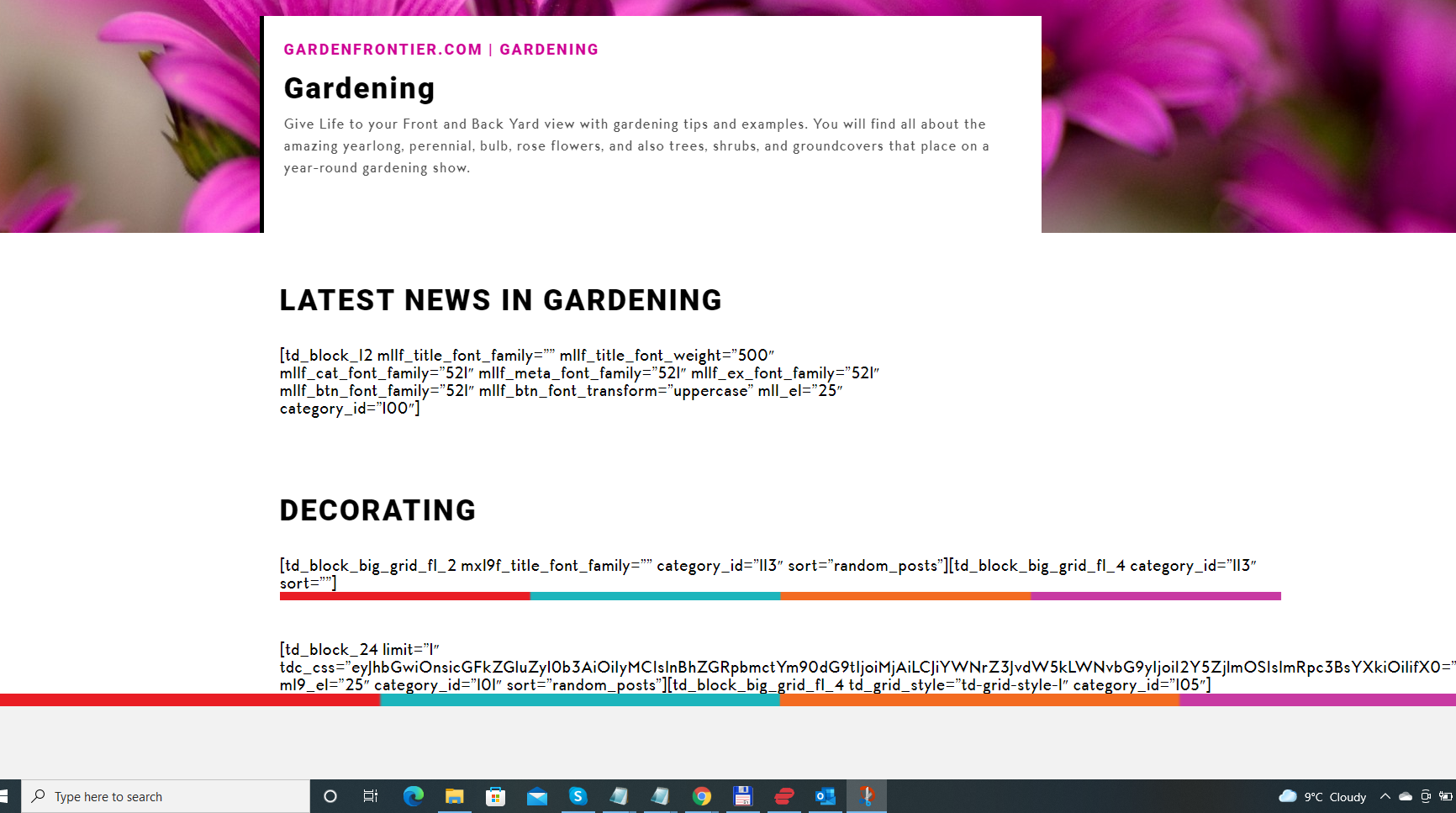
After the debacle with the “Ilegal license” I bought another license and updated it to the latest version.
However, after the update, my Home page got mangled and all I could see were Td_block entries with some strings of letters and numbers.
I need someone from the DEV team to take care of this with utmost urgency.
 saf
safEvery time my plugins need updating, my website disappears and says that I haven’t paid for a licence key. It’s extremely embarrassing. I’ll log in and update my plugins, I double key the key is still active and then this goes away. But my website is my business and I don’t understand why this keeps happening every time my plugins need updating but I have a licence key??
 dimitrisv
Hello,
Most of us when building sites that rely on their speed to get better google ranking, are concerned about the useless includes that load without meaning the pages. One of this case I notice is the inclusion of revolution slider includes
https://pathologia.eu/wp-content/plugins/revslider/public/assets/js/rs6.min.js?ver=6.5.9
In each and everypage – actually this useless js (for all the pages in the site that I am interested) – accounts for the most traffic by a single element. I use revolution slider not in the homepage, but in a page that account of 0.01 of the visits.
I would like only the pages that actually have revolution slider to have this code (together with the css etc) included.
Is there a way to do this without breaking the theme after updates?
Thank you!
Dimitris
 beattienao
Hello Team,
I have an issue with Widget. After automatical update to Version 13.1, from the WordPress dashboard, I enter “theme -> Widget”, I see it was loading, and shown many errors as attach screenshot.
“td_… has error and not working fine. Please use the programming tool to check”
Please support me to solve.
Thank you very much!
Att screenshot error: https://uphinh.org/image/error.TiD8LI



