- NewsmagHow to update a plugin
- NewsmagHow to update the theme
- NewsmagHow to update the WPBakery plugin
- NewsmagCategory templates
- NewsmagWhat’s included in Newsmag theme package
- NewsmagAjax view count
- NewsmagSmart Lists
- NewsmagFeatured images
- NewsmagFeatured image or video
- NewsmagModal window
- NewsmagtagDiv slider gallery
- NewsmagVideo playlist
 Anamaria
 Hello, David
Using our theme you can choose from 3 mobile versions
-> mobile responsive => https://www.screencast.com/t/oJ2ShOp47
-> mobile theme plugin => https://forum.tagdiv.com/the-mobile-theme/
-> mobile page => https://tagdiv.com/newspaper-10-3-7-update-brings-customizable-and-fast-mobile-pages/
If you created the mobile pages with tagDiv Composer, then when you install the Mobile Theme plugin, your pages will be overwritten by the plugin (the mobile theme comes with its templates for page, post, category, etc so your current templates from the desktop theme will get converted to the mobile theme layout, the page content is made without builders in mobile editor => https://www.screencast.com/t/xbgZG8kH also, the options that are provided to edit the mobile theme version are limited (this keeps the things simple)).
This is a video about Responsive Newspaper Theme, AMP & Mobile Theme, Mobile Pages & Templates -> https://www.youtube.com/watch?v=SpGkOnJeNZY
So, the mobile responsive is what you see then that you select the viewport on phone => https://www.screencast.com/t/matV17hH, so some settings may apply for each viewport(where is the border blue), and others are not(where the border is black).
The mobile page has the mobile templates from Cloud Library => https://www.screencast.com/t/YCcZ8rL8
Mobile responsive version of the theme and the mobile page editor can be edit with tagDiv Composer, the mobile theme plugin not.
For example, you can have the mobile theme plugin activate and use the mobile page/mobile responsive version for the homepage/pages, but for the categories pages/404 page you can’t use the mobile page/mobile responsive version if you have the mobile theme plugin activate.
So, if you want to design the pages with tagDiv Composer, you can use the mobile page or mobile responsive version.
Better deactivate the mobile theme plugin and see the results, and assign the mobile page for page, like this => https://www.screencast.com/t/lektAhyjd
Also, clear your cache.
Hope this helps you!
Thank you!
 katsar0v
 Hello Vlad,
if the fonts cannot (or shouldn’t) be removed, how can I add “font-display: swap” to all the @font-face styles in the theme? It would be great if you could do this in an update of the theme so it is optimized for pagespeed.
There are a lot of other minor things, that this theme can do, e.g. set an explicit width and height on image elements to reduce layout shifts and improve CLS (logo in header and footer).
Greetings,
Kristiyan
Anamaria Hello,
Most likely it will not work by installing the plugin, but if it needs to be implemented in code, then in these paths you can find the files for login.
wp-content/plugins/td-composer/legacy/Newspaper/parts/header/td-login-modal.php
wp-content/plugins/td-cloud-library/parts/tdb-login-modal.php
wp-content/plugins/td-composer/legacy/Newspaper/parts/register.php
Please note that any change you make in the theme files after the update will be overwritten and you have to make the changes again. Better save the code somewhere and then apply it again after every update.
Thank you!
 watztrending.technology@gmail.com
Currently there is only 1 Category Template e.g “Category Template – Magazine Pro” under the Cloud Templates. When I update this template, all the category layout would change. I wanted to have 2 or 3 types of “Category Templates” so I could customized a different category layout per category. Can you share how I could achieve this using the Newspaper Theme?
 creativeopole
 Hello,
In that case, please help me determine and find a solution that will allow you to transfer the description for the category to the list of posts.
Which files contain the container with this element, maybe just copy a file to the child theme and modify the transfer of the description to the posts there.
It is important that after the update it does not overwrite these settings.
Anamaria Hello,
This license is valid for the theme (as such it will work on any version of the theme).
On the ThemeForest, you can download only the last version of the theme 10.4, if you referring to the path 10.3.9.1_10.4 is included in the package, so if want to make the update manually, you need to upload the “Newspaper.zip” file to your “/Wp-Content/Themes” folder.
Thank you!
Anamaria Hello,
An update to the theme will be made this month, but I don’t know if this option will be introduced.
Also, you can check this topic about how you can add the ads https://forum.tagdiv.com/topic/multiple-ads-for-inline-article-ad/ and maybe can help you to achieve what you want.
Thank you for your understanding!
Anamaria Hello,
If I understood correctly, you made a mobile page for the homepage, so please make sure you set it => https://www.screencast.com/t/bYroSq7x8T9, also, the header and footer are taken from the standard ones. All you have to do is edit the mobile page, and in Manager (Website Manager) you need to import or the easy way is to convert the existent footer like this => https://www.screencast.com/t/HrjOBNayd -> https://www.youtube.com/watch?v=SpGkOnJeNZY (03:11 – Mobile Templates & Pages)
If you don’t mean this please give me more details, screenshots.
Thank you!
 Bettina
 Hello!
Our product demo was built to show a potential design of a website. If you want you can use it or not. Now, the customizations and adjustments are depending on each user.
If there is a problem with our theme we will fix it in the next updates.
Thank you for understanding!
Bettina Hello!
Please make sure you have the latest update for the theme, wordpress and plugins.
If your settings are missing from theme panel, then make sure you have Standard Pack installed and active.
Also, please make sure that all the requirements are met as you can see here: https://forum.tagdiv.com/requirements-for-newspaper/
Thank you!
Anamaria Hello,
I have added this suggestion to our list of suggestions and hope it will be added in future updates.
Also, an element that looks like your descriptions is the slide => https://www.screencast.com/t/4DJdfYYfLr
Thank you!
Anamaria Hello,
You can use a header template from Cloud Library, and you can customize it with tagDiv Composer => https://www.youtube.com/watch?v=HXQQygkCCJo
Also, you can use the standard header from Theme Panel, for this you need to have the Standard Pack plugin, but in the last update, this plugin is no longer required because the new demos are using cloud templates.
If you have a standard header style then you can enable the top bar from Theme Panel -> Header -> Top Bar => https://www.screencast.com/t/UzNU38uSE
but if you have a header from Cloud Library, then you need to add a row on the top => https://www.screencast.com/t/YfHuH8AZOX and design it with tagDiv Composer.
Hope this helps you!
Thank you!
Anamaria Hello,
We hope the update will be this month.
Keep in touch!
Thank you!
 jvfrance10
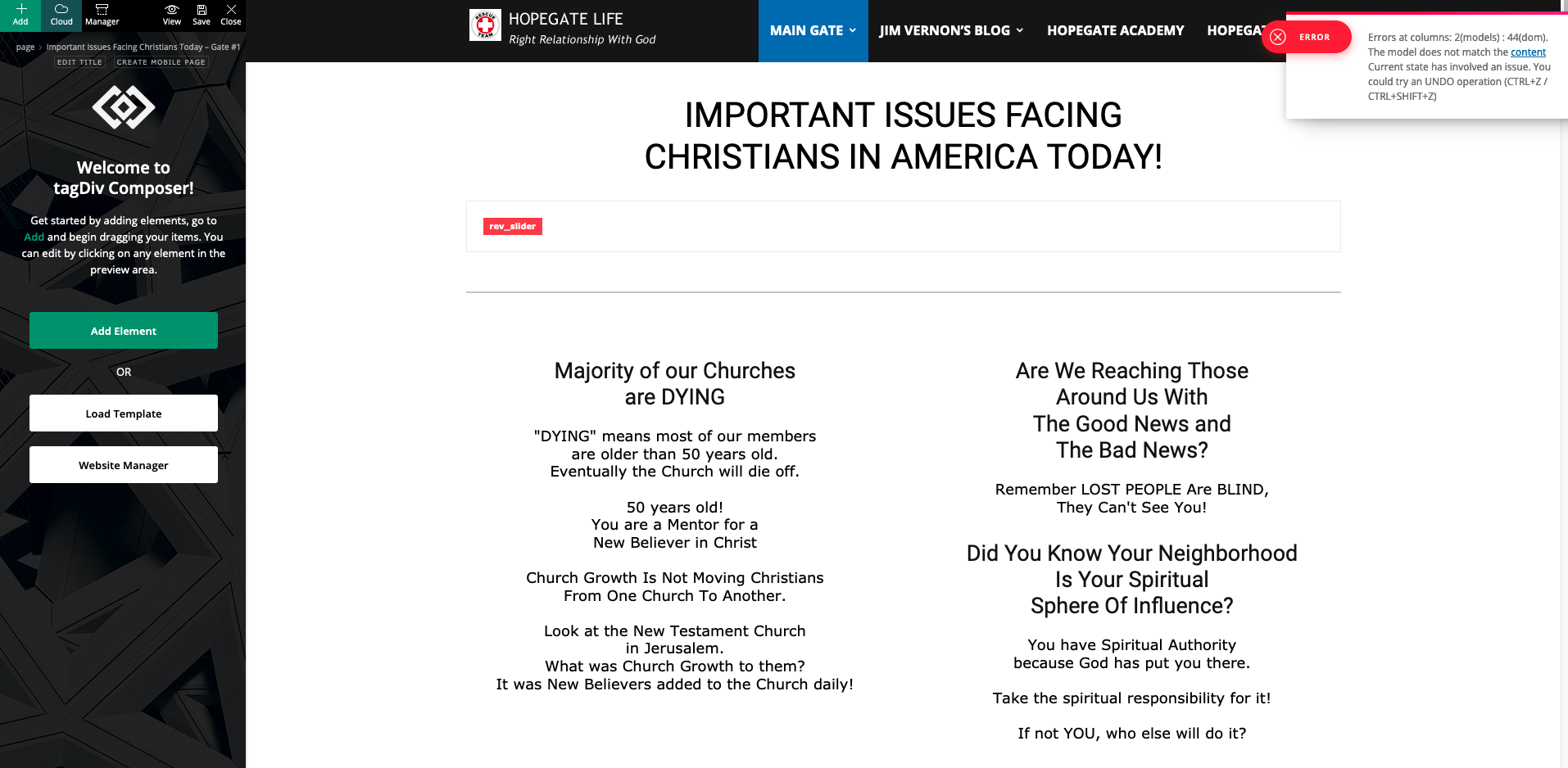
When Opening Page get following Error message:
Errors at columns: 2(models) : 44(dom). The model does not match the content Current state has involved an issue. You could try an UNDO operation (CTRL+Z / CTRL+SHIFT+Z)
Error occured after WordPress Updated to 5.7.2
My Newspaper Theme is Version 10.4
Screenshot of Tagdiv Composer Error:
https://hopegate-error-screenshots.s3.amazonaws.com/screenshot-tagdiv-wp572-error.png
Thank you for your prompt assistance,
Jim Vernon
 Revive the Netherlands
 Will there be an update soon?
Is the easiest way to just add an extra <div> in the mobile theme file?
Anamaria Hello,
If you follow the steps which are presented in this tutorial here: https://tagdiv.com/how-to-increase-page-loading-speed/ you’ll be able to increase the speed of your website.
Also, to increase the page speed you can check these similar topics for more solutions:
– https://forum.tagdiv.com/topic/optimize-script-to-improve-site-speed/
– https://forum.tagdiv.com/topic/a-few-tips-for-newspaper-x-speed-high-cpu-usage-issues/
– https://tagdiv.com/how-to-increase-page-loading-speed/
– https://developers.google.com/speed/docs/insights/v5/about
– https://forum.tagdiv.com/topic/score-100100-pagespeed-with-newspaper-wordpress-theme/
– https://forum.tagdiv.com/topic/newspaper-theme-speedify-your-website/
Please note that page speed is not covered by the support team: https://forum.tagdiv.com/newspaper-theme-support/
Please give it a try and follow the steps which I presented above about page speed.
Also, check our guide from here: https://forum.tagdiv.com/how-to-make-the-site-faster/
Please make sure to use our newest tool called tagDiv CSS Analyzer which comes in handy to resolve some of your issues. Take a look at the video guide here: https://www.youtube.com/watch?v=tnkVapqhIHc
“This custom tool performs an automatic test to find missing CSS rules applied by user interaction. Moreover, you can manually interact with a chosen section/component from the page while the tool records all the involved CSS. It will generate the final CSS file for this page and also will split the rules in Critical CSS to be loaded in the website’s header.” ( https://tagdiv.com/whats-new-in-the-newspaper-theme-10-4-update/ )
We tested our tool on our demos, and we have such great results!
Take a look at this topic because it could help you: https://forum.tagdiv.com/topic/css-analyzer-step-by-step-and-doubts/
Also, please provide a link to your website to take a look.
Let me know the results!
Thank you!
 Patrick93
 thank you. you now the releasedate of next update?
Anamaria Hello, Patrick
This implementation was discussed in this topic https://forum.tagdiv.com/topic/guidance-regarding-integrating-woocommerce-with-your-theme/ please check it.
Also in the next update, we will add new implementations to help create a beautiful shop.
Thank you!
Anamaria Hello,
Unfortunately, to add ads in more place you need to make the changes in the theme files, and those files will be overwritten when you make the update, so you need to add them again.
Thank you for your understanding!
Anamaria Hello,
For the header logo, these options have been implemented. If you have a standard header from the tagDiv Standard Pack plugin, then please deactivate, delete and reinstall the plugin again from Newspaper plugins => https://www.screencast.com/t/WLy01lbc if you have a header template from the cloud library it shouldn’t be a problem.
The options for the footer logo will be implemented in the next update.
Thank you for your understanding!
Anamaria Hello,
The username for TikTok need to be set with @username, for you “@firstcaruk” and works, but unfortunately, for now, the counter doesn’t work, so you need to set it manually.
This will be resolved in the next update.
Thank you!
 brael
brael Oh also, I live in Australia and one of our official government tourism sites have content shown on two columns when viewing on mobile.
I’m not saying this is correct, but they *should* have professional website designers behind this site and they’ve done it… I would love for this to be a feature in future updates.
It compresses the content so much better on a mobile rather than a long vertical column of content. Second feature is horizontal scrolling on one row content but I have another forum entry for that.
 Vlad S
 Hello!
This is available in Newspaper 10.4 as you can see here: https://www.screencast.com/t/8IqqMEYvLv Please update your theme and this feature will be available.
Thank you!
 kennyhyder
 Has there been any update on this question? We have an author who needs to modify his posts, and have them be listed first in the post order for a mega menu item.
It would seem to be a one line edit to change from get_published_time to get_modified_time, but I am unclear where that would need to happen for the mega-menu. Every other block on our site is customizable to order by modification date – why can the mega-menu be made to match?
Anamaria Hello,
Please make a full backup to all files and database, and try to revert to version 10.3.9.1, and after trying to reinstall the theme and plugins to version 10.4. and make sure the update is correct, using only the plugins are activated.
Thank you!