
- NewspaperHow to update a plugin
- NewspaperHow to update the WPBakery Page Builder plugin
- NewspaperHow to Update the Newspaper Theme
- NewspaperSingle Post Excerpt
- NewspaperWP Rocket and Newspaper Theme: Optimization Guide
- NewspaperCredit System
- NewspaperHow to use the Bing Maps API
- NewspaperModules Builder in Newspaper Theme
- NewspaperCreate a frontend submission form
- NewspaperCustom Fields Support
- NewspaperFlex Block Settings Guide
- NewspapertagDiv Opt-In Builder
- NewspaperHow to use the YouTube API
- NewspaperDefault Category Settings
- NewspapertagDiv Composer Tutorial
- NewspaperHow to Set the Image Avatar
- NewspaperUnique Articles
- NewspaperFacebook Share
- NewspaperCache plugin – install and configure
- NewspaperFeatured Image, Video or Audio
 Vlad S
 Hello !
No modifications are lost in the update process. And yes, if you setup a header menu and then change the header template the menu will still be there.
Thank you !
 fpbs
fpbs Thank you for your reply.
But I still have a question.
Situation and example:
I have a website where I have the theme/template Newspaper.
I imported one of your models (default).
I changed directly inside AND Menu (text of header) AND categories (of articles/posts).
Then I deleted the imported articles.
So, if I understand you, if I use “TagDiv Cloud Library plugin” then when I update the Template Newspapers, I do not lose my MENU (modification in HEADER) or my CATEGORIES (FOR MY ARTICLES/POSTS)?
What types of editing (modifications) do I lose when updating the theme?
Vlad S Hello !
We are sorry for your inconvenience !
It is mandatory to delete all what was left from the older version before intalling this update. Overwriting the files would cause a lot of problems and maybe you’ve missed something while deleting the old theme files. Have you checked the theme plugins to be deleted too?
Thank you !
Vlad S Hello !
If you have not used the Child Theme untill now then you don’t need to update it. You don’t have to keep it even installed. The tagdiv cloud library is a plugin that gives you access to all of our demos and features and tagDiv composer is the one that helps you modify it so you can create a fully custom website.
The answer is no. If you haven’t used child theme untill now, you can delete it and stick to main theme.
What I suggest is to backup before updating and also take a look through our updated tutorial for installation and updating the Newspaper Theme: https://forum.tagdiv.com/how-to-update-the-theme-2/ ( I recommend updating via FTP or WordPress )
Thank you !
 bstaff
Hi there love the theme. I have it licensed and running on two websites, both hosted on the same Go Daddy shared hosting account.
One is https://regulatorwatch.com (9.2.2) and the other is https://support.regulatorwatch.com (9.5). In the past few days a major error has started. On both sites when you log in to the Wp Admin dashboard, go to ANY page and click Edit with TD Composer an error is returned that says “This site can’t be reached”….. See attached image.
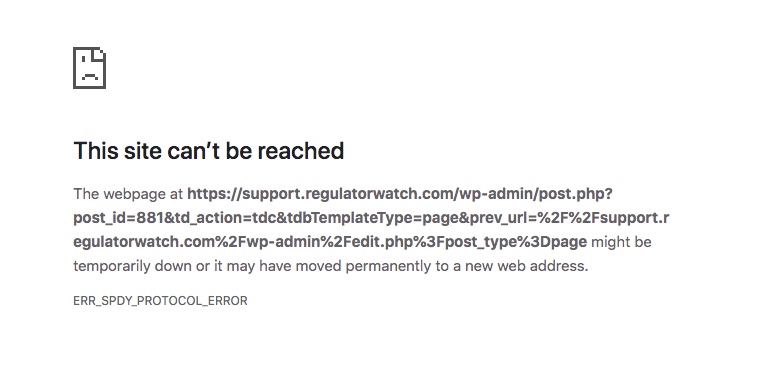
This error above is from the support.regulatorwatch.com website and it happens on every page when you click Edit with TD Composer. This also happens on every page on the main site regulatorwatch.com.
This problem is new only in the last couple of days. Each website is still up live and working. New posts and images can be added. It is simply the page editing that is not working. Major problem for me as I am still building the Support.regulatorwatch.com website.
Are you familiar with this type of error? Is it theme related? Or could it be a permissions issue with Go Daddy? Nothing has changed on my end. Plugins are updated. Themes have been totally fine and they are both different versions anyhow. I have not updated 9.2.2 yet as it’s the main site and wanted to make sure the updates were stable.
Let me know if you need login creds.
Help! Thanks.
 viralfacts1
Hello, i am using newspaper demo theme and i have noticed that after update web page is not showing any translation option . please fix it
fpbsHi!
I can’t really understand the relationship between “TagDiv Cloud Library plugin” and the “Child theme”.
My questioning:
– Do I have to use the “Child theme” or the “TagDiv Cloud Library plugin” take care of everything when I do the next theme update?
– When I next update, will it not overwrite my Menu changes, categories, etc.? ?
I don’t know if I still have to use the “Child theme” or if the “TagDiv Cloud Library plugin” allows to secure my changes (categories, menu, etc …).
Thank you for bringing me your clarifications to reassure me and that I correctly install my theme.
I need to install 4 sites with the theme NewsPaper 9 in the coming weeks. Two now!
And I have 4 sites with old versions of NewsPaper which I then have to update.
Your help and advice are therefore essential.
Cordially.
 jamesdixon
Hi,
We have recently updated the Newspaper theme from version 9.1 to 9.6. After the update, The Public Post Preview plugin stopped working for us. Looks like Newspaper’s td_cloud_library plugin is conflicting with “Public Post Preview” plugin.
Site: https://www.getelastic.com/
Any help would be greatly appreciated.
Thanks
 Tony
TonyHi
After some larger design updates I would like to force visitors to get the new theme css file by adding the child theme version as a query string to the css.
Today the child theme css looks like this in the head section:
https://i.imgur.com/oq65B4z.png
I have the following script in my child theme functions.php:
add_action( ‘wp_enqueue_scripts’, ‘theme_enqueue_styles’, 11);
function theme_enqueue_styles() {
wp_enqueue_style(‘td-theme’, get_template_directory_uri() . ‘/style.css’, ”, TD_THEME_VERSION, ‘all’ );
wp_enqueue_style(‘td-theme-child’, get_stylesheet_directory_uri() . ‘/style.css’, array(‘td-theme’), TD_THEME_VERSION . ‘c’, ‘all’ );
}
How would I modify the wp_enqueue_scripts above to achieve that?
 joram-2
 Hi Vlad,
The custom code doesn’t work. Do you expect the bug to be solved with the next update? I can wait for the new update it will be fixed by then.
 garyjones
Hi All,
I am new to WordPress and Newspaper – my main focus is databases. In a lot of the database forums I subscribe to, and as I suspect most of you know, it’s not uncommon for members to share code that creates a feature – not least because others then frequently take the initial entry, adapt it, then re-post. These sites also quite often also feature a sample code silo.
(@TagDiv Support, there’s a lot of really useful content on this forum but it’s limited navigation, layout and quantity of posts make it difficult to search effectively, not to mention time consuming. Can we have a Sample Code silo? Not only would it be useful for members but possibly limit you having to repeat the same or similar support requests).
BACKGROUND
I have a number of Use Cases that require elements on a web page to display simple listings of external editorial content – similar to a news ticker-type display but with no animation.
Initially, I decided that the TD Composer elements Blocks 10 & 9 were the most suitable – as they were closest to my required simplicity and would only be used for these Use Cases. However, the fact that there is no Newspaper option to duplicate a block within TD Composer, and I want minimal plugins installed, I decided to teach myself the PHP/CSS that would be required to achieve my objectives.
FUNCTIONALITY
- The link here shows two page elements that have different content and features which were created using the same Block 10;
- This involved creating new field types using ACF Custom Fields, including a post-type whose options could also be used in a PHP conditional If statement to create the variable field display within the same block;
The generic fields are headline, media outlet and published date for simple listings and other use cases have additional meta data fields; - When the headline linked is clicked on it has to a new web page and go to the external content. The published date must be that of the original editorial, not the WP posting date. This last point is important as I would be bulk uploading posts a few times a week, that will feature a spread of publication dates.
The following provides the necessary ACF Custom Fields setup, the PHP code and the CSS.
ACF Custom Fields
The table below lists out the field names and their setup –
- Post Type: Required. Field Type is “Select”. Drop down list choices are “Editorial” and “Research”;
- Title Link: Required. Field type is “URL”. This contains the URL of the external content page. Non-conditional as it applies to both Post Types;
- Publication Date: Non-conditional. Field type is “Date Picker”;
- Media Outlet: Non-conditional. Field type is “Text” and contains the name of the external content publication;
- Media Outlet URL: Required. Field type is “URL”. Conditional logic is if Post Type = “Editorial”;
- Some Other Field: Required. Field type is “Text”. Conditional logic is if Post Type = “Editorial”;
NOTE: I recently edited one of the Post Type options as there was a typo. I subsequently discovered that in doing so it not only broke all the conditional relationships with other ACF fields, that I then had to reset, but also reset all the Post Types assigned to my posts to a single value – which I also then had to go through and update. I raised this with ACF Support, who said –
“This is expected behavior, each field value is saved independently under each post and it is not recommended to change the field settings after posts have been saved with a value. You can however update all the field settings by creating a query to step through all the posts and pass the new value to the update_field() function. Please take a look at the following resource page for more info on this: https://www.advancedcustomfields.com/resources/update_field/”.
PHP
Block 10 uses the td_module_9.php file. My code amendment is here – https://pastebin.com/vJDbVjMA
Things to note –
- I have stripped out most of the default php echo statements that display author, WP post date and so on to stop them appearing if your default Newspaper 9 setting is to have these on;
- I’ve kept the div names etc as much as possible but the naming may not make sense in terms of the fields that sit within. This means the post title font formatting is still controlled by TD Composer’s Block 10 style settings menu. Similarly, the Media Outlet and date fonts can be collectively changed via the Article Meta Info style options;
- Additionally, as both these fields sit within a span class other style options are possible via custom CSS;
- You will see the conditional variable for the ACF field, Post Type, along with the other ACF Field variables defined within Function Render at the top of the code;
- Finally, to display the tags I used the suggestion in this support post (another good example of why a Sample Code silo would be useful), https://forum.tagdiv.com/topic/display-tags-along-the-category-on-the-blocks/. My code already contains the php get_the_tags statement, but you will have to copy Vlad’s Pastebin code to your td_module.php file as he suggests. Note that I amended this slightly as it displayed a field label for the tags and I think it’s obvious what they are;
- If you want the same, simply remove the following line –
$buffy .= '<span>' . __td('TAGS') . '</span>;
CSS
This is here, https://pastebin.com/mjTz8Tua and features comments to explain what it does, which for the most part is reducing spacing and tightening the gaps between fields.
Hopefully, this post is clear enough to enable you to replicate and hopefully extend this functionality. A big thanks to Simion C. at TagDiv for his fantastic support in helping me work through this.
Please be aware, I have only been teaching myself PHP and CSS for about four weeks so I’ve no doubt the experienced community members will have more elegant ways of writing the PHP or CSS.
Please share if you do ?
Best Wishes
Gary
 shogunteam
 What do you mean by everything? Theme files and td composer files? Or also wp bakery should be deleted before the update??
 yogeshkoli
 I do not see Primary/Child Category other thing and not even particularly from cloud templates.
but the question is why it is not allowing me to update SEO options showing here.
Vlad S Hello !
We are sorry for your inconvenience !
It is mandatory to delete all what was left from the older version before intalling this update. Overwriting the files would cause a lot of problems and maybe you’ve missed something while deleting the old files. Have you checked the plugins to be deleted too?
Please make sure that all the settings are like in our requirements, please follow the guide carefully
– https://forum.tagdiv.com/requirements-for-newspaper/
and please increase all requirements that are lower, and follow all steps.
WP_MEMORY_LIMIT try to increase it at least to 256mb.
Let me know if this was helpfull !
Thank you !
 kikiwongo
I just updated my theme content to the Travel Memories PRO and noticed it shifted all my content to the bottom of the page on new posts. I also noticed it duplicates content twice in strange formats here: https://www.kikiwongo.com/best-cat-litter-for-odor-control/
 Emprendiendo.TV
I bought the Newspaper template and enter the purchase key.
When I try to update the template it does not save the changes and in the error console this message appears:
“Failed to load resource: the server responded with a status of 403 ()”
yogeshkoliHello,
I want to exclude newspaper themes cloud templates from my sitemap showing here https://www.itechempires.com/tdb_templates-sitemap.xml
I have tried setting following from yes to now and click update but it is not working at all. basically the it is keep on staying yes only the other cloud templates removed the issue is with the Single post template 2.
Also one more question how can I avoid cloud template from listing into sitemap completely eg. https://www.itechempires.com/tdb_templates-sitemap.xml
Please help ASAP.
Thanks!
Yogesh Koli.
 bdeepu
 Thanks for the response Vlad.
>>It is mandatory to delete all what was left from the older version before intalling this update
The thing is I didn’t delete any file. I simply used the Update Theme option from the Envato section in the WordPress Dashboard. It upgraded fine but it is causing this problem. Please help me fix it. The site is looking ugly.
Thanks
 Andreas
Hi,
I’m having some issues with my newspaper website after trying to update my website logo and favicon.
After I updated my header and footer logo and favicon, I noticed that the favicon and header logo is not updated properly.
More specifically, for the desktop version of my website the favicon is not updating while the header and footer logo updated fine.
For the mobile version of my website, using the Mobile Theme, both the favicon and header logo are not updating.
When I inspect the HTML elements both on desktop and mobile I notice that they both point to the old assets.
Also, after doing a lot of troubleshooting and testing myself the Mobile Theme now is not working properly
So I tried everything from my hand but can’t seem to find what is the issue. See below a list of things I tried and specs of my website.
- cleared cache on WP Super Cache & CLoudflare
- optimized/cleaned sql db
- clear browser cache and cookies
- cleared web server cache
- updated to latest newspaper theme version 9.8
- disabled Cloudflare
- disabled cache plugin
- disabled all plugins
- updated my server to PHP7.1
- Complied to all configs in system status – all green
My website is https://ourcodepeople.com
I don’t seem to find what is the issue. Something is stuck. My mind goes to some cache not invalidating or something but I cleared all cache memories I could.
The problem still persists and I cannot update the favicon and header logo while the Mobile Theme is not working properly.
Looking forward to your kind advice on the issue.
Regards,
Andreas
 marcos.jimenez@n-people.es
 Hello again Vlad S,
I haven’t updated the nrewspaper theme, I bought it a month ago.
A hover I mean zoom, when you mouse over the image of the news.
I can give you access by private if you want to check.
Thank you 🙂
Vlad S Hello !
We are sorry for your inconvenience !
It is mandatory to delete all what was left from the older version before intalling this update. Overwriting the files would cause a lot of problems and maybe you’ve missed something while deleting the old files. Have you checked the plugins to be deleted too ? If you are certain that you have installed the updates correctly by deleting all of the older versions and made a clean install from scratch please contact us via email at contact@tagdiv.com and provide admin login, as well as cPanel or FTP if possible. We will take a look. Include a link to this topic in the email.
Also take a look at our documentation about installing the theme and plugins: https://tagdiv.com/how-to-install-plugins-and-update-plugins/ ; https://tagdiv.com/how-to-install-newspaper-theme/
Thank you !
Vlad S Hello !
Does the error started after you have updated the Newspaper Theme ?
What do you mean by hover ? The zoom in function ?
Thank you !
 mahir
mahirhi, after last update I can’t see register and logout pages. Normally I stopped allowing new users’ register but there was a warning about that and When I allowed new users to register I was able to see register page but now I can’t see. For login page now I can’t use reCAPTCHA with login page. when I tried I can’t login
Vlad S Hello !
Please provide a screenshot of your issue for a better understanding. Maybe this updated guide will help you: https://forum.tagdiv.com/tagdiv-composer-tutorial/
Thnak you !
 lightBear
I’ve tried a couple times to use the theme but could’t been able to, first time I installed the theme but didn’t activated it, while installing the plugins it suddenly started showing on every page a “site has technical issues” message, everytime I tried to open home or the WP Admin was the same, so I got into the cPanel, made a backup, deleted WP App and reinstalled it, by the time I tried to restore the backup it showed an error message, so I uploaded a previous backup and tried again with the theme, I activated it and used the “activate plugins” button, it showed another error message saying there were a Ajax error on the three plugins, so when I clicked on the “manually update plugins”, there was again the “site has technical issues” message.
Please help!!!!



