
- NewspapertagDiv AMP Plugin Tutorial
- ApiPractical example – How to add a new Block and Module
- NewspaperTrack Subscription Sources with Locker URL in Opt-In Builder
- NewspaperWP Rocket and Newspaper Theme: Optimization Guide
- NewspaperCredit System
- NewspaperIntroduction to CPT and ACF with Newspaper Theme
- NewspaperHow to edit modules for Flex Block X
- NewspaperHow to use the Posts List shortcode
- NewspaperUser review system
- NewspaperCustom Fields Support
- NewspaperHow to generate Facebook App ID
- NewspaperHow to insert a block inside the content of a post
- NewspaperModal Popup
- NewspaperPayPal Setup
- NewspaperLink Tracker
- NewspaperLockers
- NewspaperGeneral Options that May Interfere with the Newspaper Theme
- NewspaperAdd Cryptocurrency Price Ticker Widget
- NewspaperPosts Loop Element
- NewspaperThe Newspaper Mobile Theme: Introduction
 bob@mrrogersweborhood.com
okobserver.org
When activating tagDiv Mobile Theme plugin, AMP issues are found and plugin is deactivated.
Errors:
AMP compatibility issue(s) discovered with the following plugins:
Simple Google reCAPTCHA on 4 URLs
WooCommerce on 4 URLs
Hummingbird Pro on 4 URLs
tagDiv Composer on 1 URL
—
Screenshot: https://www.dropbox.com/scl/fi/qiqehek61irsqrvdqqv6d/Screenshot-2024-03-15-11.14.23.png?rlkey=8uuqqnitc2a26zq6x7lpyojo7&dl=0
 muhammadumair
 Dear Theme Support Team,
I hope this message finds you well. We are writing to seek urgent assistance regarding a critical issue affecting our website’s category section posts.
We have identified the following problems:
Inconsistent Display of Existing Posts:
Some existing posts within specific categories are not showing up, while others are visible as expected. This inconsistency in post display is leading to confusion among our users and impairing their ability to access relevant content effectively.
Failure to Display New Posts in Categories:
When new posts are added to our website, they are not appearing within their respective categories. Despite successful publication, these new posts fail to show up in the category section, hampering our site’s usability and content discoverability.
These issues are critically impacting the functionality and user experience of our website. We believe there may be underlying theme-related issues responsible for these problems and urgently require your expertise to address them.
If additional information or access to our website backend is needed for troubleshooting purposes, please do not hesitate to contact us. We are fully committed to working closely with your team to resolve these issues promptly and restore the proper functionality of our website’s category section.
Thank you for your immediate attention to this matter. We greatly appreciate your assistance in resolving these issues as quickly as possible.
Sincerely,
[Umair]
[Techrepublish CEO]
[umairahmadtechnew@gmail.com]
 Anamaria
 Hi,
Please update the theme to the latest version 12.6.5.
This malware infects not only theme files but also WordPress files or other plugin files. This malware was not detected only in our theme but also in many other themes and plugins https://www.bleepingcomputer.com/news/security/massive-balada-injector-campaign-attacking-wordpress-sites-since-2017 / -> https://cybernews.com/security/wordpress-malware-epidemic-balada-injector/ -> https://www.geoedge.com/balda-injectors-2-0-evading-detection-gaining-persistence /
You could consider reinstalling the WordPress version, reinstalling the theme, and checking for this plugin wp-zexit.php. It might be wise to inspect via FTP if it doesn’t appear in the WordPress -> Plugins. Additionally, using Wordfence to scan the website and remove unknown users would be prudent.
Thank you!
 Bettina
 Hello @BinShehab!
I suggest you use the gtranslate plugin, so you shouldn’t have doubled templates.
You can use a license key for one single product(website). For the other domains/sub-domains, please consider buying another license key. There are two places for a license: one can be used for staging, and the other is for the live version of your product/sub-domain/website. If you want to move the theme to another website or change domain/migrate, you’ll need to reset the license key from that website: https://www.screencast.com/t/Zt12bpyX and remove the theme (delete), in this way the license will be available for the new website and you can use the theme without any problems.
If you use it on subdomains that are a part of your product or wp multisite, you could use the same key.
Check this thread for example: https://forum.tagdiv.com/topic/sub-domains-installation/
Thank you!
Bettina Hello!
Try to deactivate the AMP and check if it works for you.
I’ve tested on my end and for mobile theme + amp it seems to be an issue at the moment.
Thank you for understanding!
muhammadumairDear Support Team,
I hope this message finds you well. We are currently encountering two critical issues with our website: https://www.techrepublish.com/ that are significantly impacting user experience: the category section posts are not displaying, and the mobile performance is unacceptably slow.
Category Section Posts Not Showing:

Users are unable to view posts within specific categories on our website. Despite efforts to troubleshoot on our end, including database query optimization and CMS updates, the issue persists. We suspect there may be a theme-related component causing this problem and would appreciate your expertise in resolving it promptly.
Mobile Performance Issue:

Our website’s performance on mobile devices has been notably sluggish, leading to increased bounce rates and decreased user engagement. This slowdown is detrimental to our site’s effectiveness and user satisfaction. We request your assistance in identifying and addressing any theme-related factors contributing to this performance degradation.
Given the critical nature of these issues, we urgently seek your support and expertise in resolving them. Any guidance, updates, or solutions you can provide would be immensely valuable in restoring the functionality and performance of our website.
If additional information or access to our website backend is required for troubleshooting purposes, please do not hesitate to reach out. Our team is fully committed to collaborating with you to achieve a swift and effective resolution.
Thank you for your prompt attention to these matters. We eagerly await your assistance and appreciate your dedication to ensuring the optimal functioning of our website.
Sincerely,
[Umair]
[umairahmadtechnew@gmail.com]
 happypeoplepickleball
Hi, I am setting up my WooCommerce shop. I have downloaded the newspaper theme for the base shop page:
https://demo.tagdiv.com/newspaper_shop_kids_store/shop/
I opened the cloud template to start configuration. I do not know how to change the cute picture in the first block “Shop by Category”. Where can I find this picture and how can I change it? What are the dimensions here?
On my website it is not even showing that picture – just a gray gradient box but I want to add the picture like the sample theme page.
happypeoplepickleball.com/shop
thank you
 simchris
 Also note, some sites have specific guidelines for pulling in their content via RSS. For example, if you have a nude website, most news sites will block you from pulling their content. If you are selling stuff, and trying to use content from other sources is also usually a no-no. If you have a news or content site and want to pull in news content to “fill” space, and not be your only posts, there are services like Send2Press that has free news feeds, as here:
https://www.send2press.com/wire/rss-feeds-by-topic/
For example, a newspaper in Ohio might pull national news from the above source and publish on their “national” news page to add content to their site without having to create the national news. Again, using news content for making money on an affiliate site, or selling cannabis or whatever would not be acceptable.
simchris Also remember Google guidelines are generally recommendations and not ‘gospel’– they keep trying to control the web, but their ad platform breaks all of their own guidelines, among other things that get abandoned (like so many of us leaving AMP as stupid idea for most sites). Grain of salt.
 dogukanaras
When using WooCommerce on my page, I use shortcuts like “Woo Breadcrumbs”, but I cannot change the texts. For example; It should be written “Anasayfa” in Turkish, but it writte “Home”
Bettina Hello @daddynovela!
You should use the single elements that takes the content from Gutenberg and also the featured image automatically. For example: Page Title, Single Post Featured Image, Single Post Content. Documentation here: https://forum.tagdiv.com/design-post-pages-using-cloud-library-templates/
Thank you!
 sohailahmed160
 Tried, its not working..
Also is there a way to display post view count on amp pages?
Anamaria Hi,
Did you deactivate the mobile theme and amp plugins and clear the cache? Please provide some screenshots.
Thank you!
sohailahmed160 We are using it already… we are using the AMP version that comes with the mobile theme plugin.. but it’s not taking into account the views received on AMP pages.
Bettina Hello!
You should use the AMP plugin together with the mobile theme: https://forum.tagdiv.com/the-mobile-theme/
Thank you!
 christiane.gourdin
Im facing a problem in theme activation , the green button keeps loading after entering ENVATO PURCHASE CODE & Email , any solution ?
Anamaria Hello,
You have the mobile theme plugin activated; please disable it.
Using our theme, you can choose from 3 mobile versions
-> mobile responsive => https://www.screencast.com/t/oJ2ShOp47
-> mobile theme plugin => https://forum.tagdiv.com/the-mobile-theme/
-> mobile page => https://tagdiv.com/newspaper-10-3-7-update-brings-customizable-and-fast-mobile-pages/ The option that you need to use.
Suppose you created the mobile pages with tagDiv Composer. In that case, when you install the Mobile Theme plugin, your pages will be overwritten by the plugin (the mobile theme comes with its templates for page, post, category, etc, so your current templates from the desktop theme will get converted to the mobile theme layout, the page content is made without builders in mobile editor => https://www.screencast.com/t/xbgZG8kH also, the options that are provided to edit the mobile theme version are limited (this keeps the things simple)).
This is a video about Responsive Newspaper Theme, AMP & Mobile Theme, Mobile Pages & Templates -> https://www.youtube.com/watch?v=SpGkOnJeNZY.
So, the mobile responsive is what you see when that you select the viewport on phone => https://www.screencast.com/t/matV17hH, so some settings may apply for each viewport(where is the border blue), and others are not(where the border is black).
The mobile page has the mobile templates from Cloud Library => https://www.screencast.com/t/YCcZ8rL8
The Mobile responsive version of the theme and the mobile page editor can be edit with tagDiv Composer, the mobile theme plugin cannot.
For example, you can have the mobile theme plugin activated and use the mobile page/mobile responsive version for the homepage/pages, but for the categories pages/404 page, you can’t use the mobile page/mobile responsive version if you have the mobile theme plugin activated.
So, if you want to design the pages with tagDiv Composer, you can use the mobile page or mobile responsive version.
Also, please check this topic https://forum.tagdiv.com/topic/amp-pages-not-working-well-with-this-theme/
Thank you!
Anamaria Hi,
Can you please provide an example of what you want?
Thank you!
 vicky
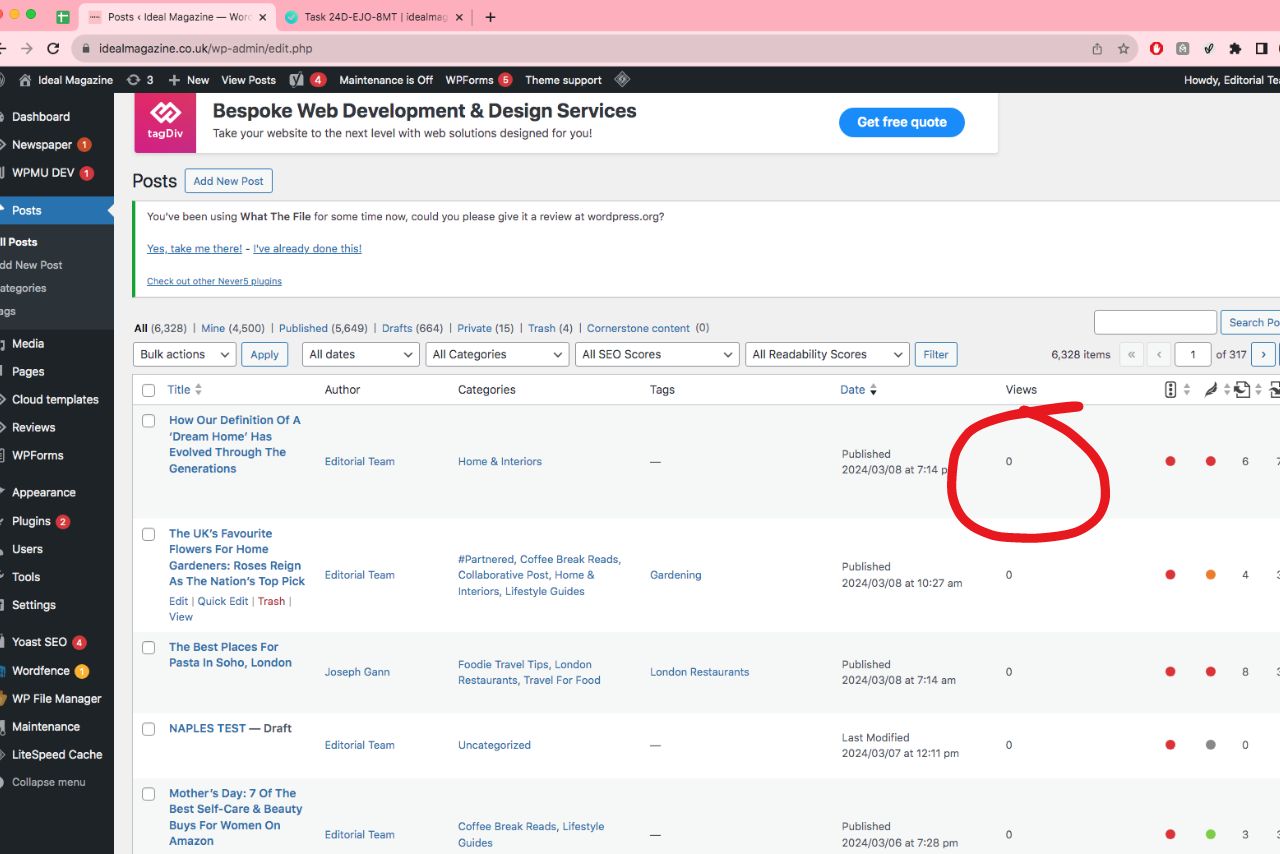
vickyHi everyone, I’ve noticed that my view counter isn’t increasing. It’s a little strange because I know that clients have been viewing the articles. How can I fix this?
sohailahmed160 Hello,
How to count views on the AMP version? It’s not counting the AMP visits in the Views data.
Anamaria Hi,
Yes, you can disable them or you can use only mobile theme.
Using our theme, you can choose from 3 mobile versions
-> mobile responsive => https://www.screencast.com/t/oJ2ShOp47
-> mobile theme plugin => https://forum.tagdiv.com/the-mobile-theme/
-> mobile page => https://tagdiv.com/newspaper-10-3-7-update-brings-customizable-and-fast-mobile-pages/ The option that you need to use.
Suppose you created the mobile pages with tagDiv Composer. In that case, when you install the Mobile Theme plugin, your pages will be overwritten by the plugin (the mobile theme comes with its templates for page, post, category, etc, so your current templates from the desktop theme will get converted to the mobile theme layout, the page content is made without builders in mobile editor => https://www.screencast.com/t/xbgZG8kH also, the options that are provided to edit the mobile theme version are limited (this keeps the things simple)).
This is a video about Responsive Newspaper Theme, AMP & Mobile Theme, Mobile Pages & Templates -> https://www.youtube.com/watch?v=SpGkOnJeNZY.
So, the mobile responsive is what you see when that you select the viewport on phone => https://www.screencast.com/t/matV17hH, so some settings may apply for each viewport(where is the border blue), and others are not(where the border is black).
The mobile page has the mobile templates from Cloud Library => https://www.screencast.com/t/YCcZ8rL8
The Mobile responsive version of the theme and the mobile page editor can be edit with tagDiv Composer, the mobile theme plugin cannot.
For example, you can have the mobile theme plugin activated and use the mobile page/mobile responsive version for the homepage/pages, but for the categories pages/404 page, you can’t use the mobile page/mobile responsive version if you have the mobile theme plugin activated.
So, if you want to design the pages with tagDiv Composer, you can use the mobile page or mobile responsive version.
Also, please check this topic https://forum.tagdiv.com/topic/amp-pages-not-working-well-with-this-theme/
Thank you!
 hyuh.appfluent
 if amp deprecated, So should I deactivate tagDiv Mobile Theme plugin and amp plugin?
Anamaria Hello,
Yes, you can adjust it, please check this guide https://www.coderchamp.com/blogs/social-tipster/solved-change-the-size-of-embedded-youtube-video-wordpress?expand_article=1
Thank you!
Anamaria Hello,
You have malware on the website. Please update the theme to the latest version 12.6.5.
This malware infects not only theme files but also WordPress files or other plugin files. This malware was not detected only in our theme but also in many other themes and plugins https://www.bleepingcomputer.com/news/security/massive-balada-injector-campaign-attacking-wordpress-sites-since-2017 / -> https://cybernews.com/security/wordpress-malware-epidemic-balada-injector/ -> https://www.geoedge.com/balda-injectors-2-0-evading-detection-gaining-persistence /
You could consider reinstalling the WordPress version, reinstalling the theme, and checking for this plugin wp-zexit.php. It might be wise to inspect via FTP if it doesn’t appear in the WordPress -> Plugins. Additionally, using Wordfence to scan the website and remove unknown users would be prudent.
Thank you!
Anamaria Hello,
I don’t recommend to using amp, because it is deprecated -> https://developer.bigcommerce.com/docs/storefront/wordpress/platform-integration/enabling-amp
For the mobile theme you can customize it from Theme Panel-> Mobile Theme -> footer => https://i.imgur.com/7ABDfSe.png You can’t edit it with tagDiv Composer.
Thank you!


