
- NewspapertagDiv AMP Plugin Tutorial
- ApiPractical example – How to add a new Block and Module
- NewspaperTrack Subscription Sources with Locker URL in Opt-In Builder
- NewspaperWP Rocket and Newspaper Theme: Optimization Guide
- NewspaperCredit System
- NewspaperIntroduction to CPT and ACF with Newspaper Theme
- NewspaperHow to edit modules for Flex Block X
- NewspaperHow to use the Posts List shortcode
- NewspaperUser review system
- NewspaperCustom Fields Support
- NewspaperHow to generate Facebook App ID
- NewspaperHow to insert a block inside the content of a post
- NewspaperModal Popup
- NewspaperPayPal Setup
- NewspaperLink Tracker
- NewspaperLockers
- NewspaperGeneral Options that May Interfere with the Newspaper Theme
- NewspaperAdd Cryptocurrency Price Ticker Widget
- NewspaperPosts Loop Element
- NewspaperThe Newspaper Mobile Theme: Introduction
 felizubi
Hi, I already replaced ‘Roboto’ and ‘Open Sans’ fonts on style.css with my typekit fonts.
Now when I load a page, I see for a fraction of a second, one or two different fonts before my typekit font appears, for example on the main menu of the page.
I know that on includes/wp-booster/td_wp_booster_functions.php and includes/td_config.php there are info about Google font, but exactly what code should I remove to completely get rid of them, especially because it looks funny and makes the loading slower.
regards,
Felipe Z.
 Ecrea
EcreaI would like to know if the theme have an option to expand the image that appears on grids. For example, if you choose a Big Grid 3 from Visual Composer, the first pic don’t fill all space if it don’t have 800×600.. Any solution
Thanks in advance
 melodica
ctive theme: Newspaper
Where do I edit the theme logo (NEWS6PAPER), and advertisement (728 x 90 ad) at the top of the page? (Between the very top menu and the lower top menu)
I can’t find it in the widgets.
Also, I can’t find out how to access the bottom section, which contains the NEWS6PAPER logo, About us, and Follow us.
Here’s a screenshot of what I am describing
Thanks
 Andrei L.
 Hi
You can deactivate the smooth scroll from theme panel > template setting like in this example: http://screencast.com/t/no5xdNWd
Thanks!
melodica Also, I can’t find out how to access the bottom section, which contains the NEWS6PAPER logo, About us, and Follow us.
 MrOrsh
I have just started using Adsense on my page and even though the ads stands out from the rest of the content I figured with Google you can´t be carefull enough to not violate their policys.
I just want to add the text above the ad, like in the sidebar ads here (for example): http://www.pcadvisor.co.uk/how-to/apple/how-replace-iphone-battery-3346693/
I´ve seen other sites that uses the Newspaper theme having this, so it must be possible somehow 🙂
Andrei L. Hi
Check the category settings in theme panel: http://screencast.com/t/H0tacrDr and enable the option to display the category on grids and blocks that you want, like in this example: http://screencast.com/t/KDR1O5nkLcN
Thanks!
 Lukao350
 For example, if I search on google for one keyword that I’m appearing as “melhores notebooks,” the little stars do not appear.
But if I take this URL and give the command in Google: “site: techtube.com.br/os-melhores-notebooks/” they appear.
About plugin is the “Post Rating”: https://wordpress.org/plugins/post-ratings/ but I already tested other and occurs the same thing.
 Ace
AceHi tagDiv team!
I thought about something today, rather than create “SEE ALSO:..” links in body of the blog posts, I want to see if it is possible to include something like this : http://www.goproace.com/wp-content/uploads/2015/07/example_jul15-copy.jpg
Ideally, the Block appearing in the body of text of the post would show related posts according to the criteria set in the Block settings.
Is this possibly within the NewsMag theme?
Any help would be great! Thanks!
 Intraprendere
 Hi, and thank you for your answer.
Your suggestion works, but if i try to use any other combination of dimensions (like 696 x 280, for example), the “theme panel” page in backend appears gray, and it doesn’t work.
Any idea about the reason it happened?
Thank you very much
G.
 extpress
 OK. Я постепенно изучаю этот форум и регулярно нахожу на нём много новой и полезной информации для практической работы. Буду следить за вашей разработкой конструктора страниц. )
Сегодня обновил тему NewsPaper до версии 6.3 и очень обрадовался, так как был добавлен очень нужный функционал для работы с Custom Post Type и Custom Taxonomy. Довольно тщательно его протестировал, пока работает чётко, без ошибок и это круто! )
Правда, не хватило нескольких возможностей, о которых напишу ниже в порядке их важности по убыванию.
1. Для одного Custom Post Type я использую несколько Custom Taxonomies и столкнулся с такой проблемой, что в настройках “CATEGORY SPOT TAXONOMY” и “TAG SPOT TAXONOMY” http://prntscr.com/7thcat можно выбирать только одну Custom Taxonomy. Эти настройки отлично работают, но хотелось бы иметь возможность выбирать несколько Custom Taxonomies для вывода их на сайте в нужных блоках “CATEGORY SPOT TAXONOMY” или “TAG SPOT TAXONOMY”.
2. При настройке блоков и других элементов в VC не нашёл настроек фильтрации по Custom Taxonomy. Наверное, данный функционал пока ещё находится в разработке ) В нужных модулях VC у меня без проблем получается выводить записи из Custom Post Type, но очень не хватает точной фильтрации по Custom Taxonomy.
3. При настройке Post Template для Custom Taxonomy я сначала немного запутался, экспериментируя с шаблонами single.php, но потом понял, что данная настройка http://prntscr.com/7thgr1 применяется одинаково для всех записей типа post. В принципе это не очень мешает, но было бы логичнее разделить настройки Post Template для Default Post Type (Blog) и для Custom Post Type.
4. Ну и последнее, в разделе “CPT & Taxonomy” в настройках “Custom post types” можно очень удобно настроить категории и теги для Custom Post Type, но почему-то нет возможности сделать это для Default Post Type (Blog), думаю, многим бы она пригодилась )
Возможно я чего-то ещё недосмотрел или не так понял, буду рад, если дадите хороший совет!
С уважением, Евгений.
————
OK. I’m slowly learning this forum and regularly find on it a lot of new and useful information for practical work. I will follow the development of your page builder. )
Today, the theme NewsPaper updated to version 6.3 and was very happy, as was added much needed functionality to work with Custom Post Type and Custom Taxonomy. Rather it carefully tested while working accurately, without mistakes and that’s cool! )
However, not enough several possibilities, of which I will write below in order of descending importance.
1. For a Custom Post Type I use multiple Custom Taxonomies and faced with such a problem, in settings “CATEGORY SPOT TAXONOMY” and “TAG SPOT TAXONOMY” http://prntscr.com/7thcat you can choose only one Custom Taxonomy. These settings work fine, but I would like to be able to select multiple Custom Taxonomies to display them on the site in the required blocks “CATEGORY SPOT TAXONOMY” or “TAG SPOT TAXONOMY”.
2. When setting blocks and other elements in the VC did not find the settings for filtering Custom Taxonomy. Probably, this functionality is still in development. ) The relevant modules VC I have no problem turns out to display records from the Custom Post Type, but are lacking in precision filtering Custom Taxonomy.
3. When configuring the Post Template for Custom Taxonomy I first bit confused, experimenting with patterns single.php, but then I realized that this setting http://prntscr.com/7thgr1 applies equally to all types of records post. In principle, it is not a botherbut it would be more logical to divide the Post Template settings for the Default Post Type (Blog) for Custom Post Type.
4. And finally, in the section “CPT & Taxonomy” settings “Custom post types” can be very convenient to adjust the categories and tags for Custom Post Type, but for some reason it is not possible to do so for the Default Post Type (Blog), thinkmany would have it handy. )
Maybe I’m something else overlooked or misunderstood, I will be glad if you give good advice!
Sincerely, Evgeny.
-
This reply was modified 11 years by
extpress.
 esmus
esmusHello,
As you can understand from the topic title, I want to use this theme without thumbnails. For example I want my homepage to show post lists from different categories without thumbnail placeholder. And of course, the categories page also must show posts without thumbnails.
How can I do this?
 guddie1
Seems Like I’m having problem with generated HTML and java widgets going into the site. I have tried the Raw HTML and Raw java tabs in VC. I have also tried to insert them in the Text tab under the Text block. I have also had a plugin that won’t work either.. Is there a block in the Theme that prevents widgets?
Thanks
 Lucian
 Hi,
Not sure how the plugins conflict with WordPress’s imagecopyresampled function but if you’ve regenerated thumbs and solved the thumbnails issues then you can disable thumbnails regenerating plugin because you don’t need it anymore as the thumbs will be automatically created when you upload an image.
The thumbnail upscale plugin is also unnecessary if you upload images large enough to fill the largest thumb container you’re using so I suggest you consider this and not use those plugins.
Thanks
Lucian Hi,
I’m not sure what you mean by:
When I put “site: meusite.com”, the stars appear but the normal search through a keyword, they do not appear.
..could you please provide more details and an example so we can have a closer look at this also let us know about the plugin you use.
Thanks
 SheShopped
Hello
I have added two plug ins Thumbnail Upscale and Thumnail Regenerate which solves the Thumbnail issue but now it has caused an issue with uploading images. Each time I upload images I get a stack of error messages. If I deactivate the plugins the issue disappears but I am left with incorrect Thumbnails. Has anyone else experienced this? Example of errors below
Warning: imagecreatetruecolor(): Invalid image dimensions in /home/sshopmin/public_html/wp-includes/media.php on line 2108
Warning: imagecopyresampled() expects parameter 1 to be resource, boolean given in /home/sshopmin/public_html/wp-includes/class-wp-image-editor-gd.php on line 182
Warning: imagecreatetruecolor(): Invalid image dimensions in /home/sshopmin/public_html/wp-includes/media.php on line 2108
Warning: imagecopyresampled() expects parameter 1 to be resource, boolean given in /home/sshopmin/public_html/wp-includes/class-wp-image-editor-gd.php on line 182
Warning: imagecreatetruecolor(): Invalid image dimensions in /home/sshopmin/public_html/wp-includes/media.php on line 2108
Warning: imagecopyresampled() expects parameter 1 to be resource, boolean given in /home/sshopmin/public_html/wp-includes/class-wp-image-editor-gd.php on line 182
3050
100%
_uwicQvN2PPzsfAb_AtDkcNIIqDfz3cx7BxFHFrCTMM.jpg
melodicaI’ve just installed the Default Demo. There’s lots of html text on the home page. How can I get rid of it?
It’s found just above each section.
Examples are:
[vc_row][vc_column width=”1/1″]
[/vc_column][/vc_row][vc_row el_class=”td-ss-row”][vc_column width=”2/3″]
[/vc_column][vc_column width=”1/3″][td_block_social_counter custom_title=”STAY CONNECTED” facebook=”tagDiv” twitter=”envato” youtube=”envato”]
etc
 goforward
 Also the result of this is Facebook trying to play a video on the Newsfeed, which doens’t work and just creates a blank white space mostly.
Can this be disabled somehow so articles with videos still show as content type article? or at least this functionality gets disabled and it shows like a regular post on Facebook with a large thumbnail?

goforwardhttp://www.statter911.com/2015/07/15/three-alarm-fire-aboard-uss-midway-museum-in-san-diego/
On this story and others, where we’re using content type video, the following OG data tags are showing up which apparently is making Facebook thing it should display the post as a video, not a usual link
Any idea why this is happening? It’s not happening for all posts that are videos using Template 11, just some.
<meta property=”og:video” content=”https://www.youtube.com/embed/asw27qdLpsU?autoplay=1&rel=0″><meta property=”og:video:type” content=”text/html”><meta property=”og:video” content=”https://www.youtube.com/v/asw27qdLpsU?version=3&autoplay=1&rel=0″><meta property=”og:video:type” content=”application/x-shockwave-flash”>
 hoops
hoops would like it to appear in the front page like this –>

date, comments & views are visible, with icons… coz now only the date is visble.
thanks!
-
This reply was modified 11 years by
hoops.
 Alin [tagDiv]
 Hi,
I have checked you site on Chrome and Mozilla and did not found any issue with fonts. For example article title on modules/blocks – http://screencast.com/t/VKVF8FJ31 Do you mean that for all elements from the page you got font family changed? Please provide more details which browser do you use and where do you have this issue.
Thanks!
 nicolaslavado
 I uploaded my logo as you can see [ http://www.48horasbadajoz.com/wp-content/uploads/2015/07/logo-2015-header.png ] but when I go to the web [ www.48horasbadajoz.com ] the header shows the default theme logo.
This problem just appears with styles 5 & 6.
Sorry for my english :S
Thank you.
Alin [tagDiv] Hi,
Unfortunately this was a small update just to fix SEO incompatibility issue and we forgot to change the theme version, but if you downloaded the latest version from themeforest then it is 6.2.1. Sorry for inconvenience!
To have also h1 and h2 to your pages just add a text block anywhere on the page(you can add it in the sidebar for example and use it on more pages) and add a title and a small description.
Thanks!
 vakalaktika
I’ve had this issue for a while and I have been trying, unsuccessfully, to solve it myself and waiting for an update.
Have also been unsuccessful to find anything in the forum.
What could be causing this? has this been reported before?
Please help
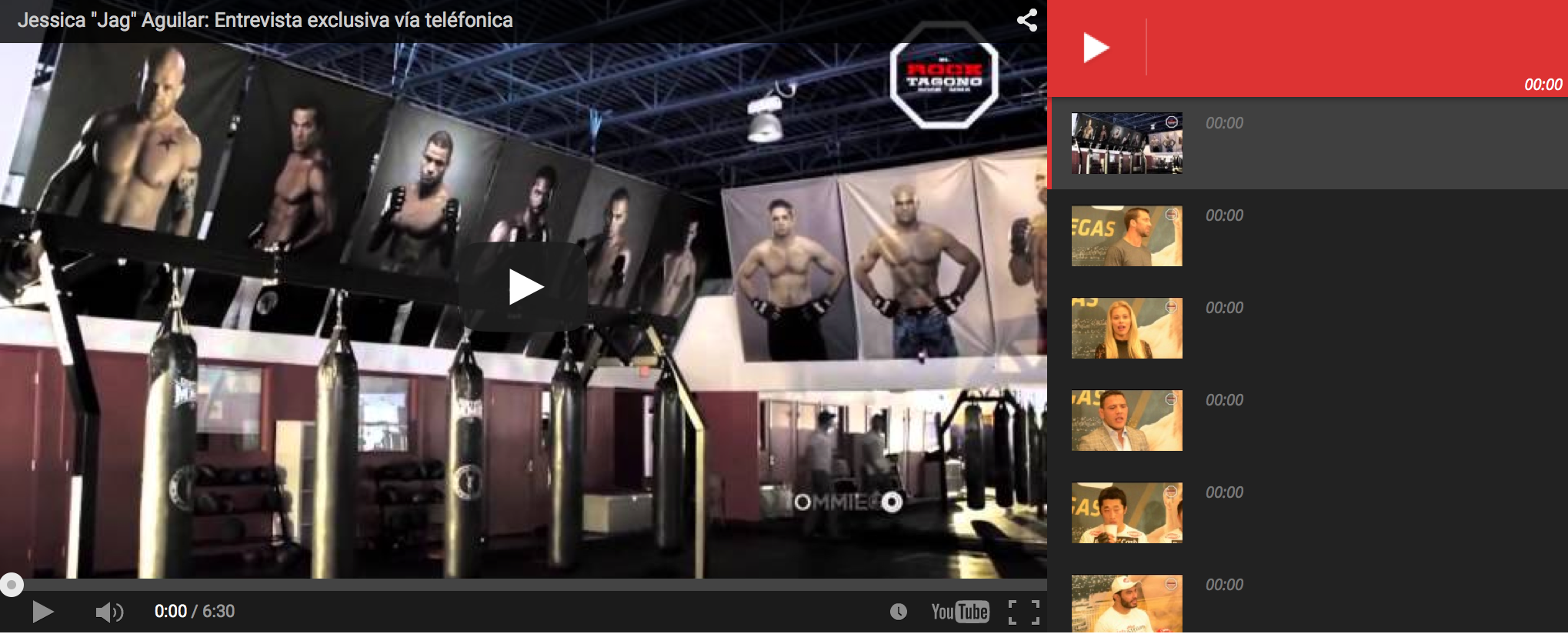
Here is an example of what the users see, the website is http://www.elrocktagono.com
thanks
nicolaslavadoI have a problem. My logo can’t be displayed when I try to use header style 5 or 6. Any advice?



