- NewspapertagDiv AMP Plugin Tutorial
- ApiPractical example – How to add a new Block and Module
- NewspaperTrack Subscription Sources with Locker URL in Opt-In Builder
- NewspaperWP Rocket and Newspaper Theme: Optimization Guide
- NewspaperCredit System
- NewspaperIntroduction to CPT and ACF with Newspaper Theme
- NewspaperHow to edit modules for Flex Block X
- NewspaperHow to use the Posts List shortcode
- NewspaperUser review system
- NewspaperCustom Fields Support
- NewspaperHow to generate Facebook App ID
- NewspaperHow to insert a block inside the content of a post
- NewspaperModal Popup
- NewspaperPayPal Setup
- NewspaperLink Tracker
- NewspaperLockers
- NewspaperGeneral Options that May Interfere with the Newspaper Theme
- NewspaperAdd Cryptocurrency Price Ticker Widget
- NewspaperPosts Loop Element
- NewspaperThe Newspaper Mobile Theme: Introduction
 kosinus
 Searching also for solution of adding VAST tag to preroll ads for featured videos. Anything new with that, or possible example of implementation?
 WordDom
Hi,
First of all, i don’t understand the difference between AMP & Mobile+AMP.
Could you be more clear ?
And i have normal responsive theme on iPad and i suppose on tablets. How can i have amp on iPad and Tablets ?
 shreeganeshadeva
Dear Team,
I am using a newspaper theme with a downtime magazine demo. when I am going to check the canonical tag with the page source option then it shows me two same canonical tags. I am also attaching a screenshot link of the issue please help how can i solve this issue.
https://drive.google.com/file/d/1W-3Vc0VhBPeC62qx8OPknBHMc9YsZHfa/view?usp=sharing
Thanks & Regards
Mohit Kachhwaha
 newspaperalobendovn
Hello everyone! Looking forward to your help!
I have a website in Vietnam. In Vietnam, the Zalo social networking application is very popular and used by many organizations and individuals.
However, the newspaper theme does not have a zalo share button, which reduces a social network sharing channel of the website.
Can anyone help me to create a share button for this app on my website?
Looking forward to the help from the Newspaper theme community.
Here is the link of the zalo app: https://play.google.com/store/apps/details?id=com.zing.zalo&hl=en&gl=US
Thanks very much!
 oxyman
Hi, I just installed the theme on a new site, and received this error on the category page:
Notice: Undefined index: tdb_templates in /home/XXXXXX/public_html/wp-content/plugins/td-cloud-library/includes/tdb_functions.php on line 516
Example:
https://designreviews.com/cat/tech/accessories/
Support has been renewed.
 First Friend
 After theme optimization & wp super cache plugin setup with cloudflare my website speed is very slow. Perforfance scorte is 20. So how to increase newspaper theme speed.
 HIRSCHBERGH
Hello,
i have over 20 Articles in one Category but it shows only a few of them.
In another Category i have only 4 Articles but it shows no articles.
Is there a Setting where i can change this?
I Imported the Demo Files and changed as example only the articles title and deleted a few, but now i can see any of them. So where to show all of them? Is there an Setting?
Urgent!
 Nagarig
How to enable the crypto pricing widget in the Crypto PRO theme. How do those shortcodes and tickers work? Please explain and guide us. Also, can we use the Crypto widget in different prebuilt theme templates for example: In compass PRO demo.
@ncalex
 Maneek
Hi.. I use Newspaper Premium on my site https://shippingandfreightresource.com.. When I go to the search option on the site and search for an item, it is not displaying in the newest to oldest (or any date order).. It is displaying in some random order.. See here – https://www.shippingandfreightresource.com/?s=electronic+bill+of+lading&post_type=post..
Can you pls advise solution, thanks..
 Youngman
It looks like the theme for responsive or broken when using the create mobile page feature.
Before mobile only page not created it’s normal, but when I create mobile page/mobile theme/amp then desktop and tablet view will follow mobile view.
I have to turn off the cache for each page or turn off the cache completely so that the appearance of the website matches the original.
Or I have to clear the cache every time, so that the display looks normal.
or I or visitors have to log in so they can see the original appearance of the website.
Desktop error display:
https://freeimage.host/i/H31m9af
This is what the actual website looks like:
https://freeimage.host/i/H3dM28N
*In addition, I use the paid litespeedcache plugin and have mobile caching enabled.
Here is my site you can check: https://animenewsplus.net/
 Maxyct
 I have another doubt; I configured Google Tag Manager properly and I’m using the following GOOGLE ANALYTICS events (on a Button for example) to push data on GA4
– GA Event Action
– GA Event Category
– GA Event Label
BUT, these events are not arriving on Google Analytics platform (if I’m not wrong).
Is it possible that those events are not “compatible” with Google Tag Manager scripts but they are with GA4 code (gtag.js)? If so, is there a way to fire those events to Google Tag Manager? Any suggestion?
Thanks,
Max
 Anamaria
 Hello,
For the footer sticky, you can use the option on the row and set it to the bottom -> https://i.imgur.com/gIX3LCA.png other option doesn’t exist.
You can try to use the Flex Block element inside the Single Post Template.
The Posts Loops settings are divided into 5 tabs: General, Layout, Style, ADS and CSS. The Posts loop is a special block and doesn’t have filtering options.
Also, one of the options for pagination of the Posts Loop has the option for normal numbered and the flex blocks do not have this option.
The Posts Loop is automatically filtering the posts depending on the cloud template you set (for example on the category page there will be posted posts from that category).
Thank you!
 winnipegwebguy
After the 11.5 update, our page does not display properly on a tablet. Tried updating to latest but problem still persists.
The tablet version (like ipad mini for example) shows a version of Magazine PRO, but the images are broken, etc. It doesn’t load the theme that we have on mobile. It’s like an in-between screen size that creates this problem. It’s fine on mobile and fine on desktop.
I’ve tried deactivating all non tag-div plugins and clearing the cache, to no avail.
Thanks in advance.
 Incrosnatu
Hi,
I want to try something new. How can i make the footer for example (or any other rows or elements), to load only when you scroll down or reach a page height point?
Also, I have customised the posts loop block on the homepage like this, but if I add it to the single posts template, it doesn’t work/display. Any idea what block can I edit go get that design?
https://i.imgur.com/fXzo27X.png
Thanks,
Daniel
 Calin
Calin Hi theheritagelab,
Unfortunately, the only way to be able to adjust it will be if you use only one size for all images from the gallery, for example 640×320, if each image has different dimensions then, then will be better to use the default settings for CSS that comes with tagDiv gallery.
Thank you for your understanding!
 Bettina
 Hello Renato!
1. You can only modify the footer with TagDiv Composer if you go to a page where it is assigned and edit that page with TagDiv Composer, and then you will have access to the footer also. For example, edit your homepage with TagDiv Composer, scroll till footer, click on footer zone and you can edit it.
2. A shortcode can be inserted by using the element called “Column text” or “Text with title”. For example, in the step3 here: https://forum.tagdiv.com/add-cryptocurrency-price-ticker-widget/
Thank you!
 TSS
TSSJust installed a complete layout and its driving me crazy that the URL path has the “tdcpt_ or tdtax_ etc” in everything.
Examples:
https://business.floridasmart.com/tdcpt_directories/cafe-de-la-piesa/
https://business.floridasmart.com/tdtax_services/cafe/
https://business.floridasmart.com/tdtax_locations/pennsylvania/
How do I change these path settings?
Like this:
https://business.floridasmart.com/listings/cafe-de-la-piesa/
https://business.floridasmart.com/category/cafe/
https://business.floridasmart.com/local/pennsylvania/
 m
m Yes, thanks.
Does this option allow to show time limited popular posts (for example, popular in last 7 days) or does it only show all time popular?
 milionilia
Hello there!
I have a problem about woocommerce variable products.
Standard products works well but when I’m stocking variable products the “add to cart” button doesn’t work.
It wasn’t happening by the start, maybe after some updates but it’s not affecting by the plugins, as well.
Example page of a Variale Product: ” https://www.d-all.gr/product/%cf%80%ce%ac%cf%89-%ce%b4%ce%b7%ce%bc%ce%bf%cf%84%ce%b9%ce%ba%cf%8c-%cf%83%cf%84-%ce%b4%ce%b7%ce%bc%ce%bf%cf%84%ce%b9%ce%ba%ce%bf%cf%8d/”
İs it possible to find what’s wrong?
Best regards
 smilelondon
HI there
I need some help with a CLS issue and failing core web vitals with Google because of this.
It is regarding our page https://www.livetube.tv/news and also the posts pages.
We only receive the CLS alert for desktop evaluations.
Appreciate your help with this.
We especially struggle to fix the zone error. We tried many different things, but the zone error stayed.
1. div.tdc-content-wrap > div#tdi_81 > div.tdc_zone > div.tdi_81_rand_style
<div class=”tdi_81_rand_style td-element-style”>
2. <div class=”tdc_zone tdi_82 wpb_row td-pb-row”>
Many thanks for your help
Best
Sven
Here is the detailed information:
For the homepage (https://www.livetube.tv/news), we get this infos:
Avoid large layout shifts five elements found
These DOM elements contribute most to the CLS of the page.CLS
Elements CLS Contribution:
div.tdc-content-wrap > div#tdi_81 > div.tdc_zone > div.tdi_81_rand_style
<div class=”tdi_81_rand_style td-element-style”>
0.39
Tuesday, November 22, 2022 LiveTube Get paid for your live story Join the For…
<div class=”wpb_wrapper”>
0.007
LiveTube Get paid for your live story Join the Forum Free Media Access Help Abo…
<div id=”tdi_34″ class=”td_block_inner td-fix-index”>
For the posts pages, we receive this alert.
Here is the example post page: https://www.livetube.tv/news/video-mexico-fans-celebrate-before-their-team-playing-against-poland
Google Report CLS Issue Element CLS Contribution
GO LIVE GET PAID Send us your livestream. Our producers are ready to review yo…
<div class=”tdc_zone tdi_82 wpb_row td-pb-row”>
0.302
div.td_block_wrap > div.tdb-block-inner > div#wpfp_958dcf090cf91464f155581dc13aff04 > div.fp-ui
<div class=”fp-ui”>
0.095
Tuesday, November 22, 2022 LiveTube Get paid for your live story Join the For…
<div class=”wpb_wrapper”>
0.006
LiveTube Get paid for your live story Join the Forum Free Media Access Help Abo…
<div id=”tdi_34″ class=”td_block_inner td-fix-index”>
0.004
ENTERTAINMENT
0.003
 vivreausmic
 Hello,
Custom field with date & time works but custom field with date (without time because i don’t need hour) doesn’t work…why ?
Thanks
Anamaria  banglak1993
Hi TD Team
My menu has problem after updating to 12.1.1 please help me
Example link: https://ibb.co/7Cn7vTV
——-
Web Link : tuhocdautu.vn
 NAGARAJBV5
 Website speed is good but the issue with GT Matrix & Google speed page Performance, We extremally request you to check with the issue, or let us know what need to be do in the website for performance upgrade.
 esalinas506@gmail.com
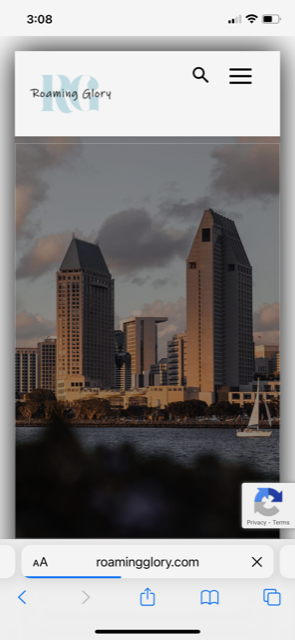
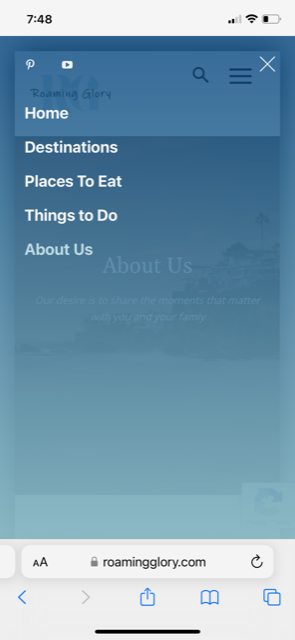
Today I noticed that the menu icon isn’t working from the home page when using a mobile phone. I noticed that after I click on the menu icon the URL adds a # at the end of the link.
Any idea why this is happening all of a sudden?
I attached some samples of what is happening.
This image shows what happens when I press on the menu from the home page.
https://i.postimg.cc/VLzTKQZ5/IMG-3155.png
If I use the menu on the footer and go to another page (ex: About Us) I am able to access the mobile menu as shown below.
https://i.postimg.cc/yYnG5Q2j/IMG-3156.png
I have not installed any new plugins. This just happened on its own.