
- NewspapertagDiv AMP Plugin Tutorial
- ApiPractical example – How to add a new Block and Module
- NewspaperTrack Subscription Sources with Locker URL in Opt-In Builder
- NewspaperWP Rocket and Newspaper Theme: Optimization Guide
- NewspaperCredit System
- NewspaperIntroduction to CPT and ACF with Newspaper Theme
- NewspaperHow to edit modules for Flex Block X
- NewspaperHow to use the Posts List shortcode
- NewspaperUser review system
- NewspaperCustom Fields Support
- NewspaperHow to generate Facebook App ID
- NewspaperHow to insert a block inside the content of a post
- NewspaperModal Popup
- NewspaperPayPal Setup
- NewspaperLink Tracker
- NewspaperLockers
- NewspaperGeneral Options that May Interfere with the Newspaper Theme
- NewspaperAdd Cryptocurrency Price Ticker Widget
- NewspaperPosts Loop Element
- NewspaperThe Newspaper Mobile Theme: Introduction
 Calin
Calin Hi,
Please connect to your website dashboard and go to AMP > Settings and disable the amp redirect from mobile to amp – https://i.imgur.com/CwjkmnB.png
Thank you!
 projectya
 I also have a problem with categories.
For example, I have a New Products category, and I have this layout there, and I select New Products in the Filter: https://prnt.sc/JbN6gvh5e2lm
and when I go to, for example, Culture, does the same thing appear as in News? Isn’t it possible to set a different page layout for each category?
 adityabansal
Hello, I have enabled AMP on my website which is working smoothly. https://legalpress.in
When I try to open any posts on the website through mobile device, by default the post loads the AMP page. I want the website to open as normal mobile device website. It happenes only while opening the posts. How to redirect users to mobile site.
 cristihagi
Hello,
1. On the Home page, the featured image from the latest article appears as the background. Not at all resolutions, but at most of them. Can we do something to remove it?
Example: https://ct100.ro/staging/
2. The banners I place are not visible if there is an adblocker on the page. Is there any way to make them visible even if someone is using an adblocker? These are just banners I upload in JPEG format. Thank you!”
Calin Hi,
1. Edit the homepage using tagDiv Composer – https://i.imgur.com/VtfDXeh.png after that, select the manager and in header, tab uncheck the sticky option for desktop https://i.imgur.com/8nHMYyn.png you can do it for both, desktop and mobile.
2. Select the mobile viewport in tagDiv Composer – https://i.imgur.com/8nHMYyn.png then if the image and mobile element are in the same column, use the layout tab to align them https://i.imgur.com/yg1SbqV.png if are in different columns, but under the same row use the layout tab from the row – https://i.imgur.com/UNv0zTL.png
3. For this, you should set the header you want to use as global, then this will be used on the entire website that is not using an individual header. Right now you are using an individual header on the homepage and a global one on the rest of your website. So when the header is edited as you want just set it as global, this can be done from multiple places, for example, from Composer using the manager – https://i.imgur.com/tBSbwLu.png ot from cloud templates – https://i.imgur.com/ZMHim4S.png or from the theme panel – https://i.imgur.com/FE5hmWR.png
Thank you!
 Alex
AlexHi,
Since July, we’ve had an issue with our website that we can’t resolve. Our CLS, measured with PageSpeed Insights, is greater than or equal to 0.30 on mobile. We can’t figure out what’s causing this high CLS. For example, on the desktop side, we have a CLS of 0.002. The problem only affects mobile, and since this issue began, the site hasn’t met Google’s requirements, preventing our articles from being published on Goolge Discover (before, when we met all the mobile requirements, we were always on Goolge Discover).
Our magazine is this: http://www.moviemag.it
Can you check and tell us how to fix the problem?
Thanks for your help.
See this screenshot https://ibb.co/M5KM0LV2
 dimitrisv
 Disabling REDIS at will it is not the optimal solution.
As said before the issue has to do with prefetch.
Here is an example of how we exclude various “keys” for the transients and the pods framework.
Please ask your development team to provide us with the keys they are using regarding authentication (in both newspaper and optin-builder) so that I can test them.
define('WP_REDIS_CONFIG', [

    'non_prefetchable_groups' => [

        'transient',

        'PodsAPI/_load_objects',

        'pods_post_type_storage__pods_pod',

        'pods_post_type_storage__pods_field'

    ],

]);
 mauriflorentin
 Hi! I’ve the same problem!
– Website is using WP Rocket cache and Object Cache Pro
– Block Settings > USE LAST 24/48 HOURS & 7 DAYS POST SORTING is enabled
– Post Settings > Ajax view count is enabled
– Post Settings > Post and Custom Post types > SHOW POST VIEWS is disabled
– Sort Order by Popular (24h/48/7d) not working, blank result.
Can you help me, please.
 simchris
HI
weird issue I just discovered with last two versions of Newsmag, running PHP 8.3x on Apache.
When I create a wildcard redirect in the htacess file (so, for example – my-image-2010.jpg –> /images/mygenericpic-800×600.jpg
Instead redirects to a post 404 page, and won’t redirect to the fallback image. Happens to all sites running Newsmag, but not on sites NOT running Newsmag.
Anybody else have this issue?
Thanks.
 Andjelko
Hi,
I’m using Newspaper 12.7.1 on WordPress 6.8.2 (PHP 7.4).
When I open Theme Panel → Ads, the request to:
/wp-admin/admin-ajax.php?td_theme_name=Newspaper&v=12.7.1
fails with 500 Internal Server Error.
Error log:
PHP Fatal error: require_once(): Failed opening required
‘/wp-content/plugins/td-composer/legacy/common/wp_booster/wp-admin/panel/views/ajax_boxes/td-panel-ads/td-get-ad-spot-by-id.php’
in /wp-content/plugins/td-composer/legacy/common/wp_booster/wp-admin/panel/panel_core/td_panel_core.php on line 217
It looks like the plugin is trying to load a missing file (td-get-ad-spot-by-id.php).
Legacy panel seems enabled but the file is not included in my Composer package.
Here is a screenshot of the problem:
Instaled plugins:
Thanks in advance!
 dragzini
 Thanks for the reply.
I understand that these are date formats.
I need for example “Monday” and “September” to be written in another language.
 NyttenET
 Hi,
Regarding the CORS headers, we are using the AMP plugin. We have already reviewed the AMP plugin code, and the required headers are included by default.
Sample code from the plugin:
public static function send_cors_headers() {
		$origin        = null;
		$source_origin = null;
		if ( isset( $_SERVER['HTTP_ORIGIN'] ) ) {
			$origin = wp_validate_redirect( wp_sanitize_redirect( esc_url_raw( wp_unslash( $_SERVER['HTTP_ORIGIN'] ) ) ) );
		}
		if ( isset( self::$purged_amp_query_vars['__amp_source_origin'] ) ) {
			$source_origin = wp_validate_redirect( wp_sanitize_redirect( esc_url_raw( self::$purged_amp_query_vars['__amp_source_origin'] ) ) );
		}
		if ( ! $origin ) {
			$origin = $source_origin;
		}
		if ( $origin ) {
			self::send_header( 'Access-Control-Allow-Origin', $origin, [ 'replace' => false ] );
			self::send_header( 'Access-Control-Allow-Credentials', 'true' );
			self::send_header( 'Vary', 'Origin', [ 'replace' => false ] );
		}
		if ( $source_origin ) {
			self::send_header( 'AMP-Access-Control-Allow-Source-Origin', $source_origin );
			self::send_header( 'Access-Control-Expose-Headers', 'AMP-Access-Control-Allow-Source-Origin', [ 'replace' => false ] );
		}
	}
-
This reply was modified 1 year by
NyttenET.
Calin Hi,
The best approach to create the menu you’re looking for is not to edit the theme files directly, as any changes will be overwritten when the theme is updated. Instead, I recommend using TagDiv Composer along with the Popup Element. You can design your desired menu with the theme builder and use the Popup Element to display it as a mobile menu on mobile devices.
Regarding AMP, the situation is a bit more complicated since the template cannot be edited using the builder; modifications will need to be made directly in the theme files.
Thank you!
 europeantimes
Dear TagDiv Support,
I am contacting you regarding critical compatibility issues between the Newspaper theme and PHP 8.4, which are affecting the performance and stability of my site (europeantimes.news).
After thorough debugging, I have identified two major issues in the td-cloud-library plugin, which is bundled with your theme.
❌ 1. Deprecated Constructor in Mobile_Detect.php
File:
/wp-content/plugins/td-cloud-library/includes/Mobile_Detect.php
Issue:
The constructor uses implicitly nullable parameters, which is deprecated in PHP 8.4:
php
1
function __construct($userAgent = null, $httpHeaders = null)
Error:
1
PHP Deprecated: Mobile_Detect::__construct(): Implicitly marking parameter $headers as nullable is deprecated
Solution:
Update the constructor to use explicit nullable types:
php
1
function __construct(?string $userAgent = null, ?array $httpHeaders = null)
❌ 2. Text Domain Loaded Too Early
Issue:
The td-cloud-library plugin loads its translations before the init hook, which triggers a WordPress deprecation notice:
1
PHP Notice: Function _load_textdomain_just_in_time was called incorrectly. Translation loading for the ‘td-cloud-library’ domain was triggered too early.
Cause:
load_plugin_textdomain() is called directly when the plugin loads, not on the init action.
Solution:
Move the text domain loading to the init hook:
php
1
2
3
add_action(‘init’, function() {
load_plugin_textdomain(‘td-cloud-library’, false, dirname(plugin_basename(__FILE__)) . ‘/languages’);
});
✅ Impact
These issues generate hundreds of PHP notices and deprecation warnings
They contribute to performance degradation
They indicate the plugin is not fully compatible with PHP 8.4
🔧 Request
Please:
Provide an updated version of td-cloud-library with PHP 8.4 support
Or confirm if a fix is already available in a newer release
Advise if there are any known conflicts with Redis, WP-CLI, or high-traffic automated sites
I am using:
WordPress 6.8.2
PHP 8.4.6
Redis Object Cache
Newspaper Theme (latest version)
Thank you for your support. I look forward to your response.
Best regards,
adityabansalI want to customise mobile menu, I was able to reorder social icons using css, and customise gtranslate widget in this menu. But I couldn’t add more items in the list.
1. For example, I want to add short code of darkify plugin (gtranslate widget appeared automatically after activation of plugin) but for darkify plugin icon – how should I add it? I have the widget shortcode. Where should I do the changes to reflect it here?
2. Please can you also provide the same menu mobile AMP page location. AMP menu customisation.
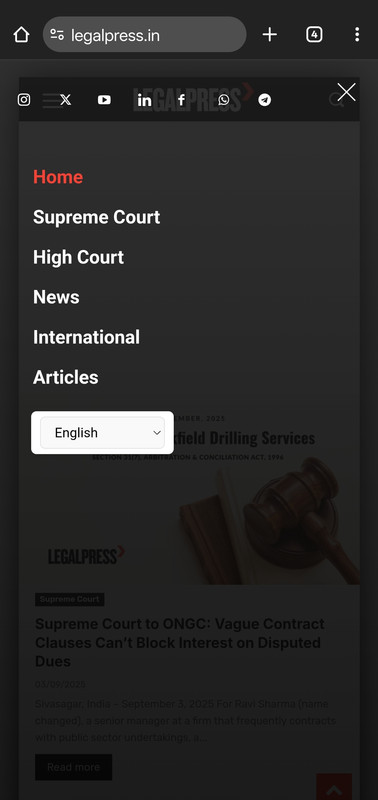
 JAMES0712
I upgraded the newspaper theme to 12, but found my PHP version is not compatible. So I want to go back old version.
where can i download verison 10 and 11?
Thank you
Calin Hi,
For this you need to create a page and edit it with tagDiv Composer, on that page add the “Form input” element and set the social, set it on “user update for” and set the custom field name, for example – https://i.imgur.com/m5c7AKs.png do the same for all fields you want to have and to submit the new information use the button User Update Form Submit.
Now when the page is done, edit my account page and select the custom pages tab there, set the id of the new page for the account settings and the results will be – https://i.imgur.com/EsluA7i.png
I hope this will help you!
 babak.s.z
Hi there
After the last update, when I use TagDiv Composer, for example, designing a page, after any change, Composer reacts to me too late, and sometimes I have to wait 20-30 seconds to view the changes I made.
https://www.bsiminzar.com/blog/
 juanantonio
Hello,
I’m using the TagDiv Social Counter plugin on my website with the latest version installed. After connecting my social profiles (Instagram, Twitter, and YouTube), the numbers it displays are different from the real ones.
For example, on Instagram it shows only 189 followers, while the account actually has over 1,000 followers.
I have double-checked that the plugin is updated to the latest version, but the issue persists.
Could you please advise if there’s a fix or a setting I need to adjust so the plugin shows the correct follower counts?
Thank you in advance!
Calin Hello,
Normally, when a color is set in the theme panel (as shown here: https://i.imgur.com/TJ48RHj.png
), it should apply correctly across the site (example: https://i.imgur.com/XX9QDEx.png
).
I checked the meta tag for the color on your website, and it doesn’t appear to be set—it’s as if the color hasn’t been configured in the theme panel.
Could you please verify that the color is set correctly in the theme panel, and test it on a few devices to ensure it’s working as expected?
If the problem persists, and you can provide a temporary WP-Admin access to the website, please contact us via email at contact@tagdiv.com and we’ll take a look.
Thank you!
Calin Hi,
The blank page in Google News is almost always caused by your AMP endpoints (amp-list / amp-access / consent APIs) failing when loaded from the Google AMP Cache domain.
Please try:
– Add proper CORS headers on those JSON endpoints:
– Access-Control-Allow-Origin: https://www-eurasiantimes-com.cdn.ampproject.org
– AMP-Access-Control-Allow-Source-Origin: https://www.eurasiantimes.com
– Access-Control-Expose-Headers: AMP-Access-Control-Allow-Source-Origin
Ensure they accept the __amp_source_origin query param.
Then re-test the cached URL with #development=1 to confirm no AMP errors.
Make sure you set correct AMP CORS headers on your API/consent endpoints, otherwise the body stays hidden in Google News.
NyttenETHi Team,
We’re facing an issue where Eurasian Times articles are not opening in the Google News app.
Steps to reproduce:
A. Open the Google News mobile app.
B. Search for Eurasian Times.
C. Tap on any of the articles.
Example URL of an article as seen in the Google News app:
When accessed directly in a browser, this URL works correctly. However, when opened via the Google News app (with the AMP prefix https://www-eurasiantimes-com.cdn.ampproject.org/v/s/), the page loads as blank.
We also attempted to curl the above story URL. Please find the response attached.
 tonnynet
Hello,
I am currently using the Newspaper theme with the Towntalk prebuilt template.
Website URL: https://headline.hifive.pro/
Here is a temporary admin account:
My question is about how to add, remove, or modify fields in the Account Details page:
https://headline.hifive.pro/my-account-towntalk_pro/?account_details
Desired setup:
1) In the Account Details (Manage your account details.) section (#case1, item 1)
1-1) I would like to add an option for editing a personal profile (user description) (#case2, item 3).
1-2) I would also like to allow users to enter their website and SNS channel addresses (#case2, item 4).
Since there are too many channels, I only want a limited selection of them to be visible.
2) I want to completely hide the Billing Details section (#case1, item 2).
# case1
https://headline.hifive.pro/my-account-towntalk_pro/?account_details

 Calin
Calin Hi,
Yes, the theme works with review snippets, you can test it using our example review https://demo.tagdiv.com/newspaper_pro/td-post-laptop-with-128-bit-processor-32gb-of-ram-and-24mp-front-camera/and the rich results test – https://i.imgur.com/kVVB0CO.png https://search.google.com/test/rich-results/result/r%2Freview-snippet?id=BHGrsoHRPLzaTHp3R2OC7A
Calin Hello,
1. This can be done by using tagDiv Composer and checking if there is any extra element in that space. If there are no elements, then you can select the row and check in css tab and set the margin top/bottom (depending on the element selected) and a number for example, 0 or 10
2.3. The author and counter from the lock can be disabled from the theme panel > block settings> meta info on modules/blocks – https://i.imgur.com/sWziYdZ.png
Thank you!



