- NewspapertagDiv AMP Plugin Tutorial
- NewspaperTrack Subscription Sources with Locker URL in Opt-In Builder
- NewspaperWP Rocket and Newspaper Theme: Optimization Guide
- NewspaperCredit System
- NewspaperIntroduction to CPT and ACF with Newspaper Theme
- NewspaperHow to edit modules for Flex Block X
- NewspaperHow to use the Posts List shortcode
- NewspaperUser review system
- NewspaperCustom Fields Support
- NewspaperHow to generate Facebook App ID
- NewspaperHow to insert a block inside the content of a post
- NewspaperModal Popup
- NewspaperPayPal Setup
- NewspaperLink Tracker
- NewspaperLockers
- NewspaperGeneral Options that May Interfere with the Newspaper Theme
- NewspaperAdd Cryptocurrency Price Ticker Widget
- NewspaperPosts Loop Element
- NewspaperThe Newspaper Mobile Theme: Introduction
- NewspaperAutoptimize Plugin – install and configuration
 FrasL
FrasL Hi @Calin,
The issue is, Google Tag Manager needs the script inserting slightly differently. JSON alone won’t allow this?
https://tgupta.net/analytics/implement-ga-on-amp-using-gtm/#json
Thanks
 justicemirror
 hello,
I was able to fix that after deactivating the mobile theme > enabling amp on the homepage > reactivating the mobile theme.
thank you.
justicemirror hello,
I tried again and cleared the cache. though the space has been reduced, the post grid width has also been reduced.
kindly compare site 1 (https://justicemirror.com/?amp=1) with site 2 (https://hindi.justicemirror.com/?amp=1).
I want site 1 post grid below the menu to be like site 2 post grid below the menu on mobile.
thank you.
justicemirror hello,
I added the code but that black-white space between the menu and post grid is still there on the mobile site amp.
I have another site https://hindi.justicemirror.com/?amp=1 where there is no such space as you can see.
I am unable to figure out what is causing that space in https://justicemirror.com/?amp=1
Kindly help
thank you
 ehealthiermtoday
Hello There!!
I hope you are having a great day!
In short, I have been using this theme for months and my mobile logo still wont load properly, it does the demo logo. It is doing this for all of my websites that I use Newspaper on. Can you please advice. Attached is an image example. I have even gone to the Cloud Templates
The logo should be like what’s on the website: http://www.healthiermetoday.com
image link: https://ibb.co/1XrSMgG
 Bettina
 Hello @mgiannelis!
Please provide some examples, so I can check it too.
A solution for sending a screenshot/video is this:
Download, capture, send: https://www.techsmith.com/jing-tool.html
After making the screenshot, you will have a link, paste it here.
Thank you!
 Calin
Calin Hi,
Yes, this can be done, here is an example what you need to do:
The Newspaper theme allows you to include flex blocks inside your post content using a single post template.
Simply click on the single post content element and click on the Ads tab. Here, you are able to add the code for the flex block to be display inside the post content. An example code to add flex block with a random post can be get from here.

Example : Flex block with a random post. The sample code added in the field for the article inline ad 1.

To make your own inline blocks, create a new page and set the flex block that you want to use, after you edit it just copy the shortcode for the flex block from the page and set it like in above example.

The code is the one set between the “vc_column” and “/vc_column” shortcodes

I hope this will help you!
Calin Hi FrasL, for amp, the Google analytics tracking code need to be set here -> https://i.imgur.com/WmCNZJD.png
I hope this will help you!
justicemirrorDear support team,
There is a white blank space between the menu and content (first post grid) on the Newspaper mobile theme amp home page (justicemirror.com/?amp=1).
As a result, the first post grid just below the menu bar appears so thin (in width) that it does not look visually appealing. Kindly help me resolve this issue at your earliest convenience.
thanks
 BLAY
BLAYHi!,
I would like to know why when I access my website with a mobile I have the mobile theme presentation or AMP instead of mobiles pages I created for each page of my website. For each mobile page, the mobile theme page grid is disable and amp plugin is also disable . So what to do to obtain the mobile pages I created in all circumstances ?
 roc-100
1. No paragraphs or indents in the text on the homepage. This challenge appears only on the homepage. See the screenshot links below for your reference
Screenshot one and Screenshot two
2. Hamburger menu – thank you for suggesting the use of a Modal popup to create a fly-out menu. The challenge I come across is that I have no idea how to make a fly-out menu using a Modal popup. Is there any reference that I can follow step-by-step to achieve one of the fly-out good examples hamburger menus The New York Times and Washington Post
Any support from your end will be highly appreciated
 bmfcdrw
 Hello, same problem here. Disabled all the plugins excluding the newspaper ones. Mobile Menu only works on AMP. Best Regards
bmfcdrw Hello. Same here. With 11.4.2 the mobile menu only works on amp version.
FrasL Hi,
Currently there is no way to implement GTM google tag manager rather than GA3/GA4, using the mobile/amp template?
I’ve been in touch with the popular GTM4WP plugin author and he’s come back with the following, with regards to using his plugin to inject the GTM AMP code.
Any ideas?
The issue is events/conversions etc cannot be tracked without the use of GTM?
Thanks!
 Freemanbiz
I installed the demo on https://example.ng and finding it difficult editing the footer and other sections of the installed demo
 Peter_86
 Hello,
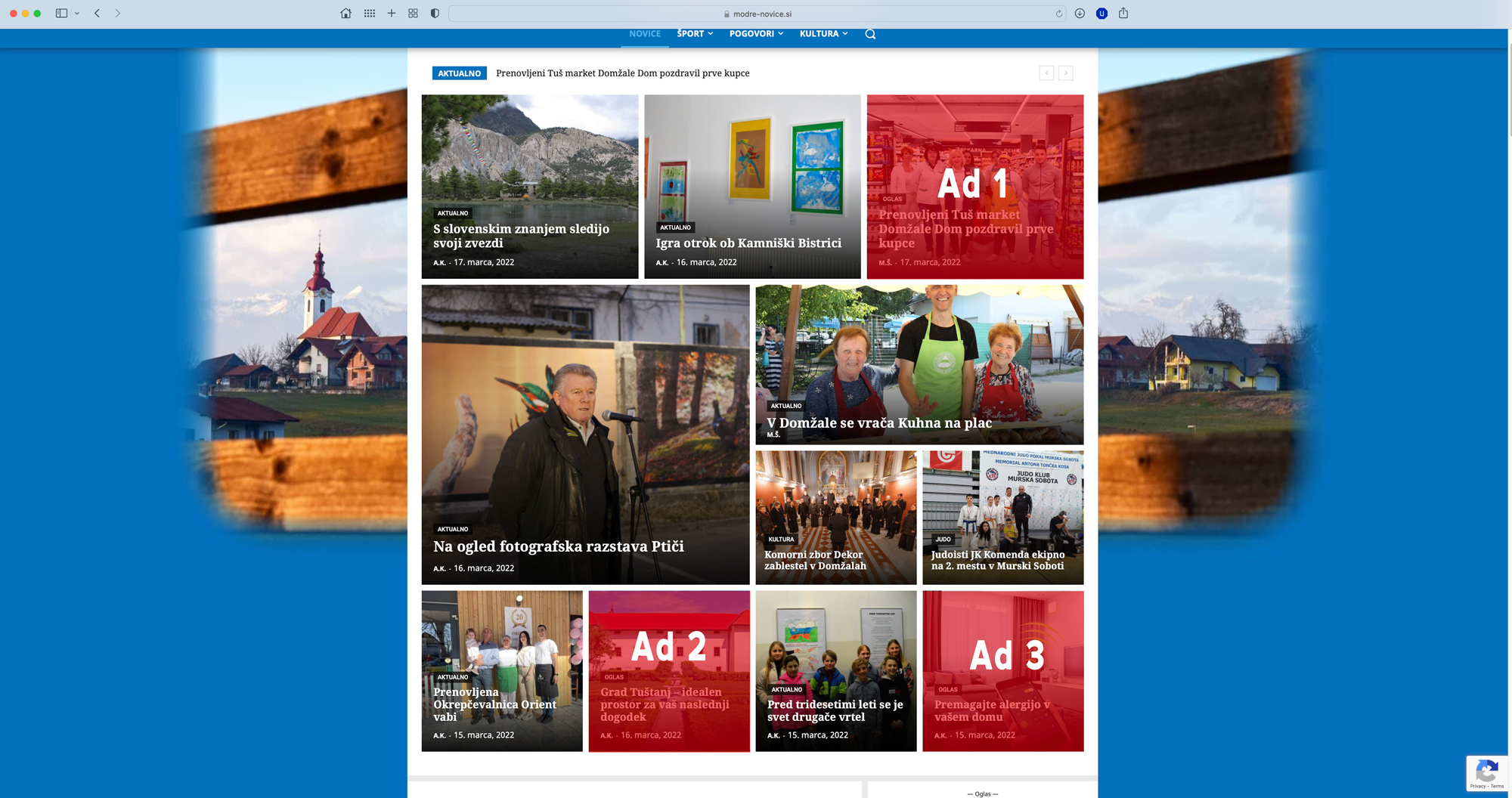
this is the link to advertorial (payed content): https://www.modre-novice.si/oglas/prenovljeni-tus-market-domzale-dom-pozdravil-prve-kupce/
I am using 3 tags for ads just as a filter option. So advertorials always appear at specific places on hompage of the portal: https://www.modre-novice.si
For Ad 1 element I have category filter set as Oglas (ad), post tag Oglas 1 (Ad 1) and sort order to random, so only here all posts with these settings would appear. Same goes for Ad 2&3 elements, only tags here are Oglas 2, Oglas 3 …
See image here: https://www.modre-novice.si/wp-content/uploads/2022/03/ads-homepage.jpg
I would like to hide just these 3 tags (Oglas 1, Oglas 2, Oglas 3) on landing pages of the advertorial posts (payed content).
See image here: https://www.modre-novice.si/wp-content/uploads/2022/03/advertorial-single-page.jpg
I hope I was clear what I am trying to achieve 🙂
Thank you!
Peter
 estelle88
I’ve followed the instructions regarding adding the YouTube API >>>
https://imgur.com/2Mfsj84
https://imgur.com/cPMUmiG
And then added in the channel id & playlist id. But it doesn’t work for either. https://imgur.com/YoNO8SH.
I’ve tried deleting the project and creating a new one in google console twice but hasn’t made a difference. If I save the editor with the playlist id then it causes an error to the site
https://imgur.com/Hs3WwmE
https://ettakesoff.com/youtube-videos/
This is the channel I would like added to the video playlist:
https://www.youtube.com/channel/UCfVW0QxCIHbpW1H54QREeWw
or any of the following playlists:
How do I get this to work?
Calin Hi,
About the ads on mobile. Normally those should look like this https://i.imgur.com/do4tpAV.png there is set by default on mobile content 20px left/right padding. But in case that this is snot apply, then you can try other methods, for example select the ad box and set in css tab some margins -> https://i.imgur.com/gRQSVH3.png or set the adsense code in a div like this -> https://pastebin.com/m2jQfFfN
I hope this will help you!
Calin Hi mgiannelis, please try to not reply multiple times in the topic if possible, this will only delay our response. Replying multiple times will refresh the topic date and move it to the back of the line, we answer from oldest to newest.
Our theme do not interfere with the admin bar, so I think that something else it is causing that problem.
About the mobile header, this is a different menu from desktop, but it can be adjusted using tagDiv Composer.
For example if you are using the responsive version, edit the homepage and set the mobile view port -> https://i.imgur.com/jdvm7qK.png
If you are using the mobile page template, then you can edit it from here -> https://prnt.sc/AkFGijSVZV10
I hope this will help you!
Calin Hi,
So you’ll like to have the mobile theme set, but instead it is display the responsive version. For this all you need to do is to have the mobile theme plugin enabled and amp (if you want to use the amp), in case that you are using cache plugin you need to make sure that the mobile support is enabled (the cache for mobile version).
Another thing that you need to do is to make sure that you didn’t disable the mobile theme from page/post, so if a page looks like responsive version, click to edit it and check the mobile theme options -> https://i.imgur.com/T0kyeMi.png
I hope this will help you!
Let us know the results!
Calin Hi,
Can you please provide a link to a post that it is not looking correctly on mobile and please let me know how you’ll like to be.
If you are using the mobile page template, you can adjust with tagDiv Composer the mobile template to look like you want -> https://prnt.sc/S3AC97PXP9tW
Also, please notice that if you choose to use amp, the layout will change to a classic layout and that one have only a few settings.
Thank you!
Calin Hi,
If the contend is not adjusted when you use one of the pre-build row layouts, what you can do is to manually set the columns row width, for example -> 75% – 25% -> https://i.imgur.com/wxI8vJt.png -> https://i.imgur.com/gEWsYzQ.png -> https://i.imgur.com/3Icfe6q.jpg or you can also use a fix width for a column -> https://i.imgur.com/7m9MfuX.jpg -> https://i.imgur.com/GxI5BEa.jpg
I hope this will help you!
 ragerobot
My website looks great on the back end when I edit it in Tag Div, but when I save and look at the site’s front end, the styling is very off. See below for an example.
How it looks on the back end in Tag Dive Composer >> https://www.ragerobot.com/wp-content/uploads/2022/03/BackEnd.png
How the site looks on the front end. >> https://www.ragerobot.com/wp-content/uploads/2022/03/FrontEnd.png
The site has been up and running for a year now and has worked perfectly but recently it started doing this.
SITE URL: http://www.ragerobot.com
Any help would be awesome!
 Balint
 Hello,
Since my problem is not resolved yet with the two-click punishment I have some questions to you. I use In-article responsive ad sizes on my article posts (single post theme) and I insert them on the Ad placement from the single post content Ads option.
I copy+paste the code that Adsense gives me for the In-article responsive ad without doing any changes. My problem is that the ad is expand use the full-width on the mobile page, like here: https://i.imgur.com/6z06cLF.png
I spoke with somebody and he told be this could be also a problem, and I should resolve this with the theme (some setting with the div).
Basically I want to set to show like here (these to examples are my friend website, he pasted the adsense code on his site and appeared like this:
https://i.imgur.com/HVM0jbZ.png
https://i.imgur.com/Wuoipra.png
Also in the Adsense example shows this example, with the margin between the ad and the site margin:
https://i.imgur.com/VgTuNSX.jpg
How can I set this on my site/theme? Is there any option? I use the Single Post Template 2.
Thanks.
 zgdk2273
 For example, this content page https://zh.tipsfootballbet.com/jiqiao/huaren-dupan-daxiaoqiu/ has a previous post and a later post