
- NewspapertagDiv AMP Plugin Tutorial
- ApiPractical example – How to add a new Block and Module
- NewspaperTrack Subscription Sources with Locker URL in Opt-In Builder
- NewspaperWP Rocket and Newspaper Theme: Optimization Guide
- NewspaperCredit System
- NewspaperIntroduction to CPT and ACF with Newspaper Theme
- NewspaperHow to edit modules for Flex Block X
- NewspaperHow to use the Posts List shortcode
- NewspaperUser review system
- NewspaperCustom Fields Support
- NewspaperHow to generate Facebook App ID
- NewspaperHow to insert a block inside the content of a post
- NewspaperModal Popup
- NewspaperPayPal Setup
- NewspaperLink Tracker
- NewspaperLockers
- NewspaperGeneral Options that May Interfere with the Newspaper Theme
- NewspaperAdd Cryptocurrency Price Ticker Widget
- NewspaperPosts Loop Element
- NewspaperThe Newspaper Mobile Theme: Introduction
 Calin
Calin Hi,
It seems there may be a misunderstanding here. Perhaps you’ve previously used a different theme that handled things a certain way, and now you’re expecting all themes to behave similarly. If that’s the case, I’m sorry to disappoint you.
As I mentioned before, when you install a demo, only the content and layout specific to that demo are included. For example, if you want to set up a shop, you’ll need to configure it manually using tagDiv Composer and tagDiv Shop (please make sure the plugin is installed, as I mentioned earlier).
Once the necessary plugin is active, you can use tagDiv Composer to build your shop pages. There are also pre-designed templates available, which you can easily import from the Cloud Library:
https://demo.tagdiv.com/select_demo/newspaper-prebuilt-websites/?demo-type=shop
To clarify again: when you add new functionality like a shop that wasn’t part of the originally installed demo, the layout for those new features won’t exist by default. You’ll need to create or import the layout manually.
Thank you!
Calin Hi,
You can contact us privately via email at contact@tagdiv.com if you’d like to share your credentials. Please do not post them on the forum.
Regarding your issue:
The problem is that you’ve edited the single post template each time when you think you add the article content, as shown here: https://i.imgur.com/LeuIZit.jpeg also, the dynamic post content element was replace with a Text with Title element. This element displays static content and does not automatically show each article’s content.
To display content dynamically for each post, you need to use the Post Content element instead: https://i.imgur.com/hldTlpY.png (I set it back)
If I understand correctly, you created the articles, then opened each article individually, edited the cloud template using tagDiv Composer, and manually changed the text inside the fixed text block. That’s the root of the issue.
There are currently 24 edits on your template, and 22 of them are changes to the text inside the static Text with Title element.
This means you’ve essentially created articles with only a title, but added the content directly in the template, not in the article itself https://i.imgur.com/U6qR7mt.png
Articles should be created properly in the post editor, like this example:
https://www.pomeranian.dk/wp-admin/post.php?post=64&action=edit
frontend view: https://www.pomeranian.dk/index.php/2025/06/26/mobile-marketing-is-said-to-be-the-future-of-e-commerce/
Also, please make sure you’re using the global template from the panel: https://i.imgur.com/vHbkSTS.png use an individual template only if you want a custom layout for a specific article.
Thank you!
Calin Hi,
The theme panel schema should be disabled and used the one from SEO plugin.
Also, I made some tests using your screenhost example and indeed the column text is removing the itemprop, so the HTML code should be set in HTML element like this https://i.imgur.com/EHv4afS.png and the results should be https://i.imgur.com/kbck7jU.png
I hope this will help!
Thank you!
Calin Hi daveslc,
The feature the user requested is not a default option from WordPress (the provided example is not using WordPress). It is a custom solution that appears only in the block module when an image and caption are used together. This functionality is not standard for block modules it’s typically only available for standalone images. We implemented this as a custom addition and have provided the necessary solution. Thank you for your understanding!
Calin Hi,
When you mention ‘time,’ you are referring to hours, for example, 10:40. If so, the time can be set using the information from my previous message – https://i.imgur.com/6r41n8F.png. All parameters should be set in the date format in the custom section (for both time and date).
Thank you!
Calin Hi,
Did you edit the articles that came with the theme, or did you create your own?
We recommend creating your own content, as the demo content provided with the theme will be removed if you install a different demo or uninstall the current one.
If you can provide some examples of the steps you took, we may be able to identify the cause of the problem.
Thank you!
 unit45host
Hi TagDiv team,
I’m currently using the Newspaper theme with TagDiv Composer, and I’d like to implement Schema.org microdata markup (e.g. itemscope, itemtype, itemprop) for services and FAQs on some of my pages for better SEO and structured data compatibility.
To make this work, I’ve extended the allowed HTML attributes using wp_kses_allowed_html inside functions.php as follows:
function allow_microdata_attributes($allowedtags) {
    $microdata = [
        'itemscope' => true,
        'itemtype' => true,
        'itemprop' => true,
        'itemid' => true,
        'itemref' => true
    ];

    foreach ($allowedtags as $tag => &$attributes) {
        if (is_array($attributes)) {
            $attributes = array_merge($attributes, $microdata);
        }
    }

    return $allowedtags;
}
add_filter('wp_kses_allowed_html', 'allow_microdata_attributes', 10, 2);
However, even after doing this:
the microdata attributes disappear both from the editor view and the rendered frontend HTML;
I’ve confirmed that the functions.php is correctly loaded and applied;
I also verified that the attributes are stripped even when I use the Raw HTML module.
So my question is:
➡️ Is there an internal TagDiv Composer or Newspaper filter that sanitizes or strips these attributes even after kses has been adjusted?
And if so, is there a recommended way to allow inline Schema microdata in Text/Raw HTML blocks?
I’d love to keep this inline for SEO reasons, but if it’s not possible, I can switch to JSON-LD with RankMathSEO plugin.
Thank you in advance for your time and support!
Best regards,
Zoltan
 gleloudas
Hello, we have send an email to support on 20&22/7 for this topic can you check it?
You have had credentails for admin if needed from another recent ticket.
Short info:
we would like to remove background images:
https://www.kynigesia.gr/wp-content/uploads/2025/07/kyn-background-radial-gradient-desktop-1.svg
https://www.kynigesia.gr/wp-content/uploads/2025/07/kyn-background-radial-gradient-desktop-2.svg
https://www.kynigesia.gr/wp-content/uploads/2025/07/kyn-background-radial-gradient-mobile-1.svg
https://www.kynigesia.gr/wp-content/uploads/2025/07/kyn-background-radial-gradient-mobile-2.svg
and replace them with this css class (already available). this css is not possible to achieve with tagdiv of course.
.redbg3{background: #9B2A2A;
background: linear-gradient(90deg,rgba(155, 42, 42, 1) 0%, rgba(221, 51, 51, 1) 50%, rgba(105, 29, 29, 1) 93%)!important;}
Full info on email.
Thank you.
Calin Buna,
Am inteles ce doriti sa obtineti, insa este posibil sa nu ma fi exprimat suficient de clar.
In prezent, atunci cand folositi tema Newspaper si deschideti un articol, prima imagine apare de doua ori (https://i.imgur.com/A8ub9nk.png). Acest lucru se intampla deoarece template-ul folosit afiseaza automat imaginea setata ca featured image, iar aceeasi imagine este inclusa si ca prim element in continutul articolului.
O solutie permanenta, care se aplica tuturor articolelor, este folosirea unui single post template din tagDiv Cloud Library, din care sa eliminati elementul de featured image. In acest fel, articolul va ramane neschimbat ca structura si continut, doar ca nu se va mai incarca si afisa acea imagine duplicata. https://i.imgur.com/UHQiuld.png https://i.imgur.com/212sYqY.png
O alta varianta este ascunderea imaginii din continut folosind un cod CSS. Totusi, aceasta optiune o ascunde doar vizual imaginea va continua sa fie incarcata in pagina, ceea ce poate afecta performanta.
Sper ca am reusit sa explic cat mai clar situatia.
Multumesc!
 Aldis
AldisDear tagDiv Team,
We are planning to introduce a paid subscription service on our portal https://tendences.lv and would appreciate your guidance on a few points:
If we import your template, will we need to install or configure anything else to enable users to purchase subscriptions? For example, is WooCommerce required or is it already integrated?
How will clients be able to make payments? Do we need to connect a payment gateway like Stripe or another system separately?
Is there anything else required to ensure that the subscription and sign-up system works fully and reliably?
Thank you in advance for your assistance.
Best regards,
Aldis
Tendences.lv
 sanjeevk765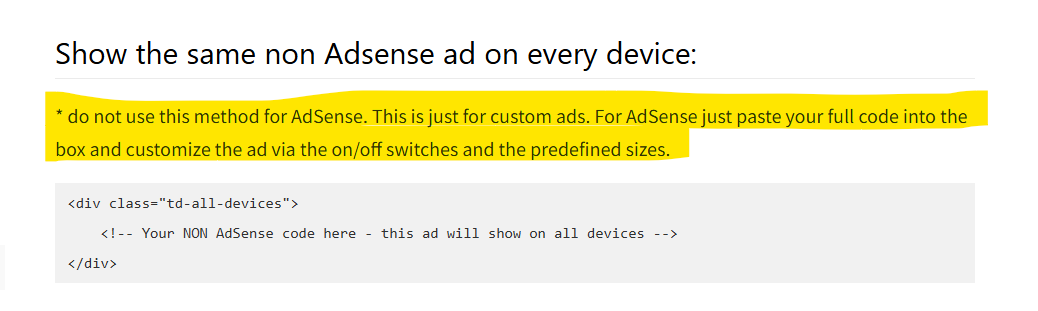
https://forum.tagdiv.com/using-other-ads-non-adsense-ads/
Documentation is not fully updated. There are 3 more places where sentences saying the same thing on the same page. Please update it thoroughly. I attached an example screenshot.
thankyou
Calin Hi,
Usually, when this happens, it is used a cache that does not have the option to deliver a separate mobile cache version. Also, sometimes it can be Cloudflare cache, if this is used (the free version does not have a separate cache per viewport).
The simplest way to resolve the problem is to disable the tagDiv Mobile theme plugin, or in case the amp plugin is used to be set to be used only on amp version https://i.imgur.com/mn3AIzp.png also, make sure that the amp redirect is disabled https://i.imgur.com/P5XcUxA.png
Thank you!
 cristihagi
Hello,
I want to change the theme of my website to yours. In the current theme, I was using both a featured image and the actual image within each article. When I switched to your theme, both images now appear in the article.
I would like to know if there is an option to disable one of them, so that only a single image is displayed.
I looked through the settings but couldn’t find anything.
Example: https://ct100.ro/staging/ambulanta-implicata-intr-un-accident-in-constanta/
 Antonis
 Hello,
This is an excellent solution!
But i face another problem now:
I have created a page with a “Flex Box 1” style, where the above solution with the drop-down sub-menu works great!
But when i connect this page with a Menu Item, the drop-down remains one column.
Except from this issue, as you see, Post categories of the Flex Box are shown over the drop-down panel.
Is there a fix to this?
Thank you!
Calin Hi,
This situation is because the tagdiv mobile theme is used and when this is used, you need to set the content for pages in the mobile editor https://forum.tagdiv.com/mobile-theme-introduction/ What I recommend is to set the settings in the theme panel from Mobile+ Amp on only amp https://i.imgur.com/KHH3UXJ.png and the problem should be resolved. Also, make sure that the amp plugin does not set the redirect from mobile to amp – https://i.imgur.com/UyUxLtr.png
Thank you!
 c.deluca
Hi! i have my site http://www.scienzepolitiche.unina.it not working on mobile devices since the last update of wordpress. In the specific: when i load the home page on iphone (example) it seems ok but as soon as i navigate through the internal pages, they show “blank” with the text: exit mobile version. If i click on this, everything goes ok.
Please could you help please? In the settings i use “Use AMP for mobile” as other settings (Mobile or Mobile+AMP) make the site work even worse on mobiles. Please help. Carlo
Calin Hi,
Can you please provide some examples. Our theme is responsive and if a template is used on desktop that one can be display on mobile too. Also, make sure that you are not using an extra plugin for the mobile version (for example, the tagdiv mobile theme plugin).
Thank you!
Calin Hi Depa,
Anamaria was right the search from our theme is searching in the post content, for example https://i.imgur.com/z3Ybpo9.png the title is “Testtt” and the content is “Thsi is a test for search” now I will search for the word “search”- https://i.imgur.com/CrPEfbx.png
Thank you!
 simchris
 Funnily enough we have the same issue with one of our websites, where we deleted the old http version and amp links, and site dropped out of google news, too. Google seems to understand they cocked things up (this site has been online 15 years). They have added a new wildcard “domain property” that covers all iterations of the domain including any subdomain, and requires adding a name record at registrar or on server to validate.
So, “it’s not just you…” they have done some weirdo messing things up while trying to implement their AI nonsense.
Make sure you have the new “domain property” setup and validated; this would be separate from the ‘https’ property you likely already have in GSC (Google Search Console.)
 ductien
Because domain old lsd1.com is on localhost xampp on my computer, it is virtual domain .
Help me change theme license domain old lsd1.com to domain new brighomes.com
and delete other domain (vuatuyendung.com, igvietnam.com is delete it)
 BenW
BenW Hi Calin, to clarify, in your example I’d like to change the word ‘Food’ above ‘Delicious places to eat in YC’ which is sat on top of the top background image. How do I go about this? Thanks
Calin Hello,
From what I’ve read, most of the recommendations have already been made on the site: object cache plugin, cache on flex blocks, cache plugin….
What I would recommend is a dev/staging where you can do some tests, for example try using a demo with classic templates like the Local News demo, but this should be tested only on dev or staging, not on live. And tested using the tagDiv Composer and tagDiv Standard Pack plugin, without any other plugins. Then, compared with the results on live.
Thank you!
Calin Hi,
Thank you for your kind words!
Unfortunately, there is no option for that, but in some situations, we can adjust the dropdown so it looks better, for example, this CSS will set the list on 2 columns:
.td-subcat-filter .td-subcat-dropdown:hover ul {

    column-count: 2;

}
The CSS should be set in the theme panel > custom code > custom CSS.
Thank you!
Calin Hi,
Can you please provide some examples?
It is possible to be something related to the locker https://forum.tagdiv.com/lockers/ or maybe the single post template https://forum.tagdiv.com/cloud-library-templates/ no longer has the content element.
 nearview
 Hi Anamaria. I’d also like to request that the Nextdoor social icon be added to the Newspaper theme. Nextdoor recently launched Nextdoor news and MANY publishers are now creating Nextdoor news accounts.
Here’s an article I wrote about it: https://nearviewmedia.com/nextdoor-news/
And here’s an example of a publisher Nextdoor news account: https://nextdoor.com/page/bethesda-magazine/
Thanks!
-
This reply was modified 1 year by
nearview.



