
- NewspapertagDiv AMP Plugin Tutorial
- ApiPractical example – How to add a new Block and Module
- NewspaperTrack Subscription Sources with Locker URL in Opt-In Builder
- NewspaperWP Rocket and Newspaper Theme: Optimization Guide
- NewspaperCredit System
- NewspaperIntroduction to CPT and ACF with Newspaper Theme
- NewspaperHow to edit modules for Flex Block X
- NewspaperHow to use the Posts List shortcode
- NewspaperUser review system
- NewspaperCustom Fields Support
- NewspaperHow to generate Facebook App ID
- NewspaperHow to insert a block inside the content of a post
- NewspaperModal Popup
- NewspaperPayPal Setup
- NewspaperLink Tracker
- NewspaperLockers
- NewspaperGeneral Options that May Interfere with the Newspaper Theme
- NewspaperAdd Cryptocurrency Price Ticker Widget
- NewspaperPosts Loop Element
- NewspaperThe Newspaper Mobile Theme: Introduction
 Bettina
 Hello!
If you need AMP, you should have amp and mobile theme plugin installed and active.
We have 3 options here:
a. Mobile – Displays content using the Mobile Theme on small screen devices (no AMP)
b. Mobile + Amp – Displays content using the Mobile Theme on both mobiles and AMP
c. AMP – Uses the responsive version of the theme on small screen devices and Mobile Theme only on AMP.
For more information about those plugins, you can find in our documentation:
– https://forum.tagdiv.com/tagdiv-amp-plugin-tutorial/
– https://forum.tagdiv.com/the-mobile-theme/
– https://www.youtube.com/watch?v=SpGkOnJeNZY
From my point of view, if you don’t use the Mobile Theme plugin, then there is no reason or benefit from AMP.
Please make a test also with the default paired url structure (first option from the AMP settings) and let me know the results.
Thank you!
Bettina Hello!
1. If you need AMP, you should have amp and mobile theme plugin installed and active.
a. Mobile – Displays content using the Mobile Theme on small screen devices (no AMP)
b. Mobile + Amp – Displays content using the Mobile Theme on both mobiles and AMP
c. AMP – Uses the responsive version of the theme on small screen devices and Mobile Theme only on AMP.
For more information about those plugins, you can find in our documentation:
– https://forum.tagdiv.com/tagdiv-amp-plugin-tutorial/
– https://forum.tagdiv.com/the-mobile-theme/
– https://www.youtube.com/watch?v=SpGkOnJeNZY
2. Please note that if you enable the Mobile Theme plugin on a page which was created with TagDiv Composer will not display the design you built because the Mobile Theme has its own templates design. https://forum.tagdiv.com/mobile-theme-introduction/
Thank you!
Bettina Hello!
Please provide more information about what you need to achieve, screenshots or an example and your website link in order to help you efficiently.
A solution for sending a screenshot/video is this:
Download, capture, send: https://www.techsmith.com/jing-tool.html
After making the screenshot, you will have a link, paste it here.
Thank you!
Bettina Hello!
I just replied you here in your own topic: https://forum.tagdiv.com/topic/please-i-want-to-change-headers-background-color-i-go-to-newspaper-theme-pane/#post-421779
Please provide more information about what you need to achieve, screenshots or an example and your website link in order to help you efficiently.
A solution for sending a screenshot/video is this:
Download, capture, send: https://www.techsmith.com/jing-tool.html
After making the screenshot, you will have a link, paste it here.
Thank you!
 tori-media
I recently redirected all mobile users to AMP and I am enjoying it except that our pages do not longer load.. We have tried all we could for several days to make it work but to no avail and we are not going back on the mobile theme..
Please help !
 Mark Gilbert
 It seems resolved now. Thanks. However, here are two general questions:
1) Do I need AMP activated when I use Mobile Theme, or does Mobile Theme contain all I need?
2) If I use Mobile Theme, is my mobile site limited to the layout of Big Grid + Latest Articles? I can’t have the same content as desktop site?
Thanks
MG
Bettina Hello Rahul!
AMP is faster and works better only with Mobile Theme. The white screen it could be a plugin conflict or a cache problem. Please make a test only with tagdiv plugins active without any cache plugin and see the results.
For more information about this plugin, please check our documentation here: https://forum.tagdiv.com/tagdiv-amp-plugin-tutorial/
Thank you!
Bettina Hello!
These elements are from a default template and you can not add them in a cloud template for example.
You can build them in the cloud template using a flex block and the weather widget: https://forum.tagdiv.com/weather-widget/
Thank you!
Bettina Hello!
You can not customize AMP at all because it comes with its own design: https://forum.tagdiv.com/tagdiv-amp-plugin-tutorial/
There are some settings in the Theme panel -> Mobile Theme.
Thank you!
Bettina Hello!
If you mean Mobile Theme, then you can not customize its own layout and edit the pages with TagDiv Composer.
You have only some settings for this layout, which you can find in Theme panel -> Mobile Theme.
Documentation here:
– https://forum.tagdiv.com/mobile-theme-introduction/
– https://forum.tagdiv.com/the-mobile-theme/
If you do not mean about the Mobile Theme plugin, then please provide more information about what you need to achieve, screenshots or an example and your website link in order to help you efficiently.
A solution for sending a screenshot/video is this:
Download, capture, send: https://www.techsmith.com/jing-tool.html
After making the screenshot, you will have a link, paste it here.
Thank you!
 Rahul chauhan
when i access my blog via mobile its open normally in amp theme mode but when click on 2nd or next page its suddenly becomes in default mobile view mode and only home page opens. Sometimes the screen also appears blank. How to solve it?
 Tughan
 Thanks a lot, everything is fine right now and working great!
May I request guidance in one thing too? Sorry if I missed it in any of these guides, I checked them twice but I’m not a native speaker.
When I type /?amp, it works great but homepage has a different design than the mobile page I created for homepage. Am I not allowed to customize the amp for now or am I missing something again?
Thank you for your patience and support! Amazing theme!
 menneskedyr
 Thank you for the quick response, but that’s not quite it. Yes, TD Composer has a lot of queries and we live with it, but this was caused by a single (double, actually) repeating query from TD Standard Pack apparently fetching the site logo, using what seems to be a highly inefficient function:
attachment_url_to_postid()
And it was doing it twice, once for the desktop and once for the mobile logo, on every single page load. This caused mysqld to spike to 200% and above.
I see now that I have posted the wrong screenshot above, sorry. Here’s the correct one:
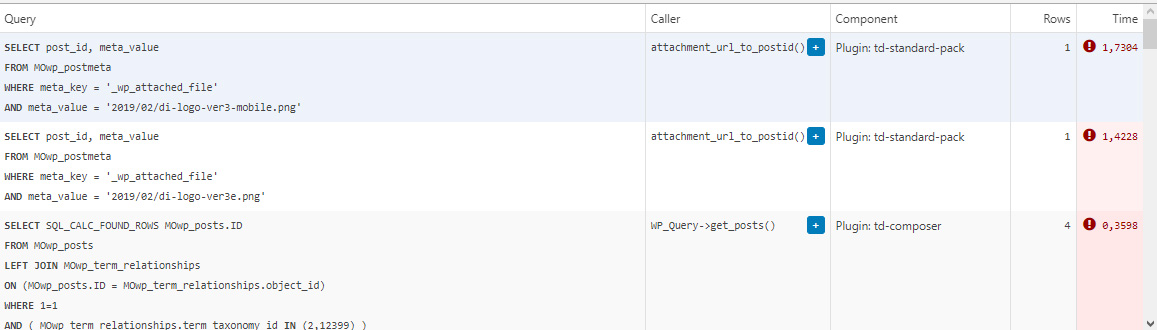
This morning I managed to patch up the problem, it’s a crude solution but may help someone. In header template I found that it was loading the logos from
plugins/td-standard-pack/Newspaper/parts/header/header-menu-h1.php
(yours may be different of course)
There I simply removed the PHP block fetching the logos and hardcoded the HTML for the logos in. As soon as I did that, the SQL spike went away. So I’d say it’s a bug, or inefficient code at least.
To be clear, we’re running the latest versions of WP, PHP, MySQL, the theme & plugins, all on a solid VPS. Yes there is quite a bit of SQL load, we’re working to optimize it with new blocks and Cloud Templates, but this was something else. Could be related to the latest Standard Pack update, don’t know, team didn’t report it before.
-
This reply was modified 4 years by
menneskedyr.
 sumasystems
Greetings, I keep getting disabling pop-ups of other articles when I am scrolling up and down a current article. How do I disable this. I have tried everything I could but it keeps on showing.
Here is the link to an example article for you to reproduce the error.
https://solwezitoday.com/finance-minister-dr-situmbeko-musokotwane-says-human-capital-development-is-critical-towards-achieving-zambias-economic-development/
Help out please.
Please h
sumasystemsWhen I scroll down and then up, pop ups of other articles appear, making it unpleasant for the reader. How do I disable this
Here is the link to an example article for you to reproduce the error: https://solwezitoday.com/finance-minister-dr-situmbeko-musokotwane-says-human-capital-development-is-critical-towards-achieving-zambias-economic-development/
Please help. It is disturbing my users.
Bettina Hello!
For example, if you delete the posts, then the images from the posts are not deleted. You need to do it manually from the Media Library.
Thank you!
 dkleidonaris
Hello,
I have imported a template to my site that has the header & footer full width, but the main content boxed. How can I make the header & footer narrow too, so that my background image won’t be hiden by them?
Thanks in advance!
Bettina Hello!
Please provide more information about what you need to achieve, screenshots or an example in order to help you efficiently.
A solution for sending a screenshot/video is this:
Download, capture, send: https://www.techsmith.com/jing-tool.html
After making the screenshot, you will have a link, paste it here.
Thank you!
Bettina Hello!
Let me explain you which options of mobile versions are:
1. Responsive version: A responsive version of your website is looking similar like on desktop, edit the page with TagDiv Composer, click on the mobile viewport: https://www.screencast.com/t/XDQJedlggSB ; there you can see your mobile version and you can edit the elements there.
2. Mobile pages: https://tagdiv.com/newspaper-10-3-7-update-brings-customizable-and-fast-mobile-pages/
3. Mobile theme plugin: The Mobile Theme is a performance optimized theme included in the Newspaper main theme and it loads only for mobile devices. It comes with its own templates for page, post, category, etc so your current templates from the desktop theme will get converted to the mobile theme layout. For more details, please take a look here: https://forum.tagdiv.com/the-mobile-theme/ https://forum.tagdiv.com/the-mobile-theme/
A full explanation you can find here: https://www.youtube.com/watch?v=SpGkOnJeNZY
If you created the mobile pages with TagDiv Composer, then when you install Mobile Theme plugin, your pages will be overwritten (disappear) by the plugin layout.
If you use Mobile theme plugin, then you can not edit the pages with TagDiv Composer.
You have only some settings for this layout, which you can find in Theme panel -> Mobile Theme. Please note that if a page is made by Composer, than the content won’t be displayed on Mobile theme version. You should create the content with the Mobile Editor.
Unfortunately, AMP is faster and works better only with Mobile Theme, because it is not compatible with cloud templates.
From my point of view, if you don’t use the Mobile Theme plugin, then there is no reason or benefit from AMP.
Check our documentation about this plugin here:
https://forum.tagdiv.com/tagdiv-amp-plugin-tutorial/
Thank you for understanding!
 CenterfoldNews
Hello,
I am trying to edit the header style on my new newspaper 11 website, but when I navigate to the theme panel, the header style and search position are missing. I am following along with the below linked youtube video. The header style I am describing can be seen at minute 31.
Am I doing something wrong? Thanks!
 bidhi
bidhihttps://www.connectbroadbandservices.com/dekkomag/
in mobile device Politics, Art & Culture, Social Set and World all section not showing kindly guide me, Also Footer Section Also not showing in mobile
menneskedyrThe latest version of TD Standard Pack suddenly started producing a massive number of SQL queries. The issue came to my attention when the team reported very slow website, particularly during media uploads.
Inspection showed mysqld process being over 100% CPU constantly, often above 200%. After eliminating the usual culprits such as Yoast SEO, it turned out that it was TD Standard Pack. When deactivated, mysqld returns to normal levels.
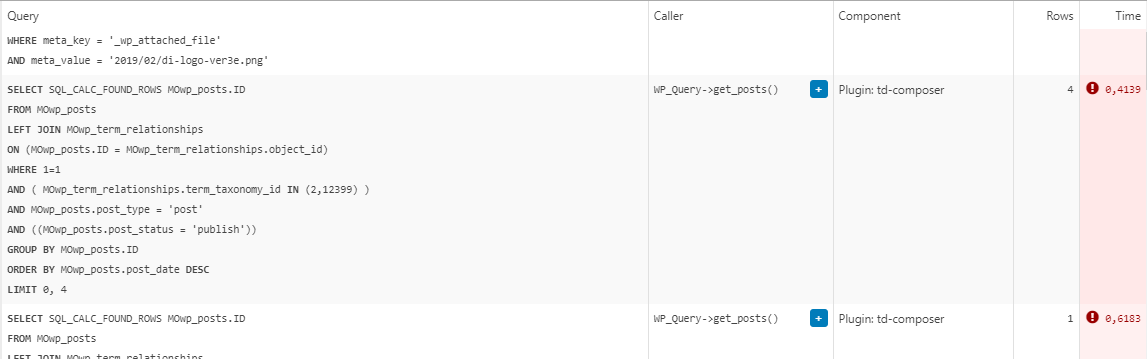
The queries in question are all “SELECT post_id, meta_value FROM MOwp_postmeta WHERE meta_key = ‘_wp_attached_file’ AND meta_value = (…)”. They seem to be constantly running and, as far as I can tell, are called from the header template.
The site is running on a solid VPS and latest versions of theme and required plugins.
We are in a process of migrating to a completely cloud templates built site which might resolve the problem because we will not need the Standard Pack anymore, but in the meantime, any ideas?
Example from Query Monitor:
 Faba
FabaHi everyone,
I’ve looking for a solution to this problem, but without success, from the theme panel I have disabled the “sign in option’ although for the mobile version is still there, so I have installed the mobile version of the theme hoping to disable from there,but from there there is no option to disable it, additionally the theme home page doesn’t show the featured image, only if I click on the actual article then it shows it.
Unfortunately I cannot upload any screenshot here to show my real example problem.
Thank you for you support
Fab
Mark GilbertI activated AMP plugin and tried to activate tagDiv Mobile Theme and got this message:
“Fatal error: Cannot declare class Mobile_Detect, because the name is already in use in /homepages/24/d715855802/htdocs/jazzjournal/wp-content/plugins/td-mobile-plugin/Mobile_Detect.php on line 28”
What next?
Thanks
Mark GilbertHello – On advice of Google AdSense I activated AMP plugin (Version 2.1.4) and tried to activate tagDiv Mobile Theme (Version 1.3) but got this message:
“Fatal error: Cannot declare class Mobile_Detect, because the name is already in use in /homepages/24/d715855802/htdocs/jazzjournal/wp-content/plugins/td-mobile-plugin/Mobile_Detect.php on line 28”
What can I do?
Thanks
