
- NewspapertagDiv AMP Plugin Tutorial
- NewspaperTrack Subscription Sources with Locker URL in Opt-In Builder
- NewspaperWP Rocket and Newspaper Theme: Optimization Guide
- NewspaperCredit System
- NewspaperIntroduction to CPT and ACF with Newspaper Theme
- NewspaperHow to edit modules for Flex Block X
- NewspaperHow to use the Posts List shortcode
- NewspaperUser review system
- NewspaperCustom Fields Support
- NewspaperHow to generate Facebook App ID
- NewspaperHow to insert a block inside the content of a post
- NewspaperModal Popup
- NewspaperPayPal Setup
- NewspaperLink Tracker
- NewspaperLockers
- NewspaperGeneral Options that May Interfere with the Newspaper Theme
- NewspaperAdd Cryptocurrency Price Ticker Widget
- NewspaperPosts Loop Element
- NewspaperThe Newspaper Mobile Theme: Introduction
- NewspaperAutoptimize Plugin – install and configuration
 Anamaria
 Hello,
If you have a mobile page you can adjust it with tagDiv Composer, and you can delete some components, but if you use the mobile responsive, you can only hide them from tab called “CSS” select the viewport phone and select the element and after hide it => https://www.screencast.com/t/Of08s58KJi
This is a video about Responsive Newspaper Theme, Mobile Pages & Templates https://www.youtube.com/watch?v=SpGkOnJeNZY
Hope this helps you!
Thank you!
 Vlad S
 Hello !
Please follow our guide and make sure that you have set AMP properly: https://forum.tagdiv.com/tagdiv-amp-plugin-tutorial/
Thank you !
 neonvitor
 Hello,
I uninstall AMP plugin and it work but the mobile interface still looks bad. What should I do? Old mobile interface did not look like this.
 Bettina
 Hello!
Please make sure that you have AMP plugin uninstalled.
Thank you!
Bettina Hello!
It is useful for you to enable retina as well because for example, most apple devices have retina display.
Thank you!
 shelleysamone
 Hello,
I do see the theme allows for custom fonts in the theme panel. I know the custom font I want to use. It’s called Cambridge. However I don’t know how to get the font file in order to convert it or upload it. Can you please provide a visual example of how to obtain a font file and how to upload it. Thank you for your assistance in helping me to customize my website.
Bettina Hello!
It seems you use a cloud template, so in this case you can edit the page with TagDiv Composer plugin( documentation here: https://forum.tagdiv.com/tagdiv-composer-tutorial/ ).
You can move the element with drag & drop in another place. Read more about flex blocks setting here: https://forum.tagdiv.com/flex-block-settings-guide/
If you put the same elements on the same post, then they will show exactly the same. You need to change the template for the second one and also for the “Love Letters” post.
Thank you!
neonvitorHello,
We did not use AMP because the AMP image of my site on mobile looked bad, but after a few adjustments, it started redirecting it to the AMP page on mobile.
Can someone help? How can i close it?
Site URL: kazancrehberi.net
Site AMP URL: https://kazancrehberi.net/?amp=1
 thcp2020
How do I create collapsable dropdown text?
I want to create a menu with Support Us and for people to click a drop down button to see other options.
Please see attached my menu and an example on instagrams website
https://paste.pics/BYGO5
https://paste.pics/BYGN0
All the best
Thomas
Bettina Hello!
Try to edit the page with TagDiv Composer and click on the element, drag & drop at the bottom of the page in the red area.
Let us know the results!
Thank you!
 browngh
Newspaper AMP is not working on my webiste http://www.browngh.com. It works perfectly on Homepage but it doesn’t work on posts which is affecting me on search and google news. Please help me solve this . Thanks
Vlad S Hello !
If you are using Mobile Theme + AMP you will have to add the code in Theme Panel – Mobile Theme: https://www.screencast.com/t/hgxj5I6Dl
If you are using AMP without mobile theme plugin you need to insert the code in Theme Panel – Custom Code – Advanced CSS: https://www.screencast.com/t/HtJKmUPQA9mk
Thank you !
Vlad S Hello !
Unfortunately this doesn’t seem to work on default themes either. Have you tested in some other themes ? Can you provide an example ?
Thank you !
 dazemkt
 I think I can`t get it work. It makes no different when I activate or deactivate mobile team.
For some categories its working on mobile but not for league of legends for example. I can`t understand what makes it different to other categories.
 Telebari
Dear staff
i’m using various plugin that create listings places.
When i install these plugins, your postbox (for example featured video, featured audio) disappears. If i disable plugins, your postbox return available.
How to fix it? Thanks
 Chema
ChemaDear sirs,
With the results cloud template i have a problem: i can not see any results if i put a search term different from the category. For example:
https://www.trplane.com/?s=innovacion
Results ok
https://www.trplane.com/?s=cepsa
No results. Wrong, there is 1 article
In the search menú of the top bar the article appears, but doesnt appears in the template
Thanks in advance
 Patrick93
 First, could you please tell me, where i can add CSS for AMP Pages? Thanks
 Calin
Calin Hi,
If you are using the cache plugins, then you need to have the option for cache date enable -> https://i.imgur.com/P6ihSlS.png then it should display the correct date, but this also can differed from cache plugin to cache plugin, for example with WP Super Cache is working -> https://forum.tagdiv.com/cache-plugin-install-and-configure/
Thank you!
 AJCF
AJCF hi, i don´t use the mobile theme or the amp. what i use is the default mobile page.
the error apears me when i try to save in the edit mobile page.
the footer and the content is save with success but the other it show me the follow message in Red: “invalid data Current state has involved an issue. You could try and UNDO operation (CTRL+Z / CTRL+SHIFT+Z)”
The mobile menu (with the burguer menu in the left and the search icon on the right) only appears me sometime on the phone, but I dont no if its because of the load of the phone or its because of the error in saving.
 mally
mallyhi. my homepage has a large hero post. i was wondering how can i have a different layout. for example, instead of 1 large hero post, can have it display 4 posts or even maybe a slider?
Current homepage: https://www.screencast.com/t/XPXJFmXcm
 stringbenderb5
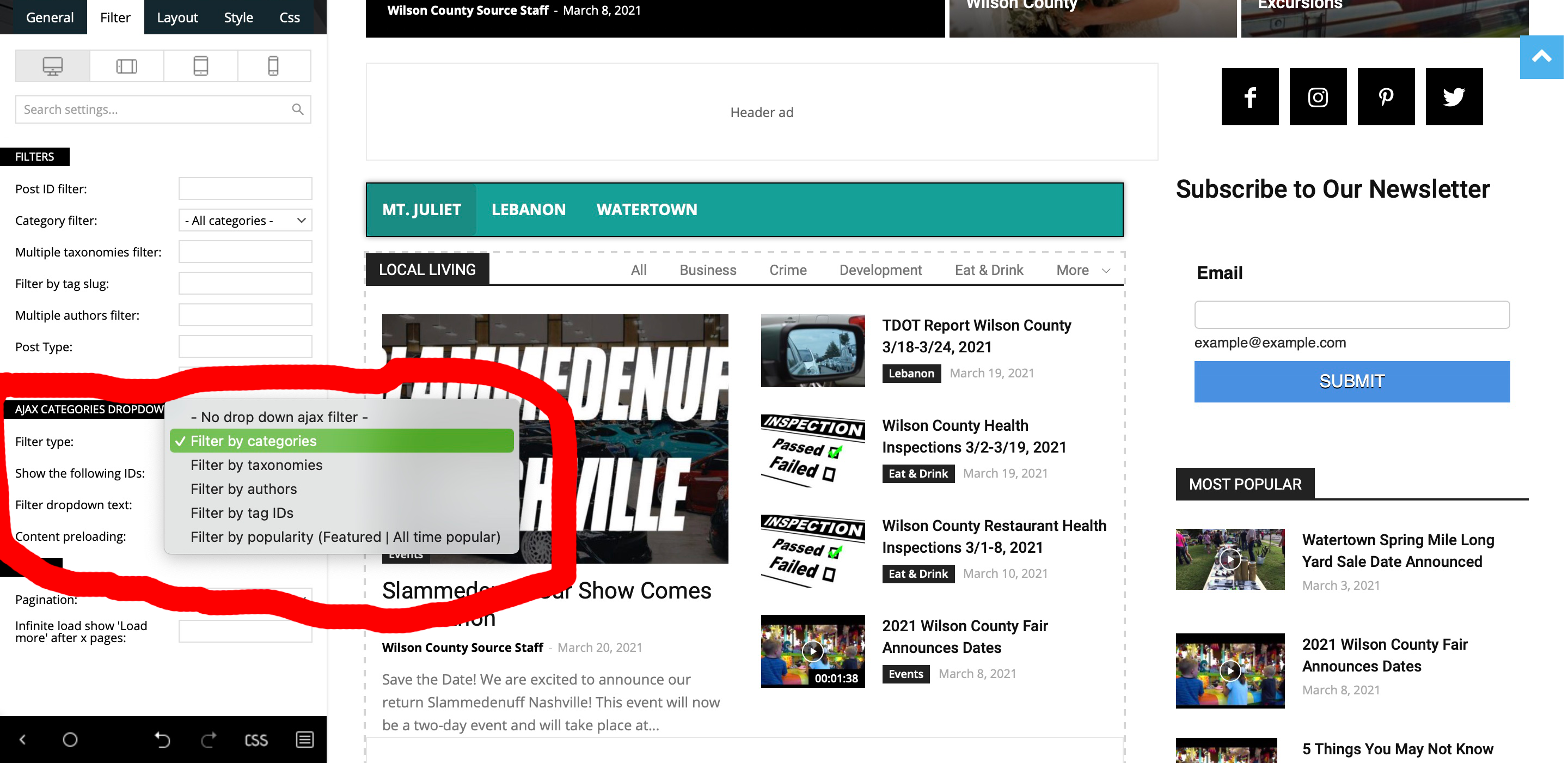
 Sorry, but the instructions you sent did not solve my issue. Please see below.
Filter by Categories gives me All, Business, Crime, Development, Eat & Drink, More (dropdown)
Filter by Taxonimies gives me only the selection “All”
Filter by ID Tags gives me All, lebanon, tn, tennessee, mt. juliet, obituaries, events, more (not sure why these are not capitalized.
So, none of the above settings gives me the below.
Element Used: Flex Block 3
Ajax Categories has been enabled.
I need it to display the below.
Parent Category: Latest News
Alax Tabs: Eat & Drink, Entertainment, Events, Health & Fitness, Kids & Family, Things to Do, Travel.
How do I get these specific categories to show up in those tabs?
As you can see in screenshot below it does not give me these options to select from.
Patrick93Mobile Theme > Custom code does not work for AMP pages?
How can I modify AMP pages? Is it only possible with media queries?
Patrick93I have uploaded my logo in the prescribed dimensions. Unfortunately, the logo is very blurry on AMP pages. What can be the reason for this? Is there any way not to upload an extra logo for AMP?
 comms
commsHi
Based on this example from https://www.feedotter.com/blog/wordpress-rss-feeds-for-categories-and-tags/
Combining Category and Tag for your RSS feed
http://www.example.com/category/categoryname/tag/tagname/feed
I am unable to achieve this using the Newspaper theme.
Any thoughts why?
I can access the feed individually for categories at http://www.example.com/category/categoryname/feed/ and tags at http://www.example.com/tag/tagname/feed/ but not combined.
Patrick93There are several ways to upload the favicon.
1.) To the index directory of the server with .ico.
2.) Design > Customizer > Website Information >> https://nimb.ws/eDm6XI
3.) Theme Panel > Header > Logo & Favicon >> https://nimb.ws/8mPtp7
Do I have to use all three variants or is one enough? Where are the differences?
Thanks

