- NewspapertagDiv AMP Plugin Tutorial
- NewspaperTrack Subscription Sources with Locker URL in Opt-In Builder
- NewspaperWP Rocket and Newspaper Theme: Optimization Guide
- NewspaperCredit System
- NewspaperIntroduction to CPT and ACF with Newspaper Theme
- NewspaperHow to edit modules for Flex Block X
- NewspaperHow to use the Posts List shortcode
- NewspaperUser review system
- NewspaperCustom Fields Support
- NewspaperHow to generate Facebook App ID
- NewspaperHow to insert a block inside the content of a post
- NewspaperModal Popup
- NewspaperPayPal Setup
- NewspaperLink Tracker
- NewspaperLockers
- NewspaperGeneral Options that May Interfere with the Newspaper Theme
- NewspaperAdd Cryptocurrency Price Ticker Widget
- NewspaperPosts Loop Element
- NewspaperThe Newspaper Mobile Theme: Introduction
- NewspaperAutoptimize Plugin – install and configuration
 Simion C.
 Hi,
That tip you mentioned is there to avoid having issues like this for example https://prnt.sc/H0JnCk3nWK4f Those sub-categories appear there below the mega menu because the menu item that is set to have mega menu has sub menus https://prnt.sc/wdskV6da4BeQ
The mega menu displays the subcategories of the parent category. I don’t think there is a limit to the levels of sub-categories, or at least not a low limit. I tested it now with 7 levels, for example https://prnt.sc/vig5xAjo9f7E -> https://prnt.sc/CpRiyl8a3E20 and they are all there in the menu https://prnt.sc/fD-NKXW1HzM1 It should not display random categories, only subcategories of the category you set in the mega menu. Or if it doesn’t have any then it will just display posts from that category. Could you provide an example of this issue?
Thank you!
 Bettina
 Hello Amit!
A good example is this one: https://demo.tagdiv.com/newspaper_pc_forge_pro/completed-builds/
If two main taxonomies work great, you can add the others of a CPT. You have multiple lines to add the name of your taxonomies, choose the filter type, and select the multi option.
Please make sure that you go to ACF -> Taxonomies, copy-paste the name of your taxonomy correctly, and add it there in the shortcode.
I checked the form by adding a listing on your website. You applied a limit there; maybe that’s why you cannot complete all the options/fields.
Please edit this form with the tagdiv Composer and check the Post your Hotel link button. Please note that there was an issue with that button in the previous version of the theme 12.6.9.
Thank you!
 simchris
 What is the specific error noted and example of the page URL noted as a problem?
Note that sometimes things like external inbound links with hanger on urls will generate this error
yoursite.ooo/posts/name-of-post?12345
when actual post is
yoursite.ooo/posts/name-of-post
might generate that error — basically they are saying we ignored the first one and went with the canonical URL.
The canonical URL is the “actual” URL, separate from any amp, pdf, print, or other “version.” This should always be noted in the header/page info when looking at the html/page source.
simchris This is issue affecting many news websites right now, actually since October. Google is in the midst of deprecating many news sites for spammy content — meaning, just parroting news from other sources vs originating it.
Only thing you can do is look at their examples of what is not being indexed and why.
Note many can be ignored, like removing AMP pages, they will generate errors for awhile that the linked location ignored on crawl, and only the canonical version used.
Nothing to do with the theme.
You can check to make sure your sitemap works. You can check the examples Google mentions as to why pages crawled not indexed, to see if actually relevant or not, and then you can request they validate your fixes if you made actual fixes, or if you think it’s totally an error on their part.
If it was indexing error, they make come back in a week and say “some validation failed” .. and then you need to look closer at that.
 newspatron
 Hello Bettina
Thanks for replying but I have tried the same. Can you point out to any url (a use case where multiple taxonomies selection is implemented.)
In my case the url shared in previous post, any one taxonomy(or multiple sub-taxonomies) when selected deliver the search results.
It is not possible to select multiple main taxonomies
For example
Filter by country (main taxonomy) – Possible
Filter by Country names (Sub-taxonomies)
Australia, UK, Singapore – Possible
Again apply another main taxonomy filter – Not possible
Filter by features – (main and sub-taxonomy)
Please not i have created several main taxonomies, such as
Country & Destinations.
Office in countries
Travel Agency Features
Destination in India
Above are examples of taxonomies.
Each have several sub-taxonomies(categories)
Please let me know how to achieve the above, ie filtering the results by applying several main taxonomies and sub-taxonomies(categories)
Also i had created forms successfully and was able to submit listings from the front end.
However ever since i created several form pages, none of the forms seems to be working.
the error during front end submission is the same
Here is the url again
https://paxpnr.com/?share=fc7008455d8e7cee5149bc4a01cb846cfb89410c7194b916286abf3c3188e6ab
Here is the url that is live and returning errors.
https://paxpnr.com/post-your-hotel-and-resort/
You can try submitting a listing.
[Common Error – Some required fields have been left blank.]
For now all the other urls have been deleted or in draft mode. I confirm that unique fields have been created and the linking is correct to the respective taxonomy.
This is a recent problem that i am not able to resolve.
Thanks
Amit
 Anamaria
 Hello,
You have the mobile theme version now, so you can disbale the plugins to check the responsive version.
Using our theme, you can choose from 3 mobile versions
-> mobile responsive => https://www.screencast.com/t/oJ2ShOp47
-> mobile theme plugin => https://forum.tagdiv.com/the-mobile-theme/
-> mobile page => https://tagdiv.com/newspaper-10-3-7-update-brings-customizable-and-fast-mobile-pages/ The option that you need to use.
Suppose you created the mobile pages with tagDiv Composer. In that case, when you install the Mobile Theme plugin, your pages will be overwritten by the plugin (the mobile theme comes with its templates for page, post, category, etc, so your current templates from the desktop theme will get converted to the mobile theme layout, the page content is made without builders in mobile editor => https://www.screencast.com/t/xbgZG8kH also, the options that are provided to edit the mobile theme version are limited (this keeps the things simple)).
This is a video about Responsive Newspaper Theme, AMP & Mobile Theme, Mobile Pages & Templates -> https://www.youtube.com/watch?v=SpGkOnJeNZY.
So, the mobile responsive is what you see when that you select the viewport on phone => https://www.screencast.com/t/matV17hH, so some settings may apply for each viewport(where is the border blue), and others are not(where the border is black).
The mobile page has the mobile templates from Cloud Library => https://www.screencast.com/t/YCcZ8rL8
The Mobile responsive version of the theme and the mobile page editor can be edit with tagDiv Composer, the mobile theme plugin cannot.
For example, you can have the mobile theme plugin activated and use the mobile page/mobile responsive version for the homepage/pages, but for the categories pages/404 page, you can’t use the mobile page/mobile responsive version if you have the mobile theme plugin activated.
So, if you want to design the pages with tagDiv Composer, you can use the mobile page or mobile responsive version.
Thank you!
Anamaria Hi,
You need to do this step. Please go to Newspaper -> My license and assign there the license to your domain. The screenshot is just an example.
Thank you!
newspatronSubject: Query Regarding Filter Functionality on Trial Website
Hi there,
I have set up a trial website, which can be accessed via the following URL:
https://paxpnr.com/?share=fc7008455d8e7cee5149bc4a01cb846cfb89410c7194b916286abf3c3188e6ab
The page below would display a custom post type, namely “travel agents.” (without filters)
https://paxpnr.com/browse-travel-agents/
I have configured two loop filters and also tried and tested it with multiple filters. The results are displayed as soon as one or more tabs (taxonomy sub-categories) are selected.
I would like to inquire if the following functionality can be implemented:
For example –
1. A site visitor first selects the country or countries using the initial set of filters.
2. Next, the visitor chooses from the second set of taxonomy filters, i.e., “Travel Agent Services.”
Is it possible for the output to reflect all the selected taxonomies and sub-categories?
At present, the filter operates based on one or more (sub-taxonomies). Upon selecting one or more sub-taxonomy categories, the results are displayed immediately, and further filtering with subsequent taxonomies is not possible.
(I have also tried to add another flex filter module and keep just one sub-taxonomy per module. The results are the same.)
The screenshots are below
Could you please guide me on how to achieve this functionality?
Thank you,
Amit
 Camy
Camyhttps://hoopoeprints.co.uk – The top menu etc. has gone – When logged into admin the TagDiv code shows – where the navigation logo etc. should be…
all plugins are up to date – and updated theme to the latest version 12.7 – No Change
 Koder
KoderHello.
Your topic has the tag “Exclusive”. Is there a way to edit this tag so that when you assign the tag to an individual article, it is not private, but public, like a regular article? I need this tag exclusively for visual purposes. Is it possible to rename it, for example, not “Exclusive” but “New”?
If this is not possible – please tell me, is there a way to add a visible “NEW” tag to individual posts so that it is visible in Big Grid Flex and Flex Block blocks?
Bettina Hello!
Unfortunately, the posts loop shortcode doesn’t have this option to show the post views.
A workaround could be to use the Module Views shortcode in a Module template and display the custom module using the flex block builder shortcode in your homepage for example.
Documentation here: https://forum.tagdiv.com/modules-builder-newspaper-theme/
Thank you!
 Cloud Hosting
 1) Which is free and better with Newsletter theme – Wp Super Cache or Wp Rocket or Cloudflare or any other?
2) Any free plugin that supports form submission to database instead of emails. Contact form and wpform connects to email.
3) Please recommend a free plugin for GDPR as the name given in the theme suggestion list shows many plugins but not with the exact name.
4) The wp rotate is being used by only 30,000 users. There are other options:
Ad Inserter – Ad Manager & AdSense Ads
Advanced Ads – Ad Manager & AdSense
Really getting confused here. Or would you recommend using Adsense and Affiliate links without these plugins?
 Amarie
Hi there,
I have tried using a template from the cloud templates, but keep getting the following error message and a red x after it is installed on the page: Invalid page template. Current state has involved an issue. You could try an UNDO operation (CTRL+Z / CTRL+SHIFT+Z)
The questions I have about this are:
1) Can you use a cloud template from a different prebuilt template if it appears in the cloud options, or do you need to select only the cloud templates from your chosen prebuilt site?
2) Since this error was occurring I tried to build my own page, however, the options were not always available to fully customize the text size, for example, making the text larger. There are only limited options once you select text, or title, or title with text, for example, so how do you make sure the text and everything is the same across all pages in the site, even those you build that don’t come with a prebuilt site) when the option is not there in the composer to make all necessary changes?
3) Finally, I am doing all these things within a staging site. When I push things into the live site, will I need to deactivate the theme in the staging site and then activate it in the live site? I read about someone having issues moving from staging to live, but I was unclear on the recommended solution.
4) Finally, in the footer, there is a count after the categories listed. Can these be deactivated while still listing the categories in the same way, just without thee numbers?
Thank you!
 dkemmons
 Disabled Elementor. The only way this is working with my current content and TagDiv composer is if I add a row to the header with page_title short code.
The pages missing Titles now do show them using the Header. The only draw back is articles double up on the Page titles
So after messing around with TagDiv composer for hours, it looks like I will have to edit thousands of pages and add the title short code to each page to display its title. This is just not feasible.
I don’t understand why other themes like WordPress default themes, Fuel Themes, Elementor Themes just work and show the page titles as intended without adding any short code to pages.
Anyways if you want to look at the example link above feel free, the page title is shown twice.
But on the pages missing titles previously it now displays but only in the header.
Hopefully you have a fix as I am at the end of my rope.
thanks
Amarie Hi There,
While I await an update on this, I have now read all the relevant documentation on the tabbed content and favourites, and I have not been able to get clarity on this, so I look forward to hearing back. In the meantime, I have a further question relating to newsletter sign up forms and also embedding other subscription forms. Can this be done? From looking around the theme template and the editing composer, it doesn’t seem possible to embed anything else if you are not using Mailchimp. I am using Leadpages and Active Campaign, so any advice relating to these would be great. Like is it possible to have a button click direct the reader to an external URL?
Thanks Again!
Anamaria Hello,
Cloud templates need to be public; otherwise, they cannot be applied to the website. A workaround that you can do is to prevent them from being indexed; therefore, you can use Yoast SEO to control the SEO for cloud templates, for example, https://i.imgur.com/6BRLmIs.png after that, you need to reindex your website on Google (or you can reindex only that link).
Thank you!
 lpecchiproper
Hi, I have noticed that just in a specific site the search function no longer works, it only finds some content, such as https://www.centromedicolampugnano.it/?s=politi and among other things just by title.
I had mistakenly set a search in the Search Form only for the post type tcp_doctors, I removed it but it still doesn’t find anything, for example https://www.centromedicolampugnano.it/?s=influenza which should at least find this post https://www.centromedicolampugnano.it/influenza-uso-appropriato-dei-farmaci-le-indicazioni-dalla-simg/.
Instead it keeps finding the contents of the post type tcp_doctors (see first url).
Do you have any hint, please?
Best regards, Luca
 asisrodriguez
Hello. As you can see in the screenshot, the “Custom title” or the “Limit post number” has disappear and can not manage.
I deactivate all plugins… but the same problem.
Please, help to fix it.

Bettina Hello!
For the gradient, you can choose multiple colors there, for example: https://app.screencast.com/K3iMyxvMGpoEN
You can also add a class on the element and add some CSS code: https://forum.tagdiv.com/create-custom-code-using-the-browsers-inspector/
Thank you!
dkemmonsHello, so just purchased Tagdiv and installed it. For some reason any Tagdiv Theme I chose and install (tried multiple) the pages never display the Title at all.
Example (staging site)
If I use a default WordPress theme or any other them, the titles show with no issues without any special code.
Example (current live site)
I checked every single setting in Tagdiv Theme panel and there is nothing that turns on or off the Title.
what am I missing?
thanks
 yordan
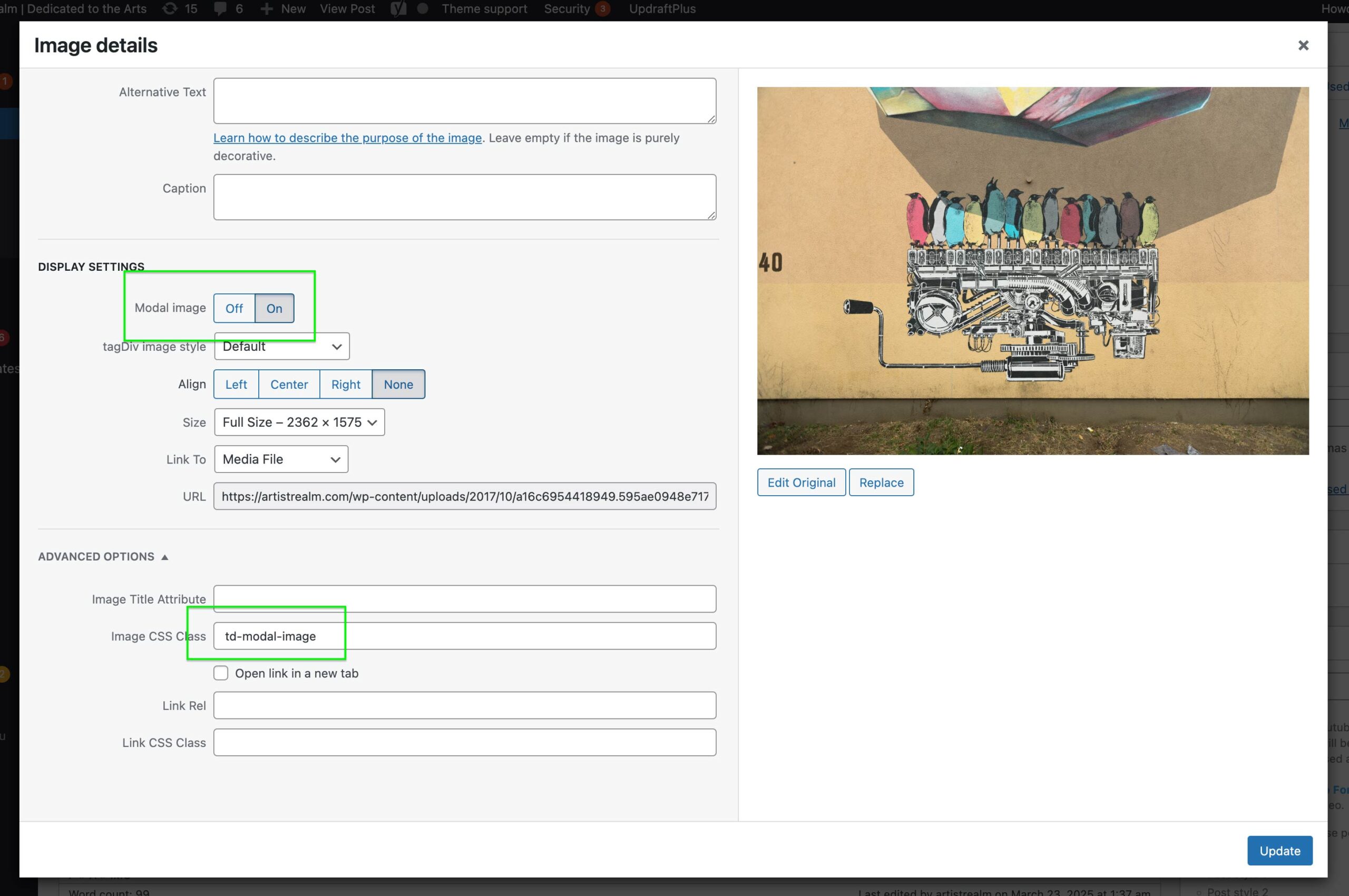
I am using Newspaper, classic editor, but the Lightbox td-modal-image on my posts is not working on mobile. It’s working beautifully on a desktop. It may be that it is set as a click event vs on touch, but I am not a developer.
I have also tried to turn of the modals on mobile to avoid sending the user to to the image file, but it does not work either.
This post page is just an example. It’s happening on all.
https://artistrealm.com/2017/10/09/propagating-machine-piece-nevercrew/
Reference images from the admin side:
https://artistrealm.com/wp-content/uploads/2025/03/Screenshot-2025-03-22-at-9.38.21 PM.png
https://artistrealm.com/wp-content/uploads/2025/03/modal_image_settup-scaled.jpg
 aperaltap
  pzawadzki
Search is not working correctly at all! I have tried a few plugins and it continues to not work. Example, I have an article called 1981 Toyota Starlet but when I search for Starlet it says no results. Not sure what is going on!!
https://tbootp.com/1981-toyota-starlet/
Also, realtime search is not working. I tried to install Relevanssi so I can narrow the search to only search titles and tags and NOT the article copy, but still no luck!
 acsienator
Hi,
After installing newspaper theme and activating one of the prebuilt webpage, the homepage and pages are not showing as the sample.
I did install the required plugins, activated the theme, read the installation manual.
At he moment: https://photonet.hu/online/ with News Magazine prebuilt webpage installed.
What am I missing?
Thanks, Attila
Bettina Hello!
1. Unfortunately, the shortcode works only with 2 options that are still available now.
You can try to use a raw HTML shortcode, add the code and style it via CSS.
2. Unfortunately, you can not achieve this with our theme. You can only export the emails and use an external service.
3. Which one you want to use? For example, check these demos: https://demo.tagdiv.com/newspaper_real_estate_pro/
https://demo.tagdiv.com/newspaper_app_find_pro/
Thank you!