
- NewspapertagDiv AMP Plugin Tutorial
- ApiPractical example – How to add a new Block and Module
- NewspaperTrack Subscription Sources with Locker URL in Opt-In Builder
- NewspaperWP Rocket and Newspaper Theme: Optimization Guide
- NewspaperCredit System
- NewspaperIntroduction to CPT and ACF with Newspaper Theme
- NewspaperHow to edit modules for Flex Block X
- NewspaperHow to use the Posts List shortcode
- NewspaperUser review system
- NewspaperCustom Fields Support
- NewspaperHow to generate Facebook App ID
- NewspaperHow to insert a block inside the content of a post
- NewspaperModal Popup
- NewspaperPayPal Setup
- NewspaperLink Tracker
- NewspaperLockers
- NewspaperGeneral Options that May Interfere with the Newspaper Theme
- NewspaperAdd Cryptocurrency Price Ticker Widget
- NewspaperPosts Loop Element
- NewspaperThe Newspaper Mobile Theme: Introduction
 kibiribi
According to your manual – https://tagdiv.com/amp-newspaper-theme/
Google Analytics code for AMP should be like this
{

            "vars":{

                "account":"UA-123456789-1"

            },

            "triggers":{

                "trackPageview":{

                    "on":"visible",

                    "request":"pageview"

                }

            }

        }
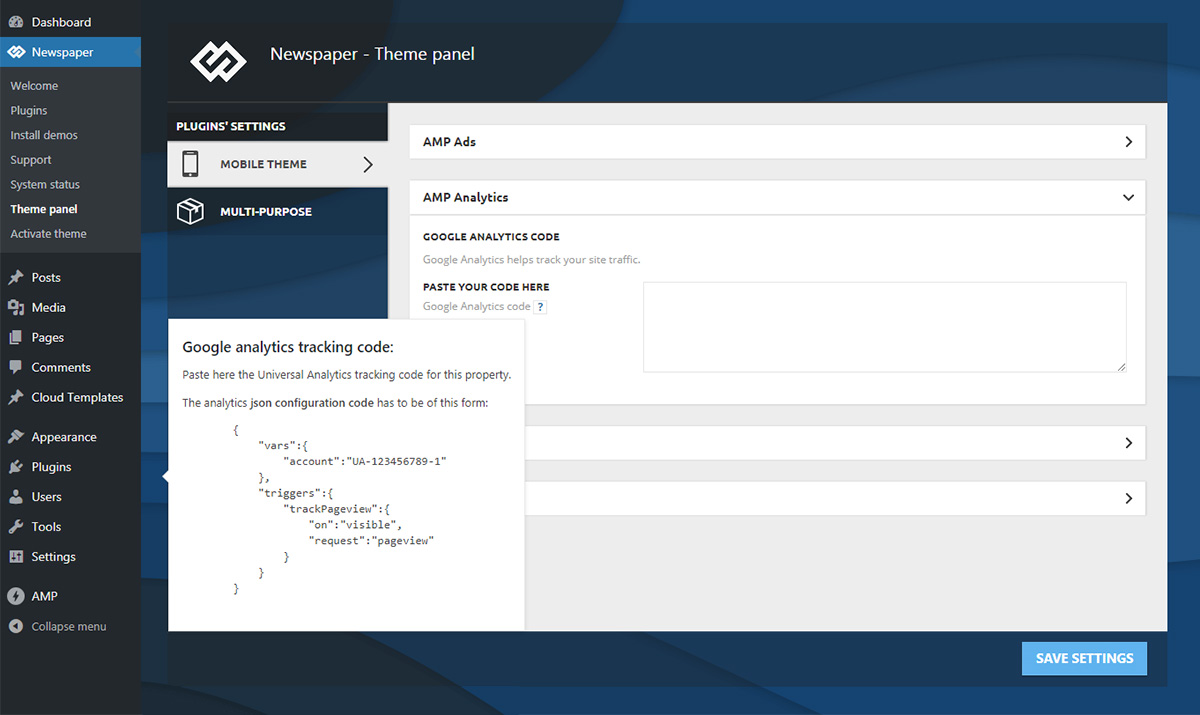
But there is no such format in Google Analytics
screen – https://www.screencast.com/t/416joI5Uo0O
Does it mean that Manual is old OR I use wrong code?
 wesquibel2
Some of the featured images on my posts are suddenly smaller than they were before. While others are still the right size.
Here are some examples of the different sizes they are showing:
https://www.fiscalflamingo.com/new-kroger-weekly-ad-and-early-sneak-preview/
https://www.fiscalflamingo.com/how-much-money-do-flight-attendants-make/
Could you please help me with this to get them all back to the correct size? Thank you!
 webmastermetrozita
 2020/05/08 13:27:46 [error] 104748#104748: *559283 FastCGI sent in stderr: “PHP message: PHP Warning: require_once(tdb_template_import.php): failed to open stream: No such file or directory in /www/metronl_339/public/wp-content/plugins/td-cloud-library/includes/tdb_functions.php on line 1358
PHP message: PHP Fatal error: require_once(): Failed opening required ‘tdb_template_import.php’ (include_path=’.:/usr/share/php’) in /www/metronl_339/public/wp-content/plugins/td-cloud-library/includes/tdb_functions.php on line 1358” while reading upstream, client: 62.235.27.151, server: testnl.metrotime.be, request: “GET /wp-admin/update.php?action=update-selected-themes&themes=Newspaper&_wpnonce=c149acb222 HTTP/1.0”, upstream: “fastcgi://unix:/var/run/php7.2-fpm-metronl.sock:”, host: “testnl.metrotime.be”, referrer: “https://testnl.metrotime.be/wp-admin/update-core.php?action=do-theme-upgrade”
2020/05/08 13:21:41 [error] 104748#104748: *558991 FastCGI sent in stderr: “=105239 in /www/metronl_339/public/wp-includes/wp-db.php on line 2030” while reading upstream, client: 62.235.27.151, server: testnl.metrotime.be, request: “POST /wp-admin/update-core.php?action=do-core-upgrade HTTP/1.0”, upstream: “fastcgi://unix:/var/run/php7.2-fpm-metronl.sock:”, host: “testnl.metrotime.be”, referrer: “https://testnl.metrotime.be/wp-admin/update-core.php”
2020/05/08 13:21:41 [error] 104748#104748: *558991 FastCGI sent in stderr: “PHP message: PHP Warning: Error while sending QUERY packet. PID” while reading upstream, client: 62.235.27.151, server: testnl.metrotime.be, request: “POST /wp-admin/update-core.php?action=do-core-upgrade HTTP/1.0”, upstream: “fastcgi://unix:/var/run/php7.2-fpm-metronl.sock:”, host: “testnl.metrotime.be”, referrer: “https://testnl.metrotime.be/wp-admin/update-core.php”
kibiribi I’ve activated AMP plugin after update version Newspaper: 10.3.3

 Calin
Calin Hi,
The newsletter can not be set in post content as in your example. You can use it on any page and cloud templates (on any element place where you can use tagDiv Composer) -> https://i.imgur.com/PKNfdAj.jpg
The Newsletter plugin -> https://forum.tagdiv.com/the-newsletter-plugin/
If you want to have the mailchimp inside the post, then you need to st the code inside of all post you want to have the mailchimp.
Thank you!
Calin Hi,
The mobile theme can be edited using the settings from them panel -> https://i.imgur.com/GT81urF.png also you can use the settings from here -> https://i.imgur.com/PqjwO7X.png to add/remove elements from posts.
The infinite loading is available only on main theme and responsive version, yo use it only on few posts, you can disable the mobile theme on these posts/pages -> https://i.imgur.com/VDX5Xcc.png or if you want to use it only on amp -> https://i.imgur.com/OqQlSR0.png if not disable it.
Thank you!
Calin Hi,
Sorry, for the moment there are only two style for News Ticker -> https://i.imgur.com/JupnPbk.png If you want a different layout, maybe you can find a plugin for news ticker.
10 Best News Ticker WordPress Plugin 2020 (Free & Premium) -> https://www.frip.in/news-ticker-wordpress-plugin/
Thank you!
Calin Hi,
That is because you are using the mobile theme plugin, you’ll gain a better speed then responsive version of theme, but in order to achieve that speed you’ll need to create a new content for pages because in the most of cases those were made with builders ( tagDiv Composer, WPBakery ) and you need to use only the mobile editor ( you need to set the content for pages in mobile editor and this content will be display on mobile theme)
-> https://i.imgur.com/9d0UWLT.png
Also you can show the responsive version on mobile theme -> https://i.imgur.com/m0bVB5T.png you can check more details about mobile theme in our documentation -> https://forum.tagdiv.com/the-mobile-theme/ or if you want to have the responsive version only, you can use the amp option from mobile theme -> https://i.imgur.com/oofST3D.png (to use the mobile theme template on amp) or you can disable the plugin.
When the mobile version or amp is displaying on desktop is a cache problem, we recommend to use WP Super Cache with the settings from our guide -> https://forum.tagdiv.com/cache-plugin-install-and-configure/ also if you are using other cache plugins please deactivate theme and make a test, also this will solve the problem with latest post on mobile device.
Have a nice day!
Calin The theme need to create thumbs for each thumb enable in theme panel -> https://forum.tagdiv.com/theme-thumbs/ if the images that you are uploading in media library are to small the theme can not create these thumbs, therefore you need to use a plugin to regenerate the images to the size that your theme needs -> https://forum.tagdiv.com/thumbnails-fix-strange-looking-images-on-blocks/
If the problem persist please provide me a link to your website and some example.
Please enable only the thumbs dimension you use.
Hope this will help you!
Thank you!
 Md. Abu Naser
 Dear @Calin as you say I tried for change logo to many sizes like as- 544×180 px, 272×90 px, 280×96 px, 140×48 px. But AMP logo size not changed. Please my AMP logo is too small. Do something please again.
 ChildhoodBiz
Hi,
Is there a way to insert a page element into a homepage that shows an image e.g. “next Sunday” or “from next Sunday on”?
For example, I want to prepare to show an image on the homepage for upcoming “mothers day” so that it shows up automatically when mothers day is coming, that would be fine.
Kind regards, Martin
 bcafaggi
Dear all,
Good Morning.
I have done my webpage in TD Composer (that is really amazing) but I cannot see the pages below when I visit my website in my mobile. What can I do to fix it? The page that appears is in black, just the head menu and the footer.
My Newspaper Theme is totally updated with the Mobile Theme activated + AMP.
Page that I cannot see through my mobile:
https://cafaggiincucina.com/conheca-o-bruno/
https://cafaggiincucina.com/contato/
Looking foward your reply.
Many thanks
Bruno Cafaggi
 Niranjan Samanta
  tmamedov
 Sure, for example try this url
https://jbhnews.com/tristyn-lees-17-year-old-body-has-even-industry-veterans-envious/24053/
or in long post, which is even more annoying to get back to comments
https://jbhnews.com/aesthetic-bodybuilding-tips-and-supplements-for-an-ideal-aesthetic-body/23403/
 Vlad S
 Hello !
By using the tagDiv Composer on your header you can edit the logos as you can see here: https://www.youtube.com/watch?v=HXQQygkCCJo&t=1s
I hope this was helpful !
Thank you !
Calin Hi,
I think that you are referring to infinite loading option-> https://tagdiv.com/infinite-loading-for-single-posts/ this is set on single post template from tagDiv Cloud Library and can be edited with tagDiv Composer.
If this option is not working on mobile, is very possible to use the mobile theme plugin, this is using a different template/layout for mobile (a simple template to make the mobile version faster). If is so, then you can activate the responsive version -> https://i.imgur.com/YPZjo9r.png on some posts, or use the amp version only for amp -> https://i.imgur.com/WMGulIt.png
Let me know the results!
Thank you!
 BenSchneider
Hello , the mobile version of the demo looks different compared to my website
https://prnt.sc/scwwe9
https://demo.tagdiv.com/newspaper_pulses_pro/#
The mobile version of my website looks like AMPified which I don’t prefer. I need to use the theme’s original mobile version like in the demo.
https://prnt.sc/scwx13
http://www.jobmofy-magazine.com/
BenSchneiderHello , the mobile version of the demo looks different compared to my website
https://prnt.sc/scwwe9
https://demo.tagdiv.com/newspaper_pulses_pro/#
The mobile version of my website looks like AMPified which I don’t prefer. I need to use the theme’s original mobile version like in the demo.
https://prnt.sc/scwx13
http://www.jobmofy-magazine.com/
Md. Abu Naser Dear @Calin as you say i tried for change logo to many size like as- 544×180 px, 272×90 px, 280×96 px, 140×48 px. But AMP logo size not changed. Please my AMP logo is too small. Do something please again.
 mochilerostv
Hi! Regarding the blocks of Composer I found the way perfect to format the posts (page title, post content…) but with the pages, i have for example html code of old pages on other theme but i don’t know how to create a page template with the sidebar and similar format as the posts. Can i do that?
This is an example of a contact page but i would like to include the sidebar too. I have other pages to format but when i open them with the composer the format doesnt look good. I saw the empty block and down the text and images but i cant change anything.
Kind Regards,
Iosu
 premiumsn
 That is not working. I get an error message when I click on the ad.
I replaced the # with the url I want the ad directed to and does not work. Can you provide an example of the process?
 VendaOnline
Good afternoon, I have the plugin
DW Question & Answer PRO in wordpress, however when I open a question, wordpress gives an error in the template. How can I solve?
VIDEO: https://drive.google.com/open?id=1XM1e15ZS7cp_2LsvN6DTV-AIDw4gEPAw
 corey615
Hello. I’m trying to utilize the ad boxes to show specific ads in my articles (Article Inline Ad), and at the bottom of every article (Article Bottom Ad). The ads that we use have shortcodes to place ads where we’d like vs a typical script. When I drop this in via the theme panel, the ads do show up on the posts, but they show up in the wrong place – they both show up at the top of the article vs their intended location within the article content and at the bottom of the article. You can see in these screenshots below. I’ve also tried wrapping the shortcode in your suggested <div class=”td-all-devices”></div> but I get the same result. I’ll provide a link below to an article on our dev site you can check out as well. I appreciate any help you can give! Thanks.
Theme panel settings: https://www.evernote.com/l/ADEdnRUAyOZH35TOW1ROLpA0igek2XyoOHo
Article example: https://www.evernote.com/l/ADEat5vkhfRMqJhUuRM6kk6Cls_JRJYHp1k
Use this link to bypass the coming soon page: https://williamsonsource.com/devjcm20200417?bypass=preview
Once you’re in, go to this article example: https://williamsonsource.com/devjcm20200417/pizza-hut-launches-contactless-curbside-pickup-nationwide/
 ttz
ttz Hello,
Sorry, I mean the mobile theme with AMP.
https://www.screencast.com/t/QjLqsPDw
Thank you!
Calin HI,
We’ve made some more tests and this seems to be excuse from amp plugin, to fix this, you need to contact the creators of amp plugins, these should know the changes that need to be made to display the embed videos on amp.
Thank you for your understanding!



