- NewspapertagDiv AMP Plugin Tutorial
- ApiPractical example – How to add a new Block and Module
- NewspaperTrack Subscription Sources with Locker URL in Opt-In Builder
- NewspaperWP Rocket and Newspaper Theme: Optimization Guide
- NewspaperCredit System
- NewspaperIntroduction to CPT and ACF with Newspaper Theme
- NewspaperHow to edit modules for Flex Block X
- NewspaperHow to use the Posts List shortcode
- NewspaperUser review system
- NewspaperCustom Fields Support
- NewspaperHow to generate Facebook App ID
- NewspaperHow to insert a block inside the content of a post
- NewspaperModal Popup
- NewspaperPayPal Setup
- NewspaperLink Tracker
- NewspaperLockers
- NewspaperGeneral Options that May Interfere with the Newspaper Theme
- NewspaperAdd Cryptocurrency Price Ticker Widget
- NewspaperPosts Loop Element
- NewspaperThe Newspaper Mobile Theme: Introduction
 Catalin
 Hi jorge,
Regarding on Adsense code, notice that exists a lot of special Ads for AMP and if you want to bring good results you need to properly customize them according to the official documentation from here -> https://amp.dev/documentation/components/amp-auto-ads?referrer=ampproject.org -> http://www.jilaxzone.com/2018/04/21/a-guide-how-to-show-adsense-ads-on-amp-pages-on-wordpress-sites/
All the Google Analytics code should have to be added in the Theme panel, here -> https://www.screencast.com/t/9wjGxm5m0NaX
At the moment, the theme does not offer any support for Disqus in AMP plugin, sorry! We have added to our list of improvements and maybe, this can be considered to be a new feature in our updates.
Please provide your website URL and more details about your encountered errors with Google Search Console and your database so we can take a closer look at them and also, so we can further investigate it. Also, provide some screens with errors!!!
Thank you!
 anca.smartdev
 Thank you Simon.
So, the domain.com/post-name/?amp= is the correct way at this point?
Isn’t that “?amp=” somehow incomplete?
 Simion C.
 Hi,
That will be possible with CSS, some guides – https://www.wpbeginner.com/wp-tutorials/how-to-style-contact-form-7-in-wordpress/
– https://tagdiv.com/how-to-create-custom-code-in-newspaper-theme/
So for example this code provided in the guide this will apply yo the button of the form
– http://prntscr.com/n9fx8z
You can customize it as you wish. If you need help with it let me know. Mention how you want it to be.
Thanks
Simion C. Hi,
We are investigating an issue like the one that is happening here. Seems that when there aren’t enough posts in a category that uses a cloud template, the header will not load properly. That is why in the first example the header template loads, while in the second it does not.
If there aren’t enough posts to populate the top grid and the loop below it, the cloud header will not be displayed.
We will fix this issue in the next theme update, sorry for this inconvenience. One solution would be to create category templates for those categories (with less posts in them) that don’t have a top grid so that the posts display in the loop.
There is also a quick fix that I could provide you until the theme update is released. replace this theme file – http://prntscr.com/n9fstd
With this one – http://www.filedropper.com/tdutil (make a backup of the file before attempting).
Thanks
 Calin
Calin Hi,
I check your link in amp version on mobile and this is looking normally -> https://www.screencast.com/t/1yMSQdH14 if you want you can use this custom css for this images -> https://www.screencast.com/t/nYPi3sZ2
body .post .td-post-content .wp-block-image  .aligncenter > * {

    max-width: 90%;

    width: 100%

}
After you set the code in Theme panel>mobile theme>Custom code > css please check again with mobile phone the amp version.
Thank you!
Simion C. Hi,
Seems the text coming from the wordpress user bio doesn’t have any style to it. Using a text element (column text or text with title) instead of the author description element, would be a better choice in this case for a author template.
Should work alright, just place a column text for example, in the author template and enter the needed text in it – http://prntscr.com/n9fi4q this way you can style the text better. When closing the text window it should save the content automatically
– http://prntscr.com/n9fir4
If there is a problem doing the above, please send us an email at contact@tagdiv.com and provide admin login, we will take a look. Mention what exactly are you doing and what is happening. Include a link to this topic in the email.
Thanks
Calin Hi,
If you want to use the mobile theme with amp, but you need to have the desktop design you can use the “AMP” option from Newspaper>Theme panel>Mobile theme>Mobile settings
-> https://www.screencast.com/t/CEVSensTM6
Thank you for your understanding!
Catalin Hi,
Please notice that our theme works as expected with the Google Analytics code as Tracking Code. If you want to add a custom trackings code, like Facebook Pixel or another one, you need to add here -> https://www.screencast.com/t/G5W9nJNYw You can check the following useful guide from here -> https://stackoverflow.com/questions/45455167/how-to-add-facebooks-pixel-into-googles-amp
Thank you!
Calin Hi,
Please notice that writing multiple times in the same topic only delays the answer. In order to get a fast response, please write once and wait for an answer. We answer from oldest to newest so if you keep posting, your post is moved to fresher ones thus receiving the answer later until we answer all posts before your last reply.
Please check our documentation for How to Make an AMP Ready Website with Newspaper Theme -> https://tagdiv.com/amp-newspaper-theme/ here you’ll find how and were to set the code ads.
There are tow section one for amp ads and one for mobile ads -> https://www.screencast.com/t/2Tz1ccuM3y1 here is an example -> https://www.screencast.com/t/JFFiV6li3ofE
-> https://www.ampproject.org/docs/reference/components/amp-auto-ads
Thank you for your understanding!
 melonscape
Hi, I am having problem with my header menu not appearing consistently on my site. I am currently using the same template in my header manager for the whole site, however there are anomalies for certain pages such as my 404 page.
For example:
https://prnt.sc/n9e8n4 -> Header appears unconsistent.
https://prnt.sc/n9e8vz -> When I click on “Edit Template”. It appears to have no issue. I have no idea where I can fix the problem. Your help would be appreciated.
Thank you.
 GoingFor2
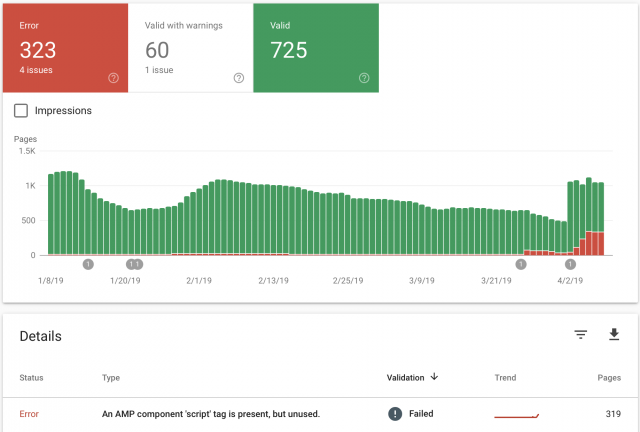
I recently updated the theme and the feature to use “mobile”, “Mobile + AMP” or “AMP” has started to create AMP errors, when previously there were none. It keeps telling me there, “An AMP component ‘script’ tag is present, but unused”. This was never an issue until after the upgrade. I had AMP Ads formatted the correct way without using the “Script” tag. As you can see from the image I attached, the errors started around March 26th, right around the time I updated. My website is GoingFor2.com. I currently have it set at “Mobile Only” because I don’t want to keep racking up errors, but I want to be able to use AMP as well. Thank you. Here is the link to the image: http://goingfor2.com/wp-content/uploads/2019/04/Screen-Shot-2019-04-08-at-10.12.43-PM.png
 haxigi
Hello. Till this new update, everything worked fine for me. Since Newspaper changed AMP plugin, my website doesn’t look like before in mobile view.
I have created static site and it work fine for desktop, but same site looks different.
It only shows: “Latest articles” and none of what i created with tdcomposer.
Why is that? My website: alilove.pl
 shelmes@liebertpub.com
I want to use AMP on my site, and to do that I apparently need the mobile theme activated along with the regular newspaper theme. When mobile theme is active it is asking for me to create my content twice, once for desktop and once for mobile. I don’t want this. I want one post content box that is used on both desktop and mobile, and I want my mobile pages to be served as AMP. How can I do this? It is a serious flaw if I have to have two post content sections, one for desktop and one for mobile…especially for the thousands of posts I have on my site already, we can’t go back into each one and make add in new content for the mobile editor.
 IMPACTMag
 Thanks Calin.
This is very close to what it needs to be but still not quite there.
Is there something I can do to have the entire image display consistently? The proportions cannot change or I get edges cut off like in this ‘cover’ sample using the CSS suggested: http://www.screencast.com/t/F9e26IuF4F8. At some breakpoints it does appear correctly, but most are getting cropped off in one way or another.
All of the original images files are 605px wide by 800px tall. The actual scale doesn’t matter to me as much as having the entire image showing. Can I designate the image size somewhere and have the column dictate the % width to scale proportionally?
 suresh
 Hi Simion,
i got the solution, tried as mentioned in this post: https://forum.tagdiv.com/topic/fix-for-autoptimize-aggregate-css-files-breaking-amp/
Now it’s working like a charm 🙂
suresh Solution to the problem: https://forum.tagdiv.com/topic/fix-for-autoptimize-aggregate-css-files-breaking-amp/
 jorgeocampo
 @Catalin, this is not due to Newspaper, but due to a serious bug with the AMP plugin , in fact the AMP plugin team just requested an SQL dump from my DB, this was also checked by the WP-Rocket plugin developers and by Kinsta Support.
I reporting this here because of your unfortunate choice to link Newspaper critical options (for news sites) to the AMP plugin.
I’m not the only one reporting BIG issues like the AdSense earnings drop or the Search Console alerts.
 Casas.tech
 Hi,
In pages in code:
<h1 class="td-logo">

<span class="td-visual-hidden">Reformas Integrales Bilbao</span>
</h1>
In content:
<h1><span style="color: #2a9221;"><b><i>Estudio de arquitectos para interiores y proyectos técnicos en Bilbao</i></b></span></h1>
It’s not correct to appear two <h1> tags.
You can see for example in https://www.casas.tech/arquitectura/
In the code in the files logo-h1.php and logo-mobile-h1.php of the theme:
// H1 on logo when there's no title with H1 in page
It seems that it is not working properly.
Thanks in advance
 ankasammerkez
Hello for example when you click on the load more pagination on the link below https://ankasam.org/en/category/regions/america/
we end up with the posts being duplicated once again instead of loading more
 Sohaib
 Why does share text not appear on AMP?
-
This reply was modified 7 years by
Sohaib.
 Sanjay Kumar Monu
 You can check this link as an example. Try to open it in desktop view to understand what I’m saying.
Calin Hi,
You can add the audio file directly in media library in -> https://www.screencast.com/t/XG8WmR5kN10z
Beginner’s Guide: How to Create a WordPress Audio Playlist Without Plugins -> https://themeisle.com/blog/create-wordpress-audio-playlist/
If you want to make a page/post podcast you need to use a plugin.
12 Best WordPress Podcast Plugins Compared (Free & Premium) -> https://www.isitwp.com/best-wordpress-podcast-plugins/
Thank you!
 npaper_434
 Unfortunately I do not feel comfortable providing login information. However you can have a look at our site. I believe that the issue mainly occurs for categories with very few articles.
Site: https://kreuzfahrthai.de/magazin/
Example for category with correct header: https://kreuzfahrthai.de/magazin/category/reedereien/aida/
Example for category with old header: https://kreuzfahrthai.de/magazin/category/reedereien/msc/
Furthermore there is a similar issue for the search result page. It works fine for searches with a sufficient number of results, but uses the old header for searches with no results.
Example: https://kreuzfahrthai.de/magazin/?s=dfssfddsf
Example (Working fine): https://kreuzfahrthai.de/magazin/?s=aida
Thank you!
 imtihan
Why does Google search results not show the homepage URL?
https://www.google.co.id/search?safe=strict&biw=1366&bih=623&ei=9kOrXJ_OBYvUz7sPmfuTuAM&q=karna.id&oq=karna&gs_l=psy-ab.1.0.35i39j0i67j0l8.197103.198137..200023…0.0..0.109.516.1j4……0….1..gws-wiz…….0i131.t8PkBpZu5s4
thank you
 bobbymc
 Ah. So I can use mobile theme only for AMP posts and the rest of the theme will look as I designed it? 🙂