
- NewspaperAdding Multiple Authors to Your Articles
- NewsmagMore articles box
- NewsmagAuthor card
- NewspaperAuthor Card
- NewspaperMore articles box
- NewspaperIntroduction to CPT and ACF with Newspaper Theme
- NewspaperUser review system
- NewspaperCustom Fields Support
- NewspaperFlex Block Settings Guide
- NewspaperPosts Loop Element
- NewspaperSingle Post Shortcodes
- NewspaperCloud Library Templates
- NewspaperBig Grid Flex Settings
- NewspaperDesign your post pages using the Default Templates
- NewspapertagDiv Cloud Library Plugin
- NewspaperHow to Set the Image Avatar
- NewspaperThe Mobile Theme
- NewsmagGeneral settings
- NewspaperReviews
- NewspaperTheme Colors Introduction
 Anamaria
 Hello,
I just checked and I don’t see that element you refer to.
Did you delete the author box?
Thank you!
 mgiannelis
Hello
I have an author box plugin on my site that I like to use. Current the site I am about to show is not the live site. Its just staged from a different domain at the moment until I get the theme right
The author box is showing up in my category pages here. https://www.techpressmedia.com/techbusinessnews/category/business/
As you will see. A photo and “Admin”
How can I remove this from category pages? This is not happening on current live site I have techbusinessnews.com.au
 casprom
Hi guys. Thank you very much for all the support so far in each topic.
Here’s a new thing we’re trying to optimize on our site. We would like our writers to be able to put the feature video link in the Feature Video box, but this field doesn’t display in the Authors view.
If they could use this box it would be much faster to review and publish their works so we we’re hoping there’s a way to make this field available and visible to them. Image of the box here: https://drive.google.com/file/d/1YXuYmILhK6-atA3tvoGx_fw016VE69qR/view?usp=sharing
 ntyam
ntyam Bettina,
Your answer doesn’t address what I’m asking.
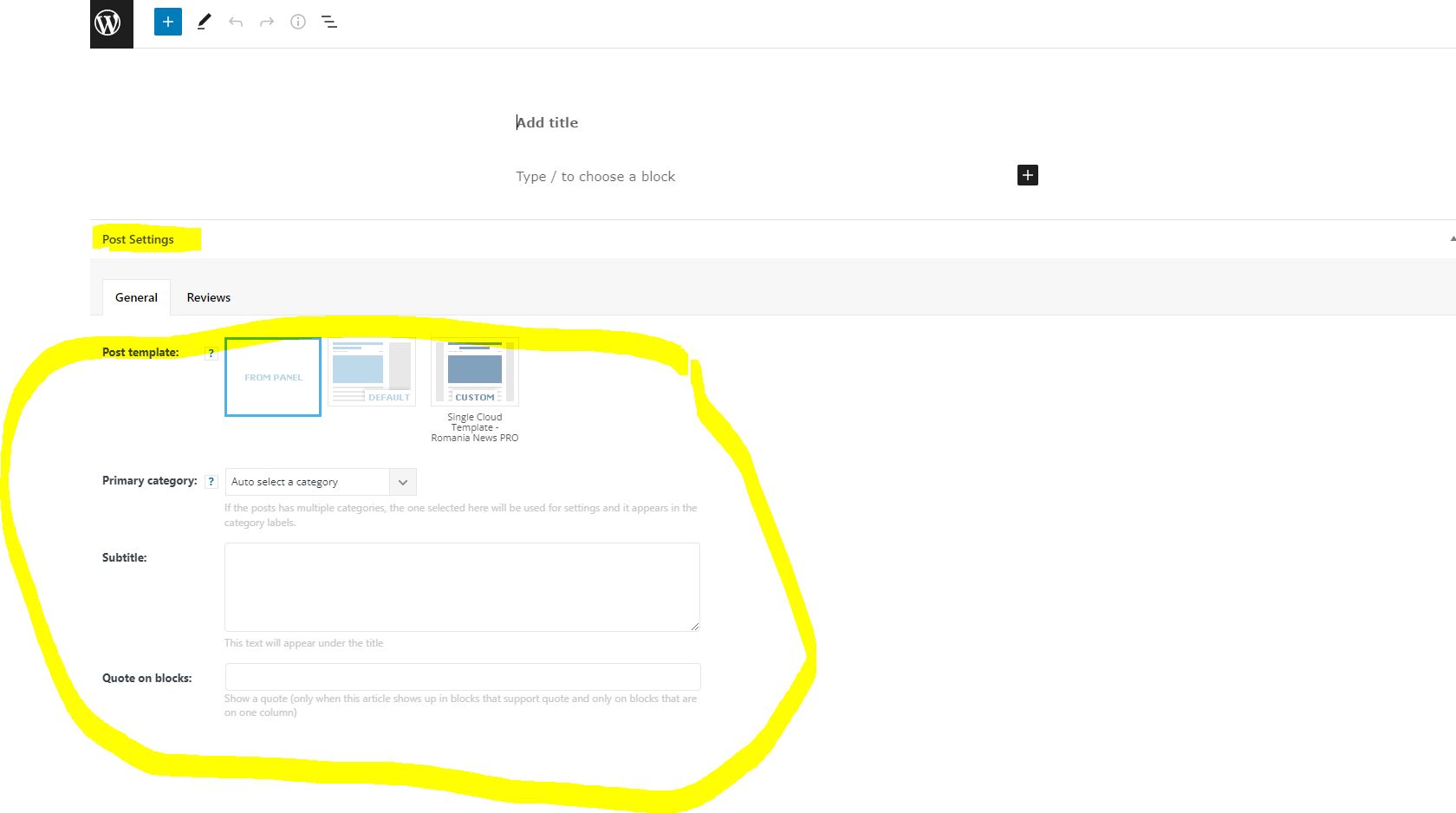
I say in the ‘Add New’ button of the post, there’s a metabox that shows up, see attached, that’s not part of wordpress but created by your theme.
That metabox is only seen by admin, administrator and author roles. We want that box to be seen by contributors as well.
As stated, this is not a wordpress feature but rather a metabox added by TagDiv
ntyamDear all,
We would like the post settings in the ‘Add new’ to show for the contributor role. The ‘Post Settings’ meta box, as of now, is only showing for Author, Editor and Administrator.
We can’t provide our employees with ‘Author’ role because they can publish posts without our authorization. The role that fits us best is the ‘contributor’ however, for this role, the ‘post settings’ meta box doesn’t exist.
Please assist.
Thanks
 Bettina
 Hello @rvkumar739!
It seems that you use Simple Author Box plugin for that. Check the options from that plugin.
Let me know the results!
Thank you!
Anamaria Hello Bettina,
To display the related articles and more from author, you can use Flex Block and filter it https://www.screencast.com/t/SEmxo13Fo2X -> https://i.imgur.com/YIg3nPP.png
To have more article box, you need to have the tagDiv Standard Pack activated.
Thank you!
 nguyentrunghoa
Hi, I’ve tried to disable the categories tags (on single posts and custom post types) and the author box (bottom of single post pages).
But they’re still show on my website.
Please tell me how should do?
regards,
Bettina Hello @paulavery!
Try to use the Molongui Author Box: https://forum.tagdiv.com/adding-multiple-authors-articles/
Also, please make sure the issue it’s not about a plugin conflict.
Let me know the results!
Thank you!
Anamaria Hello,
For image this code
.tdb-author-box  .tdb-author-photo {

pointer-events: none;

}
Thank you!
 rp-2
rp-2I want to remove the author box under the posts. I disabled it in the theme panel in post settings but still its showing up.
I use the single post template from the Magazine pro.
 mamaolazprzedszkola
Hello,
please tell me how I can delete lightbox only on image in this page:
https://mamaolazprzedszkola.blog/author/olawasiela/
I don’t know how I can delete in tagdiv “a href”…
 c386
c386Hi,
Is there a way to reproduce the related articles and more from author box that appears on the bottom of regular pages?
I’ve created my own template for certain single posts, using the blank cloud template, and have managed to replicate everything I need other than the related articles.
 netclick
The names in each Author Box on my site redirect to the home page. How can I make it link to each Author’s profile page?
Currently, Google Search Console is picking up all blog pages as Soft 404 page errors because of it.
Bettina Hello @c386!
Apply this code in the theme panel -> mobile theme -> custom code -> custom css.
.author-box-wrap {display: none;}
Thank you!
 Calin
Calin Hi,
For author aviator we recommend Simple Author Box and for co-author you can try the Molongui plugin.
I hope those will help you!
 Diogo Peres
Hello,
My site is oeconomistaexplica.com
I try to remove, in “Post settigns” in “Theme painel”, the AUTHOR NAME, POST VIEWS, COMMENT COUNT and AUTHOR BOX, but there was no change.
Also, how can i edit the articles pages, to remove the RECENT COMMENTS?
Thanks!
 Bandos
Hello,
i don’t understand why i can’t see in posts and in posts grid the multiple authors. I can see only the first author. But in the bottom of posts i can see the boxes. Here is an example: https://www.mediotejo.net/covid-19-farmacias-da-regiao-com-filas-a-porta-e-agendas-lotadas-para-realizar-testes/
Thanks
Bettina Hello!
Yes, you are right. Unfortunately, there is no setting to control the position of the author box. I will add this feature on our improvement list.
Thank you for understanding!
 Lalit
LalitHi,
It’s very URGENT!
1) schema markup error:
I have tested many urls of tech news demo for schema markup rich results and found that all posts have errors on schema.
check the report: https://search.google.com/test/rich-results/result?id=eFqGthwMe2C13kT-ebenuw
Schema markup has missing field “url” for author schema. it is a warning but still, I want to know how to fix it.
check this video: https://drive.google.com/file/d/1wCylPWWZXIctPPUXmBimEs8LaqumTdo3/view?usp=sharing
2) Ad box bug
With tagDiv composer, edit the ad box element and in the ad content section, I enabled “Hide ads for admins/editors” but it is not working. Ad still visible to admin.
Moreover, Ad title: is not visible to logged-in users but shows to non-logged-in visitors.
check this video: https://drive.google.com/file/d/1rZq65SSf6QhDGUdabjGvzozd50x1f4qJ/view?usp=sharing
If it is a bug, please fix it asap.
Regards,
 rsm
rsmHello,
I installed Molongui Author Box and the box shows properly but it is above Article Bottom Ad. How do I switch their places? I would like the Multiple Author Box to be below Article Bottom Ad. When you had support for Coauthors plugin, the author box was below Article Bottom Ad which was preferable.
TIA
LalitHello,
I want to stop all automatic spam comments on my site. So wanted to remove the website field and disallow submitting comments if a user enters any link in the comment box.
Is the following functions.php code compatible with the Newspaper Tech news demo theme?
To Remove Comment Author Link:
function tagdiv_remove_comment_author_link( $return, $author, $comment_ID ) {

            return $author;

}

add_filter( 'get_comment_author_link', 'tagdiv_remove_comment_author_link', 10, 3 );
function tagdiv_remove_comment_author_url() {
return false;
}
add_filter( 'get_comment_author_url', 'tagdiv_remove_comment_author_url');
To protect entering the website/link in the comments summary box
function remove_website_field($fields) {

   unset($fields['url']);

   return $fields;

}

add_filter('comment_form_default_fields', 'remove_website_field');
If the above code is not compatible, please share the correct one.
Regards,
 wortpflege
Hello TagDiv team,
some strange problems suddenly occured in the Composer:
First of all is that I can’t delete empty rows any longer. Right click doesn’t work, the “delete” drop zone is missing, no possibilty to delete them. I can delete elements with the small popover trashcan but no empty rows.
Second: A lot of thins in the “element editor” are not working as expected. E.g. see this screenshot for where the color picker should be. Instead of the color picker there is just one text field with no functionality: https://cof1.eu/index.php/s/NFdHFjkBTJ7nwrc
Also a lot of options do not work like sometimes aligning an element or some checkboxes like “show author”. They just do nothing.
There are more weird stuff.
What I did (more than one time): I disabled all plugins, emptied cache, browser cache, and so on.
The problem occurs in Safari and Firefox, newest versions on OSX.
Wordpress 5.8.2, Newspaper 11.3.2, everything is up to date.
The site URL: https://089wehrinhghausen.de
Thank you!
 boyddarr
I would like to simplify my single post content to exclude all the ‘additional’ content, including the like/dislike icons, all of the happy/sad/excited/sleepy/angry/surprise emojis, the multiple social sharing icons, and the author box. I have been looking everywhere for the ability to remove with no success. Please advise on a path to remove this superfluous data.
Bettina Hello!
Replace the previous CSS code and set this one:
.author-box-wrap{display:none;}
Let me know the results!
Thank you!

