
- NewsmagBlock settings tutorial
- NewsmagCategory tag on modules/blocks
- NewsmagtagDiv Composer Tutorial
- NewsmagWeather Widget
- NewsmagExchange widget
- NewsmagInstagram widget
- NewsmagHow to use the Visual Composer plugin
- NewsmagIntroduction
- NewsmagFooter templates
- NewsmagCustom ad spots
- NewsmagLoading image effects
- NewsmagSmart sidebar
- NewsmagFeatured images
- NewsmagGeneral settings
- Newsmag7 days post sorting
- NewsmagTheme thumbs
- NewsmagExcerpts introduction
- NewsmagTheme colors introduction
- NewsmagtagDiv slider gallery
- NewsmagVideo playlist
 Anamaria
 Hi,
The custom label is displayed on the blocks(Flex Block and Big Grid Flex), this element can’t be added in Single Post Template.
Thank you!
 Matija
Hi
I created this site: https://www.virovitica.hr/greenvtc/
and mobile page…and I imported the blockchain header but it isnt showing on my phone…
this is how it should be: https://postimg.cc/p9JWdZwH
I only see the logo and not the menu icon on the right…
Can you help me…
 c386
c386Since the recent theme/wordpress updates, our images are not rendering correctly.
The default space between an image and the next paragraph is no longer present. This happens whether it is a single image or an inserted gallery.
We can manually get around this issue by adding a custom bottom margin to the image block, but as we typically publish a lot of images, the workaround is not ideal.
Any help getting this resolved would be much appreciated.
Anamaria Hello,
My bad, the custom label is displayed for Flex Block and Big Grid Flex -> https://i.imgur.com/3Uop58r.jpg, not in the Single Post Template
Thank you!
 GerPic
 Greetings,
I restored my site (www.matinella.it), I reinstalled the theme and the plugins but once again the TD-COMPOSER plugin and it makes me block the site creating serious economic problems.
Here is the error message: An E_COMPILE_ERROR error was caused in line 47 of the file /web/htdocs/www.matinella.it/home/wp-content/plugins/td-composer/legacy/common/wp_booster/td_wp_booster_functions.php . Error message: require_once (): Failed opening required ‘td_block.php’ (include_path = ‘.: / Php7.4 / lib / php’).
the problem must be solved!
 jgeorgantzakos
 Sorry, try again. We have country blocks to limit our attack surface.
I have removed these for your testing.
Anamaria Hello,
Yes, you can filter it for 24 or 48 https://forum.tagdiv.com/flex-block-settings-guide/ -> https://i.imgur.com/GplMZXM.png -> https://i.imgur.com/GSoIHJ3.png
Thank you!
 Calin
Calin Hi,
From the cloud, you can get blank templates for cloud templates, templates, and sections. If you want to add a page, this can be done from the pages section -? https://i.imgur.com/ChyRWu0.png
For posts you got a single post template, now, for pages, there is no template n cloud, only pre-build pages, sections and blocks that are pre-made.
Thank you!
Anamaria Hello,
You need to edit the icon in the plugin, because there is created a custom module please check the documentation https://forum.tagdiv.com/edit-modules-flex-block-x/
Thank you!
 zenka
zenka Hi guys i have new problem. I need to post text would be set without important tag. And i cant find it. Please help 🙁
https://0.test1.lt/kai-viena-ryta-prasideda-karas/
when inspect paragraph
i see
.tdi_104, .tdi_104 > p, .tdi_104 .tdb-block-inner > p {
font-family: Montserrat !important;
font-size: 17px !important;
line-height: 1.7 !important;
font-weight: 500 !important;
this style should be not important where to change
 christopherkevil8838
 Thank you, Anamaria. Great to know!
Just to be clear, a previous homepage revision will not omit content or posts that were added after the revision date but only the layout of the blocks, etc. Correct?
Anamaria Hi,
So if the posts don’t have the featured image, then they will display a blank thumb; you can set a placeholder.
You can set a Placeholder in Theme Panel -> Blocks Settings -> https://i.imgur.com/mo0Cbu2.png.
Thank you!
Calin Hi,
There are a few tips that you can do to reduce the number of requests. Normally each option and block from our theme is using a database request.
First make sure that you do not have errors in the console, for example, this one -> https://i.imgur.com/7qAccpc.png and this one https://i.imgur.com/8VOhlRu.png this background can be removed from -> https://i.imgur.com/Cx0PD2L.png
Also, you can use a plugin to detect each element are the requests, for this, you can try the Query Monitor.
Thank you!
Anamaria Hello,
If you refer to this option with animation https://i.imgur.com/KZehyer.png, our theme doesn’t have this option.
You can try a plugin or set the filter on the block to the latest but with that animation.
Thank you!
Calin Hi, yes, that is the javascript code that is blocked. It can be blocked by some security host settings (for example it can be blocked by wordfence or -> https://i.imgur.com/dW0WPWN.png), or from a deny code set in the htaccess file -> https://i.imgur.com/MZjJaHG.png -> https://forum.tagdiv.com/general-options-may-interfere-newspaper-theme/
I hope this will help you!
Anamaria  dache74
Hi, After a recent update of the Newspaper theme, the thumbnails are no longer loading.
Details:
– Big Grid Flex 10 and Flex Block 1 are affected
– The issue happens in Chrome but not Firefox (both are up to date)
– The images load successfully after hitting “refresh” in Chrome
– Newspaper version 12.1 on WordPress 6.1
To test visit https://dvchernov.com/commissar-a-novel/ in Chrome on desktop and scroll to the bottom.
Thank you for any help!
DC
 kubick
 I’m sending a screenshot and new feature suggestions. Maybe you can add it to the list.
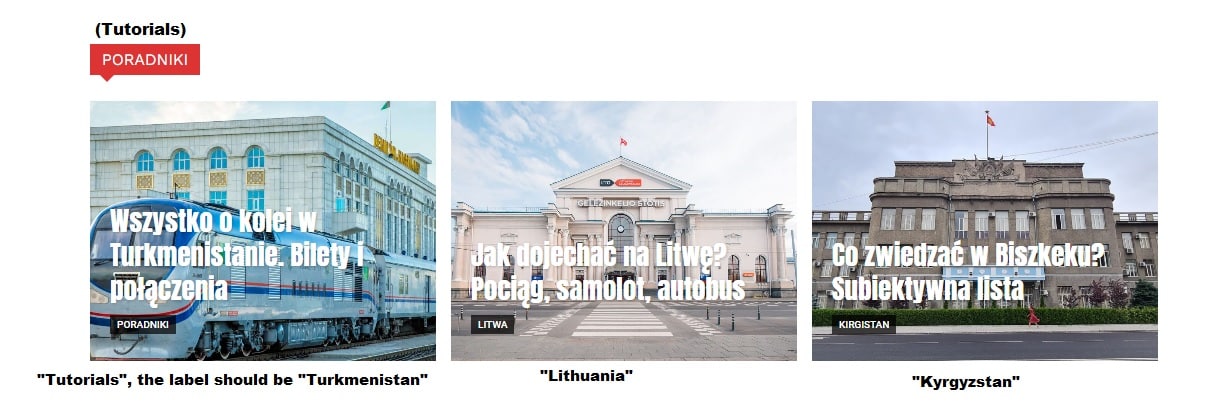
Flex block displays “Tutorials” about traveling in different countries.
Each post now has two categories: “country” and “tutorial”.
Each post should be labeled with the country category it was assigned to. There is no point in showing up the “Tutorials” category label, because that’s the name of a section on the page.
There is no option for set primary category in flex block settings. This can only be done manually in the article settings.
Better would be the default setting for the block to automate the process.
 mallenor2007
Screen recording of issue below:
 toolrev
Amazon’s “Custom” native ads have stopped showing in custom HTML blocks and custom ad boxes across my site toolrev.com. First intermittently in the sidebars, then across all posts. Amazon “Text+Image” ads will work but Native Custom Ads, new or old, will not. Any help is appreciated.
 muterobert
I’m building a Single Post template. At the top i have the Single Post Featured Image element which shows the featured image for the given article. How can I define the aspect ratio for that image? On some other elements (ie: Flex Block 1) there is an explicit setting called ‘Image Height’ which allows you to define the aspect ratio of the image. I need a similar setting for Single Post Featured Image.
 DCEPACID
I cannot figure out how to change the default block quote setting for blog posts. It comes out blue, centered, and all caps. Can someone please help me understand how to change the settings? Thank you for your time.
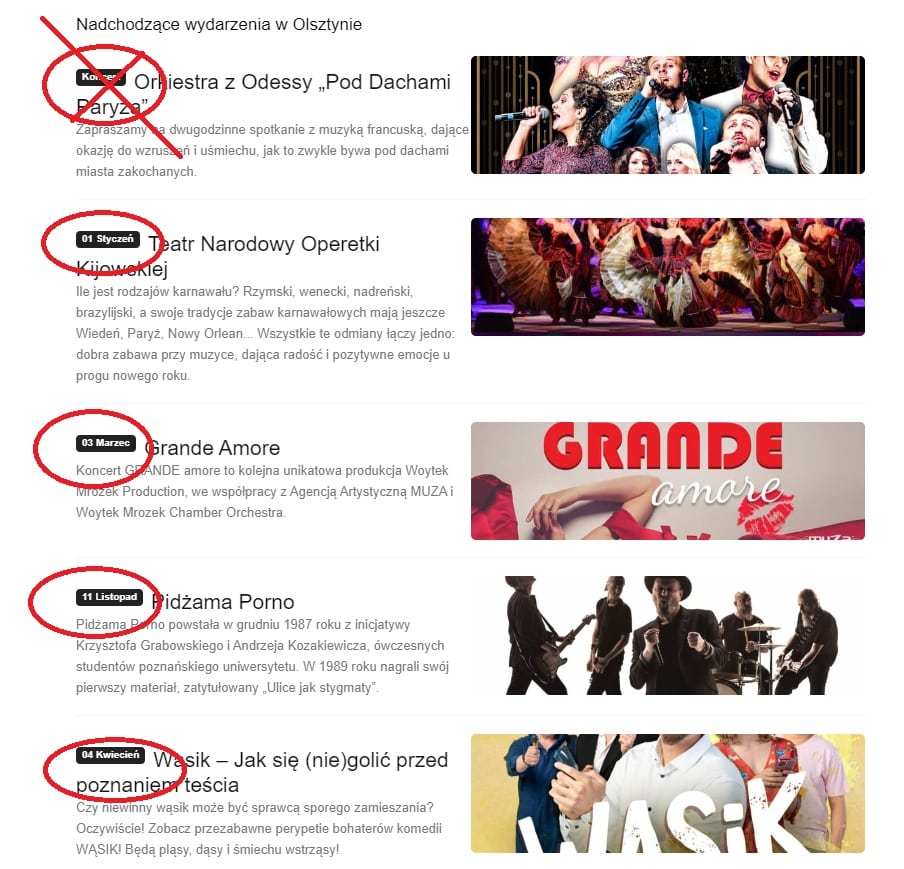
kubick Ok thank you, but I wonder how to set not a category but a category label or exclude on a flex block, when post is asigned to more then one category.
example screen shot
 smilelondon
 Hi Bettina, thanks for getting back. That’s why I have shared a link. I can also take out the featured images and re-produce the issue. It does not seem to be a caching error as we only encounter the problem in the first block – the flex block (please see screenshots). For all other blocks the placeholder image is correctly showing.
Please advise
Thanks
Sven
Anamaria Hello,
You can apply the filter only on the Flex Block and Big Grid Flex -> https://imgur.com/Nnt3zGX
The Posts Loops settings are divided into 5 tabs: General, Layout, Style, ADS and CSS. The Posts loop is a special block and doesn’t have filtering options.
Also, one of the options for pagination of the Posts Loop has the option for normal numbered and the flex blocks do not have this option.
The Posts Loop is automatically filtering the posts depending on the cloud template you set (for example on the category page there will be posted posts from that category).
Thank you!



