
- NewspaperFlex Block Builder and Flex Loop Builder
- NewspaperHow to use the Flex Blocks cache option
- NewspaperHow to edit modules for Flex Block X
- NewspaperHow to insert a block inside the content of a post
- NewspaperFlex Block Settings Guide
- NewspaperMeta Info on Modules and Blocks
- NewspaperTheme modules and blocks
- NewspaperThumbnails – Fix strange looking images on blocks
- NewspaperBlock settings tutorial
- NewspaperCategory Tag on Modules/blocks
- NewspaperWP Rocket and Newspaper Theme: Optimization Guide
- NewspaperSearch setup for custom post type
- NewspapertagDiv Opt-In Builder – Emails
- NewspaperBookmark – Save For Later
- NewspaperModules Builder in Newspaper Theme
- NewspaperFilters and sorting for taxonomies
- NewspaperUser review system
- NewspaperWooCommerce: Happy “Add to Favorites!”
- NewspaperLockers
- NewspaperLeads
 Calin
Calin Hi,
You need to use tagdiv Composer -> https://i.imgur.com/Jwjaidj.png select the block -https://i.imgur.com/8DkaX5b.png and set the post type to page.
Hope this will help you!
Calin Hi,
That is because you are using the mobile theme plugins and you do not have enable the thumbs for mobile, you need to enable in theme panel > block settings > thumbs the “265×198” and the “741×486” thumbnail sizes.
Hope this will help you!
Thank you!
 owar77
 I had a similar problem, which did not allow me to save the changes in the panel.
I noticed that the Wordfence plugin was blocking my admin-ajax.php.
By telling the security plugin that this was a valid request, the theme was able to successfully save the changes.
 bekapublishing
Hello, I want to add images and a slider in the same layout as the big grid flex 2 block. By default it pulls up the posts, but I want to add images with links in the same layout. Please let me know how is it possible.
 TkLbIY
it says blocked by robots.txt
Q.: how to do you solve this
Calin Hi,
What You can do is to regenerate the thumbs -> https://forum.tagdiv.com/thumbnails-fix-strange-looking-images-on-blocks/ and see if there are some difference or not, if the problem persists, please provide me a link where I can inspect this problem.
Thank you!
Calin Hi,
Unfortunately there is no option for this, you can achieve the hours ago on blocks only with custom work.
For this you can use this article -> https://mekshq.com/change-wordpress-date-format-to-time-ago/ or the official documentation -> https://developer.wordpress.org/reference/functions/human_time_diff/
There are also plugins that can be use for this -> https://wordpress.org/plugins/meks-time-ago/
If you want to use the “Time ago format” you need to use a single post template from tagDiv Cloud Library and edit it with tagDiv Composer click on single post date and enable the “Time ago format” -> https://www.screencast.com/t/2G5ogZnde0JZ
Thank you!
 Bettina
 Hello!
The easiest solution for this is by editing with TagDiv Composer like this: https://www.screencast.com/t/Kq76gjSsM7O for every Block 14 from your site.
Hope that helps you!
Thank you!
 madder
How do I show the latest ‘Pages’ using Block 16 instead of ‘Posts’.
Calin Hi,
For me all block titles with categories seems to work -> https://i.imgur.com/D0mYZsC.png -> https://i.imgur.com/tcnwl8m.jpg
If this is not what you mean, please let me know and provide some more details and some screenshots.
Thank you!
Calin Is possible to be from be from firewall or security module which blocks admin-ajax.php request. Please verify the console for error while saving the settings on the Theme Panel, usually it displays a 403 or 404 error.
If you don’t use a security plugin, please ask your host about this, maybe you have a security module which blocks this.
If you use a plugin like Wordfence please set it in learning mode.
For theme activation you can try this: go in Newspaper> System status and replace the url from: -> https://i.imgur.com/WlRnszw.png
admin.php?page=td_system_status
in
admin.php?page=td_system_status&reset_registration=1
And try after that to activate the theme.
Theme activation -> https://tagdiv.com/how-to-activate-the-newspaper-theme/
Hope this will help you!
Thank you!
 Mandro
Good Day
Date component dissapear after update from the Block Module. Pleas help how to fix it
Calin Hi,
Please deactivate ALL plugins except tagDiv plugins, also if you are using child theme or cache plugin, deactivate them, clear all cache and try again.
If there is still a problem make sure that you do not have some security module that is blocking the theme.
Let me know the results!
Thank you!
 Vlad S
 Hello !
I’m not sure what you mean but sticky option cannot be set in blocks. This option is not available in Newspaper Theme.
Thank you !
 loslunes
 Look at this https://forum.tagdiv.com/topic/urgent-issue-after-upgrade/
It seems it a lack of compatibility with wordpress 5.6. Two options, downgrade to wordpress 5.5 or using the jquery migrate helper plugin just as one said in the link I gave you. I have used the second one and it works (my website works anyway but not in firefox with an adblocker for example… understand noting but lots of people use adblockers so my website needs to work with adblockers too. No problem until today’s wordpress update to 5.6)
loslunes Same here with firefox with adblocker enabled since wordpress 5.6 update. I have just updated it and home page thumbs dissapear, but not in the rest! If I turn down Ublock adblocker then images are shown!
I understand nothing!
 Muharrem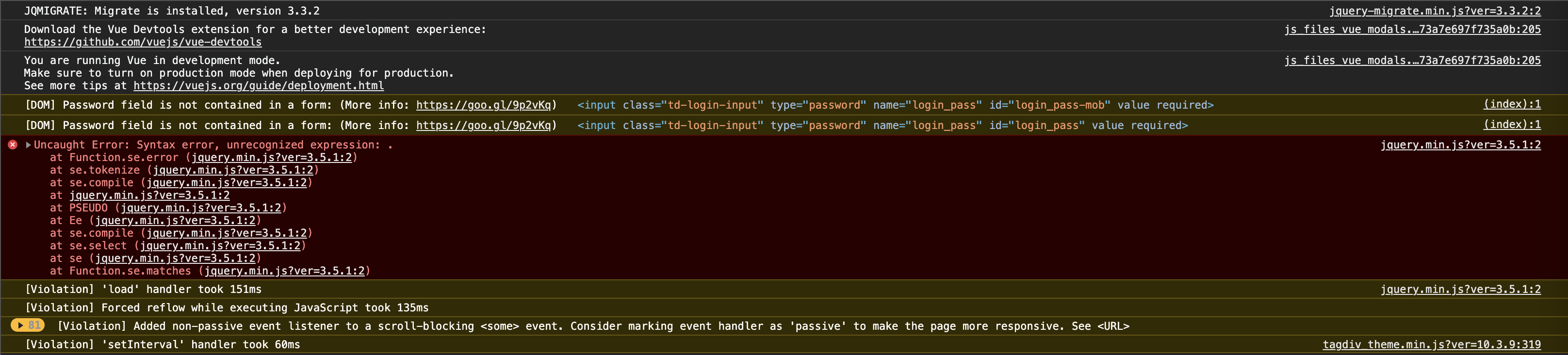
JQMIGRATE: Migrate is installed, version 3.3.2
js_files_vue_modals.min.js?ver=a50385a2d79d6600973a7e697f735a0b:205 Download the Vue Devtools extension for a better development experience:
https://github.com/vuejs/vue-devtools
js_files_vue_modals.min.js?ver=a50385a2d79d6600973a7e697f735a0b:205 You are running Vue in development mode.
Make sure to turn on production mode when deploying for production.
See more tips at https://vuejs.org/guide/deployment.html
(index):1 [DOM] Password field is not contained in a form: (More info: https://goo.gl/9p2vKq) <input class=”td-login-input” type=”password” name=”login_pass” id=”login_pass-mob” value required>
(index):1 [DOM] Password field is not contained in a form: (More info: https://goo.gl/9p2vKq) <input class=”td-login-input” type=”password” name=”login_pass” id=”login_pass” value required>
jquery.min.js?ver=3.5.1:2 Uncaught Error: Syntax error, unrecognized expression: .
at Function.se.error (jquery.min.js?ver=3.5.1:2)
at se.tokenize (jquery.min.js?ver=3.5.1:2)
at se.compile (jquery.min.js?ver=3.5.1:2)
at jquery.min.js?ver=3.5.1:2
at PSEUDO (jquery.min.js?ver=3.5.1:2)
at Ee (jquery.min.js?ver=3.5.1:2)
at se.compile (jquery.min.js?ver=3.5.1:2)
at se.select (jquery.min.js?ver=3.5.1:2)
at se (jquery.min.js?ver=3.5.1:2)
at Function.se.matches (jquery.min.js?ver=3.5.1:2)
se.error @ jquery.min.js?ver=3.5.1:2
se.tokenize @ jquery.min.js?ver=3.5.1:2
se.compile @ jquery.min.js?ver=3.5.1:2
(anonymous) @ jquery.min.js?ver=3.5.1:2
PSEUDO @ jquery.min.js?ver=3.5.1:2
Ee @ jquery.min.js?ver=3.5.1:2
se.compile @ jquery.min.js?ver=3.5.1:2
se.select @ jquery.min.js?ver=3.5.1:2
se @ jquery.min.js?ver=3.5.1:2
se.matches @ jquery.min.js?ver=3.5.1:2
S.filter @ jquery.min.js?ver=3.5.1:2
D @ jquery.min.js?ver=3.5.1:2
not @ jquery.min.js?ver=3.5.1:2
check_for_new_items @ tagdiv_theme.min.js?ver=10.3.9:429
init @ tagdiv_theme.min.js?ver=10.3.9:433
(anonymous) @ tagdiv_theme.min.js?ver=10.3.9:487
dispatch @ jquery.min.js?ver=3.5.1:2
v.handle @ jquery.min.js?ver=3.5.1:2
load (async)
add @ jquery.min.js?ver=3.5.1:2
s.event.add @ jquery-migrate.min.js?ver=3.3.2:2
(anonymous) @ jquery.min.js?ver=3.5.1:2
each @ jquery.min.js?ver=3.5.1:2
each @ jquery.min.js?ver=3.5.1:2
ke @ jquery.min.js?ver=3.5.1:2
on @ jquery.min.js?ver=3.5.1:2
(anonymous) @ tagdiv_theme.min.js?ver=10.3.9:201
jquery.min.js?ver=3.5.1:2 [Violation] ‘load’ handler took 151ms
[Violation] Forced reflow while executing JavaScript took 135ms
81[Violation] Added non-passive event listener to a scroll-blocking <some> event. Consider marking event handler as ‘passive’ to make the page more responsive. See <URL>
-
This reply was modified 5 years by
Muharrem.
 Patrick93
Hello,
how can i change the font of Block 14. Only Font of Block 14. For all Block 14 on my Website.
in best case per default on theme panel.
 HPoelert
My website starts with a “Grid Style 1”-Overview of the latest blogposts which is, in my opinion, pretty beautiful.
But, the first thumbnail always comes with a grey block inside – and I really don’t know how to fix this. I tried my best, but won’t get rid of this grey marker…
What can I do? Thank you for help!
 jonsisk
A bunch of block shortcodes are gone after upgrading to latest theme / plugin
Like the TD Block 12 we were using on homepage and the another on sidebars. Are those just gone?
 regio-online
Hi there at tagdiv,
Since the latest update to version 10.3.9 the button for tagdiv composer disappeared when I want to edit a page.
I get the blockeditor, but am missing the blue button to switch to tagdiv composer for layout (see below screenshot). Is there a solution for this? Or is this an issue after today’s update of WordPress itself to version 5.6?

Any help is appreciated! Thanks in advance for your eforts.
Egbert
 rajtrivedi26
Dear Team,
I am using the demo 4 of Newspaper. We have Latest News on the left panel. I would like to replace that with the Twitter feed. When I am trying to delete the element it is deleting the column also, I just want the block to be replaced by the Twitter feed that we have created.
 Srisundar
Hi,
I have been using newspaper theme for almost four months. But suddenly the links in the category blocks header area are not working. How do I fix this? Thanks.
website: https://dinasudar.com/
 ccbay
ccbayThe main page of my site is not showing video or post picture it’s only grey block. Website here https://corpuschristicurrent.com/
 Topfgartenwelt
 Dear Calin, I know that the Newspaper Theme Social Share Buttons use the Hover Effect, the problem is that the Pinterest Hover Button on all images in the blog post is blocked by the theme! When I checked the source code in the browser I could see that the hover button is loaded but it isn’t shown on the images. The last time I tried following code:
2

3

4

5

6
(function($){
"use strict";
$(window).load(function(){
$(".thumbnail-container img").removeAttr("data-pin-no-hover");
});
})(jQuery);
But unfortunately that doesn’t work anymore… So what can I do to get the Pinterest Hover Button on the images work again?
Greetings Kathrin



