
- NewsmagRequirements for Newsmag
- NewsmagHow to update the theme
- NewsmagtagDiv Social Counter tutorial
- NewsmagTop bar templates
- NewsmagAjax view count
 Bettina
 Hello @metacoach!
It looks like the resources can not be loaded responding with a 404 error.
Please uninstall the Siteground Optimizer plugin and see the results.
Make a test and deactivate ALL plugins except tagDiv ones, also if you are using a cache plugin, deactivate it, clear all cache and try again.
Let me know the results!
Thank you!
Bettina Hello!
For that error, please check this article: https://kinsta.com/knowledgebase/there-has-been-a-critical-error-on-your-website/
Make a test and deactivate ALL plugins except tagDiv ones and Woocommerce plugin, also if you are using a cache plugin, deactivate it, clear all cache and try again.
Please execute these steps:
1. disable Woocommerce
2. uninstall(delete) Woocommerce
3. clear cache (if cache plugin exists)
4. install Woocommerce
5. activate Woocommerce
6. clear cache (if cache plugin exists)
Let me know the results!
Thank you!
 Calin
Calin Hi,
Right now the only errors that appears on your website are related to the ads -> https://i.imgur.com/E4PvObJ.png
What I can recommend is to be sure that you use a good server and to be sure that all those theme requirements are set -> https://forum.tagdiv.com/requirements-for-newspaper/
Also, what you can do is to improve the website speed and use a cache, if you want you can check our guide for how to make the website faster -> https://forum.tagdiv.com/how-to-make-the-site-faster/
About those site crashes, you can check the error logs, most of the time there is displayed the error that is causing the crash of the website.
Also, this is an article that may help you -> How To Avoid A Website Crash During High Traffic.
Let me know the results!
Thank you!
Bettina Hello Rolf!
All images should be in your Media Library.
Make a test and deactivate ALL plugins except tagDiv ones, also if you are using a cache plugin, deactivate it, clear all cache and try again.
Thank you!
Bettina Hello!
Please let me know if you do not use the Mobile Theme plugin. You can uninstall it, clear the cache, and see the results. Or, you should add the ads in the theme panel -> mobile theme -> mobile ads.
Thank you!
Bettina Hello!
Please uninstall the Mobile theme plugin, clear the cache and see the results!
Thank you!
Bettina Hello!
Please also check the theme panel settings, clear the cache, and observe the results. Make sure you’ve deleted the text or tagline from the TagDiv Composer settings for the logo element.
Thank you!
 Anamaria
 Hello,
Please test using only tagDiv plugins, clear all cache and check if the form is displayed like this.
Thank you!
Anamaria Please deactivate, delete and reinstall tagDiv Composer from Newspaper plugins => https://www.screencast.com/t/OrzLvR2j and clear all cache.
Thank you!
Anamaria Hello,
Please make sure you have the latest version of the theme, 11.5.1
Also, please deactivate, delete and reinstall tagDiv Composer from Newspaper plugins => https://www.screencast.com/t/OrzLvR2j and clear all cache.
Thank you!
Anamaria Hello,
1. Please deactivate the mobile theme plugin, clear all cache and check the results.
Also, please check this topic where I explained each mobile version -> https://forum.tagdiv.com/topic/mobile-version-not-working-properly-2/ and choose what mobile version you want.
2.A solution is to set the offset posts on the blocks => https://www.screencast.com/t/Tsiu65TSaRS -> https://www.screencast.com/t/YbkmVbsBrnk
You can use the Flex Block 1 and you can filter it to display the posts only from a category -> https://i.imgur.com/Nnt3zGX.png and you can design it to look like a posts loops block.
Thank you!
 gwk
gwk Hi Anamaria!
Thanks for fast answer! I write to my hosting admin and he write me – hosting have not a cache, only site.
I install a new wordpress on localhost, install theme and when I settings all – I copy to my server and now is okey.
For the future I set backup – 30 times for day so as not to bother you.
Sorry and thank you! 🙂
 CommunityJournal
 Someone please let me know if you have found a solution. I’ve deactivated all non-tagDiv plugins, cleared the cache, ensured I’m meeting all requirements and yet I am having the same problem.
We are needing to create simple pages for contact, privacy and advertising rates, but I can’t do so when using Column or Text With Title. I click Edit Content and get a grey spinning circle.
I’m running:
GoDaddy Managed WordPress (Plans to upgrade once revenue starts flowing.)
Newspaper Theme 11.5.1
Wordpress 6.0
Disabled all non-tagDiv plugins and cleared the cache to test
 tmckee007
 Hi,
I have adjusted the opacity but that did not change the image of the mobile menu.
See 1.png

I have changed the background of the mobile menu. See 2.png

The image does not appear to be changed. See 3.png

That is what I want to change. The site is https://www.springfieldfitlife.com/
We have cleared browser cache
There is no website cache
We have used multiple devices
We have tried it on phones in multiple geographic locations
we have used browser resolution websites
Anamaria Hello,
1. Please check this thread and follow all the steps from here: https://forum.tagdiv.com/topic/http-error-500-internal-server-error-2/
Make a test and deactivate ALL plugins except tagDiv ones, also if you are using a cache plugin, deactivate it, clear all cache and let me know the results!
2. You can stretch the row as you want -> https://i.imgur.com/LxwWUpV.png
3. If you don’t set a featured image on the post, then the theme will load a placeholder image, the placeholder image can be set in Theme Panel -> Block Settings -> Thumbs on Modules/Blocks => https://i.imgur.com/iISRuoX.png
Thank you!
Bettina Hello!
We recommend using only one cache plugin, the WP Super Cache plugin with this configuration: https://forum.tagdiv.com/cache-plugin-install-and-configure
You need to take into account:
External factors: server speed, if you are using CDN or not, the external resources loaded by your website like ads, fonts, tracking scripts like Facebook Pixel, Google Analytics, Twitter analytics, Hotjar and so on.
Internal factors: the number of elements on the page, image size, image formats, if you are using mobile optimized layouts, console errors.
Our developers are working a lot to improve the page speed in every update.
As a suggestion, disable the lazy load animation. Other starting points to improve your website page speed are here:
– https://www.xtechkr.com/optimize-newspaper-theme/
– https://forum.tagdiv.com/how-to-make-the-site-faster/
– https://forum.tagdiv.com/topic/score-100100-pagespeed-with-newspaper-wordpress-theme/
– https://www.infophilic.com/get-almost-100-pagespeed-newspaper-theme/
– https://developers.google.com/speed/docs/insights/v5/about
– https://www.youtube.com/watch?v=tnkVapqhIHc
Please check the tutorials from those platforms gt metrix and Google Pagespeed Insights and I’m sure you can increase the page speed.
Please note that page speed is not covered by the support team: https://forum.tagdiv.com/newspaper-theme-support/
Thank you for understanding!
Bettina Hello!
We have 3 options for mobile versions that you can use:
1. Responsive version: A responsive version of your website looks similar to the desktop version. Edit the page with TagDiv Composer. Click on the mobile viewport: https://www.screencast.com/t/XDQJedlggSB; there you can see your mobile version and edit or adjust the elements to look better.
2. Mobile pages: https://tagdiv.com/newspaper-10-3-7-update-brings-customizable-and-speedy-mobile-pages/
3. Mobile theme plugin: The Mobile Theme is a performance-optimized theme included in the main Newspaper theme that only loads on mobile devices. It comes with its own templates and design for pages, posts, categories, etc., so your current templates from the desktop theme will get converted to the mobile theme layout. Please see https://forum.tagdiv.com/the-mobile-theme/ and https://forum.tagdiv.com/mobile-theme-introduction/ for more information.
A full explanation you can find here: https://www.youtube.com/watch?v=SpGkOnJeNZY
You can choose to use whichever one is more affordable and useful for you.
If anyone doesn’t fit as you created, then make a test and deactivate ALL plugins except tagDiv ones. Also, if you are using a cache plugin, deactivate it, clear all cache and try again.
Note: If you want to use version 1 or 2, then you need to deactivate the mobile theme plugin and see the results.
Thank you!
Anamaria Hello,
Please deactivate, delete and reinstall tagDiv Composer and tagDiv Cloud Library from Newspaper plugins => https://www.screencast.com/t/OrzLvR2j and clear all cache.
Thank you!
Calin Hello,
According to the screenshot, the cache plugin can not writ some configurations in WordPress file. Also, it is provided the necessary steps to fix the problem.
You can also check those topics for tips on how to fix the problem:
– https://community.bitnami.com/t/wp-super-cache-issue-on-aws-bitnami-stack/61813
– https://community.bitnami.com/t/cannot-install-the-wp-super-cache/57435
-https://community.bitnami.com/t/wp-super-cache-problem-on-aws-bitnami-stack/30205
Thank you!
gwkHi! I must reinstall my WordPress. Fifth time I install a new WordPress 6.0 and latest theme Newspaper and when I want save my changes – theme panel not save. It keeps loading. I install WordPress in main domain, also subdomain and nothing. I read yours tip, but this is a new installation WordPress. Not cache …
 sejpost
Lately, my site is loading more and more slowly. My host investigated and said this:
Using a query analyzer, it’s stating the tagdiv composer plugin the cause of many slow queries. You can email them the following screenshot. When the pages are cached, it loads quite quickly. However, when they are uncached and being loaded for the first time, it takes a long time for the pages to load. Even uncached, it should not be taking that long to load.
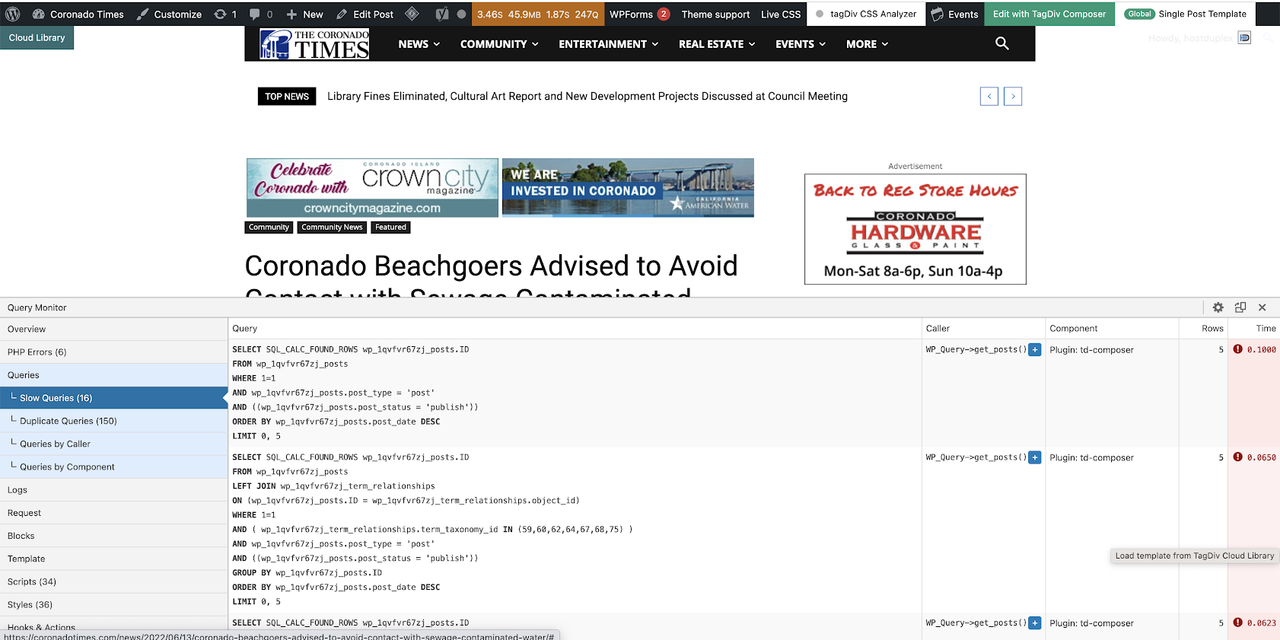
Any help? We have caching plugins to help with speed and we are on Cloudflare as well.
 muktipolice
The current cache plug-in, you can click on the error message will pop up.How do we improve?
Bettina Hello!
We recommend using only one cache plugin, the WP Super Cache plugin with this configuration: https://forum.tagdiv.com/cache-plugin-install-and-configure
Thank you!
 Carel
Carel Hi
I just did it ( i also edited ACF) but it still does not work.
There is no cache plugin on the server or website yet
 ian909
Latest version of Newspaper installed.
I have an issue when using a Cloud template for the single post view on mobile devices. When using a Cloud template the content beneath the featured image isn’t centred correctly and appears to have padding added to the right side of the screen. The footer appears correctly.
If I remove the Cloud template the issue is resolved.
No cache on and I’ve removed plug inns to see if it’s a conflict but no success.
Any ideas ?



