
- NewspaperHow to use the Flex Blocks cache option
- NewspaperCache plugin – install and configure
- NewspaperWP Rocket and Newspaper Theme: Optimization Guide
- NewspaperFlex Block Settings Guide
- NewspaperGeneral Options that May Interfere with the Newspaper Theme
- NewspaperThe Newspaper Mobile Theme: Introduction
- NewspaperAutoptimize Plugin – install and configuration
- NewspaperHow to update a plugin
- NewspaperCloudflare (CDN)
- NewspaperFacebook Share
- NewsmagRequirements for Newsmag
- NewsmagHow to update the theme
- NewsmagtagDiv Social Counter tutorial
- NewsmagTop bar templates
- NewsmagAjax view count
- TutorialsWhat is Ajax preloading?
- NewspaperVideo Playlist
- Newspaper7 Days Post Sorting
- NewspaperAjax View Count
- NewspaperTop bar templates
 Calin
Calin Hi,
Make sure that you do not have a plugin conflict, please deactivate ALL plugins except tagDiv plugins, also if you are using child theme or cache plugin, deactivate them, clear all cache and try again.
Let me know the results!
Thank you!
Calin Hi,
I just checked your website and I can not find these errors, please provide some more details, some screenshots or a link where I can inspect them.
Make sure that you do not have a plugin conflict, please deactivate ALL plugins except tagDiv plugins, also if you are using child theme or cache plugin, deactivate them, clear all cache and try again.
Thank you!
 Vlad S
 Hello !
Please make sure that you do not have a plugin conflict, please deactivate ALL plugins except tagDiv ones, also if you are using child theme or cache plugin, deactivate them, clear all cache and try again.
Thank you !
Calin Hi,
Yes, this can be achieve, but this depend on the layout and page dimension you have, plugins you are using and how well the website is optimize.
If you follow the steps which are presented in this tutorial here -> https://tagdiv.com/how-to-increase-page-loading-speed/ you’ll be able to increase the speed of your website, but indeed you need to use cache plugins, maybe a CDN.
Also you can check this similar topic for more solutions: -> https://forum.tagdiv.com/topic/optimize-script-to-improve-site-speed/ -> https://www.infophilic.com/get-almost-100-pagespeed-newspaper-theme/
– https://forum.tagdiv.com/topic/a-few-tips-for-newspaper-x-speed-high-cpu-usage-issues/
Thank you!
Calin Hi Marcel001,
Please try using a pc or laptop, also the page is displaying correctly on mobile too, but you need to scroll the page content and editing with the mobile will be very hard.
Hi Nserebrenik make sure that you do not have a plugin conflict, please deactivate ALL plugins except tagDiv plugins, also if you are using child theme or cache plugin, deactivate them, clear all cache and try again.
Hope this will help you!
Calin Hi,
Make sure that you do not have a plugin conflict, please deactivate ALL plugins except tagDiv plugins, also if you are using child theme or cache plugin, deactivate them, clear all cache and try again.
If there is still a problem, you can send us an email at contact@tagdiv.com and provide admin login, as well as cPanel. We will take a look. Include a link to this topic in the email.
Let me know the results!
Thank you!
Vlad S Hello !
On your mega-menu please make sure that you have set the mega menu properly: https://www.screencast.com/t/DrplRQdS : https://forum.tagdiv.com/mega-menu/
The footer seems to be there and looks good. Please make sure to clear your cache.
Thank you !
Vlad S Hello !
Please make sure that you do not have a plugin conflict, please deactivate ALL plugins except tagDiv ones, also if you are using child theme or cache plugin, deactivate them, clear all cache and try again.
Thank you !
Calin Hi,
I just checked your website, and is possible to have a plugin conflict -> https://i.imgur.com/iUfEJ3t.png please deactivate ALL plugins except tagDiv plugins, also if you are using child theme or cache plugin, deactivate them, clear all cache and try again.
Thumbnails – Fix strange looking images on blocks -> https://forum.tagdiv.com/thumbnails-fix-strange-looking-images-on-blocks/
Let me know the results!
Thank you!
 Topfgartenwelt
 Ok, I don’t use a special cache plugin, because my hoster provides already a cache. Is there a way to set a favicon for the mobile version?
Greetings Kathrin
 ccanjang
Hello,
Thank you for your good theme and services.
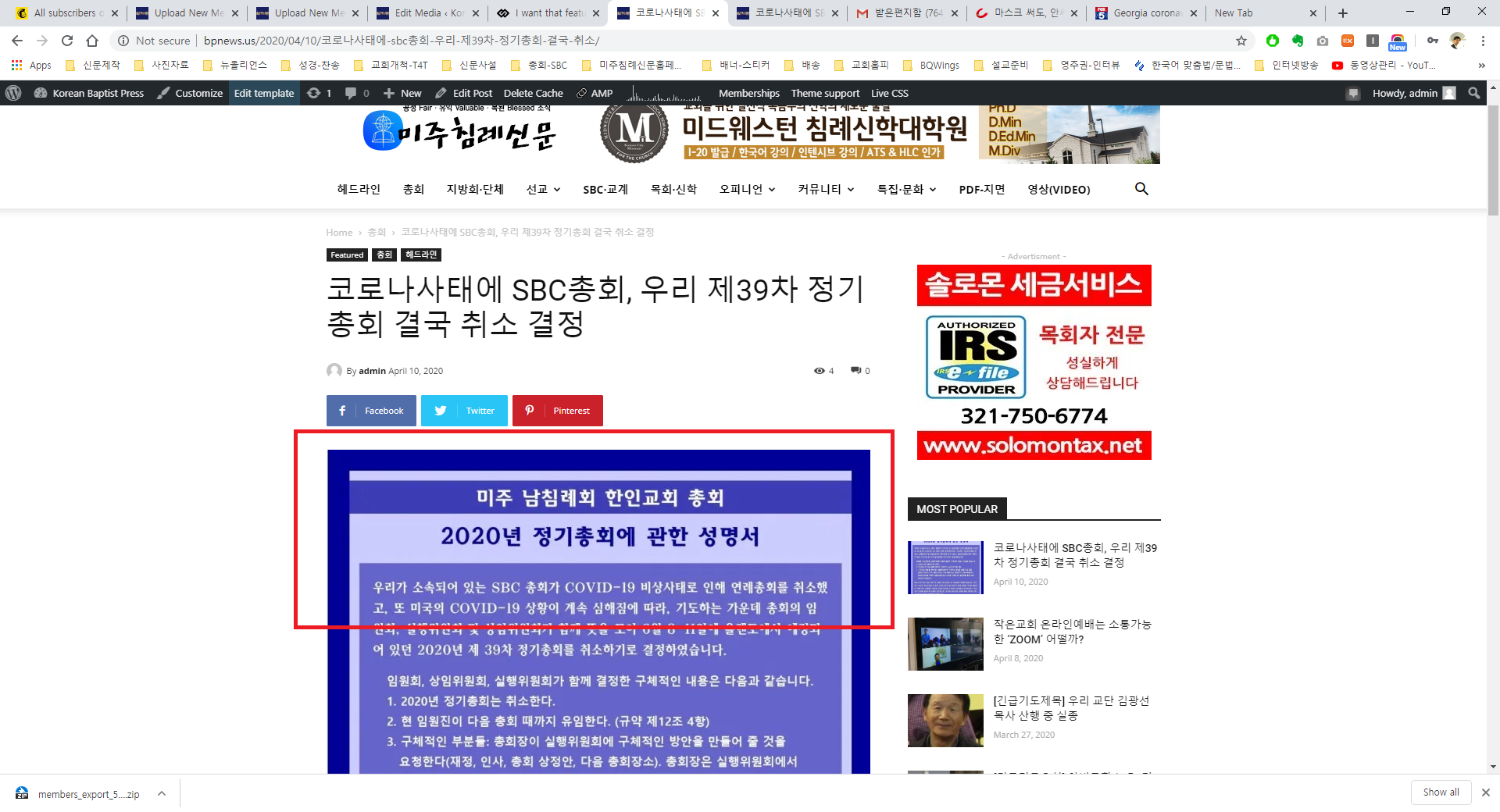
I want that featured image don’t be displayed on post pages.
Already I turned off the options SHOW FEATURED IMAGE and FEATURED IMAGE PLACEHOLDER.
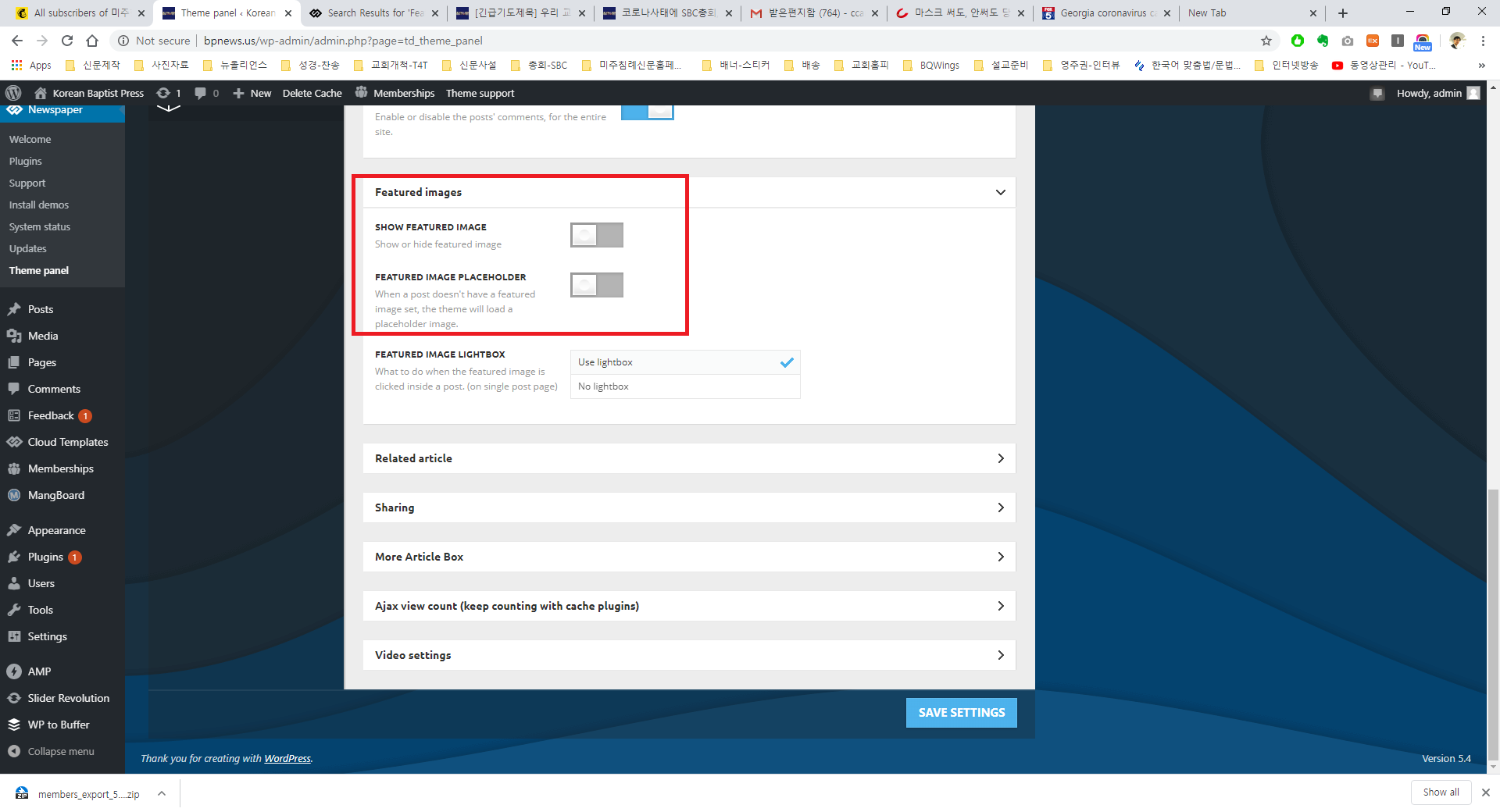
However still I see the featured image even I have tried other laptop(because I worried cache problem).
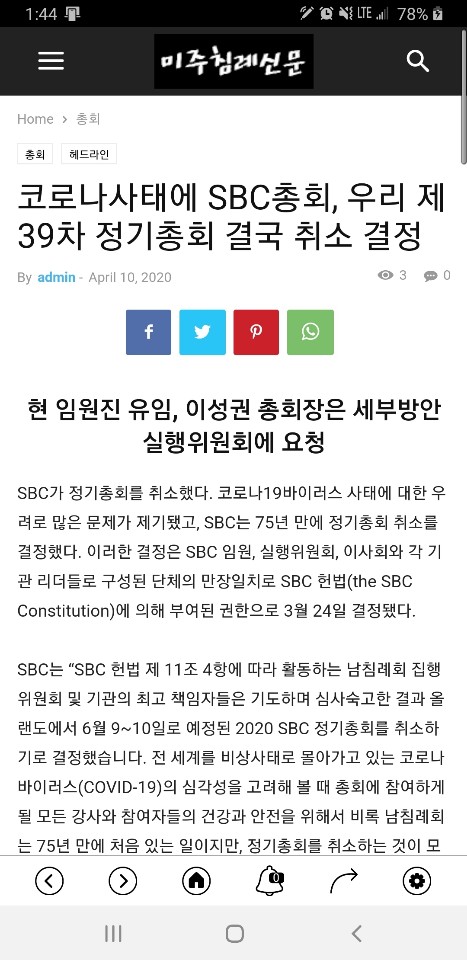
But I don’t see on mobile device.
I don’t know what is problem.
I will wait your reply.
Thanks
Calin Hi,
Make sure that wp memory limit is at list 256MB and you do not have a plugin conflict, please deactivate ALL plugins except tagDiv plugins, also if you are using child theme or cache plugin, deactivate them, clear all cache and try again.
If there is still a problem, you can send us an email at contact@tagdiv.com and provide admin login, as well as cPanel also please provide on email the licence key. We will take a look. Include a link to this topic in the email.
Thank you for your understanding!
 EgorYupatov
 Hi! Sorry, I just activate another theme for testing, when you come to my site. Actually it looks like this http://prntscr.com/rwqskv
So as I understood, you recommend me to disable Google fonts? But what if I want to use Google fonts? And how they even connect with an unused CSS cache file?
As I said before I used WP Rocket for caching (best premium cache plugin) and Imagify to compress my images and convert it in WebP format, which is really lightweight, and also I use minification plugin to minify my CSS and Java. So it’s almost all that you can do to improve your website speed, except using CDN.
But as you can see, problem not here. In another free theme, I have a less 1-sec result with the same set of plugins and content.
Calin Hi,
When the mobile version or amp is displaying on desktop is a cache problem, we recommend to use WP Super Cache with the settings from our guide -> https://forum.tagdiv.com/cache-plugin-install-and-configure/ also if you are using other cache plugins please deactivate them and make a test.
Let me know the results!
Thank you!
Calin Hi,
This is a cache file -> https://prnt.sc/rwltyx this is made by the cache plugin you are using.
You can disable the style from here -> https://i.imgur.com/HQHC2or.png
Also I checked your website and the theme plugins are not activate -> https://i.imgur.com/EcYmL26.png please activate tagDiv Composer -> https://i.imgur.com/mFmwmp8.png
If you are referring to page speed, the speed of your website depends on how well your site is optimized, if you follow the steps which are presented in this tutorial here -> https://tagdiv.com/how-to-increase-page-loading-speed/ you’ll be able to increase the speed of your website.
Also you can check this similar topic for more solutions: -> https://forum.tagdiv.com/topic/optimize-script-to-improve-site-speed/ -> https://www.infophilic.com/get-almost-100-pagespeed-newspaper-theme/
– https://forum.tagdiv.com/topic/a-few-tips-for-newspaper-x-speed-high-cpu-usage-issues/
Let me know the results!
Thank you!
Vlad S Hello !
Please make sure that you have accomplished all the system requirements as in our documentation here: https://forum.tagdiv.com/requirements-for-newspaper/
Please make sure that you do not have a plugin conflict, please deactivate ALL plugins except tagDiv ones, also if you are using child theme or cache plugin, deactivate them, clear all cache and try again.
Thank you !
Vlad S Hello !
Please make sure that you have accomplished all the system requirements as in our documentation here: https://forum.tagdiv.com/requirements-for-newspaper/
Please make sure that you do not have a plugin conflict, please deactivate ALL plugins except tagDiv ones, also if you are using child theme or cache plugin, deactivate them, clear all cache and try again.
Thank you !
Vlad S Hello !
Please make sure that you do not have a plugin conflict, please deactivate ALL plugins except tagDiv ones, also if you are using child theme or cache plugin, deactivate them, clear all cache and try again.
Thank you !
Calin Hi,
Make sure that you do not have a plugin conflict, please deactivate ALL plugins except tagDiv plugins, also if you are using child theme or cache plugin, deactivate them, clear all cache and try again.
If there is still a problem, you can send us an email at contact@tagdiv.com and provide admin login, as well as cPanel. We will take a look. Include a link to this topic in the email.
Let me know the results!
Thank you!
Calin Hi,
As I can see the problem is that the favicon is not loading on posts on mobile -> https://i.imgur.com/6BeSI5D.png this can be because you have the mobile theme plugin activate, but the cache or optimize plugin that you are using do not recognize that and is trying to set the favicon as on responsive version..
Thank you!
 Arnaud
 Hi Vlad,
I tried the following:
- Deactivating ALL plugins except tagDiv ones
- Making sure that all lights are green in the panel
- Adding a cache publing (as recommended: WP Super Cache)
In addition, I’m not using a child theme. The only workaround I found is to copy the code of the page produced by TagDiv and then create a new page. Then, it works perfectly fine… for the moment.
I read on this forum that this solution is not really a solution and that the problem sometimes come back. Any idea?
Thanks a lot
Calin Hi,
Make sure that you do not have a plugin conflict, please deactivate ALL plugins except tagDiv plugins, also if you are using child theme or cache plugin, deactivate them, clear all cache and try again
Let me know the results!
Thank you!
Vlad S Hello !
Please make sure that you do not have a plugin conflict, please deactivate ALL plugins except tagDiv ones, also if you are using child theme or cache plugin, deactivate them, clear all cache and try again.
Thank you !
Vlad S Hello !
Please make sure that you do not have a plugin conflict, please deactivate ALL plugins except tagDiv ones, also if you are using child theme or cache plugin, deactivate them, clear all cache and try again.
Thank you !
Vlad S Hello !
Please make sure that you do not have a plugin conflict, please deactivate ALL plugins except tagDiv ones, also if you are using child theme or cache plugin, deactivate them, clear all cache and try again.
Thank you !



