
- NewsmagRequirements for Newsmag
- NewsmagtagDiv Social Counter tutorial
 menneskedyr
 Thank you for the quick response, but that’s not quite it. Yes, TD Composer has a lot of queries and we live with it, but this was caused by a single (double, actually) repeating query from TD Standard Pack apparently fetching the site logo, using what seems to be a highly inefficient function:
attachment_url_to_postid()
And it was doing it twice, once for the desktop and once for the mobile logo, on every single page load. This caused mysqld to spike to 200% and above.
I see now that I have posted the wrong screenshot above, sorry. Here’s the correct one:
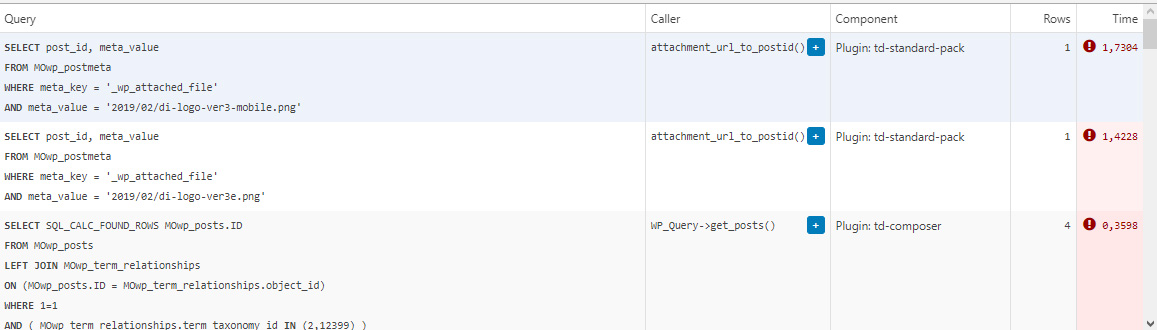
This morning I managed to patch up the problem, it’s a crude solution but may help someone. In header template I found that it was loading the logos from
plugins/td-standard-pack/Newspaper/parts/header/header-menu-h1.php
(yours may be different of course)
There I simply removed the PHP block fetching the logos and hardcoded the HTML for the logos in. As soon as I did that, the SQL spike went away. So I’d say it’s a bug, or inefficient code at least.
To be clear, we’re running the latest versions of WP, PHP, MySQL, the theme & plugins, all on a solid VPS. Yes there is quite a bit of SQL load, we’re working to optimize it with new blocks and Cloud Templates, but this was something else. Could be related to the latest Standard Pack update, don’t know, team didn’t report it before.
-
This reply was modified 4 years by
menneskedyr.
 Anamaria
 Hello,
Please check this topic https://forum.tagdiv.com/topic/co-authors-2/ ->https://forum.tagdiv.com/adding-multiple-authors-articles/
Also, this method works for the default post templates and does not affect cloud library templates.
Adding the multiple authors is a 3 step process. Adding the multiple authors is a 3 step process.
Step 1 – Adding the required functions in your child theme functions.php file.
We created 2 custom functions for the author and for the author box which we can then call on the post styles and not have to use the entire functions each time.
Add these functions in your child theme functions.php file: https://pastebin.com/ciYrSZvQ
These will create the custom implementation to add the co-author and the author box for each co-author in particular.
Step 2 – Adding the single post templates to your child theme.
In your main child theme folder, you will need to create the following folder structure: In your main child theme folder, you will need to create the following folder structure:
Newspaper-child/parts/single Newspaper-child/parts/single
Then, under the “single” folder add both the single-template and the loop-single files for each of the post styles you use on your articles => https://i.imgur.com/PNke9Eo.png
Now you will have to identify where the author is being called in each post style.
For styles 1, 5, 9 and 10 you will find the author code in the loop-single files while for styles 2, 3, 4, 6, 7, 8, 11, 12 and 13 the code is found under the single_template files.
Edit the files corresponding to the style you want to apply the co-authors to and then call the functions added at step 1. Replace the default author and author box codes:
https://i.imgur.com/AvJOQfg.png
Replace the highlighted code with the following codes: https://pastebin.com/fifu70QS
Maintain the position of the code in the PHP file though for proper results.
Step 3 – CSS styling.
For the co-authors to position properly we also need a bit of CSS code to ensure proper styling so please add the following CSS code in the theme panel under custom code-> custom CSS:
https://pastebin.com/dRaStewQ
Now you simply need to edit your post and add multiple authors using the plugin author field:https://i.imgur.com/4saivlH.png
Thank you!
 Bettina
 Hello!
Let me explain you which options of mobile versions are:
1. Responsive version: A responsive version of your website is looking similar like on desktop, edit the page with TagDiv Composer, click on the mobile viewport: https://www.screencast.com/t/XDQJedlggSB ; there you can see your mobile version and you can edit the elements there.
2. Mobile pages: https://tagdiv.com/newspaper-10-3-7-update-brings-customizable-and-fast-mobile-pages/
3. Mobile theme plugin: The Mobile Theme is a performance optimized theme included in the Newspaper main theme and it loads only for mobile devices. It comes with its own templates for page, post, category, etc so your current templates from the desktop theme will get converted to the mobile theme layout. For more details, please take a look here: https://forum.tagdiv.com/the-mobile-theme/ https://forum.tagdiv.com/the-mobile-theme/
A full explanation you can find here: https://www.youtube.com/watch?v=SpGkOnJeNZY
If you created the mobile pages with TagDiv Composer, then when you install Mobile Theme plugin, your pages will be overwritten (disappear) by the plugin layout.
If you use Mobile theme plugin, then you can not edit the pages with TagDiv Composer.
You have only some settings for this layout, which you can find in Theme panel -> Mobile Theme. Please note that if a page is made by Composer, than the content won’t be displayed on Mobile theme version. You should create the content with the Mobile Editor.
Unfortunately, AMP is faster and works better only with Mobile Theme, because it is not compatible with cloud templates.
From my point of view, if you don’t use the Mobile Theme plugin, then there is no reason or benefit from AMP.
Check our documentation about this plugin here:
https://forum.tagdiv.com/tagdiv-amp-plugin-tutorial/
Thank you for understanding!
Anamaria Hello,
This is an older video, and our theme has now new functionalities, you can use Cloud Templates -> https://tagdiv.com/how-to-use-the-header-builder-and-tagdiv-cloud-header-templates/
Also, you can use a Single Post/ footer template, etc from Cloud Library, and you can customize it with tagDiv Composer => https://www.youtube.com/watch?v=SoGQ0d5kIBg
Also, please check our documentation -> https://forum.tagdiv.com/newspaper-theme-documentation/
Thank you!
Anamaria Hello,
If you have a header from Cloud Library, then you need to add a row on the top => https://www.screencast.com/t/YfHuH8AZOX and design it with tagDiv Composer => https://i.imgur.com/ku9sfh4.png => https://tagdiv.com/how-to-use-the-header-builder-and-tagdiv-cloud-header-templates/
Hope this helps you!
Thank you!
Bettina Hello!
This issue has been discussed already here: https://forum.tagdiv.com/topic/problem-with-wp-editor-column-text-module/
Check this article too: https://support.cloudways.com/en/articles/5127209-restrict-direct-access-to-wordpress-php-files
Hope that helps you!
Thank you!
menneskedyrThe latest version of TD Standard Pack suddenly started producing a massive number of SQL queries. The issue came to my attention when the team reported very slow website, particularly during media uploads.
Inspection showed mysqld process being over 100% CPU constantly, often above 200%. After eliminating the usual culprits such as Yoast SEO, it turned out that it was TD Standard Pack. When deactivated, mysqld returns to normal levels.
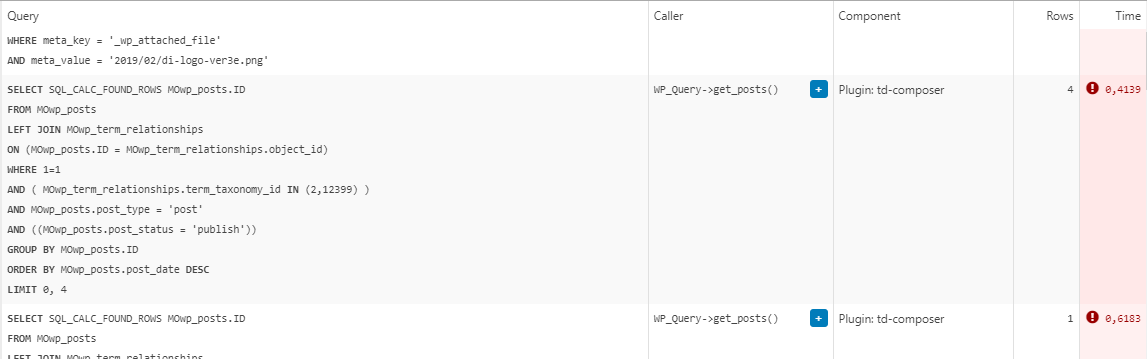
The queries in question are all “SELECT post_id, meta_value FROM MOwp_postmeta WHERE meta_key = ‘_wp_attached_file’ AND meta_value = (…)”. They seem to be constantly running and, as far as I can tell, are called from the header template.
The site is running on a solid VPS and latest versions of theme and required plugins.
We are in a process of migrating to a completely cloud templates built site which might resolve the problem because we will not need the Standard Pack anymore, but in the meantime, any ideas?
Example from Query Monitor:
 conidis
 Yes, it’s fixed. It’s a Cloudways issue. Try this:
https://support.cloudways.com/en/articles/5127209-restrict-direct-access-to-wordpress-php-files
 Nenitoblog
 Same problem here. My website is hosted on cloudways too. Any fix?
Bettina Hello Tamsin!
In order to have different elements inside for every post, you need to have different template for each post. You can install many cloud post templates and you can see them in a list here when you access a post: https://www.screencast.com/t/9mY3SZgZn
In this case, Global means that the template it’s set up for all posts by default. But, for example, you can have a post with different template and without Global. This you can do by accessing the post you want to choose other template, select from the list the template you need, that’s all. You can see how they are looking by select other template for example. The settings will be different because it’s other template, but when you assign/select the global template again you will have the same settings and you won’t lose it.
Could you explain in detail about Mobile Theme and the Standard Pack suggestion?
For more details, please take a look here: https://forum.tagdiv.com/mobile-theme-introduction/
Hope that is more understandable now!
Thank you!
Anamaria Hello,
Please make sure the tagDiv Standard Pack plugin is updated and activated.
Those shortcodes and the error are from tagDiv Standard Pack, and this plugin is not required from version 10.4, because the new demos are using cloud templates.
Thank you!
Anamaria Hello,
Please make sure the tagDiv Standard Pack plugin is updated and activated.
Those shortcodes and the error are from tagDiv Standard Pack, and this plugin is not required from version 10.4, because the new demos are using cloud templates.
Also, you can use a header template / footer template , posts, etc from Cloud Library, and you can customize it with tagDiv Composer => https://www.youtube.com/watch?v=HXQQygkCCJo
Also, please check our documentation -> https://forum.tagdiv.com/newspaper-theme-documentation/
Thank you!
Anamaria Hello Francisco,
The option from Theme Panel, import/export will import just regular theme panel settings, for Cloud
Templates you need to copy-paste the code => https://i.imgur.com/SSgIAGm.png from a template to a new template.
Also, you can check this topic https://forum.tagdiv.com/topic/move-theme-changes-from-staging-to-live/
Also, for the key, you can use the same license for test and live website.
Thank you!
Anamaria Hi,
Please check if this code is missing from your .htaccess: https://www.screencast.com/t/iN0R93dD3p from our requirements https://forum.tagdiv.com/requirements-for-newspaper/ this requirement is not displayed in System Status.
Usually, after you set the code in .htaccess the WP editor works well.
Please do a test using only tagDiv plugins and try to open the WP Editor.
Please check the console if you have any errors when you try to open the wp editor, maybe is possible to be from the firewall or security module which blocks the admin-ajax.php request, which usually displays a 403 or 404 error.
If you don’t use a security plugin, please ask your host about this, maybe you have a security module that blocks this.
If you use a plugin like Wordfence please set it in learning mode.
Also, if you are using Cloudflare, please make sure that is set as in our guide https://forum.tagdiv.com/cloudflare-cdn/, you need to disable the Rocket Loader.
Thank you!
 tamsin_lechner
 I have tagDiv Composer and Cloud templates activated but the tagDiv Composer still does not appear in the top admin bar. I do not use JetPack. What can I do to fix this?
tamsin_lechner Hi Bettina,
Thanks for your reply. I will follow the links for 1, 2 and 3 and let you know how I go.
But firstly, I still have a few of questions.
Re the cloud templates. I’m confused by how installing a new (and different) Single Post Template will affect my current post settings. There are only two mobile template options for Single Post Template. If I go with the blank mobile template I have to recreate the settings to match my desktop view? I would have thought this was done by default.
Re Mobile Theme and the Standard Pack suggestion. I already have this and it doesn’t stop the issue.
Re Mobile Theme and Mobile Editor. What exactly do you mean by “create the content with Mobile Editor”? How do I initiate Mobile content without Composer?
Thanks. Tamsin
Bettina Hello Tamsin!
1. Here you can see step by step how you can import a new cloud template for your posts: https://forum.tagdiv.com/design-post-pages-using-cloud-library-templates/
2. Please add the text and the design (elements in the page) with the TagDiv Composer, not editing the page normally. Also, the shortcode can be inserted by using the element called “Column text”. For example, in the step3 here: https://forum.tagdiv.com/add-cryptocurrency-price-ticker-widget/
3. Yes, because our plugin Tagdiv Composer sees that the elements in the page weren’t made with it and it will ignore the content. The solution is at point 2.
1. The Post Settings in the Theme Panel will appear if you will install and activate the Standard Pack plugin from Newspaper -> Plugins.
2. If you use Mobile theme plugin, then you can not edit the pages with TagDiv Composer.
You have only some settings for this layout, which you can find in Theme panel -> Mobile Theme. Please note that if a page is made by Composer, than the content won’t be displayed on Mobile theme version. You should create the content with the Mobile Editor.
How I explained above the Mobile Theme has its own design for header and footer.
Thank you!
Anamaria Hello,
If you have a header template from Cloud Library, you can set the News Ticker where you want.
Thank you!
Anamaria Hello,
You need to activate this plugin only if you use templates from Theme Panel (header, footer, posts, etc ) => https://i.imgur.com/Xjd3Xdd.png -> https://i.imgur.com/ND4vg5b.png -> https://i.imgur.com/3wFAJMu.png also, if you have added Block 1-25, Big grid, brig grid full, and if the plugin is deactivated the blocks will become shortcodes and the style will change.
So, please make sure you use Cloud Templates and Flex Block and Big Grid Flex.
Thank you!
tamsin_lechner Good morning,
I have encountered a few issues with Newspaper mobile view (both responsive version and theme plugin), and would really appreciate your help.
———-
WP 5.8.1
PHP 7.4.24
Newspaper 11.2
tagDiv Plug-ins – Composer, Cloud Library, Social Counter, Standard Pack (have also activated/deactivated Mobile theme + Official AMP for WP)
——–
My website is “coming soon” until I resolve my mobile settings, so I am sharing screenshots using your recommendation above.
FYI I have already utilised the Let’s Go Mobile tutorial (very helpful) and Theme documentation and spent a lot of time troubleshooting.
My preferred option is to use mobile templates and tagDiv composer, mostly as I have content on my homepage that I want to retain in mobile view. I have created mobile templates for the home page, header and footer only (at this stage).
When testing the responsive version live on mobile I have the following issues:
1. My posts are displayed in a default format (feature image, text then sidebar, plus wrong header and footer). In my cloud templates list I do not have any Single Post Template listed to customise as a mobile template.
Have I mistakenly deleted “Single Post Template – Default PRO” and if so how do I get it back? When searching in New Cloud Templates it is not listed and other templates would be inconsistent with my site.
2. My pages (via menu) are displayed in a similar default format. When I try to create mobile templates for these pages using Composer (checking copy content option) most of my pages are not picking up all the content. Specifically, pages that have shortcodes (eg. Contact Form 7). For example –
In the mobile template page I get an empty column (where the page title, text and/or image should display) and stretched out shortcode content. If I save it anyway and try to open it again it appears as blank.
3. One critical page on my site appears blank (header and footer only) when live on mobile. It is a Business Directory which is otherwise responsive to the theme.
Like Issue 2 above, when I create a mobile template for this page the content is copied and partially displays but after saving it disappears.
The alternative option – trying tagDiv Mobile Theme + Official AMP for WP, and testing it live, has not resolved the critical issues. NB: I switched my “homepage – mobile” to draft while using Mobile Theme.
When testing the mobile theme version live on mobile I still have these issues:
1. Posts are now ok but the “Post Settings” options (as shown in your Theme Documentation) do not appear in my Mobile Theme Plugin settings.
2. All of the pages (including Business Directory) are now completely blank (mobile theme header and footer only). FYI I have opened each page in WP Editor and ensured they are enabled for mobile theme in the tool bar and updated. This did not resolve the issue.
Please let me know your suggestions for resolution asap 🙂
Thank you, Tamsin
 rahulroushan
 It works that way. Thanks! Tagdiv support should take note.
btw I want to use Mobile theme only for AMP, but now I’m facing an issue where ‘/?amp’ at the end of the URL gives proper mobile theme, but ‘/amp/’ sends a ‘transitional’ copy of the desktop version built from cloud library. Not sure if you had a similar issue, but trying my luck again.
Anyway, I’d repeat that Tagdiv should take note. There are at least 4-5 threads highlighting the same issue, but it wasn’t resolved in any of those. They should figure out why it works when network enabled but fails to work when enabled sub-site wise.
Earlier, I had asked my host earlier why it was not working and they had this to say about the error:
The issue is occurring as the site is requesting for the file -> ‘tagdiv-deploy-mode.php’ inside the directory -> wp-content/themes/themes/Newspaper/ but the directory wp-content has only one subdirectory with the name themes and there are no other sub-directories inside the themes folder with the name -> themes. The additional directory path requesting for the file inside -> wp-content/themes/themes/Newspaper/ instead of wp-content/themes/Newspaper/ is causing the issue.
 marcorroma
Hello,
it seems that when the “tagDiv Cloud Library” plugin is active it is impossible to crop the images. Or rather, I manage to crop the image but when I publish the post or create the preview of the post I don’t see the cropped image.
Disabling your plugin seems to work correctly.
Can you give me support?
Thanks
Anamaria Hello,
You need to change the timezone from WordPress -> Settings -> General in Time Zone -> https://wordpress.org/support/article/formatting-date-and-time/
Also, for weather please check this https://forum.tagdiv.com/topic/weather-7/
Also, for ads please make sure you have a Single Post Template and follow this guide to add the ads https://forum.tagdiv.com/article-ads/
The Disqus plugin works only with standard posts style, but with single post cloud template has a different structure and this plugin cannot work with them.
Thank you!
Bettina Hello!
If you will use a cloud/PRO template, then you will have this possibility: https://www.screencast.com/t/MzgpyxTAuH.
We recommend to use cloud/PRO templates in order to have the possibility to edit them with the TagDiv Composer which contains a lot of functions and features, please check our tutorial here: https://forum.tagdiv.com/tagdiv-composer-tutorial/
Documentation here:
– https://forum.tagdiv.com/cloud-library-templates/
– https://forum.tagdiv.com/design-post-pages-using-cloud-library-templates/
– https://forum.tagdiv.com/cloud-library-category-templates/
Check also our video tutorials here: https://www.youtube.com/c/tagdivThemes/videos
Thank you!
conidis Hello,
I have provided access to Cloudways application.
Please use only this application.
https://platform.cloudways.com/apps/2233409/access_detail
URL:
padelgreece.com
The site uses Hide my Site. Password is inside Hide-My-Site settings
Thank you



