
- NewspapertagDiv Composer – Website Manager
- NewspaperWhen tagDiv Composer is Not Working
- NewsmagtagDiv Composer Tutorial
- TutorialsFrom WPBakery to tagDiv Composer
- NewspapertagDiv Composer Tutorial
- NewsmagHow to use the Visual Composer plugin
- NewspaperScroll Animation
- NewspaperSingle External Shortcode and External Shortcode
- NewspaperCredit System
- NewspaperBookmark – Save For Later
- NewspaperFlex Block Builder and Flex Loop Builder
- NewspaperModules Builder in Newspaper Theme
- NewspaperIntroduction to CPT and ACF with Newspaper Theme
- NewspaperCreate a frontend submission form
- NewspaperHow to Use the Tabbed Content shortcode
- NewspaperCreate a form contact page
- NewspaperFilters and sorting for taxonomies
- NewspaperUser review system
- NewspaperCustom Fields Support
- NewspaperWooCommerce: Happy “Add to Favorites!”
 NickDeBaerdemaeker
Hi
I am currently trying to add a custom query in the data source.php file.
One can select in the composer the different categories from which to display posts.
( I set the post limit to four and four categories, “434, 19, 21, 38, 11” ).
What I am trying to achieve is that the query gets the single last most recent post from the four categories that I set in the composer. So I get to see 4 blocks, and they should each be from a different category.
I came this far but currently it is not working. Any thoughts on how to achieve this ?
case 'one_from_each':
$wp_query_args['date_query'] = array(
'cat' => $category->term_id,
'post_type' => 'post',
'posts_per_page' => '1',
'post__not_in' => $do_not_duplicate
);
$wp_query_args['order'] = 'DESC';
break;  Calin
Calin Hi rahulroushan,
Please deactivate the composer, delete it from theme, go on themeforest login and get the theme with all file and install the td composer.
If the problem is still there please increase WP memory limit to 256 MB max_input_vars at last at 2000
And please follow the guide carefully
– https://forum.tagdiv.com/requirements-for-newspaper/
The minimum requirement are not enough if you have plugins install.
Thank you for your understanding.
Calin Hi,
Please make this steps again.
1. Delete all content from the .htaccess and save the file -> https://www.screencast.com/t/uwXvJvsodW
2. Save the permalinks -> https://www.screencast.com/t/blvTiOBhsF2
Now you can try to open a page with tagDiv Composer, is is not working, please add the below code in .htaccess file :
<IfModule mod_substitute.c>

SubstituteMaxLineLength 10M

</IfModule>
go in permalinks click on save, and try again.
Hope this will solve your problem.
Thanks.
 Catalin
 Hello imbob,
1)If you will use the TD Composer to create your pages, notice that you can use our full-width elements and also, the ROW can be stretched -> https://www.screencast.com/t/RadDU5VodwS (this is an example).
2)If you want to use two section for Sidebars, you need to use 1/4+1/2+1/4 layout configuration from here -> https://www.screencast.com/t/R2FXiwhBdJ and then, add the Widget Sidebar for the Side parts.
3)Try to add every sidebar you want using the Ad Box with TD Composer. Also, if is not what you mean, provide more details about your problem and also, provide some useful screenshots with your desired changes.
Thanks for your understanding!
 Simion C.
 Hi,
There is a solution like that for template 8, please see this topic
– https://forum.tagdiv.com/topic/featured-image-show-caption/
It should still work. The CSS can be modified according to your preference. The modification can be made in a child theme if available.
As a side note, in the cloud post templates the featured image element has an option to display/hide the caption
– https://www.screencast.com/t/iai7tuK4aa
You can experiment with the tagDiv composer and cloud library post templates here
– https://affiliate.tagdiv.com/#/load/Single
This allows to preview the template and even edit it with the composer.
Thanks
Calin Hi,
Also please activate tagDiv Composer and tagDiv Cloud Library.
Thank you.
Calin Hi,
Please read this topic: https://forum.tagdiv.com/topic/theme-panel-wont-save-when-td-composer-is-active-and-other-errors/
Thank you for your understanding.
Calin Hi,
To get the last version of visual composer, please send us an email at contact@tagdiv.com and ask for v Composer.
Thanks.
 Viju
Viju If I removed Cloudflare I am getting below error:
Refused to apply a style from ‘https://www.mysite.com/wp-content/themes/mysite-child/font-newspaper.css’ because its MIME type (‘text/html’) is not a supported stylesheet MIME type, and strict MIME checking is enabled.
If I delete all from a .htaccess file then I am receiving this an ERROR
ERROR IMAGE
Above error, I receive just for “TAGDIV COMPOSER” when I click on edit TAGDIV COMPOSER.
My site speed is OK…
 menneskedyr
 Could be something else, but tonight I solved several problems that started happening after TD Composer update by increasing server resources. Try raising max_input_vars and WP_MEMORY_LIMIT and see if that helps. Worked for me.
menneskedyr Maybe not related to your issue but tonight I solved a major headache with TD Composer update and various weird stuff that started happening. It turned out that server resources that were enough before are not enough anymore. Probably not much of a difference, but still. I cranked up max_input_vars and WP_MEMORY_LIMIT and that did it.
 sejpost
We have mutliple content blocks on our homepage: http://www.CoronadoTimes.com
We added a new one called “Real Estate”. We have one story in that new category, but when we save the new content block, it doesn’t show on the homepage. Also, in the TD Composer view, it shows up when I add the category id, but then after saving it, it says “NO POSTS” in the TD Composer view – see image:
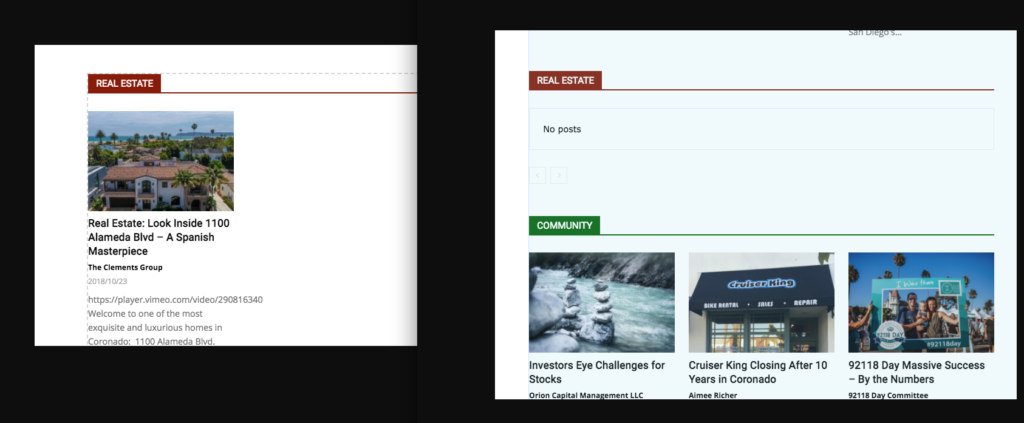
Why isn’t the single post showing? I want this post to show up in the REAL ESTATE NEWS block on the homepage:
https://coronadotimes.com/news/2018/10/23/real-estate-look-inside-1100-alameda-blvd-a-spanish-masterpiece/
Thanks,
Steve
 arrezzo
 it was ultimate add-ons for visual composer. thought I deactivated that one already.
thanks. it works now.
arrezzo how about letting me update the latest version of visual composer
Viju GET mysite.com/wp-json/td-composer/do_job/? 404
{“code”:”rest_no_route”,”message”:”No route was found matching the URL and request method”,”data”:{“status”:404}}
menneskedyr As it normally happens I figured it out minutes after posting here… but here goes for those that may stumble the same way.
It seems that server resources that were fine for earlier version of TD Composer are not enough for the new one. My minimal configuration (as it is a test site) has had no problems until now.
If you update TD Composer and it starts acting up, give it a little more room to breathe if you can. Specifically, I’ve increased max_input_vars and WP memory limit. Don’t know which one fixed it.
Sorry for troubling you guys.
 Christian81
Hi,
sorry for my english.
I have updated the newspaper theme to the latest version (9.1), but I have problems installing and activating the TagDiv Composer Plugin. After updating the theme, I tried to activate the TagDiv plugin, but I received an alert saying that “the plug-in is disabled because it is not compatible with this version of newspaper”.
I’m suggested to update TagDiv, but even following the update procedure, which ends with a positive result (the plugin is updated successfully), I go back to the plugin panel and TagDiv always results as a necessary update, so it is not actually updated after the procedure.
I have tried both the automatic and the manual procedure but, in both cases, the problem persists.
How can I solve?
Thank you
menneskedyrI have just updated my test site (fortunately not the live one) to 9.1 and new TD Composer wrecked a few things.
When TD Composer is active (new version, built 12.10.), saving options in the Theme Panel doesn’t work. The “busy” indicator just keeps spinning and nothing happens.
Also, activated TD Composer gives some very strange behaviour in the plugins area. For example, when I try to delete some other plugin by clicking the link on the Plugins page, WP throws a weird error on top of page and doesn’t do anything. When TD Composer is disabled, everything works.
I went through the usual checklist (disabling cache, all other plugins, reuploading everything from scratch…), nothing helped.
Please advise.
 Pawan Phayel
When I tried to activate both Yoast & TD Composer I found below given error message.
fatal error: unknown: cannot use output buffering in output buffering display handlers in unknown on line 0
What is this & How to solve?
 Marcus_S
Hi,
i use Templates from the Cloud Library.
But, when i will edit them with the tagDiv-Composer i can’t
Screenshot
I became this Screen for a while
 jackorobbo11
Hi, does not work tagDiv Composer. When trying to switch to the composer, the following error appears: http://prntscr.com/l9hxgc (The page is not available, Site superyachttechnologynews.com did not send data.
ERR_EMPTY_RESPONSE).Could you help me to resolve this issue?
Calin Hi,
Please open the page with tagDiv Composer click on the image, set the row, go in css and set margin top -48
https://www.screencast.com/t/Ez4RUoc8SwJb
Hope this will solve your problem.
Thank you.
 Vlad111
 I’m speaking about this problem: https://themeforest.net/item/newspaper/5489609/comments?page=666&filter=all#comment_18588378
Here is a screenshot of a search engine results page:

I’ve found some kind of solution here: https://themeforest.net/item/newsmag-news-magazine-newspaper/9512331/comments?page=191&filter=all#comment_19710460
But it means, that after tagdiv composer update, I will need to edit the file manualy again. Is there any other way to do it?
Calin Hi,
If you like to edit the posts look/template, then you can use the tagDiv Composer with tagDiv Cloud Library plugin , ( https://www.screencast.com/t/wmyqTFopbJX ).
Thank you.
Simion C. Hi,
Seems to work now, that page looks like this for me – http://prntscr.com/l9don5
Shortcodes placed in text elements should work properly. There would be no other way of displaying them in pages built with the composer.
Thanks

