
 ComicsBeat
My website was running fine but suddenly all the posts stopped loading. The front page still gets up but I get this error when I click on any post:
wp_booster error:
td_api_base::mark_used_on_page : a component with the ID: single_template_3 is not set.
/home/xxx/public_html/wp-content/plugins/td-composer/legacy/common/wp_booster/td_api.php
Display backtrace
It seems this error incoming from the theme, but how can I restore the missing templates?
My site is here:
comicsbeat.com
 pavel@earnware.com
 How to Disable Access to Exploitation Path for Vulnerable Code in Outdated TagDiv Composer Plugin: https://www.pluginvulnerabilities.com/2023/10/19/how-to-disable-access-to-exploitation-path-for-vulnerable-code-in-outdated-tagdiv-composer-plugin/
 urbandigital
Hey, is it possible to create widget sidebar with the help of the tagdiv composer and not HTML only?
Or do you have any other solution to create a sidebar with the tagdiv composer so that I can use it on certain PAGES (not posts)?
Thanks!
 insight
My pages are displaying properly but when I try to edit them they are not displaying properly. Following are some snapshots
https://app.screencast.com/ggvmNTDsp46B9
https://app.screencast.com/QtEO4Uuo3Nx9i
thx
pavel@earnware.comWe have encountered a notable surge in traffic originating from the Netherlands (some of the source IP’s are 176.222.55.137, 176.222.55.139 both listed here https://www.wordfence.com/threat-intel and 93.174.93.127), specifically targeting the path /wp-json/tdw/save_css, beginning on the 14th of December.
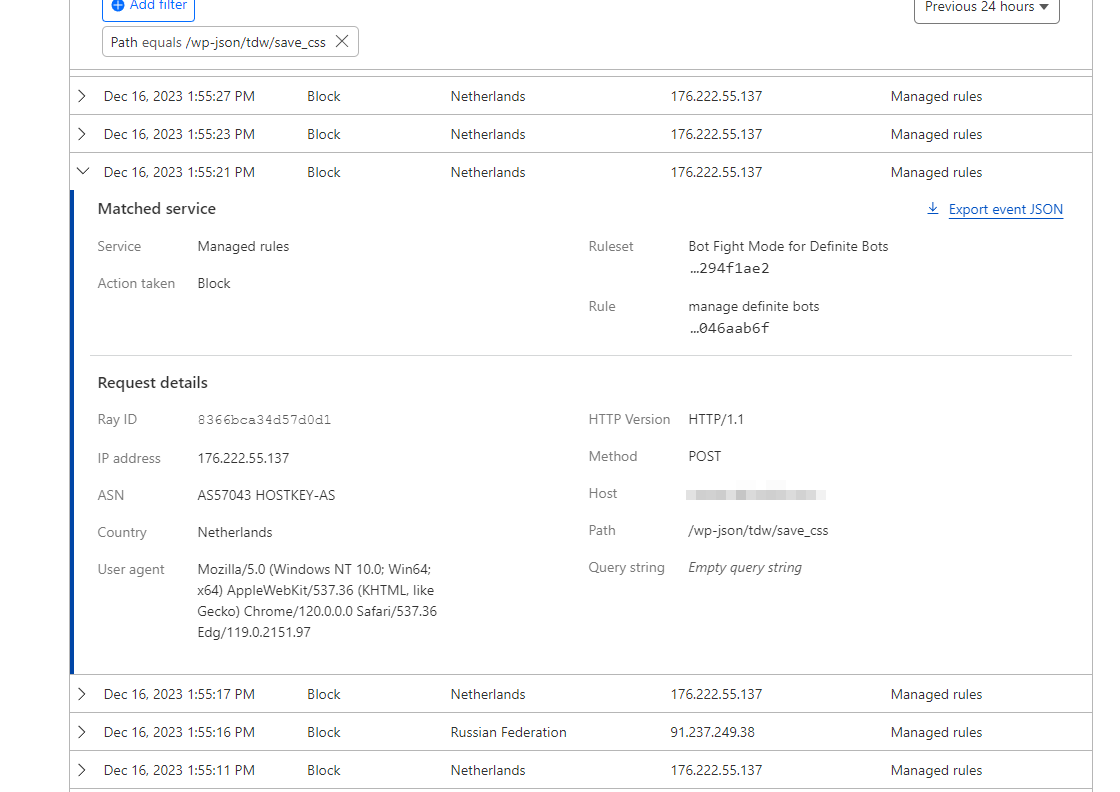
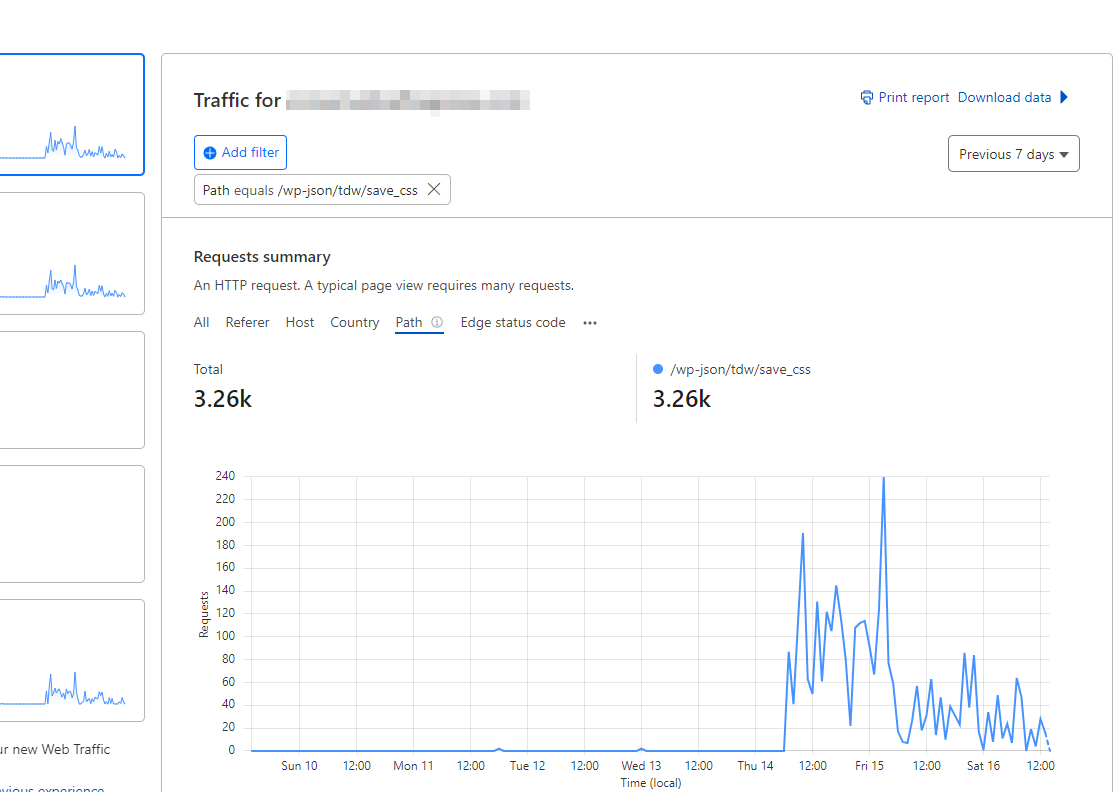
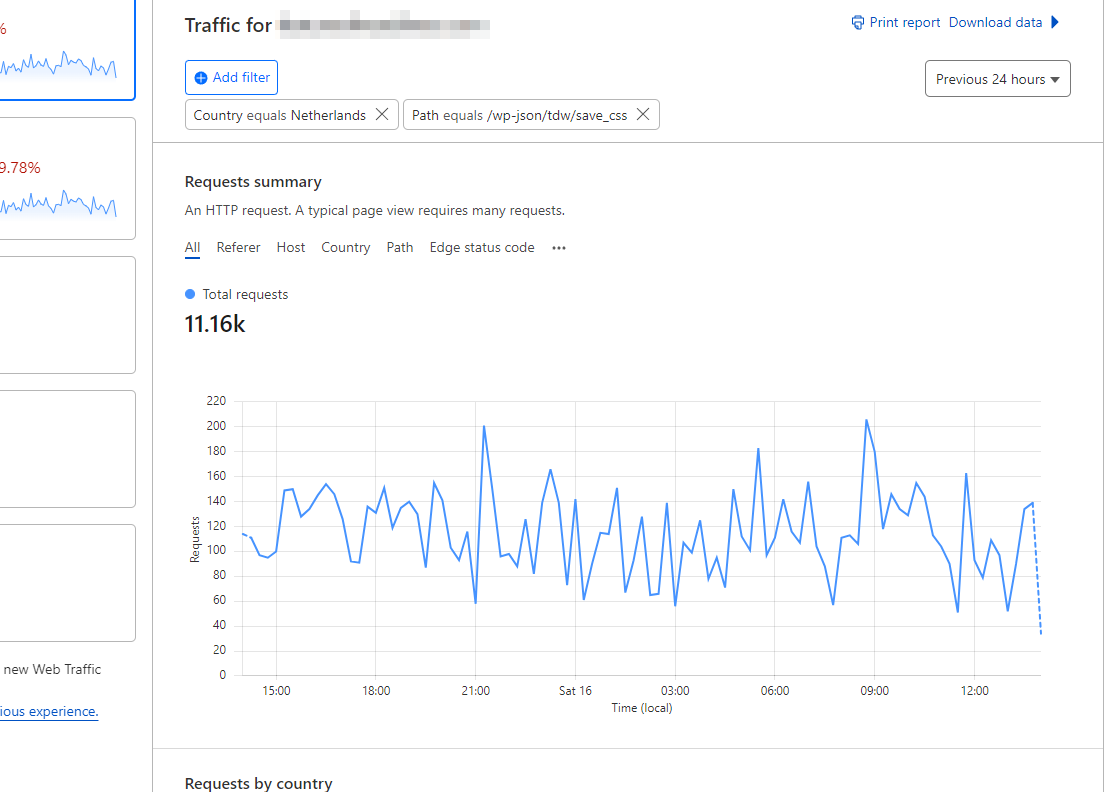
This surge is happening across multiple websites hosted on WPEngine or Digital Ocean. Despite updating all websites from version 12.6.2 to 12.6.3, the increased traffic persists.
Is this related to Balada Injector? https://blog.sucuri.net/2023/10/balada-injector-targets-unpatched-tagdiv-plugin-newspaper-theme-wordpress-admins.html
In our efforts to address the issue, we have also attempted the solution outlined here: How to Disable Access to Exploitation Path for Vulnerable Code in Outdated TagDiv Composer Plugin, but without success.
Is anyone else experiencing this issue (check your Cloudflare stats) and when a fix will be released?
 Anamaria
 Hi,
If you want to create the sidebar in Appearance -> Widgets and set the sidebar on posts, using the element from tagDiv Composer, Widget sidebar https://i.imgur.com/e1FPdYU.png -> https://i.imgur.com/q20UCZf.png -> https://forum.tagdiv.com/sidebars-tutorial/
Thank you!
 sheikhali191
You can see menu is showing on my homepage: https://www.hairs.london/
But not showing on posts: https://www.hairs.london/30-easy-to-maintain-ideas-for-medium-length-hairstyles-with-bangs/
Upon accessing a post, I navigate to the TagDiv Composer, where I modify the single post template by incorporating a menu element. While this adjustment reflects in the post, it inadvertently manifests on the homepage as well, resulting in the display of two menus. Consequently, I find it necessary to eliminate the menu from the single post template. I seek guidance on a viable solution to address this issue.
 Bettina
 Hello Pratul!
This issue with the error from Composer has also been discussed here: https://forum.tagdiv.com/topic/errors-at-columns-elements-5/
Please make sure you did all the steps which I mentioned here: https://forum.tagdiv.com/topic/errors-at-columns-1models-0dom-the-model-does-not-match-the-content-curr/
If the problem is still there, then contact us via email at contact@tagdiv.com and provide the following:
– admin url and credentials
– cpanel url and credentials
– a link to this topic in order to identify you
We will take a look and try to help you asap.
Thank you!
Bettina Hello Ken!
Edit the page with the TagDiv Composer and delete the element that has that image. There is actually a recycle bin basket for every element: https://www.screencast.com/t/wFYdqgpo6pT
Thank you!
 Calin
Calin Hi,
Please make sure that the necessary theme plugins are installed, those are tagdiv Composer, tagDiv Cloud Library, also, in some cases it’s needs to install the tagDiv Standard Pack plugin. Those plugins can be installed from Newspaper > plugins.
Thank you!
Calin Hello,
What I can recommend is to disable the tagDic Composer and tagDic Social Counter and delete them, after that reinstall the plugins from Newspaper > plugins.
In case the problem persist, then it can be an api problem, in this situation you need to use the fix count option – https://forum.tagdiv.com/tagdiv-social-counter-intro/
Thank you!
 intelweb
After the latest updates, the site crashes all the time. It is hosted on a dedicated server and the sysadmin informed us that the tagdiv composer plugin causes mysql overload. we did ALL updates after the malicious issue with the newspaper theme in version 10.2. After this we have a lot of issues. We disabled ALL PLUGINS.everything works perfect ONLY WHEN WE DISABLE THE NEWSPAPER THEME. we need help even if we pay for this,but support responds really really slow and it is urgent. can you please help me?
Bettina Hello Daniel!
Please edit the search template with the TagDiv Composer, click on that block, and check if you have any offset values in the settings: https://forum.tagdiv.com/offset-feature/
Thank you!
Bettina Hello @jguillen !
Please edit the homepage with the TagDiv Composer and add the elements you need there in order to display some information on the page. Documentation here: https://forum.tagdiv.com/homepage-how-to-build-and-set-it/
I can see that you use the mobile theme plugin.
We have 3 options for mobile versions that you can use:
1. Responsive version: A responsive version of your website looks similar to the desktop version. TagDiv Composer is used to edit the page.Click on the mobile viewport: https://www.screencast.com/t/XDQJedlggSB. There, you can see your mobile version and edit or adjust the elements to look better.
2. Mobile pages: https://tagdiv.com/newspaper-10-3-7-update-brings-customizable-and-fast-mobile-pages
3. Mobile theme plugin: The Mobile Theme is a performance-optimized theme included in the main Newspaper theme that only loads on mobile devices. It comes with its own templates and designs for pages, posts, categories, etc., so your current templates from the desktop theme will get converted to the mobile theme layout. Please see https://forum.tagdiv.com/the-mobile-theme/ and https://forum.tagdiv.com/mobile-theme-introduction/ for more information.
A full explanation is here: https://www.youtube.com/watch?v=SpGkOnJeNZY
If you need to use mobile version 1 or 2, then you need to uninstall the Mobile Theme plugin and AMP.
Thank you!
Bettina Hello @epetros !
You can duplicate the category template, give it another name, and choose a header template from Website Manager: https://forum.tagdiv.com/tagdiv-composer-website-manager/.
You can assign that template to the categories you need.
Thank you!
Bettina Hello!
Please delete the logo you’ve added in the theme panel and let only the logo added in the tagdiv Composer. Click on the mobile viewport: https://www.screencast.com/t/XDQJedlggSB. There, you can see your mobile version and edit or adjust the elements to look better. Click on the logo and check the settings.
Thank you!
Bettina Hello @molex!
Please check the steps from here: https://forum.tagdiv.com/topic/unable-to-edit-text-with-title/ and also other possible issue as here: https://forum.tagdiv.com/topic/403-error-on-tagdiv-composer-when-trying-to-use-wp-editor-wpedito-php/
Please check your .htaccess file: https://www.screencast.com/t/MJ78SDZr4Gl -> https://forum.tagdiv.com/general-options-may-interfere-newspaper-theme/
Please execute these steps:
1. disable TagDiv Composer
2. uninstall(delete) TagDiv Composer
3. install TagDiv Composer
4. activate TagDiv Composer
Hope that helps you!
Thank you!
 avrpatsfan
Very annoying issue!
When I try to edit content within the column text extended shortcode the WP editor window pops up in screen and tries to load but never does, with the loading wheel spinning forever.
Would really appreciate any help as there’s a lot of things I want to do that I can’t until I figure out how to fix this.


 wordpressive
 I’m trying to get this working, I made a custom plugin following the documentation (https://forum.tagdiv.com/the-plugin-method/)
I copied the code for flex block 4 from td_config_blocks and put it into the plugin
        //hook used to add or modify items via Api
        add_action( 'tdc_loaded' , function() { //add the api code inside this function

            td_api_block::add( 'td_flex_block_4_custom',
            array(
                'map_in_visual_composer' => false,
                'map_in_td_composer'     => true,
                "name"                   => 'Flex Block 4 Custom',
                "base"                   => 'td_flex_block_4_custom',
                "class"                  => 'td_flex_block_4',
                "controls"               => "full",
                "category"               => 'Blocks',
                'tdc_category'           => 'Blocks',
                'icon'                   => 'icon-pagebuilder-td_flex_block_4',
                'file'                   => TDC_PATH_LEGACY . '/includes/shortcodes/td_flex_block_4.php',
I copied all the ‘tdc_style_params’ ‘tdc_start_values’ ‘params’ as well but don’t want to paste them here as they are very large.
I changed the parameters that seemed to need changing, by adding _custom ad the end of them. But kept all the code the same.
When I activate my plugin and try to load it in TD Composer it doesn’t load.
tdcJobManager.addJob - Error callback - textStatus: error errorThrown:
js_files_for_wp_admin.min.js?ver=e12b81d6cbdf467845997a891495df2cx:42 jobRequest {shortcode: '[td_flex_block_4_custom modules_category="image" m…xcerpt1="" show_excerpt2="none" hide_audio="yes"]', columns: 2, jobId: 1, postId: '40247', replyHtml: ''}
tdcJobManager.addJob - ERROR: 500 server error
I see in the logs this:
Fatal error: Uncaught Error: Class 'td_flex_block_4_custom' not found
in public_html/wp-content/plugins/td-composer/legacy/common/wp_booster/td_global_blocks.php on line 33
Any help getting this working would be appreciated.
-
This reply was modified 2 years by
wordpressive.
Bettina Hello @jonasfrey !
You can customize every row or column in the tagdiv Composer and add an extra class: https://app.screencast.com/TCfMyzgF1vTZ1
We recommend using cloud/PRO templates in order to have the possibility to edit them with the TagDiv Composer, which contains a lot of functions and features. Please check out our tutorial here: https://forum.tagdiv.com/tagdiv-composer-tutorial/
More documentation about the cloud templates is here:
– https://forum.tagdiv.com/cloud-library-templates/
– https://forum.tagdiv.com/design-post-pages-using-cloud-library-templates/
– https://forum.tagdiv.com/cloud-library-category-templates/
Thank you!
Bettina Hello!
Because you do not use a cloud template. We recommend using cloud/PRO templates in order to have the possibility to edit them with the TagDiv Composer, which contains a lot of functions and features. Please check out our tutorial here: https://forum.tagdiv.com/tagdiv-composer-tutorial/
More documentation about the cloud templates is here:
– https://forum.tagdiv.com/cloud-library-templates/
– https://forum.tagdiv.com/design-post-pages-using-cloud-library-templates/
– https://forum.tagdiv.com/cloud-library-category-templates/
Thank you!
Bettina Hello @JonasFrey !
Those numbers for the containers will always change. I recommend you set up extra classes for your elements in the TagDiv Composer.
Try to replace the highlighted code with your custom class: https://app.screencast.com/OARJe0yCiBWnX
Thank you!
 ESANNI
Hi,
Please help! Mobile Logo not showing.
I have tried these:
“For mobile please edit with tagDiv Composer, select the viewport on phone, select the header logo and change it => https://i.imgur.com/cR7F0v4.png https://www.youtube.com/watch?v=HXQQygkCCJo -> https://forum.tagdiv.com/add-logo-newspaper/ Please delete the logo from theme panel.
For Mobile Theme plugin, you can change the logo from Newspaper -> Theme panel -> Mobile theme -> Header.”
Thanks.
 msproductions
 Hello,
The guide provided, “use-tabbed-content-shortcode”, is related to my original concern of not wanting to create a whole page for tabbed content.
Previous versions of Newspaper allowed the content to easily be tabbed on the same PAGE without having to create a whole other page to then import it.
Even though not the designed I was hoping for, I was open to your original suggestion of “sections” (https://cloud.tagdiv.com/#/single/page/Sections/2496) but I don’t want to import a template and have it override my page layout.
Is there a way to have it similar to an old version of Newspaper where it was a simple tab and the content was entered within the composer? or if it requires some line of code I can do that as well.
I would like to avoid the built-in option of having to create multiple pages when the main event page should be enough.
 gigiograndi
 Hi,
doesn’t works, because this blodk is built with the tagDiv Composer and I don’t know how to replicate ie in widgets



