
- TutorialsFrom WPBakery to tagDiv Composer
- TutorialsDefault Block Settings Guide
- TutorialsOffset Feature
- TutorialstagDiv Social Counter Tutorial
- TutorialsHow to Update the WPBakery Page Builder plugin
 Anamaria
 Hello,
Our theme does not have the option to take the first image from the post and set it as a featured image -> https://forum.tagdiv.com/featured-image-or-video/
Also, the settings from Theme Panel are used for the Standard Prebuilt website, so if you have a Pro Prebuilt, you need to edit with tagdiv Composer.
You can delete the element Single Featured image with right-click from the Single post template so that in this mode you won’t have a featured image -> https://i.imgur.com/re1XWKO.jpg or selecting the element and with drag & drop place into the deleting red zone from the bottom right of the page => https://i.imgur.com/vkQVCjn.jpg the same steps to delete another element.
Thank you!
Anamaria Hello,
The tagDiv Composer is a page builder and it can be used for building pages and cloud templates, but not for creating posts. For this, you’ll need to use the Gutenberg or classic editor.
Using tagDiv Composer, you can build/edit the single post template (the layout of the posts).
Here is a video that will show you how to use the builder to create a website from scratch https://www.youtube.com/watch?v=SoGQ0d5kIBg to do this you’ll need to already have the posts.
Also, on our channel https://www.youtube.com/channel/UCOT1RiNysIPCTPSnVZskwtQ, you can find more videos that can help you and documentation https://forum.tagdiv.com/newspaper-theme-documentation/ and you can ask us here on the forum or email if you have any questions.
Also, if you want to have some blocks/elements on a certain post, then you can use a different single template for posts, you can duplicate the template -> https://forum.tagdiv.com/topic/different-logo-in-categorypage/
I hope this will help you!
Thank you!
 grezako
Hi.
We are using “Newspaper The Rimont Pro” Theme (https://demo.tagdiv.com/newspaper_the_rimont_pro/).
Unable to connect on Mobile or Tablet. SEE THE SCREENSHOT OF OUR PHONE HERE: https://imgur.com/a/XHv5YJq .
When we try to connect on Tablets and on Mobile Phones, we receive the following error:
Fatal error: Allowed memory size of 134217728 bytes exhausted (tried to allocate 32768 bytes) in /home/.../public_html/wp-content/plugins/td-composer/legacy/common/wp_booster/td_css_res_compiler.php on line 211

There has been a critical error on this site.
Why is that ???
How to correct this error and allow the direction connection on small and medium devices because it is completely difficult for us to access the home pages of our site on Cell Phones (Mobile) and Tablets ???
Please reply to us.
Awaiting your reply.
Cordially.
 danna
dannaHello,
when i want to edit a page with TadDiv Composer i get this error:
“We’ve got some errors at loading API files. It could happen because of a disabled TagDiv plugin!”
But all Plug-ins are activated. This is the page: https://www.florianer-hausaerzte.at/
All the best,
Daniel
 Micha
Micha You mostly just read about problems. I can say this much, that there were no problems with my two large websites. I only had to activate the composer in the plugin directory again, but otherwise it ran smoothly.
by the way, you can simply download the theme and plugins and if the update fails, so back to the old version. This is a bit cumbersome, but easy to do.
 tnbc
tnbcHi Support,
We are running Newspaper 12 on our website When we are trying to add post in our wordpress website, we see the default wordpress editor or the Gutenberg block editor. We do not see the tagDiv Composer whereas I see the same is already active. (Attached Screenshot Below)
Why this issue is happening, and how will we resolve this?
 beckymontpetit
Good evening.
I just updated our PHP engine to 8.0, all plugins have been updated as well, and then we updated Newspaper to 12.1, but TagDiv Composer cannot be activated. We get the following error:
Warning: require_once(td_deploy_mode.php): Failed to open stream: No such file or directory in /www/rochestermom_257/public/wp-content/plugins/td-composer/td-composer.php on line 113
Fatal error: Uncaught Error: Failed opening required ‘td_deploy_mode.php’ (include_path=’.:/usr/share/php’) in /www/rochestermom_257/public/wp-content/plugins/td-composer/td-composer.php:113 Stack trace: #0 /www/rochestermom_257/public/wp-admin/includes/plugin.php(2313): include_once() #1 /www/rochestermom_257/public/wp-admin/plugins.php(192): plugin_sandbox_scrape(‘td-composer/td-…’) #2 {main} thrown in /www/rochestermom_257/public/wp-content/plugins/td-composer/td-composer.php on line 113
Any help would be appreciated, thank you!
 abdullah131
Page of tagvid customization is not being open correctly, and I dont have access to customize it, can anyone tell me what is going on with it?
 Bettina
 Hello @EmilianoB2T!
We have 3 options for mobile versions that you can use:
1. Responsive version: A responsive version of your website looks similar to the desktop version. Edit the page with TagDiv Composer. Click on the mobile viewport: https://www.screencast.com/t/XDQJedlggSB. There you can see your mobile version and edit or adjust the elements to look better.
2. Mobile pages: https://tagdiv.com/newspaper-10-3-7-update-brings-customizable-and-fast-mobile-pages
3. Mobile theme plugin: The Mobile Theme is a performance-optimized theme included in the main Newspaper theme that only loads on mobile devices. It comes with its own templates and design for pages, posts, categories, etc., so your current templates from the desktop theme will get converted to the mobile theme layout. For more information, please visit https://forum.tagdiv.com/the-mobile-theme/ and https://forum.tagdiv.com/mobile-theme-introduction/.
A full explanation is here: https://www.youtube.com/watch?v=SpGkOnJeNZY
Please disable the Mobile Theme plugin and see the results!
Thank you!
 realnets
Hello,
We have been having a consistent issue with a site we manage where the tagDiv plugins deactivate themselves. The following are the plugins that we are having an issue with.
TagDiv AMP
TagDiv Cloud Library
TagDiv Composer
TagDiv Newsletter
TagDiv Social Counter
Do you have an idea of why this might be happening and what we could do to remedy the issue?
Bettina Hello Ana!
We have 3 options for mobile versions that you can use:
1. Responsive version: A responsive version of your website looks similar to the desktop version. Edit the page with TagDiv Composer. Click on the mobile viewport: https://www.screencast.com/t/XDQJedlggSB. There you can see your mobile version and edit or adjust the elements to look better.
2. Mobile pages: https://tagdiv.com/newspaper-10-3-7-update-brings-customizable-and-fast-mobile-pages
3. Mobile theme plugin: The Mobile Theme is a performance-optimized theme included in the main Newspaper theme that only loads on mobile devices. It comes with its own templates and design for pages, posts, categories, etc., so your current templates from the desktop theme will get converted to the mobile theme layout. For more information, please visit https://forum.tagdiv.com/the-mobile-theme/ and https://forum.tagdiv.com/mobile-theme-introduction/.
A full explanation is here: https://www.youtube.com/watch?v=SpGkOnJeNZY
If you need to use the mobile version 1 or 2, then you need to disable the Mobile Theme plugin.
The Mobile theme has only some settings and can not be customized with the TagDiv Composer. Check this thread where we discussed it: https://forum.tagdiv.com/topic/amp-and-mobile-theme-plugins-issues-with-google-analytics-and-ads-sense/
Thank you!
Bettina Hello Sam!
You need to build your own CPTs, and for this I recommend the CPT UI plugin: https://www.youtube.com/watch?v=IlrdY1EyZTA
For example, a directory will be created like this: https://prnt.sc/L_-yO6B4HAIJ
You need to create normal pages for each directory page, a signup page, a submission form, etc.
Create the page by accessing Dashboard -> Pages -> Create New Page -> Edit with the TagDiv Composer. On that page you can add our shortcodes presented in our documentation.
Our shortcodes have some dropdowns from where you can select your CPTs from your directory or you can display some custom fields made with the ACF plugin.
Submission form: You can add it in the section “My account,” which users will have access to, or anywhere you like. Also, you don’t need to create pages, and you can add the shortcodes you want on the homepage, for example. The posts or CPTs can be displayed with the help of this element: https://forum.tagdiv.com/use-posts-lists-shortcode/
The opt-in builder should be implemented on your website to create plans for your users, lockers for your articles, etc. Documentation is available here: https://forum.tagdiv.com/lockers/ -> https://forum.tagdiv.com/subscriptions/
In those elements presented above, you need to add your already created plans from the Opt-in builder plugin.
Unfortunately, you can’t set a character limit on descriptions for listings.
Every new demo with CPTs has a plugin with the style of flex blocks, so you need to have it installed in order to have the custom style of flex blocks with CPTs and custom fields included.
Thank you!
Anamaria Hello,
This problem was solved in Newsapepr v12.1 -> https://wpscan.com/vulnerability/993a95d2-6fce-48de-ae17-06ce2db829ef, but as certain security plugins detect plugin version < 3.5, the problem was in 3.4. To solve the problem with <3.5 we changed the version to 3.6, all you have to do is delete tagDiv Composer and reinstall it from Newspaper > Plugins.
Thank you!
 sonicstadia
Jetpack has found a vulnerability in the Newspaper tagDiv composer. Now we can’t peacefully sleep at night without thinking about being hacked. Here’s the message below:
tagDiv Composer (3.5 | built on 19.10.2022 13:12)
tagDiv Composer < 3.5 – Unauthenticated Account Takeover
What is the problem?
The plugin, required by the themes, does not properly implement the Facebook login feature, allowing unauthenticated attackers to log in as any user by just knowing their email address.
See more technical details of this vulnerability
How to fix it?
Update to tagDiv Composer 3.5
Bettina Hello @petemason!
You can not use it with the TagDiv Composer because it is an old module that displays a post or article. For example, if you set a post page here: https://prnt.sc/Quv94d0vZJ1k It will display the module 15. Module 15 is not a block like a flex block!
Thank you!
Anamaria Hello,
I think the problem is because the settings are not saved, so please do a test using only tagdiv plugins and check the console -> https://forum.tagdiv.com/topic/tagdiv-composer-does-not-save-only-content-of-homepage/
Thank you!
Anamaria Hello,
Make sure you deactivated the non-tested plugins with the theme before installing the td composer. It could be from a plugin conflict or settings: https://forum.tagdiv.com/general-options-may-interfere-newspaper-theme/
Check the requirements here: https://forum.tagdiv.com/requirements-for-newspaper/
Thank you!
 tagdivchick
I’m trying to use the “watches store” single template that i uploaded using the cloud feature.
When I was in the post, I clicked “edit with tagdiv composer” in order to change the appearence. However, when I returned to the post, the contents are gone. When I “edit post”, i can clearly see the text of the post, but in the live published post, all the text is missing.
So confused and frustrated… please help…
 OracleDigi
I installed the theme to my website & imported default demo without content since I already had content. When I load my homepage and click “Edit with Tagdiv composer” the program goes to the screen & shows the loading icon and produces a blank screen with no website preview to edit.
I looked at all the guides and it doesn’t work for me the way it does in the videos. The screen keeps loading as blank.
 didikprabowo
Hi ,
I got error Errors at columns: 3(models) : 1(dom). The model does not match the content Current state has involved an issue. You could try an UNDO operation (CTRL+Z / CTRL+SHIFT+Z) in editor page td composer,
kindly help, thanks
 damir78
 ok, thanks for the answer.
1. do you mean newspaper?
2. ok, maybe do some action for the New Year holidays 🙂
I managed to expand the width of the template to 1200px and on the first P+V website, I got 90 for mobile / 95 desktop on the google page speed test
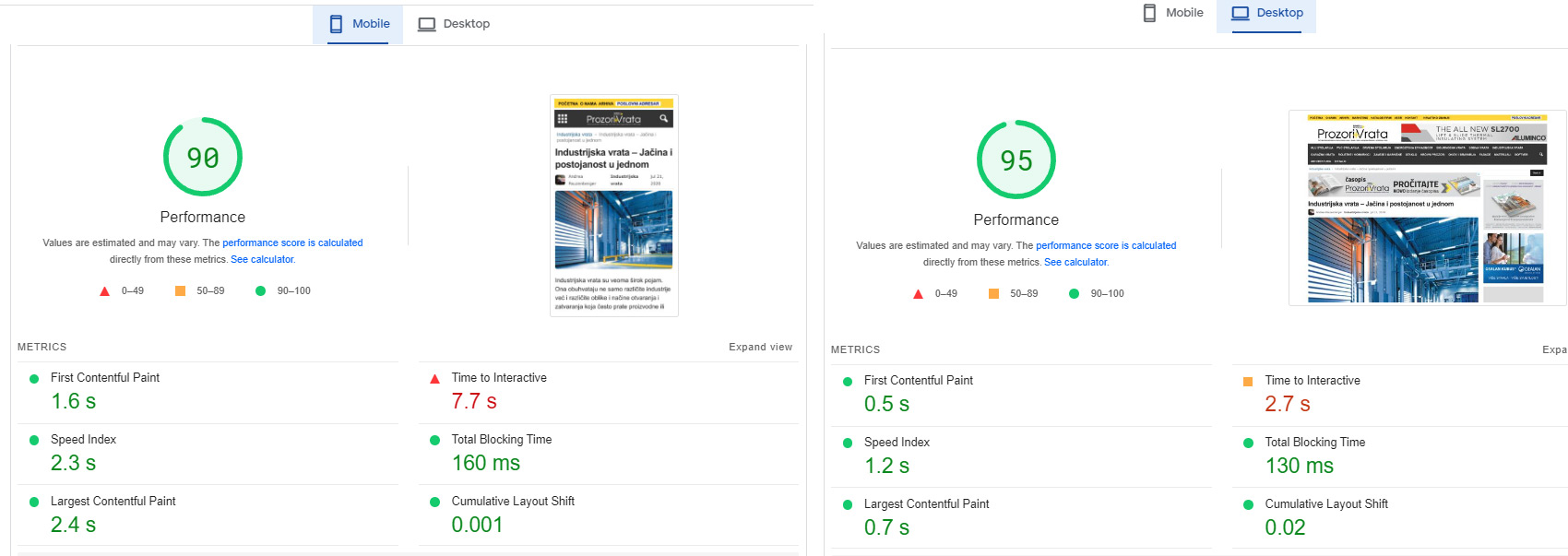
Although it is a huge website with over 20 google dfp banner positions.
I had to modify your Newsmag/style.css and td-composer/legacy/Newsmag/assets/css/td_legacy_main.css a lot
there is still space for reduction and a better rating.
On the other Podovi website, I didn’t change those two files, so far.
I just minified them, I get 83 mobile / 93 desktop
Basically, these two files must definitely be reduced, they are too big and too unused.
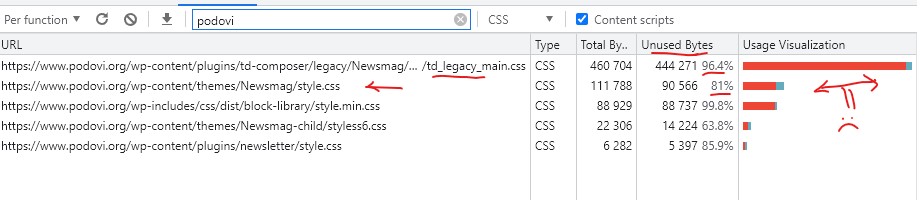
Basically, I am satisfied with the template. I will probably try the newspaper as well, because I am planning to upgrade one of those two web portals soon.
Anamaria Hi,
The option for the undo-redo is disabled, for this please open a page in tagDiv Composer, then click on Manager and then on settings -> https://i.imgur.com/KuvxEl6.png enable the option and should display the arrows for undo and redo ->
https://i.imgur.com/nxnyvw1.png
Thank you!
 Jens H.
 Thanks – I installed 5.2.2 but wasn’t prompted to upgrade TD-Composer. Will do that 🙂
 dc1
dc1 Hi Bettina,
Thanks for the link, I read the thread. Though it doesn’t really answer my question on whether or not you plan on updating WP Bakery or whether your effors going forward will be exclusively focussed on TagDiv Composer.
Since WP Bakery wasn’t updated for over a year, it seems fair to assume that you will not be updating it any longer, and that I have no choice but to update to the TagDiv Composer since if I leave WP Bakery unupdated, it may become vunerable, and if I get a licence, it may become incompatible with Newspaper.
Could you please advise on how we can make this transition as smooth as possible? As the documentation on migrating gives a 404.
Bettina Hello @SwankyFella !
You need to edit the templates with the TagDiv Composer and set the row as stretched with content. We have some settings for the rows and different stretch sizes: https://www.screencast.com/t/bsbB5P97A
Thank you!



