
- NewsmagtagDiv Composer Tutorial
- NewsmagHow to use the Visual Composer plugin
- NewsmagHow to update a plugin
- NewsmagWhat’s included in Newsmag theme package
- NewsmagRequirements for Newsmag
- NewsmagInstall via WordPress
- NewsmagInstall via FTP
- NewsmagBlock settings tutorial
- NewsmagtagDiv Social Counter tutorial
- NewsmagHow to update the WPBakery plugin
- NewsmagPage Menu
- NewsmagCustom ad spots
- NewsmagSmart sidebar
- NewsmagVideo playlist
- NewsmagPage templates
- NewsmagHomepage – How to build and set it
 Ibalex
 Hi there!
Thanks for the feedback.
My second question you did not answer was whether the tagDiv Composer editing environment is not available to Editors. Because, as Website admin, I can access the tagDiv Composer editor but could not access same as an Editor.
 benjaone1
 Hi 🙂
Stupid question, how do I edit the mobile menu with the TD-composer? Since I only know how to edit the frontpage with the TD-composer.
Thanks
Ben
 Bettina
 Hello!
Yes. We recommend to use cloud/PRO templates in order to have the possibility to edit them with the TagDiv Composer which contains a lot of functions and features, please check our tutorial here: https://forum.tagdiv.com/tagdiv-composer-tutorial/
Documentation here:
– https://forum.tagdiv.com/cloud-library-templates/
– https://forum.tagdiv.com/design-post-pages-using-cloud-library-templates/
– https://forum.tagdiv.com/cloud-library-category-templates/
Check also our video tutorials here: https://www.youtube.com/c/tagdivThemes/videos
Thank you!
Bettina Hello Ben!
We have an element in the TagDiv Composer called “Mobile menu”. Place it into your header and choose a menu from the element settings.
Thank you!
 dpernar
Hi,
While writing any new post with standard template I don’t see ability to edit with tagdiv composer. I can only edit single posts with tagdiv composer if I use templates from cloud library, is that correct?
Thank you
 AtulKatyayanMisra
 Hello calin
I find the problem that is tagdiv composer plugin conflicting with web stories section. Please resolve this
 jasaj
jasaj Hello Anamaria,
I checked all links that you send but without success. After I edit the page using tag div composer, I can’t save it. Icon “save” is in an infinity loop.
I checked my WP Super cache plugin settings, my Cloudflare settings and I checked the firewall (modSecurity) on my Plesk.
What we can do to solve this?
Regards,
Jasa
Bettina Hello Ben!
You can re-build it with the TagDiv Composer by importing and using a blank header template and assign it to your website. Please check this video tutorial: https://www.youtube.com/watch?v=SoGQ0d5kIBg
If you mean anything else, then please provide more information about what you need to achieve, screenshots or a video, so I can help you efficiently.
Thank you!
 Calin
Calin Hi,
If your license is valid, then you can update the theme via FTP / cPanel, connect on your themeforest account and download the theme package from there.
How to Update the Newspaper Theme
Please note that the update will look like a different theme (due to the very large version difference). Also please make sure that after you update the theme you’ll update the theme plugin from Newspaper > plugins. You’ll need to install tagDiv Composer and tagDiv Standard pack.
Thank you!
Calin Hi,
This is because the mobile has a different header and it need to be adjusted using tagDiv Composer -> https://i.imgur.com/IzZx4SP.jpg -> https://i.imgur.com/mM5JJOT.png drag a row in mobile header and set in it the ad box element with the ad -> https://i.imgur.com/kOEEU0E.png -> https://i.imgur.com/0zIyntF.png
Thank you!
AtulKatyayanMisraHello
tagdiv composer plugin conflicts my web stories. i troubleshoot the problem when tagdiv composer activated than title tag missed from web stories. please fix this problem.
 ionutm
 Hello,
I could use your support with some issues on my mobile pages. My website has most of its pages built using tagDiv Composer (and not the responsive version), but I’ve noticed the following behavior when these pages are accessed, namely:
– when a visitor accesses them, they are displayed in the responsive version (which has some design issues)
– when a user accesses them (so after login), they show up as they were designed with tagDiv Composer
Something like this 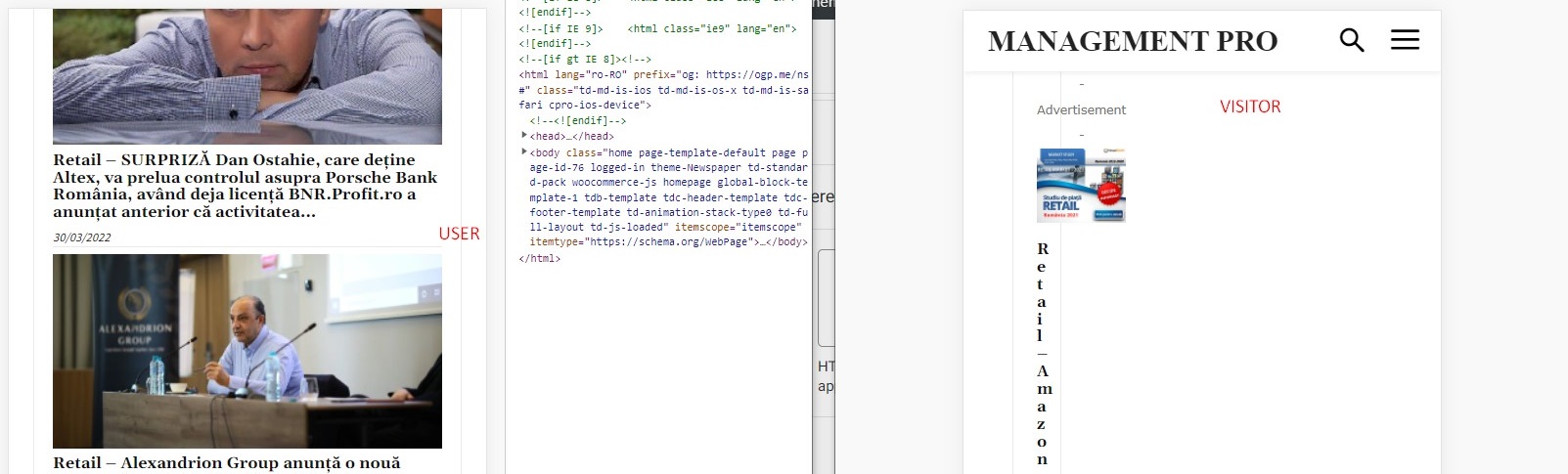
After some debugging, I’ve tracked down these issues to be related to the Wordfence plugin, which is set up in learning mode; the problem is that if I disable Wordfence, I’m losing other page settings like sticky menu setting, login menu setting, colors, etc.
Could you help me further debug it or recommend a solution? I can provide admin login if needed.
Best,
Ionut
-
This reply was modified 4 years by
ionutm.
Calin Hi,
The mobile menu section has only a few settings ion the theme panel, for example, the socials are set from here -> https://i.imgur.com/dufxNjz.png the sign in button from here https://i.imgur.com/atmikiG.png, and the menu can be set with tagDiv Composer on the hamburger element.
Thank you!
Calin Hi,
Yes, this can be done if you are using two footers, one that will be set as global in the theme panel and will be without links and a footer cloud that will be assigned individual with tagDiv Composer on homepage -> https://i.imgur.com/6WyF5hn.png -> https://i.imgur.com/OGEJiIp.jpg
Thank you!
Calin Hi,
This can be done by excluding the category that it is used for the posts on the blog.
For this you’ll need to edit the homepage with tagDiv Composer and set for each block/grid to exclude that category -> https://i.imgur.com/kOyEBiq.png -> https://prnt.sc/0wYC9GJr09JS
I hope this will help you!
Calin Hi,
Our theme provide the possibility to set the ads using the theme builder tagDiv Composer, so it is possible that the developer to used the frontend to set the other two sidebars.
This documentation is the old one -> https://forum.tagdiv.com/sidebar-ads/ that it is apply on standard templates (for those the ads are also set in appearance > widgets ).
For frontend are used cloud templates and ad box elements for ads.
Thank you!
 Anamaria
 Hello,
You can use AMP, but we offer support for the mobile version only with mobile theme + AMP plugin and set for AMP -> https://forum.tagdiv.com/tagdiv-amp-plugin-tutorial/ => https://i.imgur.com/1kMs1ds.png and set the AMP for posts => https://i.imgur.com/GLEeeoZ.png, but you can’t customize the layout for AMP with tagDiv Composer.
Also, please check this topic where I explained each mobile version -> https://forum.tagdiv.com/topic/mobile-version-not-working-properly-2/ and choose what mobile version you want.
Thank you!
 smilelondon
 Thanks Bettina for getting back.
We are seeing quite many error logs in our debug file from TagDiv.
Is this all related or are these different things and can you help us with this?
Many thanks
Sven
[04-Apr-2022 07:00:54 UTC] PHP Warning: Trying to access array offset on value of type bool in xxx/td-composer/legacy/common/wp_booster/td_module.php on line 568
[04-Apr-2022 07:00:54 UTC] PHP Warning: Undefined array key 0 in xxx/wp-content/plugins/td-composer/legacy/common/wp_booster/td_module.php on line 391
[04-Apr-2022 07:00:54 UTC] PHP Warning: Trying to access array offset on value of type bool in xxx/LiveTube/wp-content/plugins/td-composer/legacy/common/wp_booster/td_module.php on line 568
[04-Apr-2022 07:00:54 UTC] PHP Warning: Undefined array key 0 in xxx/wp-content/plugins/td-composer/legacy/common/wp_booster/td_module.php on line 391
[04-Apr-2022 07:00:54 UTC] PHP Warning: Trying to access array offset on value of type bool in xxx/wp-content/plugins/td-composer/legacy/common/wp_booster/td_module.php on line 568
[04-Apr-2022 07:00:54 UTC] PHP Warning: Undefined array key 0 in xxx/plugins/td-composer/legacy/common/wp_booster/td_module.php on line 391
[04-Apr-2022 07:00:54 UTC] PHP Warning: Trying to access array offset on value of type bool in xxx/wp-content/plugins/td-composer/legacy/common/wp_booster/td_module.php on line 568
Bettina Hello!
If you use only one category template for your categories, then you can convert that template into a mobile page and this will be applied on all your categories: https://www.screencast.com/t/mEezTBBn
We have 3 options of mobile versions that you can use:
1. Responsive version: A responsive version of your website is looking similar like on desktop, edit the page with TagDiv Composer, click on the mobile viewport: https://www.screencast.com/t/XDQJedlggSB ; there you can see your mobile version and you can edit the elements there.
2. Mobile pages: https://tagdiv.com/newspaper-10-3-7-update-brings-customizable-and-fast-mobile-pages/
3. Mobile theme plugin: The Mobile Theme is a performance optimized theme included in the Newspaper main theme and it loads only for mobile devices. It comes with its own templates/design for page, post, category, etc so your current templates from the desktop theme will get converted to the mobile theme layout. For more details, please take a look here: https://forum.tagdiv.com/the-mobile-theme/ and https://forum.tagdiv.com/mobile-theme-introduction/
A full explanation you can find here: https://www.youtube.com/watch?v=SpGkOnJeNZY
You can choose to use which one is more affordable and useful for you.
Hope that helps you!
Thank you!
Anamaria Hello,
To use the modal popup you need to import or create a page with tagDiv Composer, and after you need to add the page id -> https://www.screencast.com/t/AmQaSehY please all clear the cache.
Thank you!
Calin Hi,
2. If you can let me know where it should be set the php code of AdRotate, then I will provide the path to that file.
For example if you need to set the code in the header.php of file, then it should be set on this file -> wp-content/plugins/td-composer/legacy/Newsmag/header.php
If the banners appear in incognito, then the problem is with an extension from the browser, or maybe from cookies. Please try other browsers as well.
Thank you!
Anamaria Hello,
Yes, you can use the progress bar on the posts.
This can be added where you want in the post using tagdiv Composer -> https://i.imgur.com/ZyYBcfV.png
Thank you!
Anamaria Hello,
Please try to do the update manually via FTP/cPanel -> https://forum.tagdiv.com/how-to-update-the-theme-2/ by replacing the old theme with the new one (replace not overwrite), in case there are custom changes in the theme files, those will be lost. Also, please do a full backup of all files and databases before updating.
Also, please try to update the theme without extra plugins activated during the installation, as this may interfere with the installation process.
Also, after the update please make the tagDiv plugins are installed, like tagDiv Standard Pack, tagDiv Composer, tagDiv Social Counter, etc.
Let me know the results!
Thank you!
Anamaria Hello,
Please try to do the update manually via FTP/cPanel -> https://forum.tagdiv.com/how-to-update-the-theme-2/ by replacing the old theme with the new one (replace not overwrite), in case there are custom changes in the theme files, those will be lost. Also, please do a full backup of all files and databases before updating.
Also, please try to update the theme without extra plugins activated during the installation, as this may interfere with the installation process.
Also, after the update please make the tagDiv plugins are installed, like tagDiv Standard Pack, tagDiv Composer, tagDiv Social Counter, etc.
Let me know the results!
Thank you!
Anamaria Hello,
You can delete the element Single Featured image with right-click from the post template so that in this mode you won’t have a featured image -> https://i.imgur.com/re1XWKO.jpg
Thank you!



