
 Sammy Cheng
Hi, I have problem that at the Cloud Templates > All Templates
Why I cannot use “Edit with TagDiv Composer”? The “Edit with TagDiv Composer” was missing for all “Footer” template, even I import another new Footer Template.


 stular9
Hi,
I have a problem with ads implemented via theme panel and TagDiv Composer. I want an ad in a sidebar and on my homepage. It used to work just fine when I had ads from AdSense and Ezoic, but now I’m on some other (local) network and the ads are not showing.
I put their code in the code that is provided by Newspaper (THIS ONE: <div class=”td-all-devices”>
<!– Your NON AdSense code here – this ad will show on all devices –>
</div>), but the ads are still not showing.
What is the problem? Is that a theme problem or an ad network problem?
For the record, ads in the post placed via AdInserter plugin work just fine.
Thanks!
 itgrcapitallink
I would like to change the url and the text of “CREATE AN ACCOUNT” when someone will click on that button.
On the previous versions I was going to /xxxx.com/public_html/wp-content/plugins/td-composer/legacy/Newspaper/parts/header
and I changing the
$users_can_register_link = '' . __td('Create an account', TD_THEME_NAME) . '';"
Now, In the version 11.3.1 I cannot see the changes that I make.
Do you know why?
 Romi
RomiHi Tagdiv
Currently I am facing a problem for not being able to change text color and background color for pagination on Block 7 that I installed on sidebar. Because there is no option in Composer for changing the colors.

Thank you
 Bettina
 Hello!
I see a code there which means you do not have the tagdiv social counter plugin installed and active in the Newspaper -> Plugins. Check also about the Standard Pack plugin to be active.
Also, you use default templates, that’s why you can not edit them with the TagDiv Composer.
We recommend to use cloud/PRO templates in order to have the possibility to edit them with the TagDiv Composer which contains a lot of functions and features, please check our tutorial here: https://forum.tagdiv.com/tagdiv-composer-tutorial/
Documentation here:
– https://forum.tagdiv.com/cloud-library-templates/
– https://forum.tagdiv.com/design-post-pages-using-cloud-library-templates/
– https://forum.tagdiv.com/cloud-library-category-templates/
Check also our video tutorials here: https://www.youtube.com/c/tagdivThemes/videos
Thank you!
Bettina Hello!
1. If you need AMP, you should have amp and mobile theme plugin installed and active.
a. Mobile – Displays content using the Mobile Theme on small screen devices (no AMP)
b. Mobile + Amp – Displays content using the Mobile Theme on both mobiles and AMP
c. AMP – Uses the responsive version of the theme on small screen devices and Mobile Theme only on AMP.
For more information about those plugins, you can find in our documentation:
– https://forum.tagdiv.com/tagdiv-amp-plugin-tutorial/
– https://forum.tagdiv.com/the-mobile-theme/
– https://www.youtube.com/watch?v=SpGkOnJeNZY
2. Please note that if you enable the Mobile Theme plugin on a page which was created with TagDiv Composer will not display the design you built because the Mobile Theme has its own templates design. https://forum.tagdiv.com/mobile-theme-introduction/
Thank you!
Bettina Hello!
If the settings from the theme panel are not working, probably you use a cloud/PRO template.
Anyway, we recommend to use cloud/PRO templates in order to have the possibility to edit them with the TagDiv Composer which contains a lot of functions and features, please check our tutorial here: https://forum.tagdiv.com/tagdiv-composer-tutorial/
Documentation here:
– https://forum.tagdiv.com/cloud-library-templates/
– https://forum.tagdiv.com/design-post-pages-using-cloud-library-templates/
– https://forum.tagdiv.com/cloud-library-category-templates/
Check also our video tutorials here: https://www.youtube.com/c/tagdivThemes/videos
Hope that helps you!
Thank you!
Bettina Hello!
First of all, please make sure you have a backup done and then you can update the theme and the TagDiv plugins also.
Please take a look for this advice before updating: https://forum.tagdiv.com/topic/action-required-please-read-how-to-update-to-the-newspaper-theme-v-10/
I recommend you to make a backup and update plugins and the theme via file transfer, so that you don’t face any error: https://forum.tagdiv.com/how-to-update-the-theme-2/
Please make sure you have the latest version of the PHP, WordPress, theme and plugins(11.3.1).
If that problem is still there, then please execute these steps:
1. disable TagDiv Composer
2. uninstall(delete) TagDiv Composer
3. clear cache (if cache plugin exists)
4. install TagDiv Composer
5. activate TagDiv Composer
6. clear cache (if cache plugin exists)
Make sure your required tagdiv plugins are installed and active, check in Newspaper -> Plugins.
If you can not achieve what you need, then we can help you as I mentioned above.
Thank you!
 laguguz
I am unable to Edit With TagDiv Composer because it creates this error: This page isn’t working http://www.techfinancials.co.za is currently unable to handle this request.
HTTP ERROR 500
The logo and menus have disappered.
Bettina Hello!
We recommend to use cloud/PRO templates in order to have the possibility to edit them with the TagDiv Composer which contains a lot of functions and features, please check our tutorial here: https://forum.tagdiv.com/tagdiv-composer-tutorial/
Documentation here:
– https://forum.tagdiv.com/cloud-library-templates/
– https://forum.tagdiv.com/design-post-pages-using-cloud-library-templates/
– https://forum.tagdiv.com/cloud-library-category-templates/
Check also our video tutorials here: https://www.youtube.com/c/tagdivThemes/videos
Of course you can import a cloud/PRO header template assign it on your page where you need and add the News Ticker there, or any other element.
Thank you!
Bettina Hello!
This issue has been discussed here: https://forum.tagdiv.com/topic/403-error-on-tagdiv-composer-when-trying-to-use-wp-editor-wpedito-php/
Thank you!
Bettina Hello!
Let me explain you which options of mobile versions are:
1. Responsive version: A responsive version of your website is looking similar like on desktop, edit the page with TagDiv Composer, click on the mobile viewport: https://www.screencast.com/t/XDQJedlggSB ; there you can see your mobile version and you can edit the elements there.
2. Mobile pages: https://tagdiv.com/newspaper-10-3-7-update-brings-customizable-and-fast-mobile-pages/
3. Mobile theme plugin: The Mobile Theme is a performance optimized theme included in the Newspaper main theme and it loads only for mobile devices. It comes with its own templates for page, post, category, etc so your current templates from the desktop theme will get converted to the mobile theme layout. For more details, please take a look here: https://forum.tagdiv.com/the-mobile-theme/ https://forum.tagdiv.com/the-mobile-theme/
A full explanation you can find here: https://www.youtube.com/watch?v=SpGkOnJeNZY
Please provide more information about your issue, screenshots or a video with the settings you make in order to help you efficiently.
A solution for sending a screenshot/video is this:
Download, capture, send: https://www.techsmith.com/jing-tool.html
After making the screenshot, you will have a link, paste it here.
Thank you!
Bettina Hello!
If you mean Mobile Theme, then you can not customize its own layout and edit the pages with TagDiv Composer.
You have only some settings for this layout, which you can find in Theme panel -> Mobile Theme.
Documentation here:
– https://forum.tagdiv.com/mobile-theme-introduction/
– https://forum.tagdiv.com/the-mobile-theme/
If you do not mean about the Mobile Theme plugin, then please provide more information about what you need to achieve, screenshots or an example and your website link in order to help you efficiently.
A solution for sending a screenshot/video is this:
Download, capture, send: https://www.techsmith.com/jing-tool.html
After making the screenshot, you will have a link, paste it here.
Thank you!
Bettina Hello!
You can have the ad from the theme panel or the image, not both. In this case, if you apply both, the priority item (image with url) from the TagDiv Composer is displayed.
Thank you!
Bettina Hello!
Yes, you can build it with the TagDiv Composer. There you can delete the elements, add new ones, add the element called ” button ” where you can add a link. For more information about TagDiv Composer, please check our documentation here: https://forum.tagdiv.com/tagdiv-composer-tutorial/
Hope that helps you!
Thank you!
Bettina Hello!
We recommend to use cloud/PRO templates in order to have the possibility to edit them with the TagDiv Composer which contains a lot of functions and features, please check our tutorial here: https://forum.tagdiv.com/tagdiv-composer-tutorial/
Documentation here:
– https://forum.tagdiv.com/cloud-library-templates/
– https://forum.tagdiv.com/design-post-pages-using-cloud-library-templates/
– https://forum.tagdiv.com/cloud-library-category-templates/
Check also our video tutorials here: https://www.youtube.com/c/tagdivThemes/videos
The Standard Pack plugin is an old one with old features with default templates. We do not recommend it anymore.
Thank you for understanding!
 Calin
Calin Hi praveenkumarad, the files for the single posts templates are on this path -> wp-content/plugins/td-composer/legacy/Newsmag/parts/single if is the default php file, then will be on this path wp-content/plugins/td-composer/legacy/Newsmag
I hope this will help you!
 Anamaria
 Hello,
The footer template does not have the button to be edited with the tagDiv Composer in the backend. Please check this guide:https://forum.tagdiv.com/footer-templates/
If you have a Pro Prebuilt Website you can edit with tagDiv Composer the footer template can be edited only from the frontend if it is assigned, edit a page/post template with tagDiv Composer and go down to the footer. => https://www.screencast.com/t/rpfNhfyrF
Thank you!
 egm_ar
 This is how I see it in the composer and how it should be seen in the front:
But then again, it shows like this, and it even adds a hughe gutter below:
 integralgr
 Hello
I cant find the tagDiv Composer button to edit the post.
Do you need access to the site?
Is this post private?
Regards
 menneskedyr
 Thank you for the quick response, but that’s not quite it. Yes, TD Composer has a lot of queries and we live with it, but this was caused by a single (double, actually) repeating query from TD Standard Pack apparently fetching the site logo, using what seems to be a highly inefficient function:
attachment_url_to_postid()
And it was doing it twice, once for the desktop and once for the mobile logo, on every single page load. This caused mysqld to spike to 200% and above.
I see now that I have posted the wrong screenshot above, sorry. Here’s the correct one:
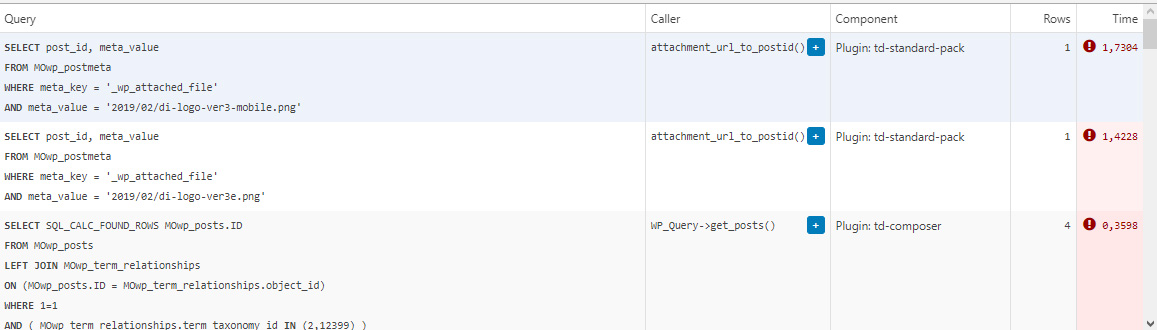
This morning I managed to patch up the problem, it’s a crude solution but may help someone. In header template I found that it was loading the logos from
plugins/td-standard-pack/Newspaper/parts/header/header-menu-h1.php
(yours may be different of course)
There I simply removed the PHP block fetching the logos and hardcoded the HTML for the logos in. As soon as I did that, the SQL spike went away. So I’d say it’s a bug, or inefficient code at least.
To be clear, we’re running the latest versions of WP, PHP, MySQL, the theme & plugins, all on a solid VPS. Yes there is quite a bit of SQL load, we’re working to optimize it with new blocks and Cloud Templates, but this was something else. Could be related to the latest Standard Pack update, don’t know, team didn’t report it before.
-
This reply was modified 4 years by
menneskedyr.
Bettina Hello!
In our theme we have a setting when you edit the post template with TagDiv Composer. You need to disable that setting like this: https://www.screencast.com/t/JaSHpq10Y
Thank you!
Bettina Hello!
You can save the settings from the theme panel and import/export them: https://forum.tagdiv.com/import-export-theme-settings/
But, if your settings are made in the TagDiv Composer, then these are not saving in that backup from theme panel.
The easiest solution here is to upgrade your host limitations.
Thank you!
 John Prince
 Hi Anamaria,
Love your name. 😉
Here’s what I got for you.
1. The block (if that’s what its called) is ‘Related Posts which I have below in full. Why is it appearing at the top of my capture in a diminished form (says RELATED only with images) in my post but not in the template. Doesn’t seem to have a way to get rid of it either in the tagdiv composer?
2. I’m using single post comments in conjunction with the ReCAPTCHA in WP comments form plugin. When deactivated I see now that the problem goes away, however I need the ReCAPTCHA.
3. My website is demo.johnprince.ca. I used the Single Post Template. Not sure which one as I renamed it? Possibly, either Tech News Pro or Art Blog Pro.
Don’t know how to do the video part?
John
 Rahul chauhan
While try to open any post on home page it shows:
wp_booster error:
td_api_base::mark_used_on_page : a component with the ID: single_template_2 is not set.
/home1/hindivib/public_html/wp-content/plugins/td-composer/legacy/common/wp_booster/td_api.php
Display backtrace
wp_booster error:
td_api_base::get_key : a component with the ID: single_template_2 Key: file is not set.
/home1/hindivib/public_html/wp-content/plugins/td-composer/legacy/common/wp_booster/td_api.php
Display backtrace
wp_booster error:
The path of the single_template_2 template not found. Did you disable a tagDiv plugin?
/home1/hindivib/public_html/wp-content/plugins/td-composer/legacy/common/wp_booster/td_api.php
Display backtrace
wp_booster error:
td_api_base::get_key : a component with the ID: single_template_2 Key: bg_use_featured_image_as_background is not set.
/home1/hindivib/public_html/wp-content/plugins/td-composer/legacy/common/wp_booster/td_api.php
Display backtrace
