
- NewspapertagDiv Composer – Website Manager
- NewspaperWhen tagDiv Composer is Not Working
- NewsmagtagDiv Composer Tutorial
- TutorialsFrom WPBakery to tagDiv Composer
- NewspapertagDiv Composer Tutorial
- NewsmagHow to use the Visual Composer plugin
- NewspaperScroll Animation
- NewspaperSingle External Shortcode and External Shortcode
- NewspaperCredit System
- NewspaperBookmark – Save For Later
- NewspaperFlex Block Builder and Flex Loop Builder
- NewspaperModules Builder in Newspaper Theme
- NewspaperIntroduction to CPT and ACF with Newspaper Theme
- NewspaperCreate a frontend submission form
- NewspaperHow to Use the Tabbed Content shortcode
- NewspaperCreate a form contact page
- NewspaperFilters and sorting for taxonomies
- NewspaperUser review system
- NewspaperCustom Fields Support
- NewspaperWooCommerce: Happy “Add to Favorites!”
 Calin
Calin Hi,
Yes, that can be done, for this you need to edit the homepage using tagDiv Composer -> https://i.imgur.com/YUyxJ6c.jpg -> select the block and set the link here -> https://i.imgur.com/gh6ygin.png also if is set with widgets you need to set the links here -> https://i.imgur.com/zJjn6r6.png
Thank you!
 jfsaclub
 Yes. It’s error the plugin td-composer. I fixed it.
 vistaradio
Hello,
I am trying to add an ad spot to the top of all my pages to be placed directly under the navigation bar.
I was able to do it no problems on the desktop pages but on the mobile pages, the edits just do not show.
I have added the ad spot to both my “Mobile header” as well as my “Desktop header, mobile view”.
Either will not show the ad spot – OR – anything i put under the navigation.
I have tried adding new rows, Inner row and even just using any element other than Ad spot … nothing takes on mobile view. Odd part, if I add it above the nav bar, it takes – just nothing below it!
Website is here: https://dev.mylethbridgenow.com/
Screenshots of my TagDiv composer.
You can clearly see the Ad Spot is there in its own row.
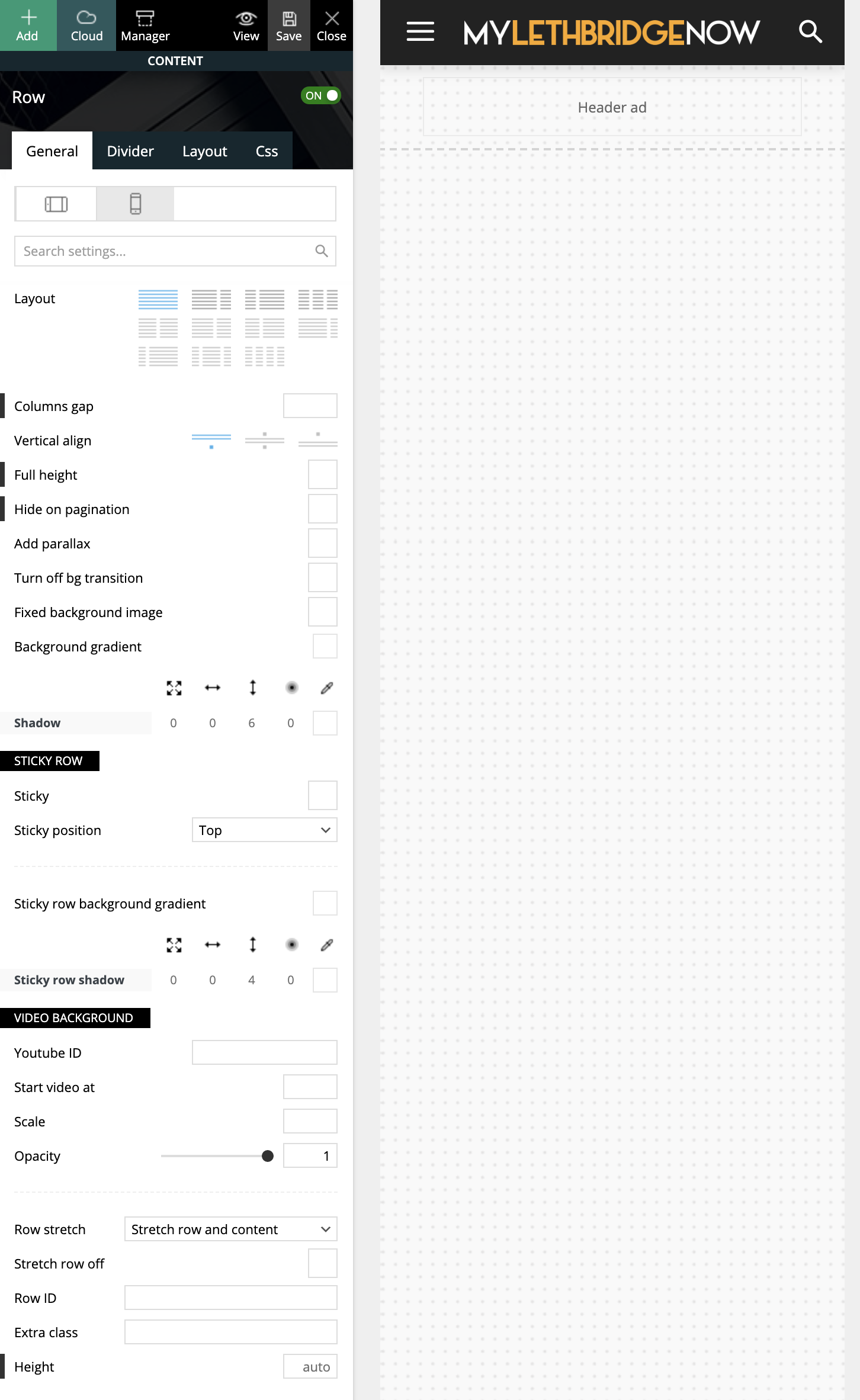
I have tried many attempts and many methods, which leads me here asking for guidance (or reporting a bug?!)
Cheers,
Ash
 alext8
Hi,
I am unable to find where to add content blocks. When I open up both the tag div composer and WPBackery page builder the content blocks are not presented as elements that can be added.
I have Newspaper instaled on other websites and never had an issue with this. The blocks 1 to 20something were available to add, on this site they are not.. Please let me know. Thnaks
 thorayork
Hello.
My site is currently a mess, because I am trying to redesign it with NewsMag. But, anyway, the link is: teamusings.com
My question is: how do I reach sidebar through TagDiv composer? I added social counter as a widget, but cannot figure out how to customize that widget?
Thank you!
 Bettina
 Hello!
A responsive version of your website is looking similar like on desktop, then you need to deactivate Mobile Theme plugin, edit the page with TagDiv Composer, click on the mobile viewport: https://www.screencast.com/t/XDQJedlggSB ; there you can see your mobile version and you can edit the elements there.
Check and let me know if you use a mobile page assigned to your homepage. For more information about this mobile version please take a look in this article: https://tagdiv.com/newspaper-10-3-7-update-brings-customizable-and-fast-mobile-pages/
Hope that helps you!
Thank you!
Bettina Hello!
Yes, you can duplicate the headers, so in this case you will have different headers on every page. Edit every page with TagDiv Composer and you can add the ads using the element called “Ad box”. For more information about this plugin, check our documentation here: https://forum.tagdiv.com/tagdiv-composer-tutorial/
Please note that you need to use a cloud/PRO template in order to achieve this.
Check this topic: https://forum.tagdiv.com/topic/different-logo-in-categorypage/ ; Here I explained how to duplicate a header correctly and do some changes.
Thank you!
Bettina Hello!
It seems you have set up a bottom margin on that element. Please edit the page with TagDiv Composer, click on the title “Instagram” and you will find some settings in the element displayed on the left part in the tab called “CSS”. Change the value from the square to adjust the space there: https://prnt.sc/116o4ju
Hope that helps you!
Thank you!
Bettina Hello!
Please edit the search page with TagDiv Composer and check if there is set up an offset in the Post Loop element.
Hope that helps you!
Thank you!
 douggilmore
Site: http://www.ospreyobserver.com
Hosting Company: DreamPress (DreamHost)
We are having issues with our website continuing to go down. Our hosting company says that the problem is with the Newspaper theme. Can you provide any ideas that might help? Thanks in advance.
From DreamHost:
“I took a look at what was running and I can see that the theme Newspaper is affecting the WordPress response due to the shortcodes running:
| do_shortcode()| wp-includes/shortcodes.php:196| 4.9033s | 0s
| function(){}| td-composer/td-composer.php:242| 1.2854s | 0s
| function(){}| td-composer/td-composer.php:234| 0.9902s | 0s
| function(){}| td-composer/td-composer.php:173| 0.8469s | 0s
This will affect performance, high response times will increase the CPU
and RAM usage. It is not clear which shortcode is affecting this at the
moment, you will need a WordPress developer to look into this.”
jfsaclub I think the plug in : td-composer is error. Can you give me the plugin another verison?
 anderss1
 Yes, but of course I would want all the block options when using the tagDiv Composer no?
 mydesignjobs
 Dear Sirs,
I found new ERRORS in my WP Admin Panel as hereunder,
Warning: fopen(/tmp/td-composer-8WtNdN.tmp): failed to open stream: Disk quota exceeded in /home/digitals/public_html/glamour.business/wp-admin/includes/class-wp-filesystem-ftpext.php on line 139
Warning: unlink(/tmp/td-composer-8WtNdN.tmp): No such file or directory in /home/digitals/public_html/glamour.business/wp-admin/includes/class-wp-filesystem-ftpext.php on line 142
Please try to assist.
Trilochan Bhattacharya
Bettina Hello!
Standard Pack is used only for default templates and not for a cloud/PRO templates. Also, when you install this plugin, you can see in theme panel the settings for default templates.
In your case, these blocks are created by default and you can not change/customize their design with TagDiv Composer. If you will need more options to customize your templates, then we recommend you to use a cloud/PRO template.
Thank you!
mydesignjobs Dear Sirs,
I contacted the support Team of my Server and they reports as hereunder :
Upon checking there is something compatibility issue after the update/installation.
As a temporary solution I renamed the file “/home/digitals/public_html/glamour.business/wp-content/plugins/td-composer/css-analyze/css-analyze.php” to “/home/digitals/public_html/glamour.business/wp-content/plugins/td-composer/css-analyze/css-analyze.php_bak” and cretaed a empty file “/home/digitals/public_html/glamour.business/wp-content/plugins/td-composer/css-analyze/css-analyze.php” in the same location.
Now the website glamour.business started loading again:
Kindly contact your web developer or the plugin provider so that we can further check on this issue.
Please help.
Trilochan Bhattacharya
-
This reply was modified 5 years by
mydesignjobs.
 Vlad S
 Hello !
By using tagDiv Composer and website manager please make sure that you are using the same header on both pages, that you can check here: https://www.screencast.com/t/1CxBat2e
Let us know the result !
Thank you !
jfsaclub yes, I have been config that.
But whenever I install td-composer plugin, this error will appear: Fatal error: Uncaught ArgumentCountError: Too few arguments to function {closure}(), 4 passed in /var/www/html/wp-includes/class-wp-hook.php on line 287 and exactly 5 expected in /var/www/html/wp-content/plugins/td-composer/css-analyze/css-analyze.php:507 Stack trace: #0 /var/www/html/wp-includes/class-wp-hook.php(287): {closure}() #1 /var/www/html/wp-includes/plugin.php(206): WP_Hook->apply_filters() #2 /var/www/html/wp-includes/meta.php(676): apply_filters() #3 /var/www/html/wp-content/plugins/td-composer/legacy/common/wp_booster/td_first_install.php(201): metadata_exists() #4 /var/www/html/wp-includes/class-wp-hook.php(287): {closure}() #5 /var/www/html/wp-includes/class-wp-hook.php(311): WP_Hook->apply_filters() #6 /var/www/html/wp-includes/plugin.php(478): WP_Hook->do_action() #7 /var/www/html/wp-settings.php(524): do_action() #8 /var/www/html/wp-config.php(90): require_once(‘/var/www/html/w…’) #9 /var/www/html/wp-load.php(37): require_once(‘/var/www/html/w…’) #10 /var/www/html/wp-admin/admin.php(34): require_onc in /var/www/html/wp-content/plugins/td-composer/css-analyze/css-analyze.php on line 507
.
and I cannot next step.
 Anamaria
 Hello,
As I said above, please deactivate the tagDiv Composer plugin, delete and re-install it again from Newspaper plugins => https://www.screencast.com/t/WLy01lbc clear all cache(also from your browser), and check if the problem persists.
Also, you can try a test on a subdomain and use only tagDiv plugins, and if you have a child theme, please use the main theme.
Thank you!
Anamaria Now you need to deactivate the tagDiv Composer plugin, delete and re-install it again from Newspaper plugins => https://www.screencast.com/t/WLy01lbc and it should work perfectly without code.
Thank you!
Vlad S Hello !
You should be able to remove some of the blocks that you don’t want to by using the tagDiv Composer page builder: https://www.screencast.com/t/obzfnfY9
Unfortunately that option is not possible in Newspaper Theme without custom work.
Thank you !
Anamaria Hello, @nawfel.oussedik,
I saw that the website is under construction => https://www.screencast.com/t/a3vGtIoH8XV
Also, make sure the ID is inserted correctly => https://www.screencast.com/t/wBbP3Fu8vj
Please follow our guide: https://forum.tagdiv.com/tagdiv-social-counter-tutorial-2/
For Youtube please check if you have set the Youtube API in Theme Panel -> Social Networks => https://www.screencast.com/t/sJMmQsPfd and the id is => https://pastebin.com/F6ebt4uM
Unfortunately, our team is working on the Instagram issue, but you can set the Instagram fixed count with tagDiv Composer => https://www.screencast.com/t/In8UL9Q92n until the issue is resolved.
Hope this helps you!
Thank you!
Bettina Hello!
Please reinstall TagDiv Composer plugin, also make sure your WordPress and plugins are up to date.
Sometimes, the issue can be from a plugin conflict, that’s why, please deactivate ALL plugins except tagDiv ones, also if you are using a cache plugin, deactivate it, clear all cache and try again.
Let us know about your results!
Thank you!
 thcp2020
 Hi there,
1. Sorry, please let me explain it more clearly. I would like to change the submenu width so that when the ‘Community’ tab is aligned to the right and underneath ‘My account they do not clash and I can get to the submenu (logout). But when I try to change the width using TD composer nothing changes. The white space for ‘Logout’ is too big!
Please see attached – https://paste.pics/C4PFT. https://paste.pics/C4PGE
2. Thank you so much, your video tutorial was very very helpful! Is there a way to customise the mobile menu?
All the best
Thomas
Vlad S Hello !
If you have updated from such an older version I personally would go to use a PRO Demo. All the PRO DEMOS and cloud library templates are fully editable using tagDiv Composer. In this way you can deactivate the Standard Pack plugin too. which will eventually improve your page speed. You can take a look at some of our video guides to see what has been changed: https://www.youtube.com/user/tagdiv
I hope this was helpful !
Thank you !
Bettina Hello!
I’m sorry to inform you in this way, but if we didn’t test this plugin, we can’t say if it will work or not. You will have to test and see. I can recommend only something that is tested and it is working 100%. There can be a plugin conflict with every untested plugin, but we are building this theme to work with the tested plugins. So, our theme was tested with those plugins: https://www.screencast.com/t/TLZqOCb6F
I hope you understand my point of view!
Also, we have some requirements for using this theme. Make sure that all the settings are like in our requirements, please follow the guide carefully: https://forum.tagdiv.com/requirements-for-newspaper/
and please increase all requirements that are lower, and follow all steps.
Our interest is to help our clients efficiently and provide solutions which are working 100%. For this we need more information to understand the issue and we try as possible as we can to reply in a short time. So, I didn’t mean this: : “that’s your problem, not ours” , and I will never say these words to our clients because we want to help anyone even if they don’t have paid support.
Regarding to your issue, after update if you just use our newest tool without reading some information about it before, you can probably destroy your work(website). This tool was built to help and not to damage your speed and quality of your website. Some clients don’t have any problem after update, but some clients has a lot and I know it is not nice to see your work damaged. That’s why we recommend all the time a full backup before every update.
If you didn’t run our tool and also you have some issues about plugin compatibility with our tested plugins, then this means it is our fault and we will solve the problem.
Also, if you don’t have the plugins up to date, any solution will not work for you that’s why I suggest to give it a try and check because if you had an old version to your updates, then the theme update is not updating your plugins automatically.
Also, you should reinstall the TagDiv Composer again and delete your cache(even from your browser).
In conclusion, if you really want to use those plugins which are not tested with our theme, then of course it is your choice and you can use it, but our support policy mentions: https://forum.tagdiv.com/newspaper-theme-support/ that we can not provide support for un-tested plugins. What you can do is to contact our custom work team here: https://tagdiv.com/premium-customization-services/ and let them know which plugins you want to use and they can change even our theme files for you and solve your issues.
Thank you for your understanding!



