
- NewspaperModules Builder in Newspaper Theme
- NewspaperIntroduction to CPT and ACF with Newspaper Theme
- NewspaperHow to edit modules for Flex Block X
- NewspaperStripe Setup
- NewspaperPayPal Setup
- NewspaperAdd Cryptocurrency Price Ticker Widget
- NewspapertagDiv Shop
- NewspaperDesign your post pages using the Default Templates
- NewspaperTheme modules and blocks
- NewspaperUsing the Theme Translations with WPML
- NewspaperHow to Set the Image Avatar
- NewspaperNewspaper theme documentation
- NewsmagInstalling pre-built websites
- NewsmagIntroduction
- NewsmagSmart Lists
- NewsmagTheme thumbs
- NewspaperSmart Sidebar
- NewspaperBreadcrumbs
- NewspaperFooter Builder
- NewspaperMain Menu
 dera
dera Hello Catalan,
Thank you, I will try to use the custom css. I don’t really know if my site will still be clean if I use the demo or when I uninstall it.
 cybero12
I asked a question about width and the answer was that I can’t add more width to the posts. AND MY POSTS LOOK VERY UGLY and i spent 49$ for it.
Now, my question is can I “ZOOM IN” the site? Like make it more closer to the screen.
Because once I put my browser at “120%” ZOOM my website looks good, but on 100% its ugly.
For example look this website : https://www.coupdepoker.com/apprendre-jouer-poker/regles-du-poker/
The post looks really closer than this : https://demo.tagdiv.com/newsmag_magazine/2017/06/14/td-post-top-3-lessons-from-a-beauty-consultant/
I know these are different themes , but you guys developed both so I was wondering if I can do it. At least don’t make me regret I spend 49$ on that theme.
 tutbar
Hi,
I’m using the demo (default) and customizing the site as per my needs.
How to edit the ”Stay Connected” block in sidebar? See screenshot: http://prntscr.com/jwdkqo
Also, how to edit the following homepage block categories? I’m not seeing such title in the categories list. See screenshot: http://prntscr.com/jwdmfq
Please help asap.
Thanks
 Simion C.
 Hi,
1. That image is set in the demo stylesheet, I believe at the moment the demo was created there was no theme panel setting. So the image was set there
– https://www.screencast.com/t/qT46uj028x
In order to set your own, please remove that highlighted code from the demo stylesheet. Then the background you set in the theme panel will apply
– https://www.screencast.com/t/jZmgeqTRfFw
Sorry for any inconvenience created by this.
2. Twitter will probably not work if you are not using he latest theme version, there were changes made by them. Try installing this social counter plugin
– http://cdn.tagdiv.com/wp-content/uploads/2018/06/td-social-counter.zip
If it still not works, download the latest theme package 8.8.1 and update the theme and social counter (they should be automatically updated when the theme is updated however)
– https://forum.tagdiv.com/how-to-update-the-theme-2/
Thanks
 Catalin
 Hello dera,
This is a premade demo and it’s ready to be used by our customers! Why do not want to use this demo? You can try to create your own Black demo from scratch to look similar with our demo but please notice that is not a simple task and you should do it yourself. As a hint, you should look at the demo style and try to replicate it. Also, you can check the following topic from here -> https://forum.tagdiv.com/topic/change-actual-post-background-to-a-dark-colour/
Thanks.
 Adaras
Hi,
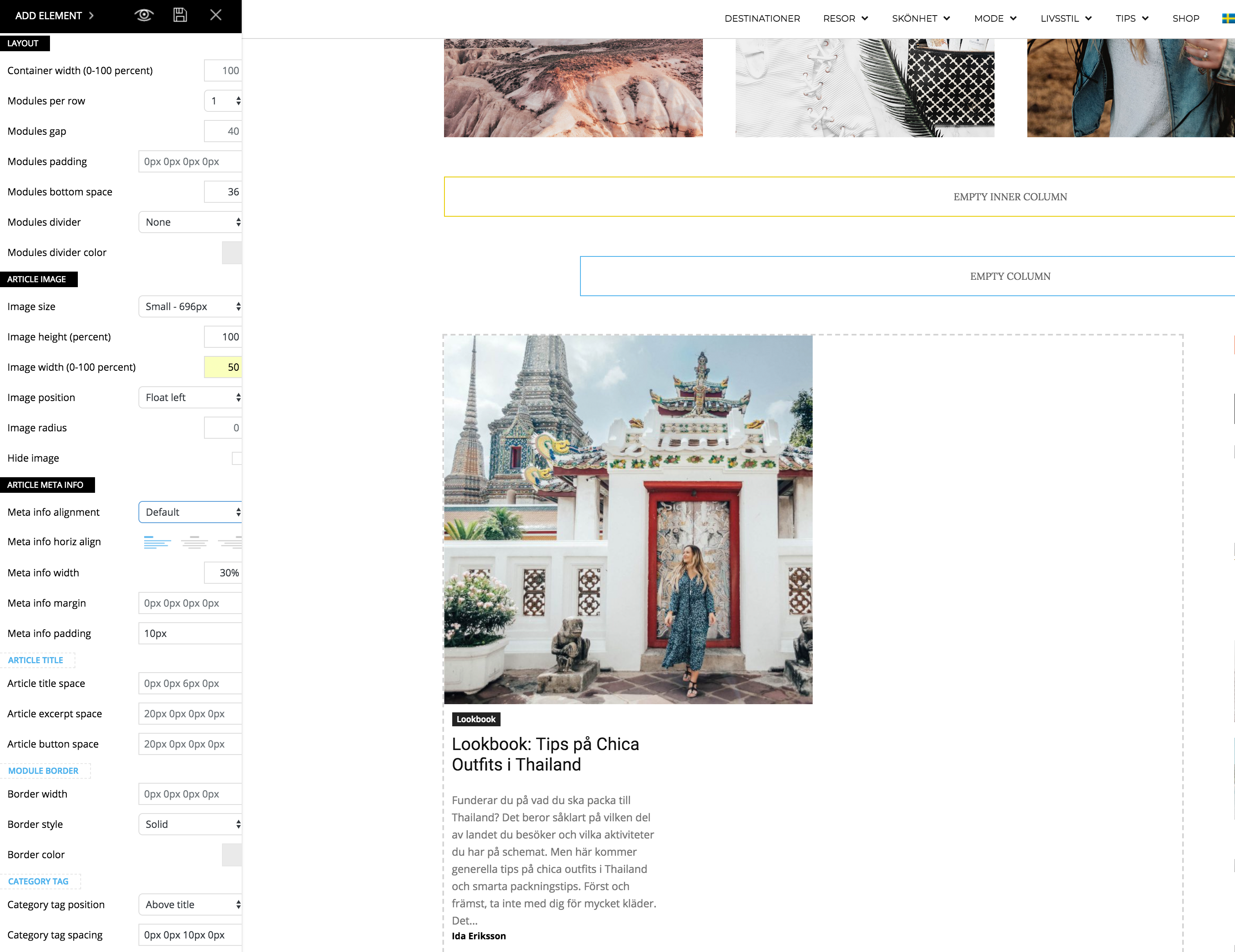
I just updated to the newest version of the theme and noticed a problem when I’m trying to make my flex block as the example for “2 modules per Row here”: https://demo.tagdiv.com/newspaper/flex-block/
I can’t get my meta description to show next to the photo. It’s position below or above the photo, no matter what I do.
When I inspected the elements I see that the difference is that my .td_module_flex_1 .td-module-container has flex-direction: column. And if I change it to “row” like in the example it works. But how do I get it right with only the TD composer?
Simion C. Hi,
Those other modules can be seen by swiping with your finger, there is a scroll there. Other grids display all the modules in view on mobile, like this grid for example
– https://demo.tagdiv.com/newspaper/big-grid-11/
But others require swiping to scroll through them. Please correct me if I misunderstood something.
Thanks
 sk_rocks
https://demo.tagdiv.com/newspaper/tabs-and-accordions/
this link content is broken. Can someone please tell me how can I add an accordion.
deraplease just like the demo. is it possible to do that without installing the demo?
all I want is the black version with white text colors and all that the settings without the content pages or tag div composer page build up.
please, how possible is that?
 ctoweett
 See this guide on how to install demos https://forum.tagdiv.com/installing-demos/. But first, make sure your web host meets these parameters https://forum.tagdiv.com/system-status-parameters-guide/ (check under Newspaper> System Status in wordpress dashboard. Those parameters should be green if your host meets them).
 Vikram
Hi,
Can we use one of the installable demo designs for our own site?
If so how to do that? Any resource set up for this?
If not, then is there a way we can “get inspired” (copy) by the layout from anywhere? Is it possible to get it from the demo theme directly to be applied to our own theme?
Any advice and guidance will be appreciated.
Thanks.
Simion C. Hi,
Most of the demos have a theme to them, like for example business or sports. All the demos use the same theme elements, what makes them different from each other is the custom design and theme panel settings. As soon as a demo is imported, the demo theme panel settings will be imported along with the custom design.
It would be up to you to decide which demo would be the proper one for you, at any time you can uninstall it and install a different one if needed.
The tagDiv composer is used to build all demos, so the same elements are available regardless of demo used.
Thanks
 com1usa
In your opinion- which theme version ( looking at your list of demo versions) would I use to for a directory project?
There isnt that much difference between a directory site and a news oriented site to begin with- but which would work better?
Simion C. Hi,
The title could be aligned to the left with a code like this
– https://www.screencast.com/t/mKj2cmtRxrg
I also added a small margin you can remove that if needed, or modify it. If you remove it the title will be like this
– https://www.screencast.com/t/X3nkqpWe6U
.td_block_template_14 .td-block-title > * {

float:left;

margin-left: 10px;

}
The code can be entered in Theme panel->Custom CSS section.
That text is the post excerpt. Some block modules show an excerpt, others do not. Here you can see how all the blocks look
– https://demo.tagdiv.com/newspaper/block-1/
Here you can see what modules each block contains
– https://forum.tagdiv.com/theme-blocks-modules/
If you want to use a block that displays an excerpts and remove it, enter the value of 1 in it’s excerpt settings
– https://forum.tagdiv.com/excerpts-introduction/
Thanks
 great1212
How can we insert the background picture in menu in mobile devices like you have used in recipes demo when used in mobile devices?
Simion C. Hi,
You could create a page, and display posts there. Create a page called blog, add it in the menu. Place blocks and grids to display them, or simply select the latest articles template for the page and display a list of posts. Something like this demo does it
– https://demo.tagdiv.com/newspaper_recipes/
It has a Blog menu item, which leads to the latest posts.
A theme license can be used on a single end product according o Envato license terms
– https://themeforest.net/licenses/standard
So if you want to create a sub-domain that would be considered a new product and a new license should be used.
Thanks
 Bogdan B.
 Hello,
Unfortunately there is no element that can grab posts from a secondary website. What you can do however is use an ‘image box’ element (https://demo.tagdiv.com/newspaper/image-box/) that will show images with a custom link and you can link them to your posts from the secondary website. Unfortunately this will not be dynamic. It will not update with the latest posts a normal block will.
Thank you!
 IllinoisNewsroom
 If I import the content from a demo, the option shows up, but if I just import the demo without the stock content, then the option to edit does not show up. that is baffling.
Simion C. Hi,
There is an author widget that will display any author you want, but it will not display the author’s latest posts. Only in the author page there will be a section that displays the author posts. Example of an author page
– https://demo.tagdiv.com/newspaper/author/admin/
The author box will not show the latest posts of an author, it is not supposed to do that. If this is required for you, maybe you can find a plugin that can display such an element and make tests with it. Sorry for any inconvenience.
Thanks
Bogdan B. Sorry but I’m not sure what you mean. If you want to ‘learn how to fish’, then please install the restro demo and edit the page in the tagdiv composer. You can see the exact elements used on the demo page.
The page template is https://www.screencast.com/t/82p5oYoOB
This will make the main menu overlay the top element.
The top element is a hero scene: https://www.screencast.com/t/5i5cU0Trlbe
Thanks
Bogdan B. Hello,
It sounds like a post style 1 to me. IF you use post template 1 and your ad is not being delivered properly, you will get this effect. Here is how post style 1 will show the top ad and featured image:
https://demo.tagdiv.com/newspaper/td-post-400k-for-whisky-most-expensive-foods-and-drink-auctioned/
I’m not sure this is the case though. I can only speculate without actually being able to inspect the site.
Thank you!
 nexxus396647247
 Hi, I deleted all of the amp posts, but here is a link to Google’s original
page with all of the articles and documentation of the problem:
https://search.google.com/search-console/amp/drilldown?resource_id=https%3A%2F%2Fultimatemarketing.co%2F&item_key=GgYIBBADGFE&hl=en&sharing_key=MNOSLUS1auOM0eZOxPWlMQ
If this doesn’t work, I’ll send you a screen capture. I’ve deactivated the AMP plugin, but now that I’ve deleted the demo posts, everything may be okay. It may be the Google ads need adjusting. If you click on one of the post links, it highlights the Google ad that is self-adjusting. Maybe this needs changing.
Larry
-
This reply was modified 8 years by
nexxus396647247. Reason: Additional information
 inje
injeI’ve recently updated to version 8.8 and imported one of the multipurpose demos. So far so good…
After i changed some of the pages with my info, i tried importing some demo sections from the cloud and the import process hangs. I received the following error in console:
js_files_for_wp_admin.min.js?ver=dee196c4efff2c8bf5c2ff4c4b4e736e:137 [Vue warn]: Error in nextTick: “InvalidCharacterError: Failed to execute ‘btoa’ on ‘Window’: The string to be encoded contains characters outside of the Latin1 range.”
This happens only on pages i’ve edited and added info and not on empty pages.
I then tried importing the section on an empty page. I saved the row and tried importing it to the page i want. On the editor preview it shows, but on the actual page it is as if it does not exist.
Please help
Simion C. Hi,
1. If none of the 7 big grid styles are according to your requirements
– https://demo.tagdiv.com/newspaper/full-big-grid-3/
Then the only option would be to use CSS code. I could try to give you a solution if possible, mention how exactly you want the grid to align that meta.
2. Only big grids have that effect, blocks and other elements do not have such a design.
3. There are some issues with the font settings for full big grids, I can give you a temporary fix for the font size if you should consider using it
– https://www.screencast.com/t/qYWL1XNu
.td_block_big_grid_fl_3 .td-big-grid-post .entry-title {

font-size: 30px;

line-height: 38px;

}
nexxus396647247 Okay, when I deleted all of the demo posts all of the articles fell into the correct categories. I think most of them had multiple categories set, so they were moving around on the page.
Thanks,
Larry
