
- NewspaperModules Builder in Newspaper Theme
- NewspaperIntroduction to CPT and ACF with Newspaper Theme
- NewspaperHow to edit modules for Flex Block X
- NewspaperStripe Setup
- NewspaperPayPal Setup
- NewspaperAdd Cryptocurrency Price Ticker Widget
- NewspapertagDiv Shop
- NewspaperDesign your post pages using the Default Templates
- NewspaperTheme modules and blocks
- NewspaperUsing the Theme Translations with WPML
- NewspaperHow to Set the Image Avatar
- NewspaperNewspaper theme documentation
- NewspaperSmart Sidebar
- NewspaperBreadcrumbs
- NewspaperFooter Builder
- NewspaperMain Menu
- NewspaperInstalling Pre-built Websites
- NewspaperPre-built Websites: Introduction
- NewspaperWhat’s Included in the Newspaper Theme Package
 Alex
Alex Hello @Anamaria,
Now you have shared a screenshot with a good INP score for desktop. Nobody reported that there was an issue with a poor INP score. So this is irrelevant.
As previously stated twice: The issue is with INP on mobile. The issue is with Newspaper theme. Your main demo that is “optimized” does not meet the required criteria for origin.
You can deny it as much as you want, try to confuse by involving prebuilt websites that no one mentioned, blame it on ads etc.
Either way, it doesn’t change the fact that the issue is with the theme.
Another very important aspect is that we offer free support to you by testing and outlining the bugs and issues in your theme so you can improve it.
 Anamaria
 Hello @Alex,
If you use ads, it’s your own choice, which is unrelated to the theme. Yes, we have several demos with good scores, and they are optimized, but it’s still recommended to make configurations and necessary optimizations regardless of which prebuilt website you use.
INP is related to mouse clicks, taps, and key presses. Now, if you have pop-ups with ads, it’s your choice. As I’ve mentioned before, you need to make the necessary optimizations regardless of which prebuilt website or theme you use https://i.imgur.com/z9rLkxK.png
Another very important aspect is that we offer support, even if you haven’t extended the support, and we try to help, and even page speed is not covered by the support team.
Thank you!
 siciliamare
Dear Theme Developers,
I hope this message finds you well. I am currently using Newspaper Theme version 12.6.5 with the Town Talk demo installed. I’ve encountered an issue that I hope you can assist me with.
Recently, I noticed a bug related to the Ads section, specifically under Ads > Article Bottom Ads. The content displayed to visitors does not match the code I have inserted in the theme settings. This discrepancy only occurs in the desktop version; the Mobile Theme > Mobile Ads > ARTICLE BOTTOM AD section updates and displays correctly in real time without any issues.
This issue seems to suggest a bug in the theme or a conflict that prevents the Article Bottom Ads section from updating as intended on desktop views. It’s critical for our advertising strategy that the ads display correctly and can be updated promptly.
Could you please investigate this issue? Any guidance on resolving it would be greatly appreciated, as it directly impacts our site’s functionality and user experience.
Thank you in advance for your time and support. I look forward to your prompt response and a possible solution.
Best regards,
Barbara
Anamaria Hello,
This parameter behaves differently; in some demos, it appears as valid, while in others, it does not https://i.imgur.com/2H3Pbl4.png. I have informed the developers to look into this situation and make improvements.
Thank you!
 donvito0
Dear sir,
I bought your theme Newspaper 12, and i have a litlle problem.
Demo version of your mobile version on themeforest is not the same when i installe it on my website.
What can be a problem?
Articles are presented only as a list, no grid, no boxes, no nothing.
What can i do?
Thank you,
Regards
 ML
ML Dear @Anamaria,
Thanks for taking the time to answers us.
I share the same concern as Alex to be honest. The fact that even your demo account is failing the INP performance is very concerning. The fact that it does not look like a prio to you is even more concerning.
Without clear feedback that you’ll tackle this soon, I’ll look for Themes alternatives that comply with this criteria.
@simchris I know it might seem extreme, but still today Google is King and if they request fast INP, we should adapt to it. Period.
Thanks for your help,
Alex Hi @Anamaria,
We used WP Rocket before and had a conversation with WP Rocket support team. To date, Newspaper and WP Rocket do not properly work together.
The preload function is for single post featured image. This feature doesn’t seem to properly work with EWWW plugin. I will make a new thread when finish testing.
Our server is optimised, as well as the theme.
– This thread (which was not started by me) is about the poor INP poor performance. It is the theme’s elements that make it fail (buttons, popups, mobile menu, comment form fields etc). It fails on your main demo – mobile origin – Despite you used a mobile page for home page, INP fails throughout your whole demo website.
You should probably improve the theme, so it meets the required criteria in 2024. It currently does not.

 happypeoplepickleball
https://demo.tagdiv.com/newspaper_shop_kids_store/
Where can I find this template in the cloud template store? I would like to create a home page similar to this one for my happypeoplepickleball.com/shop entry page. Would this be in the cloud template “shop” tab?
Also I searched Kids Store and found pre-made block sections that I would like to use.
Where do I upload these template too in Cloud templates? “General Tab”? Which template area? Page?
or do I upload this to the Cloud Template “Shop” tab and which template area? Woo SHop based template?
THANK YOU!
happypeoplepickleballHi, I am setting up my WooCommerce shop. I have downloaded the newspaper theme for the base shop page:
https://demo.tagdiv.com/newspaper_shop_kids_store/shop/
I opened the cloud template to start configuration. I do not know how to change the cute picture in the first block “Shop by Category”. Where can I find this picture and how can I change it? What are the dimensions here?
On my website it is not even showing that picture – just a gray gradient box but I want to add the picture like the sample theme page.
happypeoplepickleball.com/shop
thank you
 sotirow96
Hello, I am trying to setup the theme and I just did small changes to the Case studies – now they are Projects instead. I have changed everything needed and its working correctly except the thumbnails on the home page.

^^ This is how I see it and on the demo its totaly different than what I have, did I mess something ?
 smga
smgaHello
There is a button on the page with a phone icon and a number
If you just open the page, the icon is displayed (https://zvuk-m.com/top-exclusive-sultan-laguchev)
If the page is used as the content of a modal window, there is no icon (https://zvuk-m.com/top-exclusive – the first button for demonstration)
Tell me what could be the reason. Thank you.

 chipbiney
 Dear TagDiv support team,
1. Thank you for your previous response. I have temporarily resolved the issue I was having. However, I hope that your team will prioritize fixing this issue in the next update of the theme. The interface needs to be more visually appealing, balanced, and professional. In its current state, it requires too much editing in the “Custom CSS” section, and the customization options are still limited. This makes it quite inconvenient for users. Additionally, the “Woo My Account” section still has some minor interface bugs.
2. I would like to try out some of your pre-made demo themes, but I am unable to create an account to test the buying and selling features. I would appreciate it if you could provide me with a demo account so that I can further explore the theme’s capabilities.
Thank you for your time and consideration.
Sincerely
 roop555
I am setting up a new WordPress multi-site website. The multi site setup is for sub-directory.
Example:
Mywebsite.com (the main site)
Mywebsite.com/site1 (the sub site)
Mywebsite.com/site2 (the sub site)
Mywebsite.com/site3 (the sub site)
Mywebsite.com/site4 (the sub site)
Mywebsite.com/site5 (the sub site)
I have noticed that every time I created a new sub-site, I have to activate the theme again for each sub-site. However, the activation has no problem. It activates the theme for main domain. I am planning to Create a catalog of demos for my clients as portfolio (I am freelancing). So I will create a new sub-site for each demo.
My question is:
1. Is there any limit to activate the same licence key for the same domain? If yes, how many times?
2. Will it be a problem, If I keep activating that licence key for all sub-sites (150+ demos)?
Thanks in advance!
 gphilipp11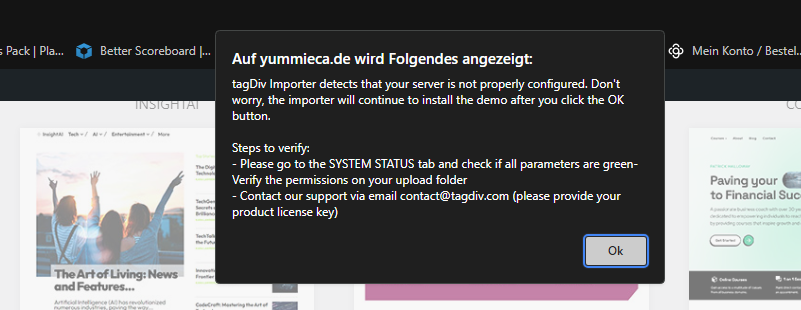
I got thie Error when i try to install the Demo Momentum Pro, on System Health is all Green.
 Sadique Ali
How can I change mobile menu?
Desktop menu:https://app.screencast.com/tJ4jmGbfUU8jH
Mobile Menu:https://app.screencast.com/3QaS3rCkFO4x8
I want to change mobile menu like the desktop, but its still showing demo template menu in mobile version, How can I change it?
 Bettina
 Hello Roger!
This is an old demo, and the CSS code for that block, which has an extra class (if you check in the tagdiv Composer in the element settings), can be found in the theme files td-composer\legacy\Newspaper\includes\demos\blog_fitness.
Thank you!
 rogerarn
 OH, Sorry it was not Fitness Pro, but this one….
https://demo.tagdiv.com/newspaper_blog_fitness/
/Roger
Bettina Hello Roger!
I can’t see the category tag on the images in this demo. https://demo.tagdiv.com/newspaper_fitness_pro/
There are some settings that need to be changed in the tagdiv composer, or check if there is a CSS code element there that modifies the block.
You can hide that category tag like this: https://app.screencast.com/lw2tEfVgPmdwB
Thank you!
 kbe3999
I am using Tech News Demo and whenever I published new blog posts, the featured image appeared to be cropped off. I would like for the featured image to show all but couldn’t find it in the settings.
Link to the issue: here
 peerblue
Hi, I installed the prebuilt theme called Newspro
Now upon publishing articles:
1. If i add featured image it is duplicated twice in the post but the image is visible on home page card as well
Home page screenshot : https://drive.google.com/file/d/1fFEEWO1WSTRYJkZoX39LBl3Rqyb96Qpg/view?usp=sharing
Look at the post with images displayed in the lower end of the screenshot
now example of the post : https://chainnewsnetwork.com/education/proof-of-liquidity-defi/341/
https://chainnewsnetwork.com/news/shiba-inu-meme-coin-mania-grips-market/387/
In both of the example image is coming in the box and is is replicated again.
2. If i do not add the featured image, on the home page there is no image and it looks quite ugly and broken
example of home page (https://drive.google.com/file/d/1fFEEWO1WSTRYJkZoX39LBl3Rqyb96Qpg/view?usp=sharing)
Example of post page
https://chainnewsnetwork.com/news/dogwif-outpaced-shib-bonk/402/
3. Also look at this demo content which you prebuilt and it looks beautiful, but my posts look ugly, While i choose default temple from panel for posting, kindly let me know what can i do to make my posts beautiful
Sample content link
(https://demo.tagdiv.com/newspaper_news_hub_pro/2022/03/04/td-post-a-newfound-quasicrystal-formed-in-the-first-atomic-bomb-testesd-in-us/)
Actual Content link :
https://chainnewsnetwork.com/news/dogwif-outpaced-shib-bonk/402/
May be i am configuring something wrong
 gerruld
Hello, I’ve set up a new website, purchased a new Newspaper license, and wanted to use the prebuilt website to edit it. Unfortunately, in every selected template, various pages look strange, and their appearance is completely different from the demo on preview. The biggest issues are with the cart and checkout. I’ve tried different things, performed a clean WordPress installation, removed all additional plugins, even reset all files on the server. I also attempted to downgrade Newspaper, but nothing helps, and these pages still look this way. How can I fix this?
Anamaria Hello,
You can use modal popup and you can import a page from cloud https://cloud.tagdiv.com/#/load/Pages and you can see the example here https://demo.tagdiv.com/newspaper_towntalk_pro/header-template-towntalk/?
Thank you!
 Vincent-01
actuwebtech.com
 booomcha
Hi there! I hope you’re having a great day!
I’m using the Urban Observer demo, and where the newsletter sign-up is, I put the WordPress subscription widget.
The problem with this is the top and bottom margins are too big.
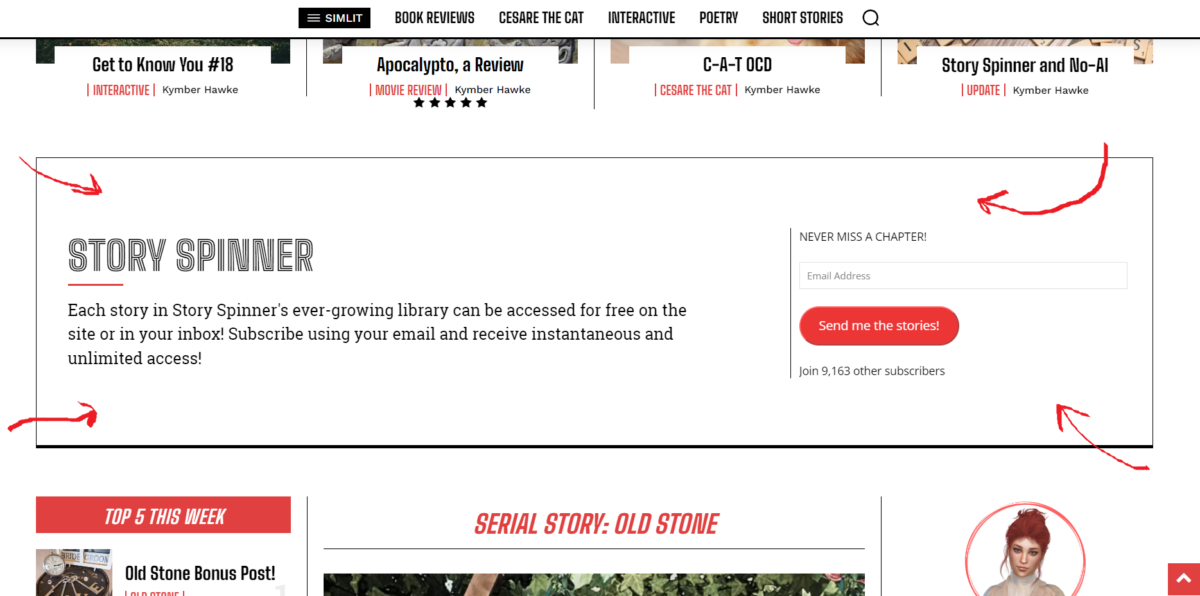
I’ve tried adjusting the margins in the cloud templates for the home page to no avail. I’m thinking the issue is to do with using a sidebar widget there, but I wondered if you had any suggestions to reduce the top and bottom margins?
Thank you.
My site is https://booomcha.com/
 Mix King
 Hi [Bettina],
Thank you for your attention to this matter. I appreciate your efforts in trying to resolve the issue with the subscription functionality on our website.
I’ve submitted two video recordings demonstrating the problem. They clearly show that after users input their email addresses, the subscription process fails to redirect them, despite the appearance of correct settings in the Tagdiv subscription feature.
Additionally, I’ve provided access to the subscription backend settings. The video examples showcase a scenario where a free email subscription is attempted, and all subscription and post settings are configured correctly. However, users still cannot be redirected to the subscription page.
In the subscription section, regardless of the email entered, users neither receive confirmation emails nor any subscription-related notifications.
Looking forward to your insights and further assistance.
https://app.screencast.com/hJ5iJ2qhVQ593
https://app.screencast.com/nEXTqUUJqGdBP



