
- NewspaperFlex Block Builder and Flex Loop Builder
- NewspaperHow to use the Flex Blocks cache option
- NewspaperHow to edit modules for Flex Block X
- NewspaperFlex Block Settings Guide
- NewspaperBig Grid Flex Settings
- NewspaperSingle Post Excerpt
- NewspaperWP Rocket and Newspaper Theme: Optimization Guide
- NewspaperSearch setup for custom post type
- NewspaperBookmark – Save For Later
- NewspaperModules Builder in Newspaper Theme
- NewspaperFilters and sorting for taxonomies
- NewspaperHow to insert a block inside the content of a post
- NewspaperCustom Post Type Support
- NewspaperMeta Info on Modules and Blocks
- TutorialsFrom WPBakery to tagDiv Composer
- NewspapertagDiv Composer Tutorial
- NewsmagSocial counter styles on Newsmag
- NewspaperSocial Counter Styles on Newspaper
- TutorialsOffset Feature
- NewspaperCloudflare (CDN)
 newspatron
 Hello!
Thanks for your help!I am now familiar with the flex block builder for modules.
I am using a custom template for my custom posts, however the categories and tags are not displayed, on the custom posts.
Please refer the screenshot.
Custom Post screenshot not displaying the required fields other than the date.
2 screenshots
Fields not displayed are
CPT Taxonomy
paxpnr_category
Custom Tags
paxpnr_category
The post url is
https://paxpnr.com/hotel-resort/kaithal-resorts/
 Bettina
 Hello!
It helps you to display a custom field in the button URL, for example, but we have the shortcode custom field as well: https://forum.tagdiv.com/custom-fields-support/
You can display a custom field for a post or listing in a block on your homepage. You should use a custom module template displayed with the help of the flex block builder: https://forum.tagdiv.com/modules-builder-newspaper-theme/
Thank you!
Bettina Hello!
You can apply a sorting option of a flex block: https://forum.tagdiv.com/flex-block-settings-guide/
Also, you can upload a section from Cloud Library where this block appears. More info here: https://forum.tagdiv.com/how-use-tagdiv-cloud-library-templates/
Thank you!
Bettina Bettina Hello!
You should also install and set the Module templates required on the flex block builder: https://forum.tagdiv.com/flex-block-builder-flex-loop-builder/
Thank you!
 shellhackx
Hello,
I want to use the pre-built ” APP Pro” site
I installed it but its missing an element.
-
“Flex Block BuilderThe Cloud Library Module Template set for this block is not valid or it no longer exists. Please select another Module Template”


The error may be on my side, but wondering if anyone can help?
Thank you
Bettina Hello!
I did a test, and it works well and displays the stars in the flex block. So, the issue seems to be on your end.
Make a test and deactivate ALL plugins except tagDiv ones. Also, if you are using a cache plugin, deactivate it, clear all cache, and try again.
If the problem is still there, then please get in touch with us via email at contact@tagdiv.com and provide the following:
– admin URL and credentials
– a link to this topic to identify you
We’ll check and try to help you as soon as possible!
Thank you!
Bettina Hello!
Unfortunately, no. You can only fix it from the offset value: https://forum.tagdiv.com/offset-feature/. Please try to use a flex block instead with the special filter for tags/categories: https://forum.tagdiv.com/flex-block-settings-guide/
Thank you!
 nuvoledibellezza
Hello,
I noticed that the review stars no longer appear on my site https://www.nuvoledibellezza.com/ .
I see them correctly in the single post (for example here: https://www.nuvoledibellezza.com/bjork-berries-body-serum/), but in the category or home page, as well as in the menu they are not visible.
In this category the posts should have stars, yet there aren’t any: https://www.nuvoledibellezza.com/recensioni/
Yet I set them to be visible and with yellow color … I also tried to insert other flex blocks but the stars never appear can you help me?


Bettina Hello!
Unfortunately, you can not add a widget[shortcode] to a shortcode. In order to add a widget into the page, edit it with the tagdiv Composer and add the shortcode called Widget sidebar.
You can build a sidebar with the TagDiv Composer. Steps:
1. Insert one new row (or delete an existing one).
2. Divide into two columns (2/3 + 1/3).
3. You can add whatever element you want from the tagdiv Composer to the second column and consider it a sidebar
This shortcode is called flex block and uses the ajax categories dropdown option: https://prnt.sc/wOfdMnBNxEC8 -> More info here: https://forum.tagdiv.com/flex-block-settings-guide/
Thank you!
 Anamaria
 Hello,
Please check this topic https://forum.tagdiv.com/topic/how-to-set-different-text-colors-for-each-category-globally-in-flex-blocks/
Thank you!
 Simion C.
 Hi,
Chris is pretty much right. Besides maintaining the theme, we don’t have plans to develop the Newsmag theme further unfortunately.
Sometimes new features that we develop for Newspaper can be added to Newsmag as well, like a couple of flex blocks, the subscription plugin, video embed element, etc. We will keep adding these.
It’s still a perfectly good theme however, light and fast. Sometimes users do not need to customize everything in detail like with the Newspaper theme, they just want a simple theme with theme panel settings.
Thank you!
 archangelsk
As the title says, I can’t find this filter anywhere. I tried any Big Grid, Flex and not.
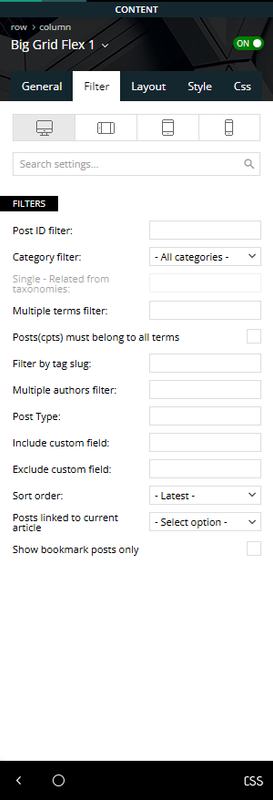
If this setting changed, how do I filter out categories?
Theme version 12.6.9
Composer version 5.3
Bettina Hello!
When you build a module for flex block builder, you use different shortcodes (title, excerpt, etc.), can check their style from the flex block one, and recreate them. They are different shortcodes. You can save and load a font setting on shortcodes, for example https://app.screencast.com/iQ7dOPEm5OChv. This could help you cut time a bit. It will save the font settings from each viewport.
Thank you!
Anamaria Hello,
I recommend to use Flex block, and there you can set the color on each block as you want -> https://i.imgur.com/dtSMoY8.jpeg in the tab style.
Thank you!
 kevrose
 I should say that I’ve created a test module and displayed the custom field, which is great, but is there a way of effectively duplicating the style of the Flex Block 1 from the pre-built website theme I’m using (Town Talk), rather than having to try and work out exactly how it was designed?
kevroseHi
I want to be able to create a custom version of Flex Block 1. It will be exactly the same, except instead of the excerpt, I’d like to display the contents of a custom post field that I’ve added to the post page. I’ve done this in other themes by editing the relevant PHP file but I’m wondering if I can do this with the Flex Block Builder?
Many thanks!
 petar777
Hey there,
Is it possible to exclude URLs from excerpts from the Flex Blocks elements.
Imagine we have an article and our writer added a related article in the first few sentences – is it possible to exclude the url from the generated excerpt somehow?
Best regards!
Bettina Hello!
1. A responsive version of your website looks similar to the desktop version. TagDiv Composer is used to edit the page. Click on the mobile viewport: https://www.screencast.com/t/XDQJedlggSB. You can see your mobile version there and edit or adjust the elements to look better. Make sure you set the row/inner row to display horizontally like this: https://app.screencast.com/pP2VLHMKvhRCq, and you can set up the flex block to display in 1 column on mobile: https://app.screencast.com/6anFiiOrILAVV
2. You should edit the article with the tagDiv Composer and use the shortcode Single Post Subtitle. Or if you mean the caption of the featured image, then there are some settings if you use this shortcode: https://app.screencast.com/kJkfArS2iurHs
More documentation about the cloud templates is here:
– https://forum.tagdiv.com/cloud-library-templates/
– https://forum.tagdiv.com/design-post-pages-using-cloud-library-templates/
– https://forum.tagdiv.com/cloud-library-category-templates/
About pages here: https://forum.tagdiv.com/page-templates-2/ -> https://forum.tagdiv.com/homepage-how-to-build-and-set-it/
Check out this video about how to create a website from scratch: https://www.youtube.com/watch?v=SoGQ0d5kIBg
Thank you!
 stemalo
I’m almost ready with my new website (new design of a already existing, also with your theme) but there are some little things making me crazy, I’m not able to resolve it by myself.
1. Please have a look at the last FlexBlock1 before footer. And take a look on mobile view. Something wrong there, the block shows two small columns, instead one article after another in one column.
2. Where can I change CSS settings of subtitle, like font, color and so on.
Did fill in at theme panel some additional CSS, but didn’t take effect.
Domain: http://www.2024.gartenwoche.ch
Anamaria Hello,
To increase page speed, I recommend checking which thumbnails you are using on your blocks. You might want to avoid having all of them enabled and optimize and regenerate images. You can use the EWWW Image Optimizer for image optimization and the OMGF plugin for fonts. Also, you can use the WP Rocket plugin.
Also, I recommended using cloud templates for posts, categories, and so on Flex blocks instead of blocks 1 to 25 and disabling the tagdiv Standard pack plugin.
here are many optimization guides provided by our users here in the forum, some made by us; you could check some of them
– https://www.infophilic.com/get-almost-100-pagespeed-newspaper-theme/
– https://forum.tagdiv.com/cache-plugin-install-and-configure/
– https://forum.tagdiv.com/how-to-make-the-site-faster/
– https://forum.tagdiv.com/topic/high-number-of-ajax-request/
– https://forum.tagdiv.com/topic/score-100100-pagespeed-with-newspaper-wordpress-theme/
– https://www.andraware.com/wp-rocket-for-newspaper-theme/
– https://forum.tagdiv.com/topic/page-speed-guide-for-2023-beginners-and-advanced/
– https://forum.tagdiv.com/topic/newspaper-theme-speedify-your-website/
– https://forum.tagdiv.com/topic/tutorial-chriss-custom-optimizations-for-functions-php-etc/
– https://forum.tagdiv.com/cloudflare-cdn/
– https://forum.tagdiv.com/topic/theme-causing-high-cpu-usage-2/
– https://forum.tagdiv.com/topic/sql-querys-high-cpu/
– https://forum.tagdiv.com/topic/newspaper-theme-slow-to-respond/
– https://premium.wpmudev.org/blog/optimizing-your-wordpress-database-a-complete-guide/
– https://underconstructionpage.com/optimize-wordpress-database/
– https://crunchify.com/better-optimize-wordpress-database-all-in-one-guide/
Thank you!
Anamaria Hello,
You can move an element with drag-and-drop https://tagdiv.com/flexibility-rows-columns-newspaper-theme/
-> https://tagdiv.com/how-to-add-delete-and-duplicate-row-newspaper-theme/
Thank you!
 richbilt2
Hi, i’m using Urban Observer cloud template and on my category pages, and i’m using the Flex Loop Sorting Options module to allow users to sort the way items display on the page.
I’d like to add the usual sorting options onto the drop down:
‘price low-high’
‘price high-low’
‘highest rating’
‘lowest rating’
How can i add them in please?
My webpages are very simple – and these are the type of results that show on the category page – with the expanded sort menu showing. thanks.
 JBW23
JBW23I want to list all of the categories that I have (They are a custom taxonomy), but using the flex block builder so that I can display information for each category (Icon, description, top 3 or 4 items in that category).
It’s easy enough to create the module as a cloud template, but when creating the block builder, there’s no way to show anything other than post type.
Am I missing something here, or is this not a feature?
 SvijetS
 I’m working with flex block as you told me, now I’m having another issue, “flex block 1” dosen’t want to show 5 post in a row but the flex loop with no problem at all. Is there a way to filter category on loop block?
———-edit
My god, sorry there is post limit…
-
This reply was modified 1 year by
SvijetS. Reason: issues with understanding

