
- NewsmagFooter templates
- NewspaperDesign your Post Pages using the Cloud Library Templates
- NewspaperFooter Builder
- Apitd_api_footer_template::delete
- Apitd_api_footer_template::update_key
- Apitd_api_footer_template::update
- Apitd_api_footer_template::add
- ApiAPI – Footer Template – Introduction
- NewspapertagDiv Composer – Website Manager
- NewspapertagDiv Opt-In Builder – Emails
- NewspapertagDiv Cloud Library Plugin
- NewspaperUsing the Theme Translations with WPML
- NewspaperThe Mobile Theme
- NewspaperChild Theme Support
- ApiThe Theme API
 Bogdan B.
 Hello,
The footer widgets are most likely predefined content coming from the footer template: https://forum.tagdiv.com/search/footer+templates/
As for the social icons they can be added either in the widgets area of WordPress or on the page itself in the tagdiv composer.
Thank you!
Bogdan B.  Simion C.
 I can’t see the footer that website uses, after a few minutes of infinite scrolling I gave up.
Our theme has predefined footer templates you can choose from
– https://forum.tagdiv.com/footer-templates/
Or you can create a page with the elements you want and display it in the footer
– https://www.screencast.com/t/mRGdmaWaY
Simion C. Hi,
1. In some cases 500 errors were produced by insufficient resources, mainly WP memory. Increasing the limit fixed the errors.
2. Your ID works for me, with the same plugin used
– https://www.screencast.com/t/1x2qe9o5
Try clearing the cache plugin you have installed and also purge CDN cache if used.
3. That is the latest articles page template
– https://www.screencast.com/t/wXoH35F5uI5
The section of posts it displays at the bottom of the page has only numbered pagination. You could select a different page template for the page, then add at the bottom a block of your choosing. Blocks have infinite loading pagination
– https://forum.tagdiv.com/block-settings-guide/
4. The mobile theme may not work as intended or at all with the caching plugin you use. Caching plugins are the number one cause for mobile theme problems. We recommend the super cache which works properly with the mobile plugin. The mobile plugin is optional however.
6. The footer template you use has it’s own predefined widgets
– https://forum.tagdiv.com/footer-templates/
So your widgets will be displayed below them. Use empty footer templates to display only your desired widgets.
Thanks
Simion C. Hi,
Please read this footer templates guide
– https://forum.tagdiv.com/footer-templates/
As mentioned there some footer templates have predefined content, such as the one you are using now. You can choose an empty template and add your own widgets for example.
Thanks
Bogdan B. Hello,
In order to remove the author names from your site, please remove it from here for posts:
https://www.screencast.com/t/xpiMElDd and from here for pages and other templates:
https://www.screencast.com/t/P7P68nis
As for the second issue, the subfooter cannot be changed for specific pages. The setting from the theme panel affects the entire website
Thank you!
Simion C. 4. Maybe I am misunderstanding the problem. So you are inserting images in the post content, then publish the post. Are the images visible when you enter them in the post content? From what I can see that post contains no images, none that I checked have. They also do not have featured images, so no thumbnails will be created
– https://forum.tagdiv.com/featured-image-or-video/
– https://forum.tagdiv.com/theme-thumbs/
The latest version of the theme supports PHP versions up to 7.2 so this would not be a problem. If you get the detect encoding error, your PHP web server is lacking support for the function: mb_detect_encoding.
Please ask the host if this can be enabled.
5. Does the admin bar show if you use a default WordPress theme? Test if possible. The theme does not have a setting for disabling the admin bar, so it would only be affected by the WordPress setting I mentioned.
In the footer you can choose one of the available templates, or use a footer page
– https://forum.tagdiv.com/footer-templates/
Widgets you enter in the footer sections will be displayed below the predefined ones (if you use a style that has them) or you can choose an empty template and display them only. They should appear once you enter them. I see that you seem to be using footer style 1, so the additional widgets you enter here will be shown below
– https://www.screencast.com/t/800M0njCv
So basically the theme and theme plugins should work if the requirements mentioned in my previous reply are met. Check them carefully. However most issues that happen are related to server configurations, limitations etc.
The composer issues were fixed in some cases with these solutions
– https://forum.tagdiv.com/topic/gray-page-tagdiv/
– https://forum.tagdiv.com/topic/javascript-error-td-composer-wont-load/
Let us know the results.
Simion C. Hi,
1. The most recommended method would be by FTP
– https://forum.tagdiv.com/install-via-ftp/
There could be a number of reasons why WordPress displays that message, even insufficient max upload size
– https://forum.tagdiv.com/requirements-for-newspaper/
2. Please check the theme requirements mentioned in the guide provided above. Those are the number one cause for this to happen, insufficient resources. If needed ask your hosting provider to increase those parameters.
3. There will be 3 columns with the widgets, but below the Instagram section
– https://www.screencast.com/t/PBLMQPbQ
If you use footer template 1 this should have predefined widgets to display
– https://forum.tagdiv.com/footer-templates/
In your case it seems those default widgets are not displayed. Try changing the footer template and check if it displays properly. Make sure the footer is enabled
– https://www.screencast.com/t/o1GfZHbMdfBG
4. That could be related to a plugin conflict or code entered in the theme panel. Those are the most common causes for image problems.
If you check on the bottom of the post the related articles/more from author section is also not working properly, the header search function is also not working.
Try to temporarily deactivate all non-theme plugins, check if this solves the problem. Let us know.
5. The admin bar is not controlled by the theme. Maybe you removed it by code previously or it is not enabled in your WordPress user profile settings
– https://www.screencast.com/t/smzaNr1InM
Thanks
Simion C. Hi,
That demo uses a footer page, you can edit that page here for example
– https://www.screencast.com/t/stzKeF8LlyR
Since a few updates ago you can now use pages in the footer section, in addition to the footer templates.
Thanks
 michaelaulia
First of all, great work on having your own working and optimised AMP plugin 🙂 I’ve switched from using the Automattic AMP plugin to this one on my site.
Some feedback from myself – I know it’s still an initial version so I understand more updates will be coming, but here they are:
- On the /amp page, the search icon/button on the top right links to the WordPress Address URL, and not the Site Address URL (i.e I have my WordPress files in a folder structure, so the search icon goes to 404).
- The Related Articles on the /amp page are using 300×194. Hoping there are more options on the administration panel to either disable thumbnails, or use other dimensions? For example if I visit my site on a mobile (regular page, and not the /amp page), the Related Articles are using a different thumbnail dimension/block
- There is an empty “About Us” section on the Footer of the /amp page. This is probably my fault for not knowing where should I enter the information in 🙂
For those who want to “hack” or edit the plugin files and know a bit of PHP:
- Change search URL: under td-amp/templates/header-bar.php, change “site_url” to “home_url” on line 22
- Disable About Us on Footer: under td-amp/templates/footer.php, comment out line 46 (add a ‘//’ in front of the About Us print-out line)
 Titus Sutio Fanpula
 You can do it. Follow these instructions:
- Go to the wp-admin of your WordPress Site
- Click Newsmag and go to the Theme Panel > Footer
- In Footer, you can choose FOOTER TEMPLATES style what You Want.
That’s All.
Conclusion: You can modify the footer from the footer section of the theme panel. But sometimes if you choose the right “style”, then you can add and change widgets that exist in the footer via the Widgets page.
 Edward Edward
 Be sure to use the latest version of the Theme – 8.7.2.

I think the style 9 is not able to display social networking icons.
This style has 3 sections. It’s up to you to decide what content will be displayed in these widget columns.
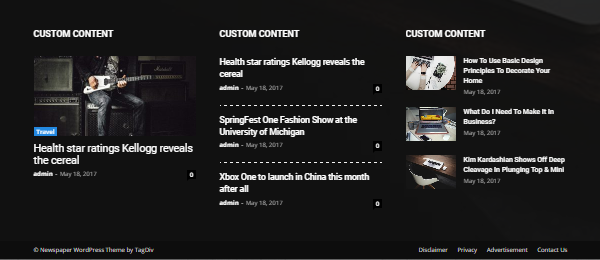
Try to use style 2 or 3 for example.
Simion C. Hi,
Unfortunately that is not a theme feature on mobile. There is no swipe to next/previous article at the moment.
The footer predefined templates have a maximum of 3 columns, but there is an option now that a page can be displayed in the footer
– https://www.screencast.com/t/ZewMAPQgT
However an exact 5 column split would not be possible, maybe something like this
– https://www.screencast.com/t/3rKMbgvC
6 even columns would be possible
– https://www.screencast.com/t/RkWkAM7RT85
You could experiment more with the row layouts.
Thanks
Simion C. What Catalin was trying to say, is that if you have full width elements in the website (stretched rows in pages, full big grids, full width revolution sliders, post templates will full width elements etc) and you set a background color/image
– https://forum.tagdiv.com/background-introduction/
The result will be that the website will be boxed, there will be no full width elements displayed.
So as long as there is no background image or color, rows can be stretched
– https://www.screencast.com/t/tM9dWee1jX
Full big grids can be used
– https://demo.tagdiv.com/newspaper/full-big-grid-1/
Also header and footer sections can be stretched
– https://www.screencast.com/t/ed3M6XfOG
Let us know if you have more questions.
Thanks
 casaldemochilao
Hi! Is there a way that I can put the google translator flags in TOP Bar?
A simple way would be to put the code in extra information using TopBar Multi-purpose, however the field is only for text and the code does not work.
Google Translator plugin codes:
For usage in pages/posts/sidebar: [google-translator]
For usage in header/footer/page templates: <?php echo do_shortcode(‘[google-translator]’); ?>
Thanks,
Larissa
 ctoweett
 Some footer templates have predefined content, this cannot be removed, and your added content will be displayed below them. There are multiple footer templates to choose from including blank templates
– https://forum.tagdiv.com/footer-templates/
Simion C. 1. I have tried configuring the top bar weather widget, all it needs is an API key and valid location
– https://www.screencast.com/t/bFgm2eaJua
– https://www.screencast.com/t/xt4PPreAjJBc
– https://www.screencast.com/t/LeS3k5DarE
– https://www.screencast.com/t/Mkep1BrrHz
Result – https://www.screencast.com/t/n8q1g1ip
Try generating another API key and use that one, there should be no problem.
2. That would be the latest articles section with pagination. Remove it by selecting a different page template for the page
– https://www.screencast.com/t/61fVxgpxD
3. Some footer templates have predefined content, this cannot be removed, and your added content will be displayed below them. There are multiple footer templates to choose from including blank templates
– https://forum.tagdiv.com/footer-templates/
Also a few theme versions before a new option was introduced, in the footer you can now use a page
– https://www.screencast.com/t/kiGVKIY5HrcB
Let us know if you have further questions, we will try to help as best we can.
Thank you
Bogdan B. Hi,
Yes, in the future there will be lots of new options for headers, footers, pages, templates etc. We have big plans on how the templates work as well as the header options you seek. But for the moment it is still too early for me to promise anything. It is still in development at an early stage.
For the moment though I cannot provide any solution for having different headers for different pages.
Thank you!
Simion C. Hi,
If the popular category widget is present in the footer, but not ion the footer sections, that probably means you are using a footer template with predefined content. There are footer templates which display content by default without you entering widgets in the footer sections
– https://forum.tagdiv.com/footer-templates/
So you can change the footer style (an empty one) and display the widgets you want only.
However the category widget should not be broken, if you could provide a link to your website we will inspect the widget.
You could try before to deactivate all plugins except theme plugins and clear all caching. Maybe a plugin is causing the widget to be broken.
Thanks
Simion C. Hi,
Some footer templates come with predefined content, others are blank. The predefined content cannot be customized
– https://forum.tagdiv.com/footer-templates/
You can select an empty template and add the widgets you want, configured the way you want
– https://www.screencast.com/t/5Mu5tNpTkWL
Also a newly introduced feature is to place a page in the footer, instead of a template
– https://www.screencast.com/t/0ImWuvWN
If you are having problems with something please provide some more details about it, we will try to help you.
Thanks
Simion C. Instead of using predefined footer templates which cannot be modified in terms of column layout, you could display a page in the footer
– https://www.screencast.com/t/b4pshnbj
Create a page with the composer and use any layout you want with the available row settings, then set it in the footer. A row can be split in maximum of 4 columns with the tagDiv composer, but there are inner rows which can be split even more
– https://www.screencast.com/t/tNHwyBT640oe
 seawild
I have been researching the options for editing the footer templates in the Newspaper Theme. There is a constant answer relating to footer templates but I am always getting 404’d when I hit the link?
Why would you create a footer menu that cannot be directly accessed from the standard Footer Widgets in WordPress? It’s pretty disorienting.
I understand that I need to access another widget but as the 404 won’t let me how can I?
Cheers,
Mark.
 MOKANA
 I am using Style 1. I did not use a demo as a starting point. I built it up from the ground up, however, never touched any footer or header templates. Just dragged and dropped. It is quite annoying.
 Catalin
 Hello Bagra,
If you want to use all the Footer spots from Widgets you should change the Footer Template. Please check here -> https://forum.tagdiv.com/newsmag-footer-templates-2/
Thanks for the message!
