- NewspaperHeader Builder
- NewspaperHeader ads
- NewspaperHeader styles
- NewspaperSearch setup for custom post type
- NewspapertagDiv Composer – Website Manager
- NewspaperBookmark – Save For Later
- NewspaperWooCommerce: Happy “Add to Favorites!”
- NewspaperModal Popup
- NewspaperFlex Block Settings Guide
- NewspaperPosts Loop Element
- NewspaperHow to Add a Logo in Newspaper
- NewspaperDefault Category Settings
- NewspaperWhen tagDiv Composer is Not Working
- NewspapertagDiv Cloud Library Plugin
- NewspapertagDiv Composer Tutorial
- NewspaperUsing the Theme Translations with WPML
- NewspaperInstagram in Newspaper WordPress Theme
- NewspaperWeather Shortcode
- NewspaperThe Mobile Theme
- NewspaperLogin – How to Enable User Registration
 dharmendra11
 Thanks,
If I want to change the size of the logo on the header
How can I do that?
 Bettina
 Hello!
It seems that you have a cloud template, which means you can edit the homepage, click on that row from your header, access the CSS tab of the header’s element and there you can find options to add padding in the top and in the bottom. So, in this mode you can adjust the height of your header.
Thank you!
 Tribiker
On a WordPress site I am maintaining, the client wants to have a different header image for the blog post than what appears in the thumbnail on the blog roll page and wherever the thumbnail to the blog post appears on the site.
Right now it seems that the featured image is used for both the header image and the thumbnail.
Is there a way where these images can be different?
Any help is appreciated, thanks!
 Neil264846
Hello,
Please do you have an idea how to change background colors on the whole width for header and footer on the picture on the link WeTransfer below :
https://we.tl/t-r44kJh6aA4 (header)
https://we.tl/t-IOWomXjjf0 (footer)
No problem for the rest of the site, I disabled the “background boxed layout” in “Theme Panel” -> “Theme colors” -> “General theme colors”.
But impossible but to extend the white background on all the width for the header and the black background for the footer.
I have read this forum and tried some CSS and HTML codes but nothing worked.
Thank you in advance.
 dharma3d
On mobile theme I have a header ad, but there is some white space above and below. I would like it with no space. How can I do it?
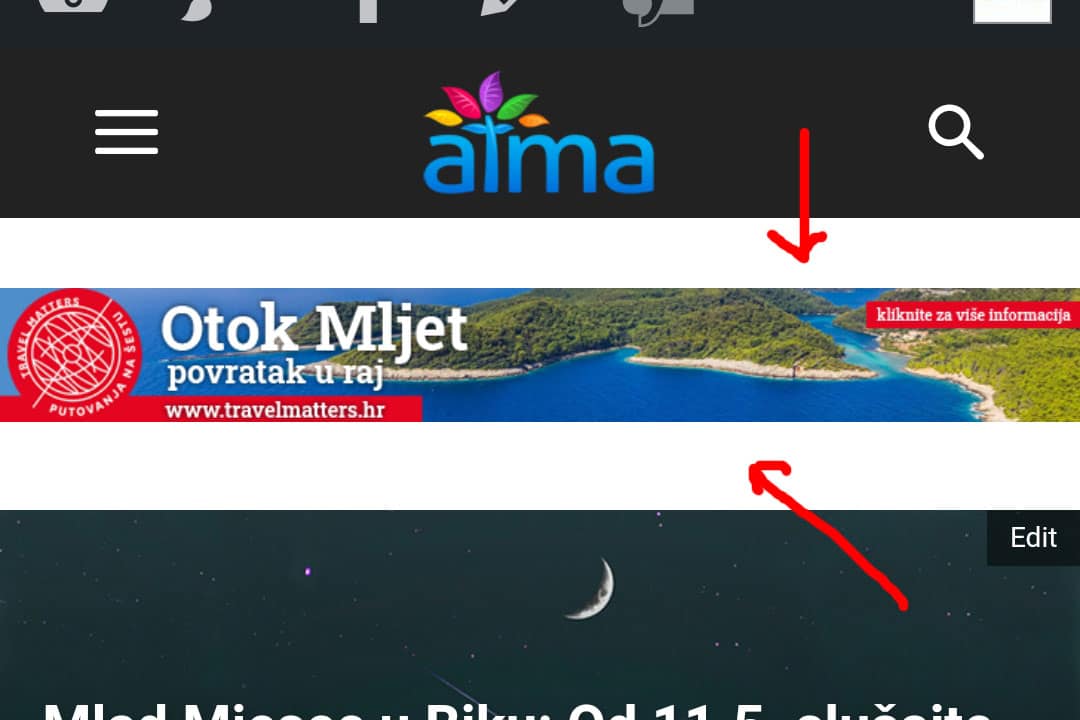
Second related question is – How can I check the CSS for mobile theme so I can customize a few CSS things? With regular theme I would go to Chrome on my desktop PC and do Ctrl+Shift+I
My website is https://atma.hr/
 fabioloutfi
 Hey Vlad. thanks for your reply. Currently I am using the Default PRO so we shouldnt have this problem, but I still cannot edit further those pages. You can take a look here: http://15.161.194.119/wp-content/uploads/2021/05/Captura-de-Tela-2021-05-10-às-09.00.22-2.png
Another question is concerning the blank between the header and the flex grid. Can you help me with that?
You can see in this link: http://15.161.194.119/wp-content/uploads/2021/05/Captura-de-Tela-2021-05-10-às-09.00.07-2.png
Another thing is that is showing me in the homepage is a space with the words ‘Google Search Engine’ between the Grid Flex and the Menu. How can I fix it (take it out)?
-
This reply was modified 5 years by
fabioloutfi.
-
This reply was modified 5 years by
dharmendra11 Thanks,
I want to change the height of the header https://imgur.com/a/EIphTBB
How can I change this?
Neil264846Hello,
Please do you have an idea how to change background colors on the whole width for header and footer on the picture on the link WeTransfer below :
https://we.tl/t-r44kJh6aA4 (header)
https://we.tl/t-IOWomXjjf0 (footer)
No problem for the rest of the site, I disabled the “background boxed layout” in “Theme Panel” -> “Theme colors” -> “General theme colors”.
But impossible but to extend the white background on all the width for the header and the black background for the footer.
I have read this forum and tried some CSS and HTML codes but nothing worked.
Thank you in advance.
 mortgageman
Is there any css for sticky mobile theme header and desktop header.
The setting on td composer is set to sticky for mobile and desktop, but it’s not working.
I’m using the mobile theme and td composer custom-built theme for desktop.
 Prateek
Hello, team tagDiv.
I am unable to remove the underline animation from my header menu. The header template that I currently have on my website doesn’t have these animation, but I need to make some changes and as soon as I edit anything in td-composer menu setting, it adds line animation underneath those menu links.
For certainty, I created a fresh menu template and tried to remove that blue line added by default — but no changes, can’t change menu styles (e.g. background, border), can’t change line width, color, height — nothing.
I’ve tried to demonstrate the problem in this screencast.
 Oldmagio
 Hi there,
I solved the problem with the menu. I managed to set an header from cloud.
But the image of the logo of the cloud menu doesn’t desappear with my logo uploaded even if I toggle the selecion from the options and often the live visualization of TagDiv Composer doesn’t work and the composer crash down.
Moreover I would like to remove or reduce the black row in the screenshot and I can’t to cancel it or to reduce or to change its color.
Could you help me?
 sirms
sirmsHi,
Problem 1:
I have a security issue with this theme. If I enable login then I will be able to log in with the administrator account without using two-step verification.
Problem 2:
I want to create a child theme and remove all codes I do not use such as javascript and css.
For example, I want to remove the Login and sign up the code in the theme, I also want to remove the header from the theme since it wraps everything on the page which makes the page a bit slower and not as smood, I would rather implement my very own custom header that will work equally on both mobile and desktop.
I know if I’m going to do this then this has to be done after every update something I’m comfortable with.
Screenshot of something i will like to remove from the files: https://www.screencast.com/t/XZnqZPmBpze
 PIaIndx
Hi,
I can’t seem to get the thumbnails to load in posts/blocks (https://eygcmedia.com/). I have checked force full content and have the premium rss full text feed to post.
I also can’t get the homepage up on mobile. Its currently showing the default header with Newspaper logo and not the current setting I had implemented.
Thanks
 ted
tedWe recently upgraded to version 10.4 and it has caused the heading menu on some of our pages to disappear and be replaced with a search bar. I think this might be due to changes in the new versions of tagDiv Cloud Library or tagDiv Composer, but we haven’t been able to identify the issue. Here’s an example of a page without a header menu: https://regulatory.news/regulators/regulator_regions/americas/
In our staging environment we are running version 10.3.9.1 and the header menu appears correctly on the same page: https://staging19.regulatory.news/regulators/regulator_regions/americas/
Can you let me know what changed between 10.3.9.1 and 10.4 that might be cause the issue?
Thanks for the help!
Bettina Hello!
Please check which template you have assigned for the header in mobile version, desktop version and set it one for all.
You can try our newest tool called tagDiv CSS Analyzer which comes in handy to resolve some of your issues. Take a look at the video guide here: https://www.youtube.com/watch?v=tnkVapqhIHc
“This custom tool performs an automatic test to find missing CSS rules applied by user interaction. Moreover, you can manually interact with a chosen section/component from the page while the tool records all the involved CSS. It will generate the final CSS file for this page and also will split the rules in Critical CSS to be loaded in the website’s header.” ( https://tagdiv.com/whats-new-in-the-newspaper-theme-10-4-update/ )
We tested our tool on our demos, and we have such great results!
Take a look in this topic because it could help you: https://forum.tagdiv.com/topic/css-analyzer-step-by-step-and-doubts/
Thank you!
 OmurHak
  danielkostuj
My header look other in all site. In mobile other, in web other. Template is very slow. Site full read is 14s https://developers.google.com/speed/pagespeed/insights/?hl=pl&url=czasostrefa.pl&tab=mobile
 Breinblik
Hi!
When i’m building a mobile page for my regular page and i want to test it in the browser i don’t see my content on that page. I see a stripped down version of the page with only the header, page title and footer. What am i doing wrong?
https://test.circulaireconsumptiegoederen.nl/doe-mee/
Thanks!
 Anamaria
 Hello,
Normally, this demo has the shadow, but if you want to add the shadow, please edit the homepage with tagDiv Composer => https://www.screencast.com/t/pofURkpwQDM, and after header you need to have a CSS Code =>https://www.screencast.com/t/CvkujL8gLtW2, if you don’t have it you can add the element from tagDiv Composer, called “RAW CSS” open it => https://www.screencast.com/t/sRHhHBuDFand add this custom code
.td-header-desktop-wrap .tdc_zone {

  box-shadow: 0 -13px 10px 3px rgba(0, 0, 0, 0.12);

}

.td-main-content-wrap {

  box-shadow: 0 0 10px 3px rgba(0, 0, 0, 0.12);

}

.td-footer-wrap .tdc_zone {

  box-shadow: 0 13px 10px 3px rgba(0, 0, 0, 0.12);

}
Hope this helps you!
Thank you!
 Brain916
 It’s the header adsense spot:
 Krimiwa
 Hi there,
I also would like to assign single post templates to custom posts – or at least assign a custom header.
Is there any news on when you will implement this?
-
This reply was modified 5 years by
Krimiwa.
 Calin
Calin Hi BlakeForm, we hope that this month we’ll make the update for Newsmag, and in case that this is not possible, then it will be the next month.
Thank you for your understanding!
Hi Sepjir,
The problem with height and width from logo is that the option from WP Rocket is setting the full size on logo, and the header that you are using is use a smaller size. You can use a smaller logo something like this 126x45px (more or less) and the logo should display better with that option from WP Rocket.
Let me know the results!
Brain916 Photoboy
Composer does not work, can’t click on elements, and I get this message;
Errors at columns elements: 18(models) : 16(dom). The model does not match the content Current state has involved an issue. You could try an UNDO operation (CTRL+Z / CTRL+SHIFT+Z)
https://www.dropbox.com/s/wyxaius71nfh2xt/Screenshot%202021-05-06%20at%2013.18.17.png?dl=0
I have these plugins all active:
Advanced Custom Fields
Akismet Anti-Spam
AMP
bunny.net
Contact Form 7
Cookie Notice & Compliance for GDPR / CCPA
Featured Images in RSS for Mailchimp & More
Insert Headers and Footers
MC4WP: Mailchimp for WordPress
Rank Math SEO
roll call (custom plugin)
Site Kit by Google
Smush Pro
TagDiv Cloud Library
tagDiv Composer 2.8
tagDiv Mobile Theme
tagDiv Social Counter
tagDiv Standard Pack
Thrive Leads
Thrive Product Manager
UpdraftPlus – Backup/Restore
Velvet Blues Update URLs
WP File Manager
WP Rocket
WPMU DEV Dashboard
Yoast Duplicate Post
Bettina Hello!
You should be able to add an element called “Button” with TagDiv Composer in the header.
For more information about this plugin, please check our documentation here: https://forum.tagdiv.com/tagdiv-composer-tutorial/
Thank you!