- NewspaperHeader Builder
- NewspaperHeader ads
- NewspaperHeader styles
- NewspaperSearch setup for custom post type
- NewspapertagDiv Composer – Website Manager
- NewspaperBookmark – Save For Later
- NewspaperWooCommerce: Happy “Add to Favorites!”
- NewspaperModal Popup
- NewspaperFlex Block Settings Guide
- NewspaperPosts Loop Element
- NewspaperHow to Add a Logo in Newspaper
- NewspaperDefault Category Settings
- NewspaperWhen tagDiv Composer is Not Working
- NewspapertagDiv Cloud Library Plugin
- NewspapertagDiv Composer Tutorial
- NewspaperUsing the Theme Translations with WPML
- NewspaperInstagram in Newspaper WordPress Theme
- NewspaperWeather Shortcode
- NewspaperThe Mobile Theme
- NewspaperLogin – How to Enable User Registration
 degelcreatives
 i need to fix me right now you have my admin account into contact tagdiv the fixed the comment issue but the style i request isnot bulid tag div ineed comment under the post like facebook style but they under the releted post the other issue is header login on the mobile donst work when you click stucks olny not opening and the third issue is google adesense application isnot aproved my website all three errors i want to fix now to knight mr Calling
 Simion C.
 Hi,
That’s very unusual, it looks like the edit page is blank. It probably means there’s a problem with the header, although it looks like a basic header. Have you tried importing a new header -> https://prnt.sc/cd5Hdo8Y3uYR to see if the same happens?
I can take a look at it as well. I need access to the website, admin user and pass, you can send these by email at contact@tagdiv.com And please paste a link to this topic in the email as well.
Thank you!
Simion C. Hi,
Instead of using a header menu in the mobile header, you could use the intended mobile menu directly https://prnt.sc/mGVbj30dW1bE
Or, since I see you created a page to display that menu, you could use a popup and set the page in it https://prnt.sc/iyxc5FM6gfDa
For example if you check this demo on mobile, the mobile menu is a popup which opens a page https://demo.tagdiv.com/newspaper_urban_observer_pro/
More about the popup element here -> https://forum.tagdiv.com/modal-popup/
Either of these would be a good solution for a mobile menu. Please give the a try. Let me know if you have questions.
Thank you!
 Westfrieslandpraat
on a other site i run you can show video in the header, but when selecting audio, there is no audio in the header.. https://hbpmedia.nl/napleiten-podcast-de-livestream-moord/
 berwarnews
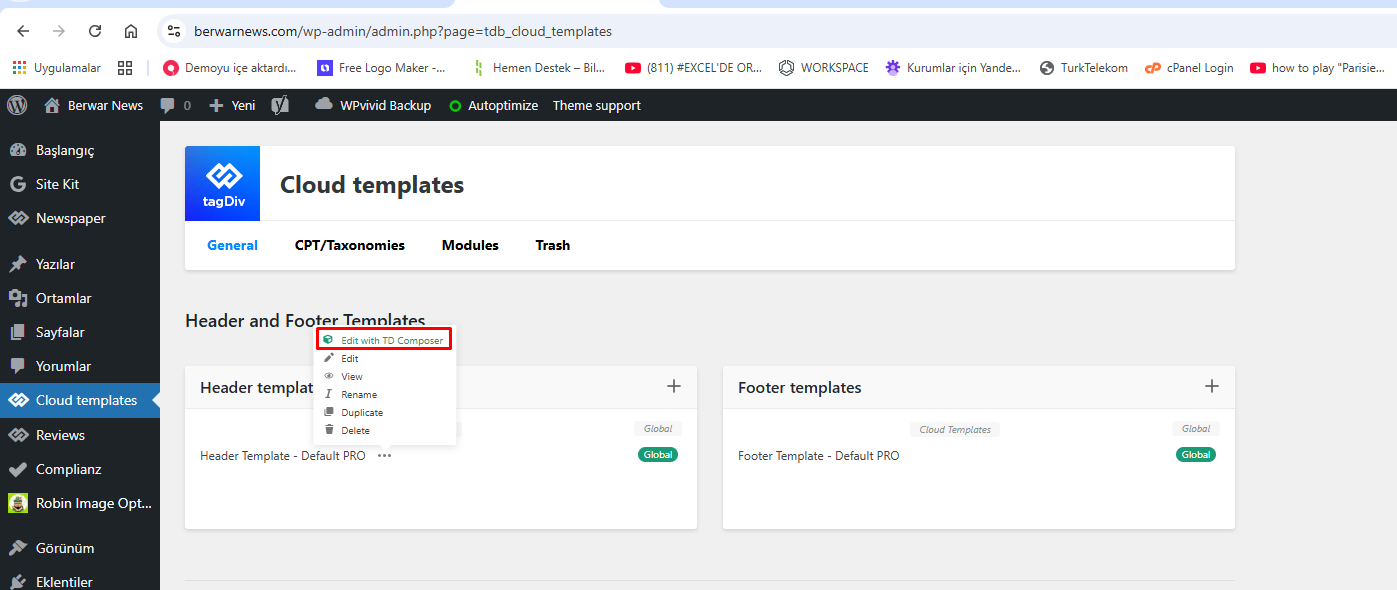
When I try to edit my website’s header page not loading. Pls help.
https://berwarnews.com/wp-content/uploads/2026/05/01.png
https://berwarnews.com/wp-content/uploads/2026/05/02.png
Simion C. Hi,
That’s the header template from our Amsonia demo https://demo.tagdiv.com/newspaper_amsonia_pro/amsonia-header-template/?
I imported just the header https://prnt.sc/5JAf2N9YbZYa and it looks like this https://prnt.sc/2W712fCrNMx4
The header requires the opt-in plugin to be active https://prnt.sc/1AUZY0w1_E74 in order to display the login element in the menu https://prnt.sc/1agvRvzrlAjm
And it also requires setting a page for the menu popup, for example https://prnt.sc/A056qQljOam_
But other than this the header should display exactly like in the live demo. How does it look when you import it? If you can provide a link to where you are using this header and there are problems, I will check it. Or if you prefer you can send us email with the link at contact@tagdiv.com
Thank you!
 getnidhi.29
How is it possible to make the same like design. Even importing demo is also not giving this design. Could you help me.
Hi,
If the ad is placed in the mobile header, then it’s quite unusual if its displayed on desktop. The whole mobile header is hidden on desktop, so why would just the ad from it appear. Could we take a look at this on your website? You can provide a link here, or by email at contact@tagdiv.com Then we can inspect the ad to see what happens exactly.
Thank you!
 muchado12000
 Hello, Calin. Thank you for replying. I’m not using image ads, I’m using non-Google banner ads that are not images. I pasted the ad code into Custom ad 2 in the Theme panel. Then I dragged the box ad to the mobile header. Then I chose Custom ad 2 in TagDiv composer. However, when I click the other viewports, the Custom ad 2 code shows in all 4 viewports. I only want the mobile ad to show on mobile.
 Calin
Calin Ok, now is understand the situation.
You have created mobile templates that you are using only for mobile, but you do not have a mobile header and footer, so those need to be converted, edit a mobile template and select the manager, you can convert the header and the footer – https://prnt.sc/j20mPExYC01H – https://i.imgur.com/TbDs2b2.png
Calin Hi,
Most of the time, the problem is from a html tag that is not complete (si open but not close or closed but not open); therefore, after you set it with tagDiv Composer and save the page/cloud template, the next time you try to edit it, you’ll get that error.
If is only for one page or a cloud template (it can be on the header or footer, you can change them for tests and see if the problem persists), this is from some settings/shortcodes set on it and it can be fixed using the page revision https://wordpress.com/support/page-post-revisions/
Thank you!
 maxcao
Hello everyone, the website I’m building with the Newspaper template is this one: https://www.aefvg.eu/. I don’t understand how to color the entire top header bar yellow (besides the logo and main menu). How can I do that?
I’m also wondering how to remove the “LEAVE A REPLY” option at the bottom, near the footer.
Thanks for your support.
Max
getnidhi.29 I have designed the template as needed for me. For me I need “LC – Single Template” as my mobile view and “Single Post Template – Free News” as my computer view. How can I set it. I checked for the option by copying the “LC – Single Template” and making to mobile version but still when I give the mobile template option again the issue is raising for the header and footer as its not coming as intended.
At the same time I only have one header and one footer. The only issue is that when clicking the mobile view, I am getting the below header and footer which is not present while editing the mobile view via tag div
Header and footer which I dont want and which comes when I click mobile version of the theme I want:
https://prnt.sc/bmwv-EnUe2yI
https://prnt.sc/thtJ3oi1fUbl
This is how front end shows me for the same mobile version tagdiv composor:
https://prnt.sc/XmKcb7mcrvEm
https://prnt.sc/x21NvOxFkM-f
I need exactly like this in mobile version without the black header and footer
getnidhi.29 As you can see in the pic. I only have one option as my header and footer. I have issue with both header and footer. Its not getting fixed after many follow-ups.
Calin Hi,
This can be done using the copy-paste method. For example, if you want to copy a header, edit it, hover over the three dots, and click Edit: https://i.imgur.com/FUHR4iN.png
If you only need the Cloud Templates and want to import everything related to them, the best solution is to use the WordPress Import/Export tool and export only the Cloud Templates.
Thank you!
Calin Hi,
Yes, you can edit the mobile header. For this, please use tagDiv Composer and edit the homepage.
Once opened, select any element on the page and switch to the mobile viewport. From there, you can customize the header elements such as the logo, menu, and search icon colors. You can also modify the row that contains these elements for example, setting the background color to white and adjusting the menu and search icons to black – https://forum.tagdiv.com/header-manager/
https://prnt.sc/Pu7oOYY1AASk
https://prnt.sc/uf35inzHSd-F
https://prnt.sc/5vvGw1JqMRdU
https://prnt.sc/PKvQoV4s0owm
Thank you!
Calin Hi,
The zones refer to the header/content/footer zone.
Most of the time, the problem is from a shortcode that is not compatible with our theme; therefore, after you set it with tagDiv Composer and save the page, the next time you try to edit it, you’ll get that error. The simplest and fastest way to resolve it is to use a page/template revision – https://wordpress.com/support/page-post-revisions/ (in this case will be a post template revision).
If the above solutions are not working, please send us an email at contact@tagdiv.com and provide the WP-admin login, as well as cPanel and credentials. We will take a look. Include a link to this topic in the email.
Thank you!
 Patrick S
Good Morning, I am attempting to make some changes, My logo for my newspaper is white and the nav bar is showing black on mobile. So it looks black with my logo in between, What setting do I need to change this to make my navigation on mobile more visually appealing to the viewer? Is it also possible to change the background color on the navigation menu so it’s not semi transparent. The URL in question is https://thenewsofsalemcounty.com
Calin Hi,
I’ve checked the website, and it appears that the responsive header and footer are now loading correctly. However, based on your screenshots, it looks like the tagDiv Mobile Theme plugin may still be installed and active.
Please verify this on your side. If the plugin is installed, kindly disable it, then clear all cache. This should resolve the issue.
getnidhi.29I would like to know that how is it possible to edit the following heading and banner in mobile view. I tried in the cloud template option, but there it has no option for editing the mobile header and footer. Please refer the pics for your reference. My website is http://www.editnews.in
And how can I make the mobile menu floating. Please help on the same
Image 01: https://postimg.cc/vcfZygKN
Image 02: https://postimg.cc/BX9JmZvH
 Reyking74
I am experiencing a persistent Facebook Sharing Debugger / Open Graph issue on a website using the Newspaper theme by TagDiv:
The Facebook Debugger consistently returns HTTP 403 and fails to properly retrieve Open Graph metadata from article pages.
Before suggesting generic hosting/firewall checks, please note the following:
Technical context:
What has already been verified:
Important observation:
Another WordPress site (mine, personal) hosted on the exact same server successfully returns proper Open Graph data and is scraped correctly by Facebook.
This strongly suggests the issue is related either to:
The Facebook Debugger currently retrieves incomplete OG data and sometimes only partial metadata such as:
Could you please provide technical insight specifically related to Newspaper/TagDiv behavior with Facebook crawlers, rather than generic hosting or firewall suggestions?
Thank you.I am experiencing a persistent issue with Facebook sharing/scraping on my website serenissima.news, which uses the Newspaper theme by TagDiv.
I have already performed a deep cleanup of the database and verified the server configuration. Before suggesting the usual “contact your hosting provider to whitelist Facebook in the firewall,” please consider the following:
I am the hosting provider. I own and manage the server (DirectAdmin based).
The firewall is NOT the issue. There are dozens of other websites on the same server (same IP) that share perfectly on Facebook without any blocks.
The issue is site-specific. Only the installation using the Newspaper theme is failing to provide the correct metadata or is being blocked/rejected during the scrape.
What I have checked so far:
Metadata: Standard OG tags are present, but the Facebook Debugger is not pulling them correctly.
Plugins: Performed a cleanup of caching plugins (WP Super Cache removed) and optimized the wp_options table.
Isolation: As mentioned, other sites on the same server work flawlessly, ruling out any server-side IP blacklisting or Firewall (CSF/LFD) interference.
I suspect there is a specific conflict within the theme’s header output or a built-in SEO/Open Graph setting in TagDiv that is clashing with Facebook’s crawler.
Please provide technical insights that don’t involve “whitelisting” as that has already been ruled out.
 RENATO
 @Calin, You know what’s happening, the theme is ignoring the post made for mobile (there’s a separate mobile theme), you can see it here: https://ibb.co/DgpbbLbT. It loads the desktop page on the phone, analysis: faint blue header and an ad like this (it’s for desktop), there’s no ad on mobile, the ad is only for desktop. Remember you told me to activate this? https://ibb.co/Rkjbv6bP It’s activated. Even so, the theme is loading the desktop theme on mobile, it doesn’t know how to separate them and isn’t separating them. The cache is correct https://ibb.co/JRVBbRqz it’s activated to generate mobile cache, look at this loading from https://ibb.co/TBT7jJLr, I mean, I did this last year, separate mobile theme, look at this https://ibb.co/x8c0yx07 everything is correct. I ask for a solution to fix this. You saw the performance is bad, horrible, because of this. I think the theme developer needs to create a plugin to redirect pages created on the mobile theme, so that when you open the mobile theme, you only open the desktop theme, and only the desktop theme, to avoid this mess. I’m asking for help; if you can’t help, talk to the person who created this theme and ask for guidance. I’m losing audience and rankings because of this.
Calin Hi,
I will forward this to our developers, and they will check it out.
Also, I want to let us know that using a mobile page/template will still load teh tagDiv Composer and cloud library (because those are used to create those pages and cloud templates for the mobile version). Normally, this option should be used when you need to have different content on mobile pages and mobile templates, maybe a smaller page with fewer elements, blocks, and for a different layout. Having the same layout and content will be better to use the responsive version, instead of the mobile page/template.
Here are a few additional recommendations you can try. For some users, all themes work without issues, while for others, only certain ones function properly. This can vary depending on the extra plugins in use, as well as any caching or optimization plugins installed.
-> Footer delayed load https://prnt.sc/FS34hBno40sx (under the theme panel > footer > footer delayed load)
-> MINIFY INLINE CSS and AGGREGATE INLINE CSS – https://prnt.sc/en14t6CQChM- (under the theme panel > block settings> inline css)
-> Don’t load on mobile/desktop, this option is only on the cloud header for HEADER MENU https://prnt.sc/udlAW4icvSPP on HEADER MENU STICKY https://prnt.sc/9pKnilQdWyex on MOBILE MENU https://prnt.sc/ff7fRQvTnaXt and on MOBILE MENU STICKY https://prnt.sc/Mm-4mbC4WB68
-> Flex Blocks cache – https://forum.tagdiv.com/use-flex-blocks-cache-option/
Also, it is recommended to use a good cache plugin and even Cloudflare (CDN)
Thank you!
 opinandosinanestesia
Is there a way to set the header images, like with YouTube videos, to adult-only mode? And only have those images visible to people who disable “adult-only” mode directly on the image itself.
 azdesinews
Hi there, I am trying to change the header template for the blocks, but I can’t. I select a header template, and no changes are applied. I’m using the downtown theme.
azdesinews.com