
- NewspaperHeader Builder
- NewspaperHeader ads
- NewspaperHeader styles
- NewspaperSearch setup for custom post type
- NewspapertagDiv Composer – Website Manager
- NewspaperBookmark – Save For Later
- NewspaperWooCommerce: Happy “Add to Favorites!”
- NewspaperModal Popup
- NewspaperFlex Block Settings Guide
- NewspaperPosts Loop Element
- NewspaperHow to Add a Logo in Newspaper
- NewspaperDefault Category Settings
- NewspaperWhen tagDiv Composer is Not Working
- NewspapertagDiv Cloud Library Plugin
- NewspapertagDiv Composer Tutorial
- NewspaperUsing the Theme Translations with WPML
- NewspaperInstagram in Newspaper WordPress Theme
- NewspaperWeather Shortcode
- NewspaperThe Mobile Theme
- NewspaperLogin – How to Enable User Registration
 PrabathR
Dear Friends,
Since yesterday my site suddenly not loading properly. all the article content become duplicate and it top of the site header. someone help me to fix this issue.
URL – http://www.adasrilanka.com/amazing-foods-for-successful-marriage/
 mifwebid
Hi, I installed the Art Creek demo and found these issues:
1. The social widgets aren’t on the right place
2. I cannot find the way to change the hero image https://drive.google.com/file/d/1u2c8mYxJ5wi4nZKKcqtpczBEYPrHsV6C/view
3. The tried to change theme color such as header background color but didn’t work.
 Catalin
 Hello Pruthvi,
You should check the AdSpots from the Theme panel because there are all the advertisements on your website. For more information about these ads, please check our documentation from here -> https://forum.tagdiv.com/newsmag-header-ads/
Thanks for your understanding!
 Bogdan B.
 Hello,
When using an overlay menu, you will have to make the menu visible for all other templates besides the page and implement the css for that page only. Please make the menu black or other colors so you can see it on every other template and then add this css code to your page in the tagdiv composer:
.home .td-header-wrap .td-header-menu-wrap .sf-menu>li>a{

color:white;

}
Thank you!
 pabelp
I made a header on all pages of the site with a transparent background and white letters. As here: http://www.brandnewwoman.ru/home/
But on the blog page of the header you can not see: http://www.brandnewwoman.ru/2018/01/05/hi/
Do not tell me how to solve the visibility problem of the header on the blog page?
Thank you in advance!
 22p
22p I removed the class “td-travel-header td-stretch-content” from the row but never change. The only difference is that now on desktop i have a top margin.
Any ideas to solve? The problem remain on mobile.
 blithe
 In that thread, files are outdated. Also I am using multipurpose. I figured out. After this change; h1 on logo only show in homepage.
Change this file : wp-content/plugins/td-multi-purpose/header/tdm-header-menu-h1.php
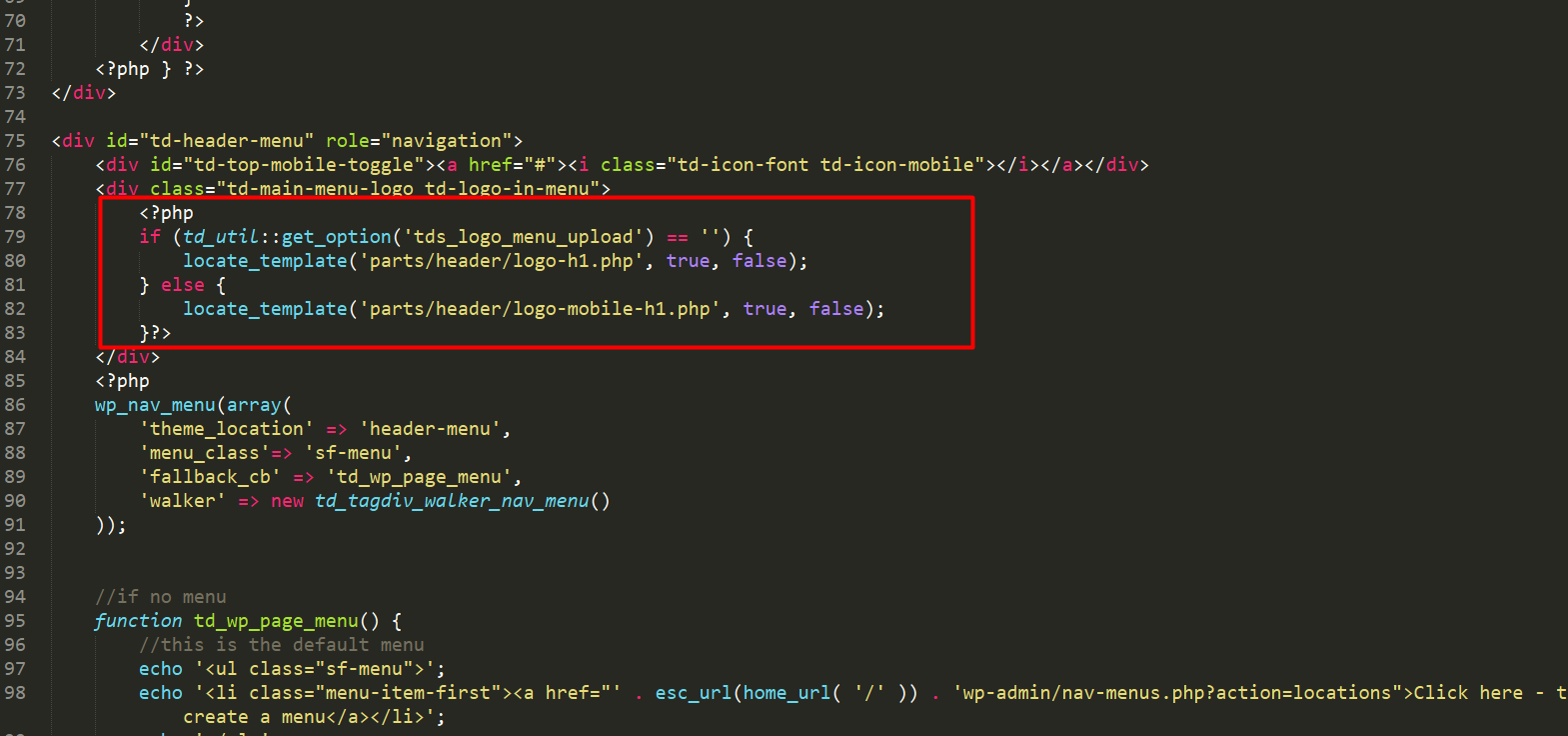
TO:
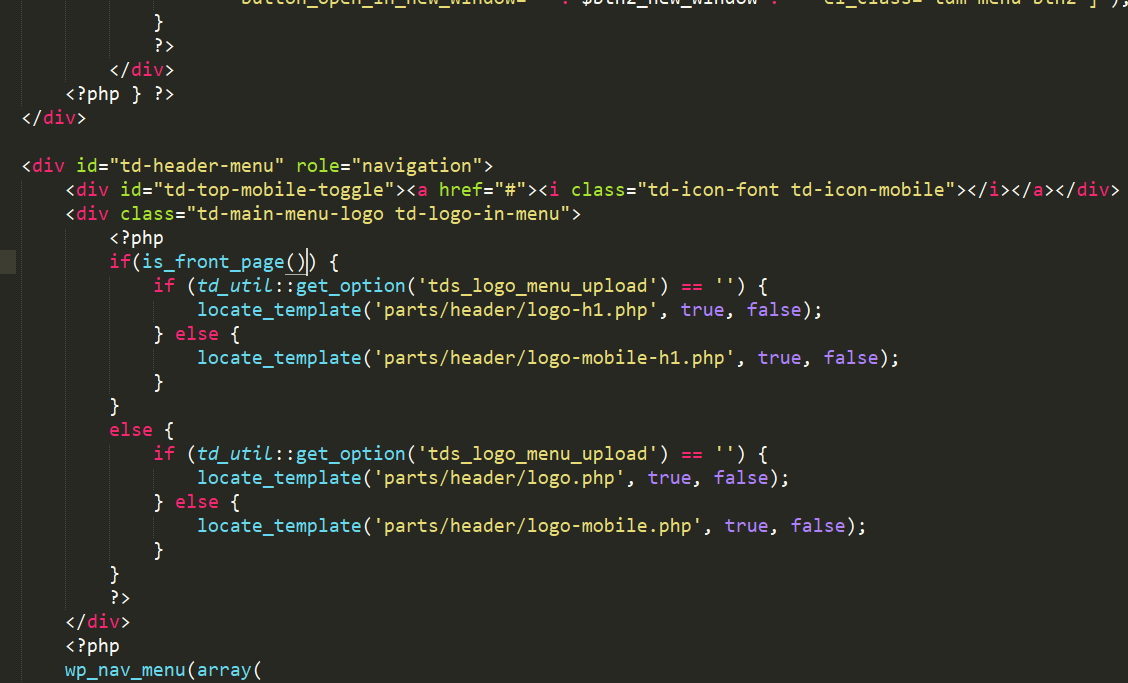
 Ducacordero
 <?php
/**
* The single post loop Default template
**/
if (have_posts()) {
the_post();
$td_mod_single = new td_module_single($post);
?>
<article id=”post-<?php echo $td_mod_single->post->ID;?>” class=”<?php echo join(‘ ‘, get_post_class());?>” <?php echo $td_mod_single->get_item_scope();?>>
<div class=”td-post-header”>
<?php echo $td_mod_single->get_category(); ?>
<header class=”td-post-title”>
<?php echo $td_mod_single->get_title();?>
<?php if (!empty($td_mod_single->td_post_theme_settings[‘td_subtitle’])) { ?>
<p class=”td-post-sub-title”><?php echo $td_mod_single->td_post_theme_settings[‘td_subtitle’];?></p>
<?php } ?>
<div class=”td-module-meta-info”>
<?php echo $td_mod_single->get_author();?>
<?php echo $td_mod_single->get_date(false);?>
<?php echo $td_mod_single->get_comments();?>
<?php echo $td_mod_single->get_views();?>
</div>
</header>
</div>
<?php echo $td_mod_single->get_social_sharing_top();?>
<div class=”td-post-content”>
<?php
// override the default featured image by the templates (single.php and home.php/index.php – blog loop)
if (!empty(td_global::$load_featured_img_from_template)) {
echo $td_mod_single->get_image(td_global::$load_featured_img_from_template);
} else {
echo $td_mod_single->get_image(‘td_696x0’);
}
?>
<?php echo $td_mod_single->get_content();?>
</div>
<footer>
<?php echo $td_mod_single->get_post_pagination();?>
<?php echo $td_mod_single->get_review();?>
<div class=”td-post-source-tags”>
<?php echo $td_mod_single->get_source_and_via();?>
<?php echo $td_mod_single->get_the_tags();?>
</div>
<?php echo $td_mod_single->get_social_sharing_bottom();?>
<?php echo $td_mod_single->get_next_prev_posts();?>
<?php echo $td_mod_single->get_author_box();?>
<?php echo $td_mod_single->get_item_scope_meta();?>
</footer>
</article> <!– /.post –>
<?php echo $td_mod_single->related_posts();?>
<?php
} else {
//no posts
echo td_page_generator::no_posts();
}
 applesandarrows
 Awesome! That worked for the header, but I’m struggling to make that happen with the footer logo.
Thank you so much!
 Simion C.
 Hi,
Please try removing the demo class td-travel-header from the row. Check the general row settings for the top row and remove the custom class found there. It is added by the demo for custom design used on the default elements. Let us know the results.
Thanks
Simion C. Hi,
That would be the case if you have installed the Business demo
– https://demo.tagdiv.com/newspaper_business/
This demo has custom design that will position the logo on the right, when using header style 1. All the demos have custom design, based on modifications made to the default theme elements.
In this case you could either change the header style (the design is only for header style 1), or remove the code that is responsible for the modification, in the demo stylesheet directly
– https://www.screencast.com/t/oE3x6hLon
Thanks
Catalin Hello dunies,
All the AdCode should have to be added to the Ad Spots in Theme panel. Please check our documentation from here -> https://forum.tagdiv.com/header-ads-adsense/ and here -> https://forum.tagdiv.com/using-other-ads-non-adsense-ads/ if you want to add some custom ads.
Thanks for the message!
 avielder
Hello!
I have chosen Header Style 7 and I have it as a sticky menu when I scroll down. I noticed that when I scroll down the menu is sticky but the logo disappears. Is there a way to get the logo to shrink down proportionally and stay on the header?
 kredit
 my header logo (syle 1) is showing on the right and not on the left site. (adsense banner code is not submitted) yet.
How Can i Move my logo from the right to left please ?
http://prntscr.com/i0vlcb
 jasonleewkd
 I’m trying to get something like the “Top destinations”, “Editor’s choice” headers, and manual links to posts under those headers.
Is that possible?
Bogdan B. Hello,
Please add this css to the theme panel-> custom css box:
.home .td-header-style-5 .black-menu .sf-menu > .current-menu-item > a{

    background-color: transparent!important;;

}
Thank you!
 gbouquet
Hello,
how can I use the “Style 1 – Multipurpose” in “theme panel> header> Top bar”?
I would like to add some elements to my top bar.
Is there a tutorial?
Thanks
 duck1970
 Hello Bogdan, sorry for missing information for a correct solution to my question.
YES it is a plugin which offers me the Shortcode [djwp] that I have installed in my WordPress. This plugin shows me a photo in the header of a size of 1040×140, the plugin is called DJROTATOR and shows photos in the schedules that I program. Thank you
Bogdan B. Hi,
Or you can use a header style that does not show the full size logo./ Avoid header styles 9, 10 or 11 if you do not want a full width logo.
Thanks.
Simion C. Hi,
1. That would be the demo header ad, it can be replaced with your own ads in the theme panel ads section
– https://www.screencast.com/t/Th0h0Snzd4
Or simply replace the demo image and set the link you want in the demo ad code
– https://www.screencast.com/t/ynUvB1yK
More about it here – https://forum.tagdiv.com/using-other-ads-non-adsense-ads/
2. Enter the ad code as provided (like Adsense for example )in the ad section you want. If you do not use Adsense but a different ad implementation, the same applies. If the ad code is valid it will be displayed (in some cases additional steps have to be taken, follow ad provider instructions).
3. The sizes of Big grids are fixed, they will always look the same. There are 10 Full big grids that can be used for full width
– https://demo.tagdiv.com/newspaper/full-big-grid-1/
Also blocks have predefined design, however the rows in which they are placed can be stretched and they will adapt
– https://www.screencast.com/t/n7MpHTGdFB
4. Regardless of image size used for featured images, the theme will create thumbnails from them. These thumbnails will be loaded, not the full image. Still there are methods to optimize the thumbnails, see point 3 in this guide for example
– https://forum.tagdiv.com/how-to-make-the-site-faster/
Thanks
avielderHello,
Is it possible to create a video background header that goes behind the menubar as well? Here is a sample of what I mean.
Simion C. Hi,
That could be made in these files, in each of the two locations
– https://www.screencast.com/t/fv7V2O0J
– https://www.screencast.com/t/5QtNF8NRYcaq
By default the header logo will direct to the homepage. A change like this for example, will change this functionality
– https://www.screencast.com/t/l5wFa3dCA3
– https://www.screencast.com/t/d6nJ49OVl
Thanks
duck1970Hello forum friends, I have a question for you: is it possible to use this Shortcode [djwp] in the header of my website? It is a sortcode that shows an image and changes every hour. If possible, can you tell me which code to insert and where? thank you very much
I leave my link to the web
http://www.radiomarcabarcelona.com/
 niederense
 you can try it with CSS
.td-header-style-10 .td-header-sp-logo img {
  display:block;
  position:relative;
  width:300px;
  z-index:1;
}-
This reply was modified 8 years by
niederense.
 modocmag
Hi there,
I am currently trying to replace my PNG header logo to SVG, however, whenever I do it, the logo expands into full size on the browser. Is there a code I can keep it for example 300 by 300 pixels?
Website is http://www.ourculturemag.com – SVG is not currently the main logo
