- NewspaperHomepage – How to build and set it
- NewspaperHow to edit modules for Flex Block X
- NewspaperGeneral Options that May Interfere with the Newspaper Theme
- NewspaperThe Newspaper Mobile Theme: Introduction
- NewspaperHow to Add a Logo in Newspaper
- NewspapertagDiv Shop
- NewspaperHow to Use tagDiv Cloud Library
- NewspaperDesign your Post Pages using the Cloud Library Templates
- NewspaperHeader Builder
- NewspapertagDiv Cloud Library Plugin
- NewspapertagDiv Composer Tutorial
- NewspaperNewspaper theme documentation
- NewspaperThe Mobile Theme
- NewspaperPage templates
- NewspaperTheme Colors Introduction
- NewspaperFooter Builder
- NewspaperMain Menu
- NewspaperPre-built Websites: Introduction
 Catalin
Hello, on my website homepage (ecommercenews.ro) I have a “Big Grid Flex 3” with the latest posts. Below that I have a “Flex Block 5” also with the latest posts. I would like to show the latest posts on the “Flex Block 5” without the ones already shown on the “Big Grid Flex 3”. Is that possible? Thank you.
 Bettina
 Hello!
You should edit the homepage with the tagdiv Composer, click on the logo and remove those text and image: https://app.screencast.com/GzlhC6XKWygKT
You can also delete the element and add another header logo. There is a recycle bin basket for every element: https://www.screencast.com/t/wFYdqgpo6pT
I recommend you uninstall the Mobile theme and AMP plugin.
Thank you!
Bettina Hello!
Unfortunately, I can’t see your screenshot: https://app.screencast.com/eAivuEMQ81Zvg
You can edit the homepage with the tagdiv Composer, scroll down to the footer, and check the links you have there. You can edit the elements there and delete them if you do not need them anymore. There is a recycle bin basket for every element: https://www.screencast.com/t/wFYdqgpo6pT
Thank you!
 JimC50
Hi – I’m having problems editing my homepage. I want to add an image that links to an internal page on the right hand side, where I currently have a podcast embedded and an ad underneath it. I can add an Image Info Box in between them, and I can change the background image. I can also change the text. But I cannot change the title, nor can I add the URL to link the box to. I’ve tried everything, and it’s driving me insane. Any help would be great. Or maybe I add something that isn’t an Image Info Box, but I can’t seem to add an image that I then link to an internal page.
 Good Target
 the homepage on mobile displays fine (Safari and Chrome), but if you open an article (https://saintmalowithlove.com/marche-de-noel-saint-malo/), the CSS is no longer supported and the article is all broken.
the header and footer are not displayed. the page layout is broken.
Bettina Hello!
I’m not sure what you mean exactly. Do you mean copy content for the mobile pages? https://tagdiv.com/newspaper-10-3-7-update-brings-customizable-and-fast-mobile-pages/
More documentation about the cloud templates is here:
– https://forum.tagdiv.com/cloud-library-templates/
– https://forum.tagdiv.com/design-post-pages-using-cloud-library-templates/
– https://forum.tagdiv.com/cloud-library-category-templates/
About pages here: https://forum.tagdiv.com/page-templates-2/ -> https://forum.tagdiv.com/homepage-how-to-build-and-set-it/
Check out this video about how to create a website from scratch: https://www.youtube.com/watch?v=SoGQ0d5kIBg
If you want, I can take a look, see exactly the issue, and let you know what you can do there. Please contact us via email at contact@tagdiv.com and provide the following:
– admin url and credentials
– more details about the issue
– a link to this topic in order to identify you
Thank you!
Bettina Hello!
Use a single cloud template, so you can edit it with the tagdiv Composer, and there you can drag & drop the elements in any green area.
A useful guide here: https://forum.tagdiv.com/tagdiv-composer-tutorial/
More documentation about the cloud templates is here:
– https://forum.tagdiv.com/cloud-library-templates/
– https://forum.tagdiv.com/design-post-pages-using-cloud-library-templates/
– https://forum.tagdiv.com/cloud-library-category-templates/
About pages here: https://forum.tagdiv.com/page-templates-2/ -> https://forum.tagdiv.com/homepage-how-to-build-and-set-it/
Check out this video about how to create a website from scratch: https://www.youtube.com/watch?v=SoGQ0d5kIBg
Thank you!
 dtechted
 And about this?
https://tap.dtechted.com/
(Plan your next trip)
This is heading, there is slider below that and I tried to upload a post and made Home_info category and selected in filter Modulte section that Category but its not showing at homepage slider. Can you please check
dtechted Its a travelpayout script tag and can you tell me how to use .webp in newspaper theme.
https://tap.dtechted.com/
(Plan your next trip)
This is heading, there is slider below that and I tried to upload a post and made Home_info category and selected in filter Modulte section that Category but its not showing at homepage slider. Can you please check
 Cestování na fulltime
When I last posted on my website, I noticed that my main menu on the homepage had disappeared. Instead, there are just a bunch of unreadable letters. Please advise me on how to fix this. I tried checking the menu settings, but I didn’t change anything, so I have no idea why this happened.
 Børnenes Aarhus
Hi tagDiv Support Team,
I’m having an issue where the <h1> tag around the logo isn’t being removed, even after enabling “Disable H1 on logo” in both the frontend (tagDiv Composer) and backend (Theme Panel). I’m running Newspaper version 12, updated from version 8, and working in a test environment to redesign my site. My goal is to fix a “Multiple H1” issue flagged by Screaming Frog, where the logo has an empty <h1> alongside the page title’s <h1>.
Here’s what I’ve tried:
In tagDiv Composer (Frontend):
I imported a new header from Cloud Library.
Edited the “Header Logo” block, found “Disable H1 on logo” (a checkbox), checked it (enabled it), and saved the template.
Assigned the new header to the homepage in Theme Panel > Header > Main Menu.
In Theme Panel (Backend):
Went to Theme Panel > Header > Logo.
Found “Disable H1 on logo” (another checkbox), checked it (enabled it), and saved settings.
Cache Clearing:
Cleared W3 Total Cache (“Empty All Caches”).
Cleared Chrome browser cache and tested in incognito mode.
Despite these steps, the <h1> tag remains in the source code. Here’s an example of what I see when inspecting the page in Chrome:
html
<h1><span class=”tdb-logo-img-wrap”> </span></h1>
This empty <h1> causes a “Multiple H1” issue, as my page titles (e.g., from “Single Post Title”) also use <h1>.
What could be overriding the “Disable H1 on logo” setting? Is this a known issue after updating from version 8 to 12? Could old templates or settings from version 8 be interfering? Any help would be appreciated!
 JGL
JGLDear team,
We have recently bought the newspaper theme and we are using Covid Stats Pro as our pre-build theme.
We would like to amend H1 and H2 tags for SEO purpose but we don’t know how to do it.
Please advise, thank you very much!
 barryalbert
Error at zones: 6(models) : 0(dom). The model does not match the content Current state has involved an issue. You could try an UNDO operation (CTRL+Z / CTRL+SHIFT+Z)
I see there is already a topic on this, but I read through all of them, and I did not see any solutions or it has not been posted yet. Has anyone gotten a fix or a solution for this error when editing the homepage that is in use? You can edit and save a backup homepage, but the one that is set as the frontpage will not save. Plus, depending on your server setup, it can also temporarily ban your IP.
This also causes “Server Error 500 Internal Server Error” for some viewers.
Bettina Hello!
That image effect is like that because of the image. You can try uploading the homepage again from the Cloud Library. Edit the homepage with the tagdiv Composer, click here:https://app.screencast.com/fV9QOkXeiUdYM and search for the blockchain homepage, click and install it again.
Thank you!
Bettina Hello!
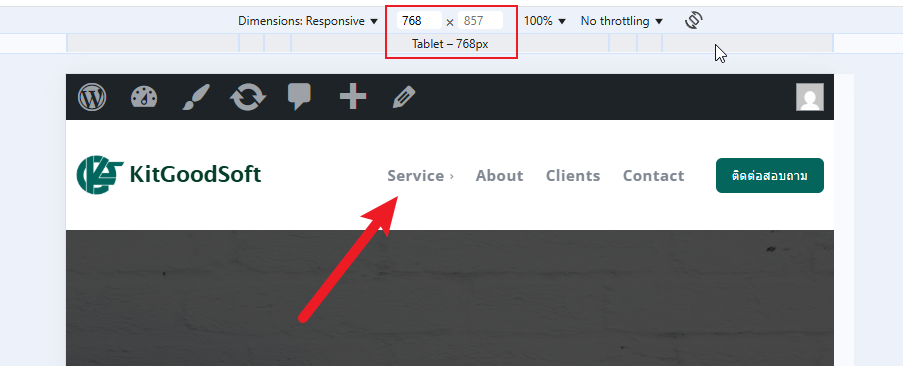
Unfortunately, there is a problem with the mobile pages and that option. Can you unset the mobile page and make the changes directly on your homepage on the tablet viewports?
Thank you!
 mongreanly
 I already assigned the mobile template https://t7516229.p.clickup-attachments.com/t7516229/ff5d9aa2-bdac-41b2-a273-82fb1cc5e1c2/image.png?view=open
and set up homepage https://t7516229.p.clickup-attachments.com/t7516229/e40b838a-92c4-4ee0-9e5d-d498e0ed0404/image.png?view=open
but it not display mobile menu https://t7516229.p.clickup-attachments.com/t7516229/6ca0ca3d-54e2-49de-9f82-ba62d8145826/image.png?view=open
Bettina Hello!
You did not seem to assign the template and the mobile page you’ve built. Mobile pages: https://tagdiv.com/newspaper-10-3-7-update-brings-customizable-and-fast-mobile-pages
Homepage set up: https://forum.tagdiv.com/homepage-how-to-build-and-set-it/
About Cloud Library Templates: https://forum.tagdiv.com/cloud-library-templates/
Thank you!
Bettina Hello!
It helps you to display a custom field in the button URL, for example, but we have the shortcode custom field as well: https://forum.tagdiv.com/custom-fields-support/
You can display a custom field for a post or listing in a block on your homepage. You should use a custom module template displayed with the help of the flex block builder: https://forum.tagdiv.com/modules-builder-newspaper-theme/
Thank you!
Bettina Hello!
For example, page templates are different from the single, category, tag templates.
So, you should edit the pages one by one. But if another template is global, for example, a single cloud template, then you should make the changes once, and they will apply to all your articles.
More documentation about the cloud templates is here:
– https://forum.tagdiv.com/cloud-library-templates/
– https://forum.tagdiv.com/design-post-pages-using-cloud-library-templates/
– https://forum.tagdiv.com/cloud-library-category-templates/
About pages here: https://forum.tagdiv.com/page-templates-2/ -> https://forum.tagdiv.com/homepage-how-to-build-and-set-it/
Check out this video about how to create a website from scratch: https://www.youtube.com/watch?v=SoGQ0d5kIBg
Thank you!
 accursi
 Dear Simion,
I can talk to you now about the edges task.
In the meantime, thank you for helping us in all cases. You’re very good.
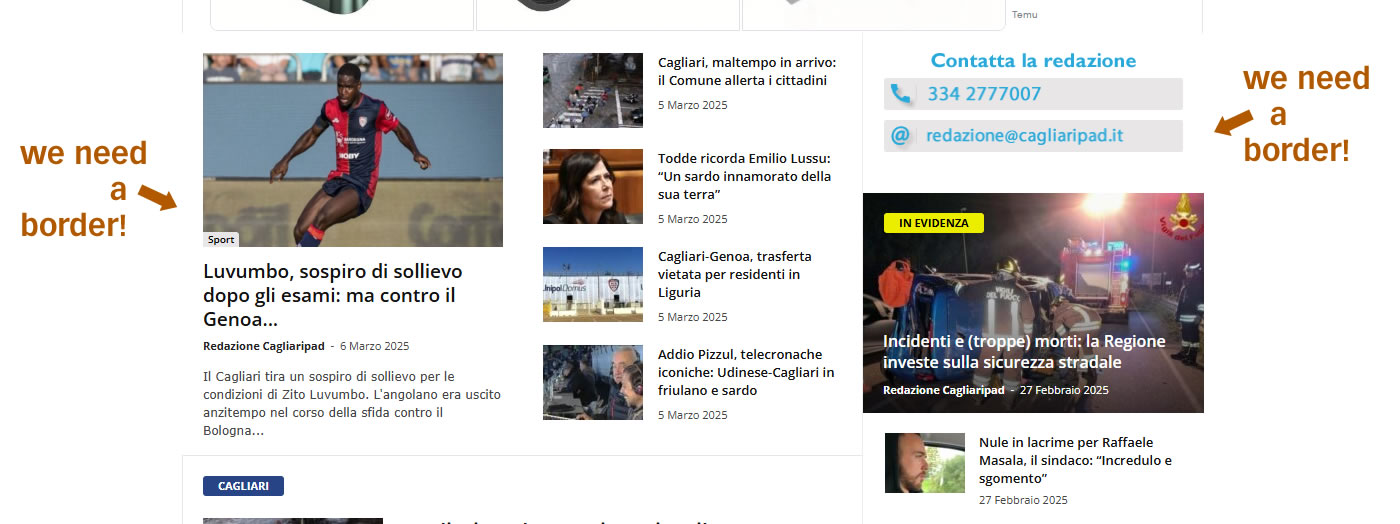
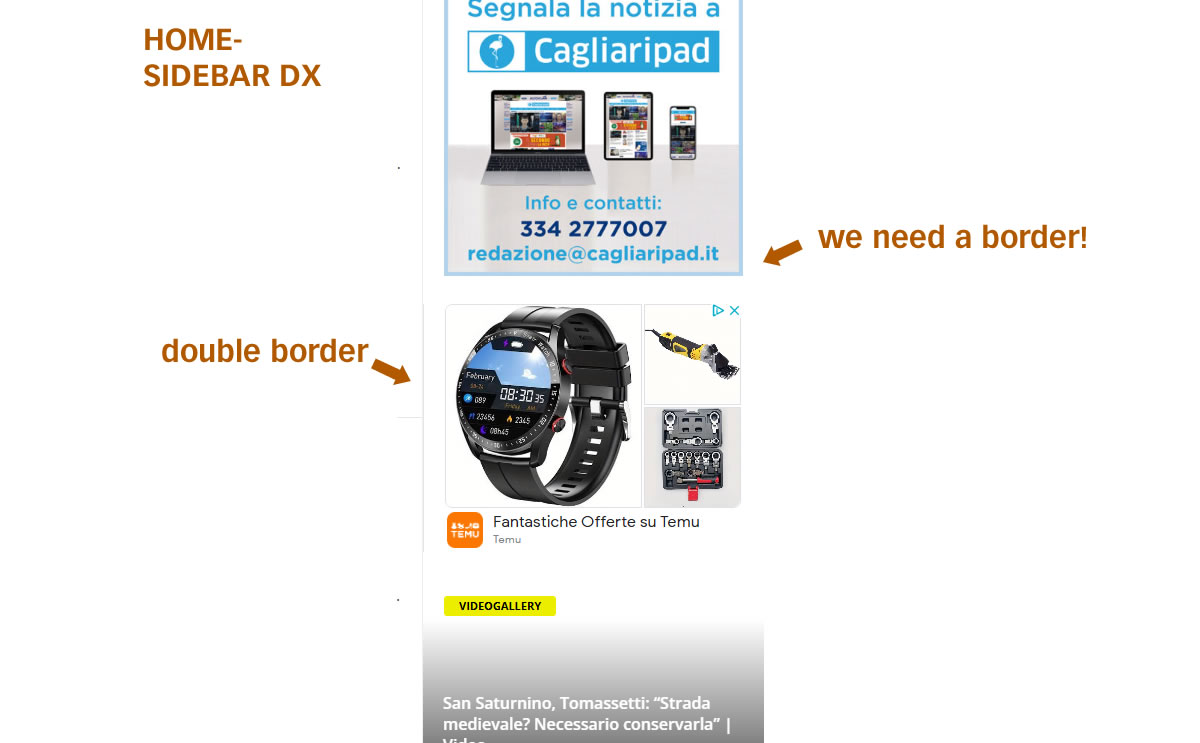
as I wrote, we cannot manage or change the edges.
We’ll want the entire homepage with the light gray border of the theme.
I’ll send you examples of where we fail to change them.
1 https://assets.cagliaripad.it/wp-content/uploads/2025/03/06114038/screen001.jpg
2 https://assets.cagliaripad.it/wp-content/uploads/2025/03/06114042/screen002.jpg
Thanks and good work
Bettina Hello Gus!
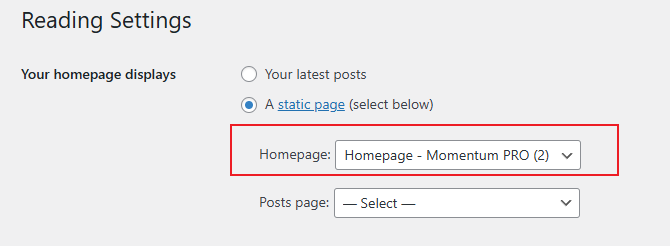
It seems you set up the blog page to appear on the homepage. Check this guide: https://forum.tagdiv.com/homepage-how-to-build-and-set-it/
You can not customize the default blog page. You can create another page with that name and edit it with the tagdiv Composer if you want.
Thank you!
Bettina Bettina Hello!
Sure. This is possible when using cloud templates. We recommend using cloud/PRO templates to have the possibility to edit them with the TagDiv Composer, which contains a lot of functions and features; please check our tutorial here: https://forum.tagdiv.com/tagdiv-composer-tutorial/
More documentation about the cloud templates is here:
– https://forum.tagdiv.com/cloud-library-templates/
– https://forum.tagdiv.com/design-post-pages-using-cloud-library-templates/
– https://forum.tagdiv.com/cloud-library-category-templates/
About pages here: https://forum.tagdiv.com/page-templates-2/ -> https://forum.tagdiv.com/homepage-how-to-build-and-set-it/
Check out this video about how to create a website from scratch: https://www.youtube.com/watch?v=SoGQ0d5kIBg
Thank you!
Bettina Hello!
Please edit the homepage with the tagdiv Composer, click on the logo and check the options from there. You should hide the SVG icon from there: https://app.screencast.com/K5gVCJLK2wXq9 You can also delete the current logo shortcode and add another one with no settings applied, so the logo from the theme panel should display on your website. Check the guide here: https://forum.tagdiv.com/add-logo-newspaper/
Thank you!
Bettina Hello Vunt!
Unfortunately, you can not edit with the tagdiv Composer the blog page generated by WordPress. Apply these changes: https://app.screencast.com/rd5HXhCY5MHne
When you access an article, it should be the single post template from the Default pro demo. You can upload another single cloud template from the Cloud Library to your posts for more customization options.
More documentation about the cloud templates is here:
– https://forum.tagdiv.com/cloud-library-templates/
– https://forum.tagdiv.com/design-post-pages-using-cloud-library-templates/
– https://forum.tagdiv.com/cloud-library-category-templates/
About pages here: https://forum.tagdiv.com/page-templates-2/ -> https://forum.tagdiv.com/homepage-how-to-build-and-set-it/
Check out this video about how to create a website from scratch: https://www.youtube.com/watch?v=SoGQ0d5kIBg
Thank you!