
- NewspaperHomepage – How to build and set it
- NewspaperHow to edit modules for Flex Block X
- NewspaperGeneral Options that May Interfere with the Newspaper Theme
- NewspaperThe Newspaper Mobile Theme: Introduction
- NewspaperHow to Add a Logo in Newspaper
- NewspapertagDiv Shop
- NewspaperHow to Use tagDiv Cloud Library
- NewspaperDesign your Post Pages using the Cloud Library Templates
- NewspaperHeader Builder
- NewspapertagDiv Cloud Library Plugin
- NewspapertagDiv Composer Tutorial
- NewspaperNewspaper theme documentation
- NewspaperThe Mobile Theme
- NewspaperPage templates
- NewspaperTheme Colors Introduction
- NewspaperFooter Builder
- NewspaperMain Menu
- NewspaperPre-built Websites: Introduction
 Bettina
 Hello @eduardo!
Edit the homepage with the TagDiv Composer, click on that row and remove that image: https://app.screencast.com/DodiJWwGOdRfW
Thank you!
 Wriper
 Maybe, can you tell me where i can find the post grid called on homepage in php (file)? Maybe there is something injected directly in code. I have tried to disable all the plugins it has to be something in theme. Thank you
WriperHello,
We have tried activating the “post grid” on newspaper mobile theme.
Suddenly, there is 300×250 blank space called. When inspecting it tell us it is an AD.
I have checked all places for codes in theme, deactivated ad inserter (it is not called by ad inserter plugin). Deactivated our AD tag scripts. I dont know what this is or what i am missing
Do you know which part of theme is activating this place? I tought this is our homepage ad from desktop but it is not i have tried to deactivate that block and nothing happens.
Screenshot 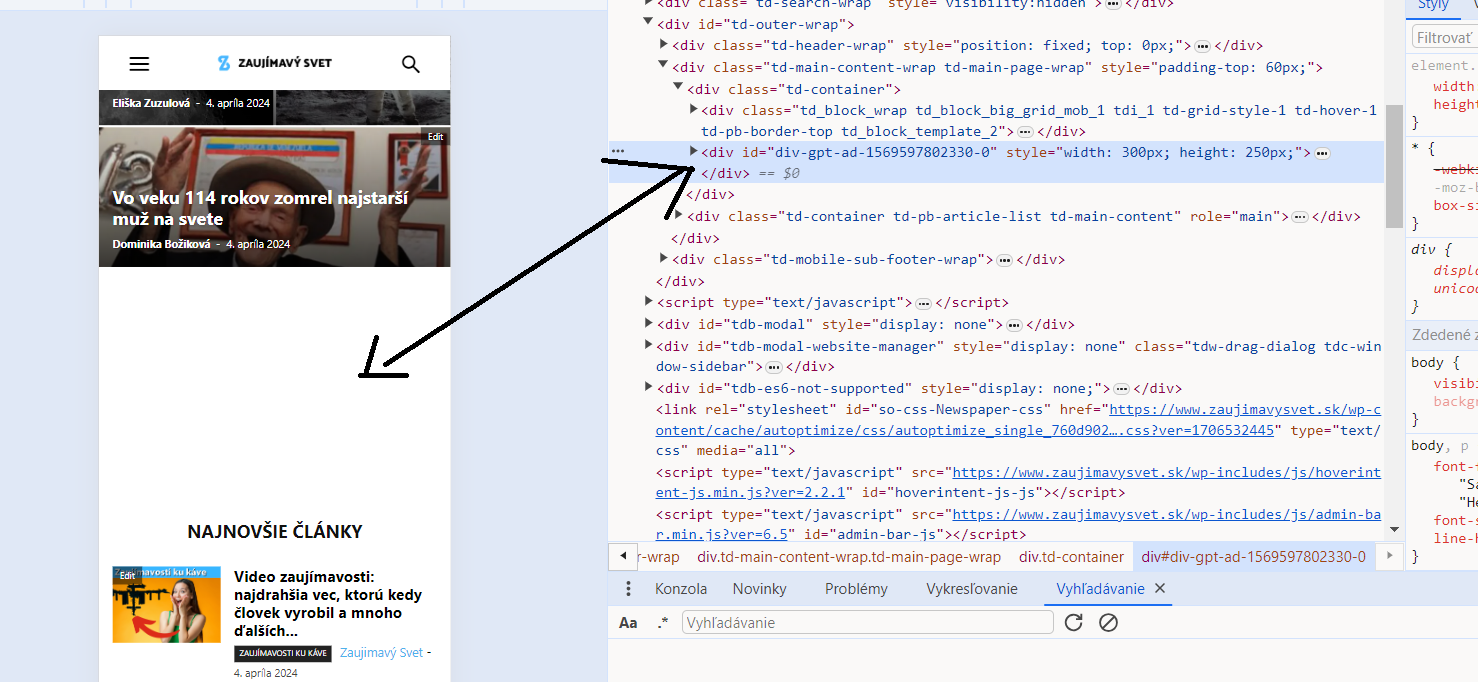
Thank you
 anshulrajora
Hi,
I have Installed “tagDiv Mobile Theme” and added the Mobile Template for Homepage, Category Page, Tag Page, Single Page & Author Page but when I am checking the settings on my mobile it’s not reflecting and showing a default structure. Also when I am trying to open the Menu in Mobile it’s responding too late.
 Anamaria
 Hello,
Please delete the menu from the theme files. You need to assign the menu with tagdiv Composer like in our guide -> https://forum.tagdiv.com/main-menu/
Also, if you add the menu for mobi,e in the theme files, please delete it because it is not working https://i.imgur.com/oizfjVC.png
Edit the homepage with the tagdiv Composer, go to the mobile viewport, click on that menu icon and change the menu from that dropdown: https://app.screencast.com/QU8PVGPjHw4b0
Thank you!
 successbank
hello.
I’m curious about how to manage the homepage banner.
url : https://ebook.or.kr
img : https://ebook.or.kr/test.png
 Owebdesigned
Hello
First of all I am using your BlockChain Tagdiv theme.
I would like to use the Blog Category Post (that is on the demo) as homepage.
I couldn’t select it because it is not a static page.
And also, when I try to recreate a new page using the Flex Bloc, I couldn’t obtain the same style (I don’t know why)
Could you please propose to me a solution ?
 newspulpaper
 Hello,
Thank you for the guidance. The TagDiv Composer plugin was indeed reinstalled and active, which is evidenced by the content displaying correctly, though the header and footer were lost. However, this was not a major concern as it occurred within a testing environment, and I have since overwritten the staging environment with what was in production.
Just to formalize, we continue to face issues with the TagDiv Composer, unable to save layout changes on our homepage for some days now, causing a series of problems in our content update routine.
After countless hours with the hosting server support and in contact with some developers of the plugins we use, it seems, though we are not yet certain, that the root of the problem lies in the TagDiv theme. This is because in 100% of the cases when we try to save any change on the homepage, if the request takes more than 10 seconds, it fails without saving the changes.
We thought it might be server limitations, so we conducted various server tests, plugin deactivations, and log reviews. We’ve collected evidence suggesting that the problem may originate from TagDiv, and we will share this with you via email at contact@tagdiv.com, hoping we can resolve this issue as soon as possible.
Kind regards
 apbforum
Hi, I am using newspaper theme and have created a mobile page to display home page in mobile. Here are the issues I am seeing;
1) When I open the page on my mobile sometimes it shows the Mobile home page which I created and sometimes the actual home page (responsive) page will be displayed.
2) When I open homepage in my tablet it displays the horizontal version of my mobile page, where I am looking to display mobile page only on mobiles not on tablets.
Not sure how to limit the mobile page to be displayed only on mobile but not on tablets
Please let me know if you have any suggestions.Thanks a lot.
 frankiefop
Hello,
I have highlighted four issues I needed to fix below.
Site URL: https://converseer.com
1. After analysing my site, I realised fonts make up 57.8% of the total page size. This is a lot just for fonts. Please, how do I reduce this?
2. The DOM is very large and it’s causing high TBT time. How do I fix this – which HTML element do I need to fix or remove?
3. How do I preload the LCP image on the homepage? The theme is also using CSS background image, which I’ve realised can’t be preloaded. Is there an option to load these images inline instead?
4. The tagdiv JS file is very large and can’t be delayed. It should be more modular but everything seems to be in one big JS file. How do I optimise it? Is there any way you can load more of your CSS in an external file?
Please, I need help with this. I have been stuck, instead of creating content, I am stuck with optimisation. 👉 https://pagespeed.web.dev/analysis/https-converseer-com/ty7j496bq7?form_factor=mobile
See screenshots via the links:
i. https://paste.pics/dc62669811dc058f56da1886394f408e
ii. https://paste.pics/310b4a236e5dd1a960ad287335ce139e
iii. https://paste.pics/ed5381602eaea936e8b930e1c4deca66
iv. https://paste.pics/943b1b809d1c784b2d3b4b849b04c81b
v. https://paste.pics/ce6eb42f1377f5c2eff08c041d73f002
I know you’ll say speed optimisation is not covered by you, however, I am asking you to do it, just show me how, and I will but the one you can, please, I help by doing it.
Thank you.
 imtk
imtkHi,
on my homepage I have three main blocks of posts:
block A – main flex block 4 which shows the latest published post, regardless of category/tag/author etc.
block B – flex block 4, which shows 3 latest posts from few selected categories (e.g. X, Y) that are usually more articles written in more depth
block C – flex block 5, which lists 3 latest posts from a single category (e.g. Z), which are usually basic news posts
There’s no offset in any of them, but I encounter a repeating problem. Because block A is displaying whatever was posted lately, that same post will appear in either B or C blocks, depending on the latest posts’ category.
Meaning if I post something in category X, it appears under blocks A and B; if I post something in category Z, it will appear in blocks A and C.
I can’t use offset in B or C blocks as one of them will wrongly remove a post that’s not displayed in A, i.e. when latest post is category X, block C will wrongly offset one post from category Z which then isn’t displayed anywhere.
What do you suggest I do to add some form of logical non-duplication, ideally doable directly through Cloud templates which will ensure it not breaking in the future?
Using latest Newspaper and WP versions.
Thanks!
Anamaria Hi,
Please check this topic https://wordpress.org/support/topic/favicon-not-showing-on-bing/
Also, on the homepage there’s an option Customize icon => https://www.screencast.com/t/I2uVvP4b -> Site identity -> Site icon -> Change image -> publish => https://www.screencast.com/t/lY9WEOZEj
Thank you!
successbankhello.
Newspaper – I am writing this because I have a question after purchasing and setting up WordPress.
My site is ebook.or.kr.
The problem is that our homepage is written in Korean, but if you search for content in Korean, no search results appear.
Can I get help with a solution?
 todaysnifty
Website URL: https://todaysnifty.com/
My Homepage Images not Loading and my Site performance is also slow.
Can You Please Solve this Issue as soon as possible.
Anamaria Hello,
Yes, you can create a sidebar -> https://forum.tagdiv.com/sidebars-tutorial/ and copy the block from the homepage and put it in the sidebar with right-click.
Thank you!
Bettina Hello @sangha9!
Yes. Install the Yoast SEO plugin, edit the homepage with Gutenberg, scroll to the bottom, and there you have some SEO settings. Update the changes and check the results.
Thank you!
 Kirti
Kirti Hii,
I have added few post for both categories and also set cloud library template from theme panel.
FYI these two categories are newly created by me whereas the other two were predefined with the newspaper template (changes are reflecting on them).
Also, I tried adding one more category, but it is not showing on homepage -> menu category
Thankyou.
Anamaria Hi,
Please check if you have the mobile theme plugin enabled.
Using our theme, you can choose from 3 mobile versions
-> mobile responsive => https://www.screencast.com/t/oJ2ShOp47
-> mobile theme plugin => https://forum.tagdiv.com/the-mobile-theme/
-> mobile page => https://tagdiv.com/newspaper-10-3-7-update-brings-customizable-and-fast-mobile-pages/ The option that you need to use.
Suppose you created the mobile pages with tagDiv Composer. In that case, when you install the Mobile Theme plugin, your pages will be overwritten by the plugin (the mobile theme comes with its templates for page, post, category, etc, so your current templates from the desktop theme will get converted to the mobile theme layout, the page content is made without builders in mobile editor => https://www.screencast.com/t/xbgZG8kH also, the options that are provided to edit the mobile theme version are limited (this keeps the things simple)).
This is a video about Responsive Newspaper Theme, AMP & Mobile Theme, Mobile Pages & Templates -> https://www.youtube.com/watch?v=SpGkOnJeNZY.
So, the mobile responsive is what you see when that you select the viewport on phone => https://www.screencast.com/t/matV17hH, so some settings may apply for each viewport(where is the border blue), and others are not(where the border is black).
The mobile page has the mobile templates from Cloud Library => https://www.screencast.com/t/YCcZ8rL8
The Mobile responsive version of the theme and the mobile page editor can be edit with tagDiv Composer, the mobile theme plugin cannot.
For example, you can have the mobile theme plugin activated and use the mobile page/mobile responsive version for the homepage/pages, but for the categories pages/404 page, you can’t use the mobile page/mobile responsive version if you have the mobile theme plugin activated.
So, if you want to design the pages with tagDiv Composer, you can use the mobile page or mobile responsive version.
Also, please check this topic https://forum.tagdiv.com/topic/amp-pages-not-working-well-with-this-theme/
Thank you!
 nile-tech
i use video plugin i ask how i add video to home page
https://wordpress.org/plugins/all-in-one-video-gallery/
 llucson
Hello. We are having two issues with the Town Talk template. I’ll detail them for you.
Problem 1: When we create a page, the date remains in English, something that does not happen when dealing with an individual post. It makes no sense because the website is in Spanish, and it’s the same type of block: Single post date, with the same settings. See photos here (single post, ok) and here (page, doesn’t works). Here, link to page
Problem 2: In the Title Over Image block type, we have a row with 4 blocks, and in each one, a Title Over Image module. The block height does not work. All 4 were set to 220 pixels, but it only remains on the last one. When you add a new module within the row, the previous one starts to display vertically. See image here.
You can see the block at the end of the homepage
 pkvolattu
 “This issue has been discussed already here, please check: https://forum.tagdiv.com/topic/author-link-is-not-working-redirects-to-404-and-homepage/”
This solved the problem. Thank you!
Bettina Hello!
Normally, the author name link should lead you to the author’s page template and not to the homepage. The author’s page is working dynamically for each author, and you can customize it in the tagdiv composer and style it as this page as well. https://infoinspired.com/about-me/
Documentation here: https://forum.tagdiv.com/cloud-library-templates/
This issue has been discussed already here, please check: https://forum.tagdiv.com/topic/author-link-is-not-working-redirects-to-404-and-homepage/
Thank you!
pkvolattuHi,
How to edit the URL of the author name in a single post, both in the ‘Single post Author’ and ‘Single post author box’. Currently, it’s https://infoinspired.com/author/ii, which is redirecting to my homepage. Instead, I want to use the URL https://infoinspired.com/about-me/.
Using the cloud template ‘Single Post Template – Today News PRO’.
Screenshot 1:
Screenshot 2:
Thanks
Anamaria Hello,
Did you clear the cache? Are the settings saved?
Yes, you can change the design of the homepage with tagdiv Composer and elements and delete them as you want. I like to see a screenshot of how you want to add the category tag.
Thank you!
 JuliusDoom
There’s a lots of request made to the SQL Database requested at the same time thus rate limiting issue is happening on the site.
WordPress database error MySQL server has gone away for query SELECT post_id, meta_value FROM 3cEugTXx_postmeta WHERE meta_key = ‘_wp_attached_file’ AND meta_value = ‘https://noticiasnrt.mystagingwebsite.com/wp-content/uploads/2022/01/BackS-300×169-1.png’ made by require(‘wp-blog-header.php’), require_once(‘wp-includes/template-loader.php’), do_action(‘template_redirect’), WP_Hook->do_action, WP_Hook->apply_filters, cnfp_template_redirect, include(‘/plugins/colorlib-404-customizer/includes/colorlib-template.php’), get_header, locate_template, load_template, require_once(‘/themes/Newspaper/header.php’), do_action(‘tdc_header’), WP_Hook->do_action, WP_Hook->apply_filters, {closure}, require_once(‘/plugins/td-composer/legacy/Newspaper/header.php’), wp_head, do_action(‘wp_head’), WP_Hook->do_action, WP_Hook->apply_filters, td_background->wp_head_hook_background_logic, attachment_url_to_postid
WordPress database error MySQL server has gone away for query SELECT post_id, meta_value FROM 3cEugTXx_postmeta WHERE meta_key = ‘_wp_attached_file’ AND meta_value = ‘https://noticiasnrt.mystagingwebsite.com/wp-content/uploads/2022/01/BackS-300×169-1.png’ made by require(‘wp-blog-header.php’), require_once(‘wp-includes/template-loader.php’), include(‘/plugins/td-cloud-library/wp_templates/tdb_view_single.php’), get_header, locate_template, load_template, require_once(‘/themes/Newspaper/header.php’), do_action(‘tdc_header’), WP_Hook->do_action, WP_Hook->apply_filters, {closure}, require_once(‘/plugins/td-composer/legacy/Newspaper/header.php’), wp_head, do_action(‘wp_head’), WP_Hook->do_action, WP_Hook->apply_filters, td_background->wp_head_hook_background_logic, attachment_url_to_postid
One thing we’ve identified is that the Newspaper theme is making some very lengthy and expensive database queries that slow down page loads and may be contributing to elevated SQL CPU usage.
For example, on the homepage the Newspaper theme runs the following code.
require(‘wp-blog-header.php’), require_once(‘wp-includes/template-loader.php’), include(‘/plugins/td-composer/legacy/Newspaper/page.php’), get_header, locate_template, load_template, require_once(‘/themes/Newspaper/header.php’), do_action(‘tdc_header’), WP_Hook->do_action, WP_Hook->apply_filters, {closure}, require_once(‘/plugins/td-composer/legacy/Newspaper/header.php’), wp_head, do_action(‘wp_head’), WP_Hook->do_action, WP_Hook->apply_filters, td_background->wp_head_hook_background_logic, attachment_url_to_postid
Which also executes the following query.
SELECT post_id, meta_value FROM 3cEugTXx_postmeta WHERE meta_key = ‘_wp_attached_file’ AND meta_value = ‘https://noticiasnrt.com/wp-content/uploads/2022/01/BackS-300×169-1.png’
This is a very expensive and lengthy query, especially on a site of this size.
In some cases, it might take over 2 seconds for that code and query to complete because it is not optimized and likely doesn’t have database indexes that would help speed it up.
it seems that the problem originates from the td-composer plugin. Would it be alright if I deactivate it temporarily?
PHP Fatal error: Uncaught Error: Failed opening required ‘/srv/htdocs/wp-content/plugins/td-composer/legacy/common/wp_booster/td_page_views.php’ (include_path=’/:.’) in /wordpress/core/6.4.3/wp-includes/template.php:790 Stack trace: #0 /srv/htdocs/wp-content/plugins/td-composer/legacy/common/wp_booster/td_autoload_classes.php(42): load_template(‘/srv/htdocs/wp-…’, true) #1 /srv/htdocs/wp-content/plugins/td-cloud-library/wp_templates/tdb_view_single.php(111): td_autoload_classes->loading_classes(‘td_page_views’) #2 /wordpress/core/6.4.3/wp-includes/template-loader.php(106): include(‘/srv/htdocs/wp-…’) #3 /wordpress/core/6.4.3/wp-blog-header.php(19): require_once(‘/wordpress/core…’) #4 /wordpress/core/6.4.3/index.php(17): require(‘/wordpress/core…’) #5 {main} thrown in /wordpress/core/6.4.3/wp-includes/template.php on line 790



