- NewsmagInstall via WordPress
- NewsmagInstall via FTP
- NewsmagInstalling pre-built websites
- NewsmagUsing the theme translations together with WPML
- NewsmagHow to update a plugin
- NewsmagNewsmag theme support
- NewsmagCustom Post Type Support
- NewsmagImport / Export theme settings
- NewsmagHow to add icons in the menu
- NewsmagRequirements for Newsmag
- NewsmagNewsmag documentation
- NewsmagHow to update the theme
- NewsmagBlock settings tutorial
- NewsmagHow to update the WPBakery plugin
- NewsmagIntroduction
- NewsmagMain menu
- NewsmagFeatured image or video
- NewsmagAuthor card
 Catalin
 Hi,
Make sure if you are using the latest version of the theme installed via FTP way and also, provide some useful screenshots with the problem and your website URL if it persists.
Thanks.
 Calin
Calin Hi,
1. Please provide me a screenshots with the layout of the Brunei mega menu
2. Unfortunately for the moment that can be change only with custom css -> https://www.screencast.com/t/LzOCpbuKK here is the code
.td-mega-menu .td-post-category {

    background-color: red;

}
feel free to change the color and add the code in Newspaper>Theme panel>Custom code>Custom css
3. Please note that all demos have custom styles that can be achieve with custom css, so if you do not have any demo install and you like the news magazine demo style you can import the settings from that demo -> https://www.screencast.com/t/pVKacTC8b
Thank you for your understanding!
Catalin Hi,
I have made some tests on my localhost and the Icons element seems to be loaded as expected, as you can see here -> https://www.screencast.com/t/NR4hS2Ie Try to make a new install to another sub-domain for testing, clear all the caches, purge CDN files and check the results.
Thanks for the message!
Calin Hi,
But what slide you want? maybe you are refer to revolution slider
How to install Revolution Slider v5 -> https://forum.tagdiv.com/how-to-install-revolution-slider-v5/
Import Revolution Sliders on demos -> https://forum.tagdiv.com/import-revolution-sliders-on-demos/
Thank you!
Calin Hi,
First please make sure you are installing the actual theme zip file, not the whole package
– https://forum.tagdiv.com/whats-included/
Here are the theme install guides, either by FTP or by WordPress
– https://forum.tagdiv.com/install-via-ftp/
– https://forum.tagdiv.com/install-via-wordpress/
This is the theme requirements guide – https://forum.tagdiv.com/requirements-for-newspaper/
Please check the requirements guide carefully and if needed increase the parameters mentioned in it, or ask your hosting provider to do it for you if possible.
That message you are receiving could be caused by a low max upload size value, like in this similar topic
– https://wordpress.org/support/topic/the-link-you-followed-has-expired/
Let us know if you have more questions.
Thanks
Calin Hi,
You could try to install the demo manually but if you do not have php greater then v5.6 will not work properly, sorry.
I think the best way will be to change the host or theme, because on current host Newspaper will not work properly only if you can achieve the requirements of theme, sorry.
Thank you for your understanding!
Calin Hi,
First please make sure you are installing the actual theme zip file, not the whole package
– https://forum.tagdiv.com/whats-included/
Here are the theme install guides, either by FTP or by WordPress
– https://forum.tagdiv.com/install-via-ftp/
– https://forum.tagdiv.com/install-via-wordpress/
This is the theme requirements guide – https://forum.tagdiv.com/requirements-for-newspaper/
Please check the requirements guide carefully and if needed increase the parameters mentioned in it, or ask your hosting provider to do it for you if possible.
That message you are receiving could be caused by a low max upload size value, like in this similar topic
– https://wordpress.org/support/topic/the-link-you-followed-has-expired/
Let us know if you have more questions.
Thanks
Calin Hi,
First please make sure you are installing the actual theme zip file, not the whole package
– https://forum.tagdiv.com/whats-included/
Here are the theme install guides, either by FTP or by WordPress
– https://forum.tagdiv.com/install-via-ftp/
– https://forum.tagdiv.com/install-via-wordpress/
This is the theme requirements guide – https://forum.tagdiv.com/requirements-for-newspaper/
Please check the requirements guide carefully and if needed increase the parameters mentioned in it, or ask your hosting provider to do it for you if possible.
That message you are receiving could be caused by a low max upload size value, like in this similar topic
– https://wordpress.org/support/topic/the-link-you-followed-has-expired/
Let us know if you have more questions.
Thanks
 LarsHindsley
I currently run Newspaper on DangerManMedia.com and after issues with another theme on a sister site, I decided tonight to purchase a second license and have both sites run the same theme. That site is DangerMansLair.com
Upon installation I’ve got this error twice in a row:
Installing Theme from uploaded file: themeforest-5489609-newspaper.zip
Unpacking the package…
Installing the theme…
The package could not be installed. The theme is missing the style.css stylesheet.
Theme installation failed.
I can use some support please. 🙂
Lars
 pete@e-production.net
 I made sure the host (Netfirms) optimized the server per your instructions. And just before trying a different calendar app I did a complete backup, uninstall, reinstall with these results.
Pete
 ORBGaming
So, when I was first starting out, I uploaded a demo to get an idea of how everything works – I then went through editing all the theme and things through the Newsmag options. If I was to uninstall that demo would I lose all of those settings/customizations or would it carry over to the base theme uploaded?
 ktchicago
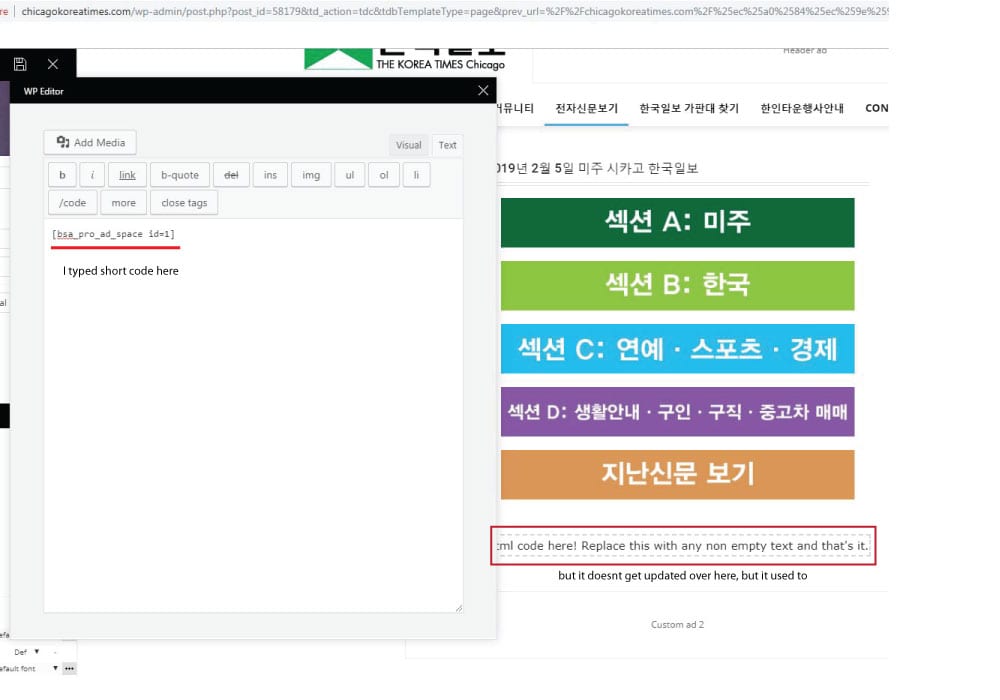
 the short code worked when I edit the page with WP bakery, but the error message appears when I tried to edit the page with TD composer after editing page with wp bakery.
It used to work fine, but the contents I wrote on column text box doesnt get updated as I write on it. I tried it again after disabling all plugins I installed recently, but it still was same :/
http://chicagokoreatimes.com/wp-content/uploads/2019/02/columntext1.jpg
 Jeanne
Hello,
Is there a way to know what’s the size for the featured image?
I installed the demo called “lifestyle magazine”
Thank you!
Jeanne.
pete@e-production.net Upon reinstalling Cloud Library I get this error when I try to use it. I was starting to like the results of my layouts but these roadblocks are killing me — and my wife who’s business is ready to kill me.
Fatal error: Out of memory (allocated 184811520) (tried to allocate 147775 bytes) in /hermes/bosnaweb16a/b1871/nf.greatcompanions/public_html/newsite/wp-content/plugins/td-composer/includes/tdc_main.php on line 609
pete@e-production.net After uninstalling the calendar plugin, it continues to appear on my homepage design screen (not on tagDiv Composer). I only began to show up when I installed tagDiv cloud library, which I have also uninstalled for this screen shot. Where does this text reside that I can find it and remove it?
https://drive.google.com/file/d/1gkIUUpF2MTLsrXm5trB62aoFEafk-0CW/view?usp=sharing
 Paradoxer
 Hello Calin,
The confusion I have with that documentation is that I never had any kind of Visual Composer plugin until now. the only ones I have ever had are the ones that came with the installation files for Newspaper, which were “js_composer” and “td_composer.” I’m not sure if I’m supposed to install both, or just td_composer.
 Odufroehliche
 Hi,
will do – thanks. What about Revolution Slider? Must-have to ensure that Newsmag works properly (as it is part of the packet)? Or can I ignore/deinstall the plug-in if I don’t need it?
Thanks
Petra
Catalin Hi,
I saw that you have minified all of your code and maybe, that’s why appears these issues. Try to make a new install to another sub-domain for testing, clear all the caches and check if these will reappear.
Hope this helps and let us know how it goes!
Thanks.
 Simion C.
 The classy demo uses a cloud template for the posts, you can change it to a different template if you want to.
With the introduction of the cloud library plugin, now post templates and many other templates can be created with the tagDiv composer
– https://forum.tagdiv.com/tagdiv-cloud-library-plugin/
There are templates designed by us which can be imported
– https://affiliate.tagdiv.com/#/load/All
Also there are blank templates which can be used to create a template from scratch. Using cloud templates is not mandatory, the default post templates are still available.
You can install the demo with no content, this way only the theme panel settings will be imported. This demo has an additional stylesheet but it is minimal indeed
– http://prntscr.com/mghck5
Most of it’s design is made in the composer directly with the available settings. Flex blocks were used mostly and these have a great deal of options and settings. We tried to keep the design similar to the erotic demo but there were some changes.
The class td-erotic is no more, it is now td-classy. This was one of the reasons the erotic demo has been modified.
You can remove the body class if it remained in the theme pane, it has no purpose anymore. Unless you used it in custom CSS code.
If you need help with anything else let me know.
Catalin Hi,
Normally, you should not need to add this custom CSS code, sorry! The theme should fit over your content, sorry! I do not what kind of untested plugins you are using on the website which might break the theme’s functionality, sorry! Try to disable all of these, clear all the caches and check the results. As a test, you can make a new clean install to another subdomain for testing, use only the plugins which come bundled with the theme core files without your custom CSS code and check the results.
Thanks for the message!
 LordZ
LordZHello,
I’ve just installed “Cookie Notice” plugin. In it’s settings it has a text box, where i have to place the google analytics and facebook pixel javascript codes, which ones will be enabled by the page visitor.
At the same time, I have those JS codes in the NewsPaper / Theme Panel / Analytics/JS Codes already.
Should I delete the analytics JS codes from the NewsPaper Theme Panel, and only keep them in the Cookie Notice plugin?
Or is it okay if I keep them in both place?
Site name is: https://www.melyiketvalasszam.hu/
Thanks in advance!
 mdzahidurbd
Hi, how are you? I’m buy newspaper 9 theme & upload theme, install demo. Now how to upload my old website?
Catalin Hi,
I have made some tests on my side and the gallery seems to works as expected and it can be edited as expected, as you can see here -> https://www.screencast.com/t/bBjg4dF1 I have added and remove some images from the media gallery and works as expected. Ensure that you are using the latest version of the theme installed via FTP way, clear all the caches, purge CDN files and check the results.
Thanks for the message!
Odufroehliche Hi Catalin,
thanks for your feedback. I’ve downloaded the whole packet already. As soon WordPress 5.03 is installed – what part of the theme-packet should be updated first to avoid problems? Newsmag-theme? Or visual composer first? Or doesn’t matter?
And what about Revolution Slider? Is it necessary at all for correct functioning of the theme or can I delete/ignore it?
Best
Petra
mdzahidurbdHi, How are you? I am Zahid.I buy newspaper 7 theme. I am upload this theme, install, demo contant. Now how to upload my old files?