
- NewspaperAutoptimize Plugin – install and configuration
- NewspaperCache plugin – install and configure
- NewspaperInstalling Pre-built Websites
- NewspaperHow to Install Newspaper via FTP
- NewspaperHow to Install Newspaper via WordPress
- NewspaperIntroduction to CPT and ACF with Newspaper Theme
- NewspaperHow to edit modules for Flex Block X
- NewspaperWooCommerce: Happy “Add to Favorites!”
- NewspaperWoo Brands
- NewspaperStripe Setup
- NewspaperModal Popup
- NewspaperPayPal Setup
- NewspaperFlex Block Settings Guide
- NewspaperHow to setup the Contact Page
- NewspaperAdd Cryptocurrency Price Ticker Widget
- NewspaperInfinite Loading for Single Posts
- NewspaperThe Newspaper Mobile Theme: Introduction
- NewspapertagDiv Social Counter plugin
- NewspapertagDiv Shop
- NewspapertagDiv Opt-In Builder
 @Sean
@Sean This happened with me. Check your theme plugins are up to date. The composer on my install was updated and the menus reappeared.
 simchris
 Best bet is delete old plugin versions via ftp, then manually install from the all files download, unzip and upload clean versions via ftp.
 longleafpublisher
Hey, I recently installed the popular “WP Job Manager” plugin, and it appears to work fine on desktop. But when I access my site via mobile device, the job listings do not appear — just the plugin’s search function. Any advice?
 ashokudhayan
Hi Team,
Today, I have installed the latest version 8.8.1 on my blog https://www.techtolead.com . Everything is working fine. But I observed that the ads and share buttons are loading too late after the contents are loaded. Can anyone check my site and advice asap?
Regards
Ashok
 janellelcarter
Hi,
When I try to share posts to Facebook I sometimes end up with no image and a heap of text that I don’t want included in the preview such as the categories, social media buttons etc. Then the next time I share the same post I get an image but still some text I don’t want to show such as the categories.
To better explain what I’m talking about, when I try to share this post://revesbyparents.com.au/2018/06/29/lambeth-reserve-picnic-point/
The first time I got the preview on the left and the second time I got the preview on the right as shown here:
https://revesbyparents.com.au/wp-content/uploads/2018/06/SharingProblems.png
It might just be that the image didn’t have time to load the first time I tried to share it. Either way, I don’t want the categories included in the Facebook preview. How can I get full control over what is shown in the social media previews?
I’ve seen Yoast SEO mentioned in the forums. Is this a plugin that is guaranteed to be fully compatible with Newspaper theme? Is it something you would recommend we use or is there another way we can do this without having to install a plugin?
Thank you!
Janelle
 TheLuckyGuy
Hello,
I’am new to child themes. But I need to add a code line into the functions.php
How do I add that.
Just install the child theme and put it in or is it not that easy?
Code:
/**
* separate media categories from post categories
* use a custom category called ‘category_media’ for the categories in the media library
*/
add_filter( ‘wpmediacategory_taxonomy’, function(){ return ‘category_media’; } ); //requires PHP 5.3 or newer
Thank’s
 mparlevliet
Hi TagDiv team,
I have Version 8.8 installed on my server and the front page takes an hour (or longer) to show the latest updates in the blocks. My host says W3 Total Cache is configured correctly and I’ve even removed Cloudflare to see if that was the issue, but it’s still doing it. Do you have any advice?
 tzabula
 Simion, hi!
I’ve installed the latest update from 27/06/2018 – http://prntscr.com/k0r67t
But … the problem with strange style of category description text is not fixed 🙁
http://prntscr.com/k0r7b6
http://prntscr.com/k0r7uh – it still doesn’t react on any style changes in category description form
Please, let me know when this bug is to be corrected. Many thanks in advance!
 Simion C.
 That would be impossible, the code in the theme stylesheet is loaded at all times. Unless maybe you have caching that prevents the modified stylesheet to load, serving the old one, or maybe you use a CDN service.
The code should be added at the end of the stylsheet
– https://www.screencast.com/t/Xx9xfU1v0QqX
– https://www.screencast.com/t/K4goNPCdM
Then save the file. Clear the browser cache, clear installed caches or server provided, clear or purge CDN if used.
 Catalin
 Hello najarfermin,
1)Sorry for this inconvenience but please notice that we know about this problem and we hope to solve it.
2)Please keep in mind that if you want to translate your description from About US section from Footer, notice that you can do it from WPML Plugin, but it’s needed to make some adjustments through it in order to achieve as you wish.
First of all, you should install the WMPL and then go to it in String Translation section and then, press the Translate texts in admin screens, like this -> https://www.screencast.com/t/DvZ8tStcO7A Please notice that all of the theme’s setting is loaded in the td_011 field and the footer text which you want to translate it is saved in the tds_footer_text meta key, which should have to be checked from here -> https://www.screencast.com/t/YXh36jIo. So, after this, if you will select this field, where you can create your translations and what exactly you want to bring when a language is active, like this -> https://www.screencast.com/t/eUCPJpvuyE
Hope this helps!
Thanks for the message!
 skadmin
 Mine worked up untill 8.8.2. have had to roll back a backup as everything broke once i installed it
 mcsinkers
 Okay so how do i solve the problem that the file link isn’t there?
I am installing through the wordpress admin and have the file locally saved. has there been a problem with the download ?
 avenlylane
Hey,
Plugins will not install – TagDiv AMP & Tag Div Social Counter. The social counter it says actions are forbidden and with AMP it says “plugin not activated” and then says “a higher version of this plugin is needed to work, please update.”
I am not sure how to update as it is not showing up in my plugin section and only in my theme panel section of my site.
I am also having issues with my sidebar for posts. I have 2 ads and need to put a widget in the middle of the 2 ads for my article pages and latest posts section but it keeps deleting my widgets.
Thank you.
 tutbar
Hi,
* Can I change my current domain and install the theme using the same key into another domain?
Because I’m planning not to use the theme in my current domain. So I want to delete the site along with theme from my current domain and want to use the theme for a new domain. Is it possible and it will work?
* Which hosting provider do you recommend? (Please)
Thanks
 bayingilizce
Hi,
I’m using the Newspaper theme with the “beauty” demo installed.
I noticed that some of the post images (featured images) aren’t showing up and some images inside posts don’t also show up unless I refresh 2-3 times. What could be the reason?
 TrashTalk
I got this error after updating the theme and i didnt have the WP Booster plugin installed on my site.
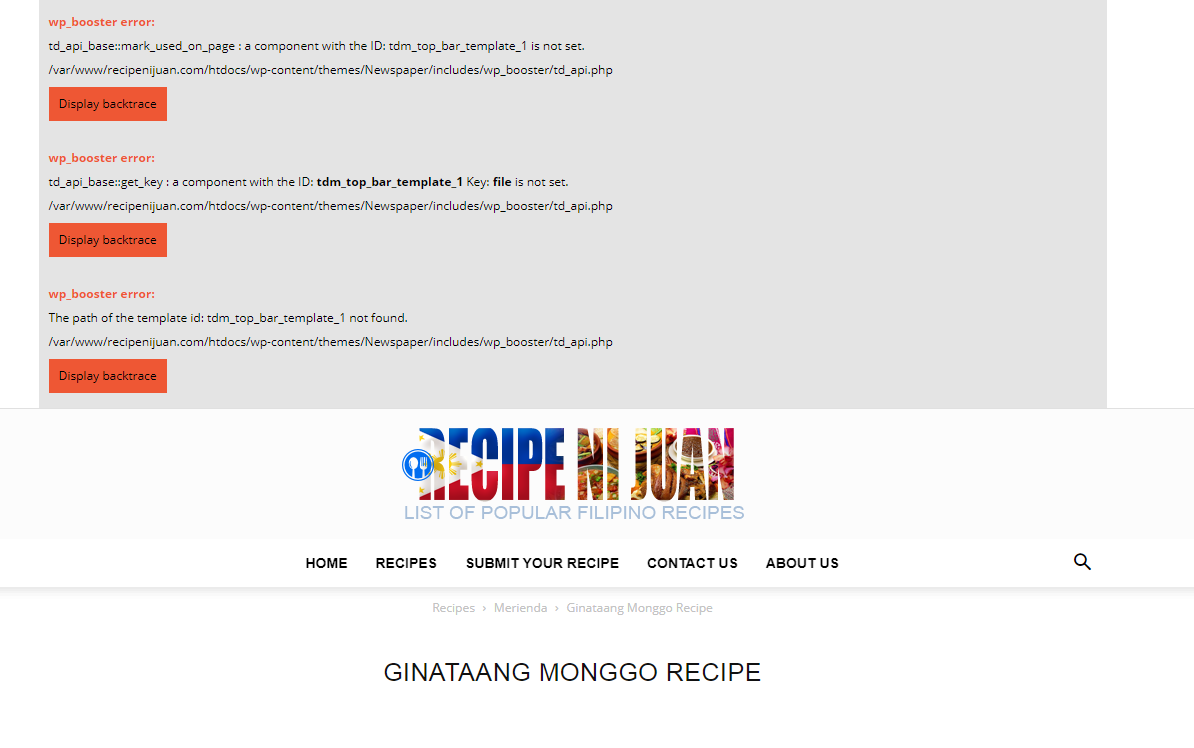
sample of the error Here
 nknishant08
Hello,
I installed newspaper theme and the travel demo, the layout of thumbnail images on frontpage are small, images are small, not perfect layout.
Please Check Screenshot – https://s15.postimg.cc/psbn18lyj/layout.png
Catalin Hello mcsinkers,
We are talking about FTP only if your website is loaded on a dedicated server and not when it is installed on a local host.
Thanks.
Simion C. Hi,
We could take a look, send us an email at contact@tagdiv.com and provide admin login access. Mention which demo you want to install and we will try to install it.
Thanks
nknishant08Hello,
I install newspaper theme and the travel demo, but logo is missing and the layout of images on frontpage is small, please help in this issue.
Simion C. Hi,
@ianternet Try to clear any caching installed, also the browser cache. if you use CDN clear that as well. Also try as a test with a different Instagram ID, see if it displays images then.
If nothing works, send us an email at contact@tagdiv.com and provide admin login access. Include a link to this topic in the email.
Thanks
Simion C. Hi,
That could be caused by migrating the website. Try to deactivate the composer plugin and remove it, reinstall it from the theme plugins panel.
Maybe also check that everything has been set properly when migrating, check some guides
– http://www.wpbeginner.com/wp-tutorials/how-to-move-wordpress-from-local-server-to-live-site/
– https://codex.wordpress.org/Moving_WordPress
– https://pantheon.io/resources/quickstart-guide-migrating-wordpress-site
The duplicator plugin is recommended by many users when migrating or creating copies of the website.
Catalin Hello mcsinkers,
Please try again to install/upload the theme via FTP way after you read our useful guide from here -> https://forum.tagdiv.com/install-via-ftp/
Thanks for the message!
 Rumaysho
I installed Newsmag theme’s on My site https://rumaysho.com
it’s working properly for desktop. But when open it on mobile it’s becoming trouble
– the menu cannot be opened
– all of image post’s is not showing
– “more article box” cannot be closed, so I disabled it.
– ad image in article is not showing
but, if I deactivated all plugin except plugin from Newsmag it’s becoming normal.
I was trying to activated other plugin one by one, but even I activated just one other plugin,
mobile site not working properly again.
 kytmagic
No idea what is going on.
This is what I see on the GoDaddy back-end: https://ibb.co/j1CJaT.
Just wondering if people have ever experienced the same. I did a fresh install. Is it possible, it’s because I’m making crazy multi-category calls?


