
- NewspaperThe Newspaper Mobile Theme: Introduction
- NewspaperThe Mobile Theme
- NewspaperModules Builder in Newspaper Theme
- NewspaperNewspaper theme documentation
- NewspaperTheme Colors Introduction
- NewspaperWhat’s Included in the Newspaper Theme Package
- NewspaperFilters and sorting for taxonomies
- NewspaperHow to Add a Logo in Newspaper
- NewspaperBig Grid Flex Settings
- NewspaperHeader Builder
- NewspapertagDiv AMP Plugin Tutorial
- NewspaperBest Of Forums
- NewspaperCache plugin – install and configure
- NewspaperFont Customization
- NewspaperBackground Introduction
- NewspaperHeader ads
- NewspaperPost template ads
- NewspaperCustom ad spots
- NewspaperMain Menu
- NewspaperHow to Install Newspaper via FTP
 Bettina
 Hello @laurenskok !
You need to create a mobile page in order to achieve that: https://tagdiv.com/newspaper-10-3-7-update-brings-customizable-and-fast-mobile-pages
Yes. Disable this setting from Newspaper -> Theme panel. You can not customize it in the TagDiv Composer.
Thank you!
Bettina Hello!
There is a special field for Google Analytics (theme panel>analitics/js code) and you do not need to add the code in the multiple fields. Make sure it is not a plugin conflict issue. Please make a test and deactivate ALL plugins except tagDiv ones, also if you are using a cache plugin, deactivate it, clear all cache and try again.
Every template has its own settings and it shouldn’t interfere if you edit a different template.
“J’ai beau essayé, mais à chaque fois que j’effectue un changement dans la page d’une catégorie, le même changement s’effectue sur le reste des catégories. ” -> If the categories use the same template, then of course every setting will reflect on all your categories. If the category template has the same header, and you add a new element to it, then it will reflect on all pages that have been assigned that header template.
The responsive version should be the same as the desktop ( PC version ). Do not confuse the mobile pages with the responsive version. Some settings should be the same also, the elements should coincide with the desktop version and others could be set regarding the size of the screen. These are not bugs, but the way they are working.
Please provide an example, a screenshot or a video with the issue ( modification d’une page “catégorie” qu’on apporte sur TagDiV Composer ne se verra sur mobile ! ), so I can better understand and explain everything.
You have the right to ask everything, and I will always reply and try to help you as much as I can. Every “issue” or “bug” should be solved and clarified.
Thank you!
 laurenskok
Hello,
I had a question concerning the mobile menu. Is it possible to create and select a menu in mobile mode that is different from the desktop?
I’ve already tried with tag div composer but the problem is when I select another menu in mobile, it changes the desktop.
At the moment, I have this type of menu : https://pasteboard.co/jCmFSvYHQLgY.png
For example I would like to erase the avatar picture + logout button and replace them by a company logo.
Is it possible with Tagdiv and the prebuilt sport theme?
How can I proceed?
Thank you
 Anamaria
 Hi,
This will not affect your page speed. Did you check for a plugin conflict?
There are a lot of factors which can make your site slow. Make sure you use only some templates and fewer functionalities and options.
Some factors which you need to take into account are:
External factors: server speed, if you are using CDN or not, the external resources loaded by your website like ads, fonts, tracking scripts like Facebook Pixel, Google Analytics, Twitter analytics, Hotjar and so on.
Internal factors: the number of elements on the page, image size, image formats, if you are using mobile optimized layouts, console errors, if you are using the Standard Pack plugin or not, if you are using the PRO demo or a standard one.
There are many optimization guides provided by our users here in the forum, some made by us; you could check some of them
– https://forum.tagdiv.com/cache-plugin-install-and-configure/
– https://forum.tagdiv.com/how-to-make-the-site-faster/
– https://forum.tagdiv.com/topic/high-number-of-ajax-request/
– https://www.infophilic.com/get-almost-100-pagespeed-newspaper-theme/
– https://forum.tagdiv.com/topic/score-100100-pagespeed-with-newspaper-wordpress-theme/
– https://www.andraware.com/wp-rocket-for-newspaper-theme/
– https://spraythemes.com/newspaper-theme/how-to-speed-up-the-newspaper-wordpress-theme-using-wp-rocket/
– https://forum.tagdiv.com/topic/page-speed-guide-for-2023-beginners-and-advanced/
– https://forum.tagdiv.com/topic/newspaper-theme-speedify-your-website/
– https://forum.tagdiv.com/topic/tutorial-chriss-custom-optimizations-for-functions-php-etc/
– https://forum.tagdiv.com/cloudflare-cdn/
– https://forum.tagdiv.com/topic/theme-causing-high-cpu-usage-2/
– https://forum.tagdiv.com/topic/sql-querys-high-cpu/
– https://forum.tagdiv.com/topic/newspaper-theme-slow-to-respond/
– https://premium.wpmudev.org/blog/optimizing-your-wordpress-database-a-complete-guide/
– https://underconstructionpage.com/optimize-wordpress-database/
– https://crunchify.com/better-optimize-wordpress-database-all-in-one-guide/
Also, pagespeed is not covered by support -> https://forum.tagdiv.com/newspaper-theme-support/
If you use Wp Rocket, you can try to exclude the following files
/jquery-?[0-9.](.*)(.min|.slim|.slim.min)?.js
/jquery-migrate(.min)?.js
/wp-content/plugins/td-composer/legacy/Newspaper/js/tagdiv_theme.min.js
tdBlocksArray
Thank you!
 Hamid Fekhart
 Bonjour,
C’est mon troisième message. Je vous prie donc de lire des deux précédents.
Désolé de vous écrire autant, mais je sens que tout va de travers avec votre thème.
En fait, comme je vous ai déjà écrit, j’ai un souci avec la version mobile : les modifications qui s’effectuent pour plusieurs pages dès qu’on les apporte à une seule page.
Voyant que ça devenait de plus en plus compliqué, je me suis résigné à adopter la “version réactive” : les pages mobiles qui ressemblent aux pages du site. Ce n’était pas ce que je désirais, mais je voulais vraiment finir avec la construction du site qui commence à prendre un temps fou. Mais là, aussi, je tombe sur un autre problème : des changements (pas tous) que je porte sur la version mobile s’effectuent aussi sur le site (la version PC) ! Voilà plus de détails : Quand je change le CSS des blocs sur la version mobile, les changements ne sont pas apportés sur la version PC, ce qui est, en soi, bien et même logique, selon ce que j’ai pu apprendre sur le thème Newspaper. Mais si je viens à supprimer un élément sur la version mobile, il se supprime également sur la version PC !
Autre souci pour la version réactive : les pages “catégorie” ne s’affichent pas de la même façon sur TagDiv Composer que sur un mobile normal (je veux dire, quand on se connecte). Autrement dit, aucune modification d’une page “catégorie” qu’on apporte sur TagDiV Composer ne se verra sur mobile !
C’est là, la multitude de problèmes que je rencontre. Et je me demande s’il n’y a pas encore d’autres à découvrir.
Aussi, je me demande si ce n’est pas le thème Newspapaer qui est à ce point limité. Mais je ne crois pas, d’ailleurs, j’ai vu sur plusieurs vidéos que la version mobile est clairement séparée de la version PC.
Enfin, si le thème Newspaper a des soucis passagers (ça peut arriver, après tout), je vous prie de m’en informer pour que j’arrête de chercher des solutions à des problèmes qui ne dépendent pas de moi. Et si, dans tout ce que je viens de vous dire, il n’y pas de problèmes (genre, c’est moi qui demande trop !), je vous prie aussi de m’en informer. Ainsi, je vais essayer de résoudre les problèmes autrement.
Cordialement,
-
This reply was modified 3 years by
Hamid Fekhart.
-
This reply was modified 3 years by
Hamid Fekhart Bonjour,
(Je vous prie de lire mon message précédent, avant de lire celui-ci).
En fait, je crois que le problème que j’ai rencontré avec les pages (les modifications qui se font partout) est plus sérieux que ça. Je l’ai aussi rencontré pour d’autres templates. En effet, j’ai effectué des changements sur la page “Accueil” mobile, et, à ma grande surprise, j’ai vu que les mêmes changements apparaissent dans l’article (single poste). Pourtant, la template que j’ai téléchargée pour la page “Accueil” Mobile et celle que j’ai téléchargée pour l’article (single post) Mobile ne sont pas les mêmes. Notez que c’est aussi le cas pour les catégories : impossible d’avoir des catégories personnalisées pour la version mobile. J’ai beau essayé, mais à chaque fois que j’effectue un changement dans la page d’une catégorie, le même changement s’effectue sur le reste des catégories.
À mon sens, c’est un problème dans le thème Newspaper.
Merci de m’éclairer, car, là, je suis perdu.
Cordialement
-
This reply was modified 3 years by
Hamid Fekhart Bonjour,
Je crois que vous n’avez pas compris ma question.je ne parle pas de la pub (je n’en suis pas encore là !), mais de Google Analytics. Je vous prie de relire mon message que voici :
J’ai un souci avec Google Analytics. Je reçois la notification suivante : “la propriété Hamid Fekhart n’enregistre aucun appel”. J’ai déjà inséré le bout de code de Google Analytics dans les trois espaces de ANALYTICS/JS CODES dans le theme panel (HEADER SCRIPT CODE, AFTER BODY SCRIPT CODE et FOOTER SCRIPT CODE). Je vous prie de noter que dans les débuts, ça a marché et que je recevais les statistiques de Google Analytics. Après, ça a cessé de marcher. J’ai supprimé le bout de code et je l’ai réinstallé, mais toujours en vain. Notez que mon site est un site d’actualités. Je poste quelque 5 à 6 articles par jour (est-ce de là le souci ?). Fin du message.
L’autre problème que j’ai rencontré, c’est avec les pages. J’ai téléchargé des templates cloud différentes pour quatre pages (à propos, politique de confidentialité, contact et mentions légales) pour que je puisse créer à chacune une template mobile. Mais dès que je porte une modification sur une page, les autres pages – à part la page contact – subissent la modification, ce qui n’est pas, à mon sens, normal. J’ai pensé à créer d’abord les pages sur l’interface de WordPress, mais, dans ce cas, il ne sera pas possible de créer des templates mobile. Est-ce un beug ? En tout cas, ça en a bien l’air.
Merci infiniment.
 thalesbrandao
 I asked some friends to test it and now I realized that in all requests the site on the desktop is in mobile format. I think this fact started to happen after the latest theme updates. how to solve? please!
Bettina Hello Renato!
We have 3 options for mobile versions that you can use:
1. Responsive version: A responsive version of your website looks similar to the desktop version. TagDiv Composer is used to edit the page. Click on the mobile viewport: https://www.screencast.com/t/XDQJedlggSB. There, you can see your mobile version and edit or adjust the elements to look better.
2. Mobile pages: https://tagdiv.com/newspaper-10-3-7-update-brings-customizable-and-fast-mobile-pages
3. Mobile theme plugin: The Mobile Theme is a performance-optimized theme included in the main Newspaper theme that only loads on mobile devices. It comes with its own templates and designs for pages, posts, categories, etc., so your current templates from the desktop theme will get converted to the mobile theme layout. Please see https://forum.tagdiv.com/the-mobile-theme/ and https://forum.tagdiv.com/mobile-theme-introduction/ for more information.
A full explanation is here: https://www.youtube.com/watch?v=SpGkOnJeNZY
Make sure you do not use Mobile theme plugin, if you use the mobile option 1 or 2.
Thank you!
 QamarShafique
Hi Team
I am using Jnews on my blog and my web blog’s speed and core web vitals are perfect. I install newspaper on my friend’s recommendation, it’s the worst theme I’ve installed. My page speed is 16 for mobile and 52 for desktop. Let me know if I can increase the website page speed. I have installed the required cache plugin named super cache etc.
Looking forward to hearing from you
 danna
danna Hello,
i guess it’s not a problem with the plugin but a problem with the mobile theme.
All the best,
Daniel
danna Hello,
i didn’t ad the code in the TagDiv Composer, i added it directly into the Post (Gutenberg):

After that the ad is displayed in Desktop and in the mobile theme. Everything works perfect. But on Desktop i don’t want the ad to be displayed in the post, because i have it in the sidebar. So i use a filter from advanced ads to just display it on mobile devices:
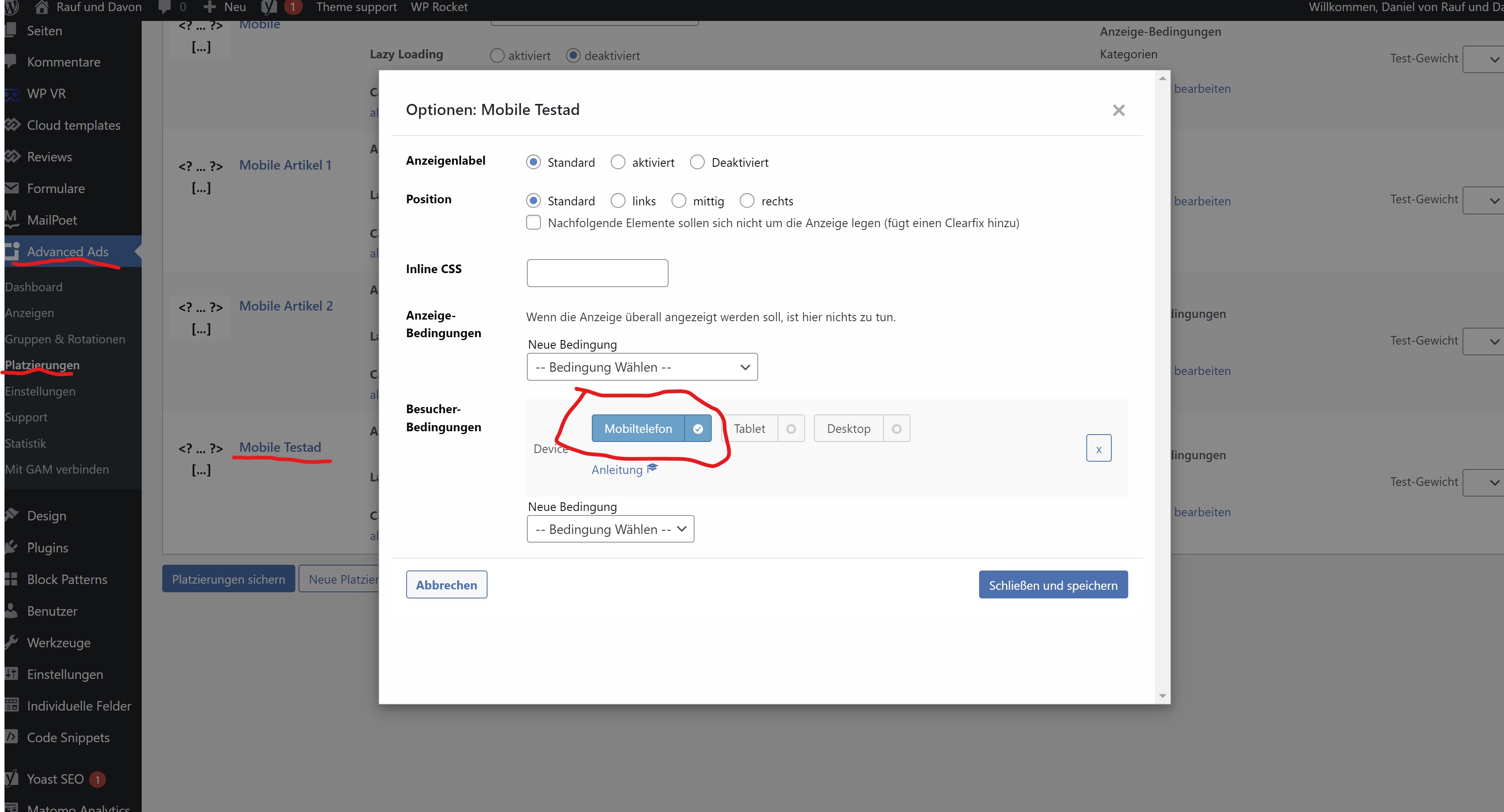
After the filter is applyed, the ad is still displayed in the DevTools (there i can load the mobile theme):
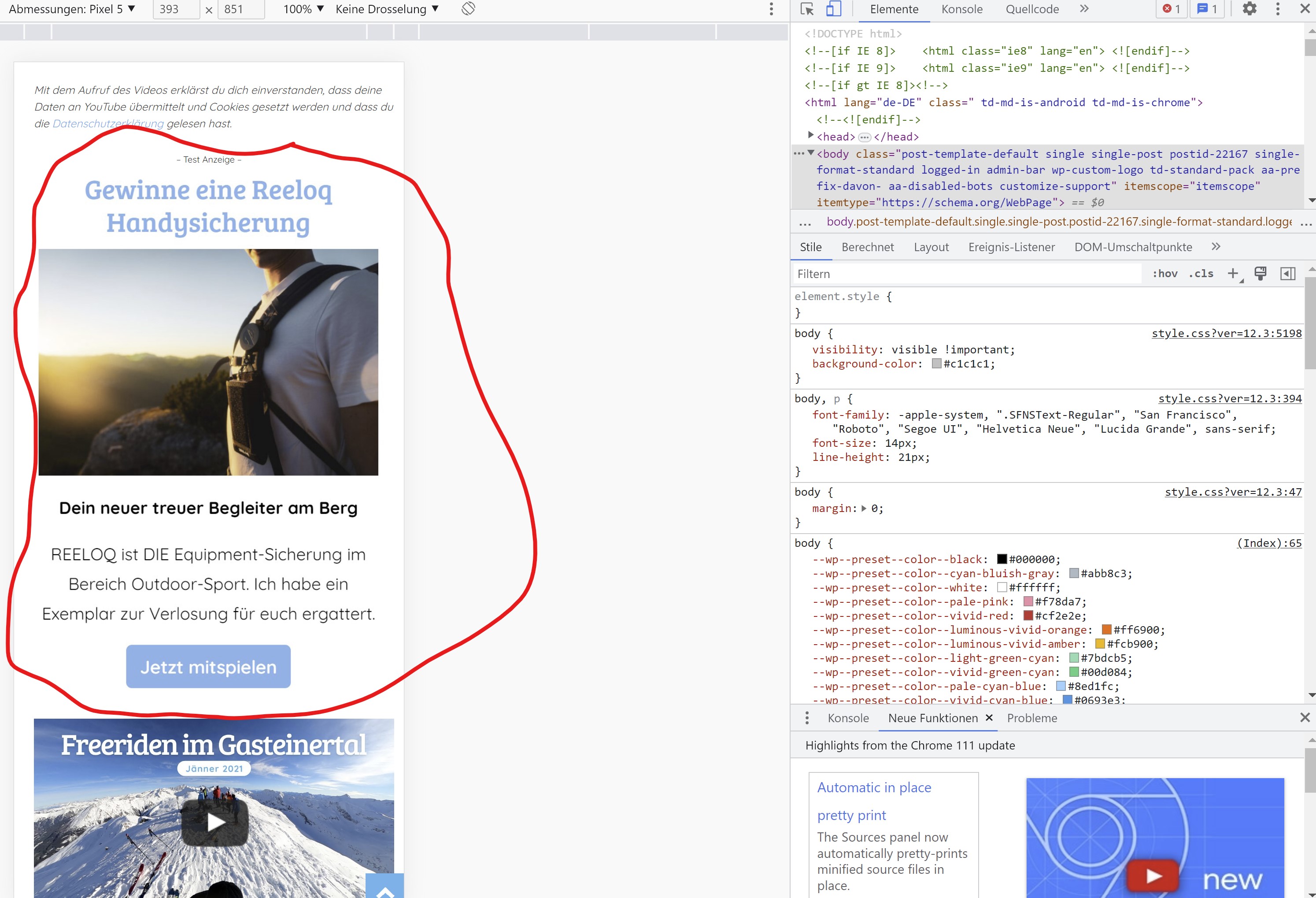
So it is displayed in the mobile theme but for some reason it’s not displayed on a real mobile device.
You can check it our here: https://rauf-und-davon.at/freeriden-gasteinertal-2023/ – the ad should appear between the two Vidoes.
All the best,
Daniel
-
This reply was modified 3 years by
danna.
danna Hello,
as i said, i need to show ads on a custom place. I manually inserted the placement-adcode in every single post on a different spot. As long as i don’t use a filter in advanced ads, the ads are displayed on the desktop version AND in the mobile theme. If i activate the advanced ads filter, to only display them on mobile, the ads are not diplayed al all – neither desktop nor mobile.
So generally it works and ads are displayed in the mobile theme. But as soon as i apply an advanced ads filter, the ads are not shown in the mobile theme anymore.
All the best,
Daniel
Bettina Hello Daniel!
As I said, you should add the ads in Newspaper -> Theme Panel -> Mobile theme -> Mobile ads. There, you have the fields for the article ads too. Otherwise, they do not display in the mobile theme layout.
Thank you!
danna Hello,
I don’t want to customize the ads, I just want them do be shown just in the mobile theme. There has to be some solution (at least with some extra code). I mean I put the adcode directly in the posts, so the have to be loaded in the mobile theme, right? And as I said, they are shown in the DevTools (the mobile theme gets loaded there), why aren’t they shown on mobile devices? This feature is really really important for me and my clients (I already bought 8 Newspaper Themes an more to come).
All the best and thanks for the help,
Daniel
Bettina Hello Daniel!
Unfortunately, we do not have settings in order to customize the ads in the Mobile theme.
Thank you!
danna Hello,
thanks for getting back. I know this option but as i want to show the ads on exact spots (there where i put the code into the posts) this doesn’t work for me.
How can i solve the issue with the placement filters from advanced ads as written above? The funny thing is, the ad is shown if i load the mobile theme via Chrome DevTools but not displayed on mobile phones itself.
F. ex. here, the ad between the videos: https://rauf-und-davon.at/freeriden-gasteinertal-2023/
All the best,
Daniel
Bettina Hello Daniel!
If you use the Mobile theme plugin, then you should add the ads in Newspaper -> Theme Panel -> Mobile theme -> Mobile ads. There is a special field for the AMP ads if you use that plugin too.
Thank you!
 shokuhinet
Dear support
Our site plan to remove tags list on single post pages of tagdiv mobile theme.
Please tell me css class name or id to do it.
I wrote css to do it as
.td-post-source-tags {
display:none;
}
But it is not working.
Regards
 PLC
PLCHi guys,
Background: I’ve got this website with your Newspaper theme installed which I have not been using or updating for at least two years, and the theme version was probably even older than that.
Since I was updating other websites yesterday (based on other theme) to new WordPress and theme version, I decided to update Newspaper theme (and the whole website) at the same time, cause it’s on the same server.
I had the feeling that making a backup copy before updating after such a long time would be a really good idea, but of course I thought to myself ‘Nah, what bad could happen that I would not be able to fix?’. Well… here we go:
So after uploading the newest Newspaper folder via ftp and replacing the old one, shit hits the fan.
First, I get a fatal error, website crashed.
I googled and this was a known issue with new WordPress version and old themes, I applied a quick fix (change one line code) in class-wp-textdomain-registry.php and hooray! the website ressurects. Happy days? Not really…
Second, the website does not look like before.
In fact, it does not look like a website at all (frontend), nothing works or displays correctly.
I googled and found that you made a major update some time ago and I need to install additional plugin to make old things work as they should (Standard Pack). So I did that and success again – pages and posts load as they should… with one very strange exception…
…the Contact page seems to constantly reload itself in an endless loop (it looks like it’s trying to send the form constantly without any fields filled in?), and the contact form is not visible in mobile version at all (mobile plugin installed), maybe it’s actually good because it’s not reloading endlessly like in the desktop version… This really drives me crazy… BUT! I change browser from Firefox to Chrome and the problem disappears! How come? Any idea what’s wrong? Also seems to be wrong only for logged in members (admins), that’s really strange.
But on mobile the Contact form is not there in any case.
I’d be grateful if you could tell me what is the best way to set everything straight, cause I like to have my websites and server files in good working order and clean, without any messed up code if it’s not necessary, so I’d prefer to reload WordPress and probably upload the newest Newspaper theme from the scratch – but how can I keep all my pages and posts and keep the structure and settings? If I make a normal backup copy with all site details included – will it not replicate the problem after importing it back onto the newly reinstalled WordPress and theme with old plugins, settings etc?
In the (not so) worst case scenario I may fancy rebuilding the website using one of the new templates you provided which look really nice, but I need my original content (e.g. pages, posts and media) to do that.
But if I didn’t want to redesign with new template – what’s the best solution to get everything back to clean and working state (now it’s working, but a bit messy and prone to problems in future, I guess…)?
Thanks.
dannaHello,
i use the tag div mobile theme and the plugin advanced ads. If i create a placement in advanced ads and tell the placement to only appear on mobile devices the ad doesn’t get displayed in the mobile theme. Also the plug in add on where i can set a “maximum browser width” as filter doesn’t work. The ad only appears if i delet all filters.
I put the shortcode of advanced ads directly into my posts on the spots where i want them to appear but i only want to show them on mobile devices – on dektop i use the sidebar to show ads.
Can you help me?
All the best,
Daniel
 The Irish Place
 The link is theirishplace.com
It is still not working so I have installed the CookieYes plugin. Both are currently live but only CookieYes appears to work in both the mobile theme and desktop versions.
The Irish PlaceHi,
When I click on the menu selector/accordian icon when using the mobile theme I am getting a display asking me to ‘Click here – to use the wp menu builder’.
Site url is theirishplace.com
I have set the mobile theme to ‘mobile+AMP’
All else appears to work. Please advise.
Anamaria Hi,
To change the font and colour for the mobile menu please go in Theme Panel -> Theme Colors -> Mobile menu/mobile search => https://www.screencast.com/t/0CvSgXp9H to set a background image go in Theme Panel -> Background -> Mobile menu/mobile search => https://www.screencast.com/t/uvDejzbX to change the font from Theme Fonts => https://www.screencast.com/t/ANBQe7hQhJd
The social icons from the mobile menu are coming from the Theme Panel -> Social/Apis -> Social Networks -> https://i.imgur.com/kKYIECB.png remove/edit them after your needs.
Thank you!
 beyonduality
If i click on the menu button (responsove newspaper theme) i have this background https://imgur.com/a/5u1TZT1
But we want a background on mouse click with this color 040024


